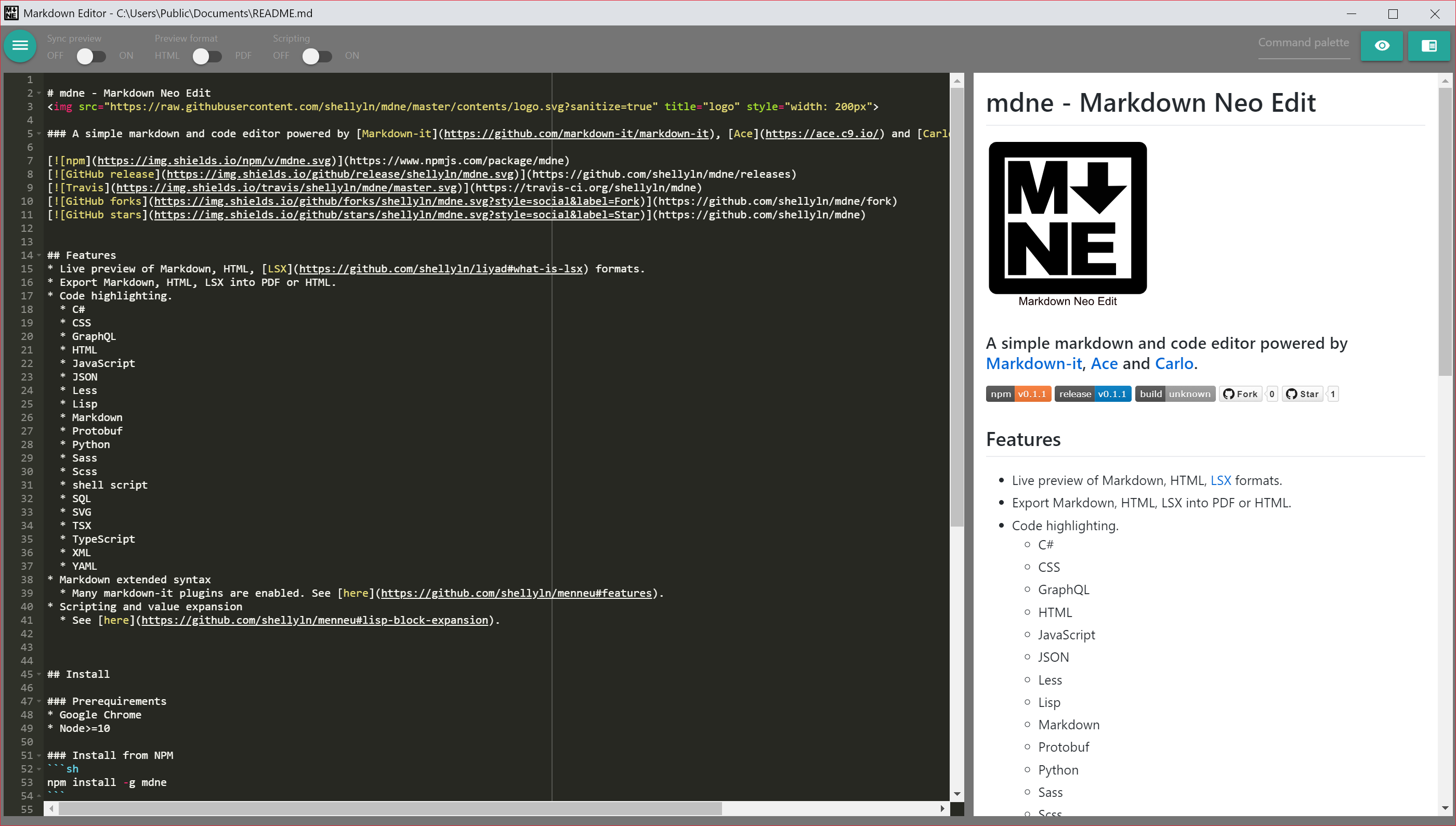
# mdne - Markdown Neo Edit
 ### A simple markdown and code editor powered by [Markdown-it](https://github.com/markdown-it/markdown-it), [Ace](https://ace.c9.io/) and [Carlo](https://github.com/GoogleChromeLabs/carlo).
[](https://www.npmjs.com/package/mdne)
[](https://github.com/shellyln/mdne/releases)
[](https://github.com/shellyln/mdne/actions)
[](https://github.com/shellyln/mdne/fork)
[](https://github.com/shellyln/mdne)
### A simple markdown and code editor powered by [Markdown-it](https://github.com/markdown-it/markdown-it), [Ace](https://ace.c9.io/) and [Carlo](https://github.com/GoogleChromeLabs/carlo).
[](https://www.npmjs.com/package/mdne)
[](https://github.com/shellyln/mdne/releases)
[](https://github.com/shellyln/mdne/actions)
[](https://github.com/shellyln/mdne/fork)
[](https://github.com/shellyln/mdne)
 > **Migrate from `v0.1.x`** (for Windows)
> Please re-run `./make-shortcut.cmd`.
## Features
* Live preview of Markdown, HTML, [LSX](https://github.com/shellyln/liyad#what-is-lsx) formats.
* Export Markdown, HTML, LSX into PDF or HTML.
* Code highlighting.
* C#
* CSS
* Dockerfile
* Go
* GraphQL
* HTML
* JavaScript
* JSON
* JSON5
* JSX
* Latex
* Less
* Lisp
* Makefile
* Markdown
* Protobuf
* Python
* R
* Ruby
* Rust
* Sass
* Scss
* Shell script
* SQL
* SVG
* Tex
* TSX
* TypeScript
* XML
* YAML
* Markdown extended syntax
* Many markdown-it plugins are enabled. See [here](https://github.com/shellyln/menneu#features).
* Scripting and value expansion
* See [here](https://github.com/shellyln/menneu#lisp-block-expansion).
* Full screen mode (F11)
## Distributions and Integrations
* [mdne](https://github.com/shellyln/mdne)
* Offline desktop app for Google Chrome browser + Node.js.
* *This repository*
* [Carlo](https://github.com/GoogleChromeLabs/carlo) app
* [mdne-electron](https://github.com/shellyln/mdne-electron)
* Standalone offline desktop app for Windows/Mac/Linux.
* [Electron](https://electronjs.org/) app
* [mdne-for-kintone](https://github.com/shellyln/mdne-for-kintone)
* Edit kintone record's field. (browser app)
* [mdne online](https://shellyln.github.io/mdne/)
* Live demo (PWA)
## Install
### Prerequirements
* Google Chrome (latest)
* Node>=10
### Install from NPM
* Linux
```sh
env PUPPETEER_SKIP_CHROMIUM_DOWNLOAD=TRUE npm install -g mdne
```
* Windows
```cmd
set PUPPETEER_SKIP_CHROMIUM_DOWNLOAD=TRUE
npm install -g mdne
```
* Chrome OS (Chromebook / Chromebox) Crostini
```sh
env PUPPETEER_SKIP_CHROMIUM_DOWNLOAD=TRUE npm install -g mdne
cd
mkdir Desktop
```
### Create desktop and 'send to' menu shoorcuts (Windows)
* Download source zip archive from [here](https://github.com/shellyln/mdne/archive/master.zip).
* Extract zip archive and run `make-shortcut.cmd`.
### Create desktop icon (Linux)
* `mdne.desktop`
```ini
[Desktop Entry]
Version=1.0
Type=Application
Name=mdne
Comment=mdne
Exec=/home/(user name)/.nvm/versions/node/v??.??.??/bin/node /home/(user name)/.nvm/versions/node/v??.??.??/lib/node_modules/mdne/index.js %F
Icon=/home/(user name)/.nvm/versions/node/v??.??.??/lib/node_modules/mdne/contents/favicon.svg
Path=/home/(user name)/Desktop
Terminal=false
StartupNotify=false
Name[en_US]=mdne
```
> Replace `(user name)` and `??.??.??` .
## Run
### Open blank editor:
* Linux, Windows
```sh
mdne
```
* Chrome OS (Chromebook / Chromebox) Crostini
```sh
env MDNE_CHROME_CHANNEL_CHROMIUM=true mdne
```
* `MDNE_CHROME_CHANNEL_CHROMIUM=TRUE` can alternatively be written to `.bashrc`.
* Chromium is downloaded locally the first time it run.
### Open file:
* Linux, Windows
```sh
mdne README.md
```
* Chrome OS (Chromebook / Chromebox) Crostini
```sh
env MDNE_CHROME_CHANNEL_CHROMIUM=true mdne README.md
```
* `MDNE_CHROME_CHANNEL_CHROMIUM=TRUE` can alternatively be written to `.bashrc`.
* Chromium is downloaded locally the first time it run.
## CLI
Please use [Ménneu](https://github.com/shellyln/menneu#use-cli) CLI.
## Live demo
[https://shellyln.github.io/mdne/](https://shellyln.github.io/mdne/)
#### Open external files from live demo
* Drop a local file into FileDropOpenDialog.
* Set the target URL to a location hash.
* example: [react-dom.development.js](https://shellyln.github.io/mdne/#open.url=https%3A%2F%2Fcdnjs.cloudflare.com%2Fajax%2Flibs%2Freact-dom%2F16.7.0%2Fumd%2Freact-dom.development.js)
* Fetching files is restricted by the Same-Origin Policy.
* Set zipped data to a location hash.
* example: [hello.md](https://shellyln.github.io/mdne/#filename=hello.md&open.d=eJwtyjEOgCAMBdCdU3zjit6BuLh4CKQdiIWSSkK8vYnxzW_GziLqUajy5FzAnUsTRol2kY6KWAlJicGUuxqaDjYmnA-O_yy5e4TE392iia7uBTWXHe8)
* location hash is generated when `Save` or `SaveAs` commands are done.
#### Live demo browser requirements
* Google Chrome: latest
* Firefox: latest
#### Live demo restrictions
* Rendering / exporting to PDF is not available.
* Save and SaveAs commands download the file being edited.
## Deploying Live demo
1. Run `npm run manifest` after edit the `contents/*`.
* New `contents/precache-manifest.yyyyy.js` will generate.
1. Remove the old `contents/precache-manifest.xxxxx.js`.
1. Edit `contents/service-worker.js` to change the reference of `contents/precache-manifest.yyyyy.js` file name.
1. Deploy the `contents/*`.
## Security warning
Exposing of Node side functions by RPC is enabled in preview iframe.
**DON'T OPEN links to untrusted sites from the preview.**
Exposed functions have the ability to list / read / write local files.
## License
[ISC](https://github.com/shellyln/mdne/blob/master/LICENSE.md)
Copyright (c) 2019 Shellyl_N and Authors.
----
## Bundled softwares' license
* [Ace](https://github.com/ajaxorg/ace): [license](https://github.com/ajaxorg/ace/blob/master/LICENSE) (BSD-3-Clause)
* [Materialize](https://materializecss.com/): [license](https://github.com/Dogfalo/materialize/blob/v1-dev/LICENSE) (MIT)
* [Normalize.css](https://necolas.github.io/normalize.css/): [license](https://github.com/necolas/normalize.css/blob/master/LICENSE.md) (MIT)
* [React](https://reactjs.org/): [license](https://github.com/facebook/react/blob/master/LICENSE) (MIT)
* [pako](https://github.com/nodeca/pako): [license](https://github.com/nodeca/pako/blob/master/LICENSE) (MIT + ZLIB)
* [dialog-polyfill](https://github.com/GoogleChrome/dialog-polyfill): [license](https://github.com/GoogleChrome/dialog-polyfill/blob/master/LICENSE) (BSD-3-Clause)
> **Migrate from `v0.1.x`** (for Windows)
> Please re-run `./make-shortcut.cmd`.
## Features
* Live preview of Markdown, HTML, [LSX](https://github.com/shellyln/liyad#what-is-lsx) formats.
* Export Markdown, HTML, LSX into PDF or HTML.
* Code highlighting.
* C#
* CSS
* Dockerfile
* Go
* GraphQL
* HTML
* JavaScript
* JSON
* JSON5
* JSX
* Latex
* Less
* Lisp
* Makefile
* Markdown
* Protobuf
* Python
* R
* Ruby
* Rust
* Sass
* Scss
* Shell script
* SQL
* SVG
* Tex
* TSX
* TypeScript
* XML
* YAML
* Markdown extended syntax
* Many markdown-it plugins are enabled. See [here](https://github.com/shellyln/menneu#features).
* Scripting and value expansion
* See [here](https://github.com/shellyln/menneu#lisp-block-expansion).
* Full screen mode (F11)
## Distributions and Integrations
* [mdne](https://github.com/shellyln/mdne)
* Offline desktop app for Google Chrome browser + Node.js.
* *This repository*
* [Carlo](https://github.com/GoogleChromeLabs/carlo) app
* [mdne-electron](https://github.com/shellyln/mdne-electron)
* Standalone offline desktop app for Windows/Mac/Linux.
* [Electron](https://electronjs.org/) app
* [mdne-for-kintone](https://github.com/shellyln/mdne-for-kintone)
* Edit kintone record's field. (browser app)
* [mdne online](https://shellyln.github.io/mdne/)
* Live demo (PWA)
## Install
### Prerequirements
* Google Chrome (latest)
* Node>=10
### Install from NPM
* Linux
```sh
env PUPPETEER_SKIP_CHROMIUM_DOWNLOAD=TRUE npm install -g mdne
```
* Windows
```cmd
set PUPPETEER_SKIP_CHROMIUM_DOWNLOAD=TRUE
npm install -g mdne
```
* Chrome OS (Chromebook / Chromebox) Crostini
```sh
env PUPPETEER_SKIP_CHROMIUM_DOWNLOAD=TRUE npm install -g mdne
cd
mkdir Desktop
```
### Create desktop and 'send to' menu shoorcuts (Windows)
* Download source zip archive from [here](https://github.com/shellyln/mdne/archive/master.zip).
* Extract zip archive and run `make-shortcut.cmd`.
### Create desktop icon (Linux)
* `mdne.desktop`
```ini
[Desktop Entry]
Version=1.0
Type=Application
Name=mdne
Comment=mdne
Exec=/home/(user name)/.nvm/versions/node/v??.??.??/bin/node /home/(user name)/.nvm/versions/node/v??.??.??/lib/node_modules/mdne/index.js %F
Icon=/home/(user name)/.nvm/versions/node/v??.??.??/lib/node_modules/mdne/contents/favicon.svg
Path=/home/(user name)/Desktop
Terminal=false
StartupNotify=false
Name[en_US]=mdne
```
> Replace `(user name)` and `??.??.??` .
## Run
### Open blank editor:
* Linux, Windows
```sh
mdne
```
* Chrome OS (Chromebook / Chromebox) Crostini
```sh
env MDNE_CHROME_CHANNEL_CHROMIUM=true mdne
```
* `MDNE_CHROME_CHANNEL_CHROMIUM=TRUE` can alternatively be written to `.bashrc`.
* Chromium is downloaded locally the first time it run.
### Open file:
* Linux, Windows
```sh
mdne README.md
```
* Chrome OS (Chromebook / Chromebox) Crostini
```sh
env MDNE_CHROME_CHANNEL_CHROMIUM=true mdne README.md
```
* `MDNE_CHROME_CHANNEL_CHROMIUM=TRUE` can alternatively be written to `.bashrc`.
* Chromium is downloaded locally the first time it run.
## CLI
Please use [Ménneu](https://github.com/shellyln/menneu#use-cli) CLI.
## Live demo
[https://shellyln.github.io/mdne/](https://shellyln.github.io/mdne/)
#### Open external files from live demo
* Drop a local file into FileDropOpenDialog.
* Set the target URL to a location hash.
* example: [react-dom.development.js](https://shellyln.github.io/mdne/#open.url=https%3A%2F%2Fcdnjs.cloudflare.com%2Fajax%2Flibs%2Freact-dom%2F16.7.0%2Fumd%2Freact-dom.development.js)
* Fetching files is restricted by the Same-Origin Policy.
* Set zipped data to a location hash.
* example: [hello.md](https://shellyln.github.io/mdne/#filename=hello.md&open.d=eJwtyjEOgCAMBdCdU3zjit6BuLh4CKQdiIWSSkK8vYnxzW_GziLqUajy5FzAnUsTRol2kY6KWAlJicGUuxqaDjYmnA-O_yy5e4TE392iia7uBTWXHe8)
* location hash is generated when `Save` or `SaveAs` commands are done.
#### Live demo browser requirements
* Google Chrome: latest
* Firefox: latest
#### Live demo restrictions
* Rendering / exporting to PDF is not available.
* Save and SaveAs commands download the file being edited.
## Deploying Live demo
1. Run `npm run manifest` after edit the `contents/*`.
* New `contents/precache-manifest.yyyyy.js` will generate.
1. Remove the old `contents/precache-manifest.xxxxx.js`.
1. Edit `contents/service-worker.js` to change the reference of `contents/precache-manifest.yyyyy.js` file name.
1. Deploy the `contents/*`.
## Security warning
Exposing of Node side functions by RPC is enabled in preview iframe.
**DON'T OPEN links to untrusted sites from the preview.**
Exposed functions have the ability to list / read / write local files.
## License
[ISC](https://github.com/shellyln/mdne/blob/master/LICENSE.md)
Copyright (c) 2019 Shellyl_N and Authors.
----
## Bundled softwares' license
* [Ace](https://github.com/ajaxorg/ace): [license](https://github.com/ajaxorg/ace/blob/master/LICENSE) (BSD-3-Clause)
* [Materialize](https://materializecss.com/): [license](https://github.com/Dogfalo/materialize/blob/v1-dev/LICENSE) (MIT)
* [Normalize.css](https://necolas.github.io/normalize.css/): [license](https://github.com/necolas/normalize.css/blob/master/LICENSE.md) (MIT)
* [React](https://reactjs.org/): [license](https://github.com/facebook/react/blob/master/LICENSE) (MIT)
* [pako](https://github.com/nodeca/pako): [license](https://github.com/nodeca/pako/blob/master/LICENSE) (MIT + ZLIB)
* [dialog-polyfill](https://github.com/GoogleChrome/dialog-polyfill): [license](https://github.com/GoogleChrome/dialog-polyfill/blob/master/LICENSE) (BSD-3-Clause)