Navigation: Docs/Reference | Demo Playground | Github Source
[](https://travis-ci.com/NateZimmer/Maths.js.svg?branch=master) [](https://coveralls.io/github/NateZimmer/Maths.js?branch=master) [](http://opensource.org/licenses/MIT)
## Math-Script
A math library for JS with an emphasis on matrix operations, non linear solvers, visualizations, and **overload support**!.
```js
var M = require('math-script');
M.execute(function(M){
var X = M.range(0,0.1,10); // Create an input matrix, [100,1] matrix
// Your typical ugly JS math library
var Y = X.pow(3).multiply(-1.3).add(X.pow(2).multiply(13)).add(X.multiply(-5)).add(30);
// What math-script supports
Y = -1.3*X**3 + 13*X**2 + -5*X + 30; // not normally possible in JS
console.log(Y.print());
});
```
**Core features:**
- Matrix operations operator support in execute environment `*, +, **, -`
- Feature rich [M,N] matrix operation support, see [reference](https://natezimmer.github.io/Maths.js)
- SVD support / Nonlinear solvers
## Install
**NPM Installation:**
```
npm install math-script
```
**Browser minimal:**
See [dist](https://github.com/NateZimmer/Maths.js/tree/master/dist) folder for files
```html
```
**Math-Script with Plotting**
```html
```
## Library Application Sample
**Linear Regression Example:**
This example uses linear least squares to identify a best fitting polynomial to arbitrary data. This example demonstrates the matrix and plotting functionality of libary.
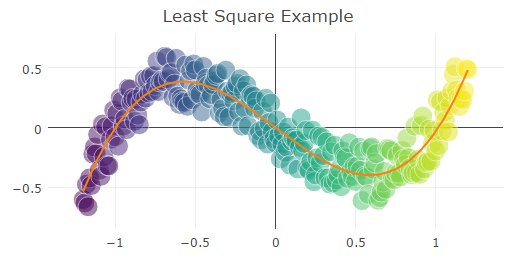
```js
var X = Matrixs.range(-1.2, 0.01, 1.2); // Creates a matrixs with a range of values
var Y = X.pow(3).subtract(X).addNoise(0.9); // Y = X^3 - X + noise
// Create a column matrix for a least square solution [x^3,x^2,x,1]
var A = X.pow(3).catH(X.pow(2)).catH(X).catH(Matrixs.ones(X.length(),1));
var x = A.lsq(Y); // Least squares solution
var yFit = A.multiply(x); // Ax = Y
plotyLayout.showlegend= false;
plotyLayout.title= 'Least Square Example';
Plots.create([X,Y],{type:'scatter'});
Plots.add([X,yFit]);
```
## Basic Matrix Examples
Maths.js supports numerous matrixs opperations. Below is small sampling and see [here for the matrixs reference](Matrixs.md).
**Matrix Creation:**
```js
var A = Matrixs.make([[1,2,3],[4,5,6],[7,8,5]); //creates a 3x3 matrix
A.print(); //prints matrix
//Results
//1.000 2.000 3.000
//4.000 5.000 6.000
//7.000 8.000 5.000
```
**Matrix Opperations (Addition, Multiplicaiton ...ect):**
One can add or perform any basic matrix opperation with scalars or other matricies. These commands can be sequentially chained.
```js
var A = Matrixs.make([[1,2,3],[4,5,6],[7,8,5]); //creates a 3x3 matrix
A.add(1).add([[1,2,3],[0,0,0],[0,0,0]]).print(); // adds scalar of 1 to matrix, then adds a 3x3 matrix, then prints result.
//Results
//3.000 5.000 7.000
//5.000 6.000 7.000
//8.000 9.000 6.000
```
**Matrix Inversion:**
Maths.js can invert arbitrary sized(e.g. 100x100) singular and non singular(with SVD) matricies.
```js
var A = new Matrixs([[1,2,3],[4,5,6],[7,8,9]]); //creates a 3x3 matrix
A.invert().print(); //Prints after inverison. Print is set to 3 decimals
//Results:
//-0.639 -0.167 0.306
//-0.056 0.000 0.056
//0.528 0.167 -0.194
```
## Basic Plot Example
**Simple Line and Scatter Plot :**
Maths.js can easily create plots for visualization. Please see [here for the plot reference](Plots.md). . The backbone of this
library is [plotly](https://github.com/plotly/plotly.js) whos backbone is D3 meaning the plots are SVG based.
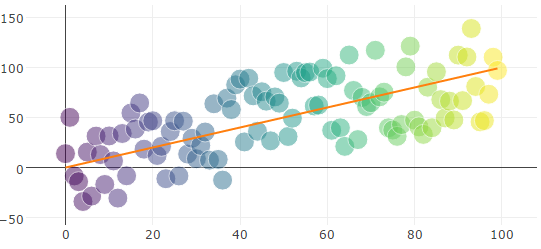
```js
var X = Matrixs.range(100); // Creates a 0-99 value array
var Y = X.addNoise(0.9); // Adds 90% relative noise
Plots.create([Y],{type:'scatter'}); //Creates scatter plot
Plots.add([X]); // Adds orange best fit line
```
## License: MIT
https://opensource.org/licenses/MIT