
# Manifest for Node.js
**The API resilience layer for your Node.js apps.**
[](https://github.com/mnfst/manifest-node/actions/workflows/ci.yml)
[](https://www.npmjs.com/package/manifest)
[](https://www.npmjs.com/package/manifest)
---
## What is Manifest
Manifest is the API resilience layer for your apps and agents. It works with every API they call: external services, your internal APIs and MCP tools.
* 🗺️ **See every API your app depends on**, and how reliable each one is.
* 🎯 **Repair failed API requests on the fly**, so your app keeps working.
* 🛠️ **Know what to fix in your code**, with a prompt for your coding agent.
## How it works
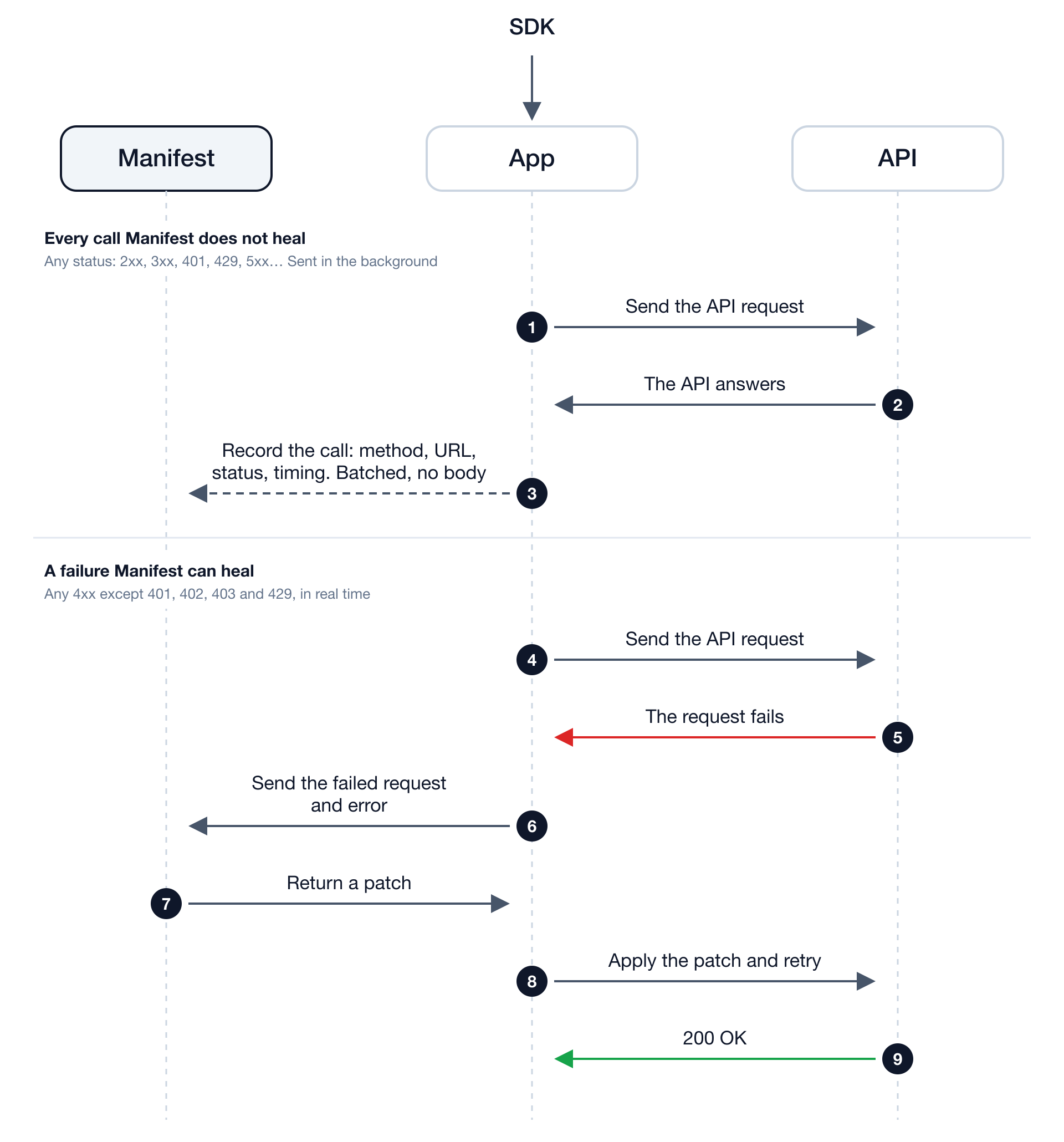
Every call your app makes is reported to Manifest as metadata only (method, URL without its query string, status and timing), in the background. A failure Manifest can heal is sent in full, so it can be repaired. [What is sent](docs/guide.md#data-sent-to-manifest).
## Prerequisites
- Node.js 22 or higher
## Get started
### Start with your agent
```
"Install Manifest in this app: https://dashboard.manifest.build/prompt-node.md"
```
[Read the prompt →](https://dashboard.manifest.build/prompt-node.md)
The prompt adds the one-line install to your entry file and stops to let you paste your key.
### Start with code
1. Create a project in your [Manifest dashboard](https://dashboard.manifest.build) and copy its project key.
2. Install the SDK:
```sh
npm install manifest
```
3. Call `manifest()` from the first import of the file that starts your app, before any client is constructed:
```js
import { manifest } from 'manifest';
manifest(); // Once, at startup.
// Keep making your API calls as usual.
```
TypeScript, ESM and CommonJS. Zero dependencies.
4. Set your key in the environment of your app, or in the project's `.env`:
```sh
export MNFST_KEY='your-project-key'
```
5. Restart your app, then check the install from your project directory:
```sh
npx manifest doctor
```
It reads the key from the shell, then from the project's `.env.local` or `.env`. It resolves the installed SDK version, masks and validates the key, checks that Manifest loads before your app, and prints the runtime coverage.
Some clients keep the `fetch` they saw when they were built, and a client built at import time runs before your call. Where that happens, or where the start command is not yours to change, preload the SDK instead:
```sh
node -r manifest/register app.js
```
### n8n
Manifest runs in a self-hosted n8n with Docker Compose, through this SDK. n8n Cloud cannot load it. Run the steps in this order:
1. Install the SDK from the folder of your `docker-compose.yml`:
```sh
docker compose exec n8n npm install --prefix /home/node/.n8n/manifest manifest
```
2. Add these two lines to the `environment` of your n8n service, and of every worker service in queue mode:
```yaml
MNFST_KEY: your-project-key
NODE_OPTIONS: --require /home/node/.n8n/manifest/node_modules/manifest/dist/register.cjs
```
3. Restart n8n:
```sh
docker compose up -d
```
n8n does not start when `NODE_OPTIONS` names a file that is not installed yet, so keep this order.
## Try it
Send a request that fails with a 4xx error, such as a value the API rejects:
```js
import { manifest } from 'manifest';
manifest({
onHeal(event) {
console.log('[manifest]', event.healStatus, event.replayStatusCode);
},
});
const res = await fetch('https://api.example.com/orders', {
method: 'POST',
headers: { 'content-type': 'application/json' },
body: JSON.stringify({ limit: 500 }), // rejected by the API
});
console.log(res.status);
```
The failed request appears in your [Manifest dashboard](https://dashboard.manifest.build), grouped with others like it in an issue. Once Manifest has a patch for that error, the next request that fails the same way is repaired and retried: `onHeal` reports `patched` or `unverified` with the retry's status code, and your app receives the answer to the retry.
## Choosing which calls reach Manifest
Keep calls out of Manifest entirely: they are neither repaired nor tracked, and nothing about them leaves your app. Each entry is a domain or a domain with a path:
```sh
MNFST_ALLOWLIST=stripe.com # only Stripe
MNFST_ALLOWLIST=stripe.com/v1/payment_intents # only this Stripe endpoint
MNFST_DENYLIST=stripe.com/v1/charges,internal.example.com # never these
```
- A domain covers its subdomains, with or without a path: `stripe.com` and `stripe.com/v1/charges` both match `api.stripe.com`.
- A path matches whole segments: `/v1/charges` covers `/v1/charges/ch_123`, not `/v1/charges_export`. Paths are case-sensitive.
- A scheme, port, query or fragment in an entry is ignored. `*` in a path is not supported yet: the entry is skipped with a warning, and an allowlist made only of skipped entries lets nothing through.
- The denylist wins over the allowlist. With no allowlist, every call is eligible.
Or in code: `manifest({ denylist: ['stripe.com/v1/charges'] })`. An option overrides its environment variable. When Manifest starts from a preload (`node -r manifest/register`), set the environment variables: a later `manifest()` call cannot change the configuration.
## More
[Documentation](https://docs.manifest.build) · [Configuration, limits & development](docs/guide.md) · [API contract](CONTRACT.md) · [Python SDK](https://github.com/mnfst/manifest-python) · [PHP SDK](https://github.com/mnfst/manifest-php) · [Website](https://manifest.build)