# m - MongoDB Version Manager
`m` helps you download, use, and manage multiple versions of the MongoDB server
and command-line tools.
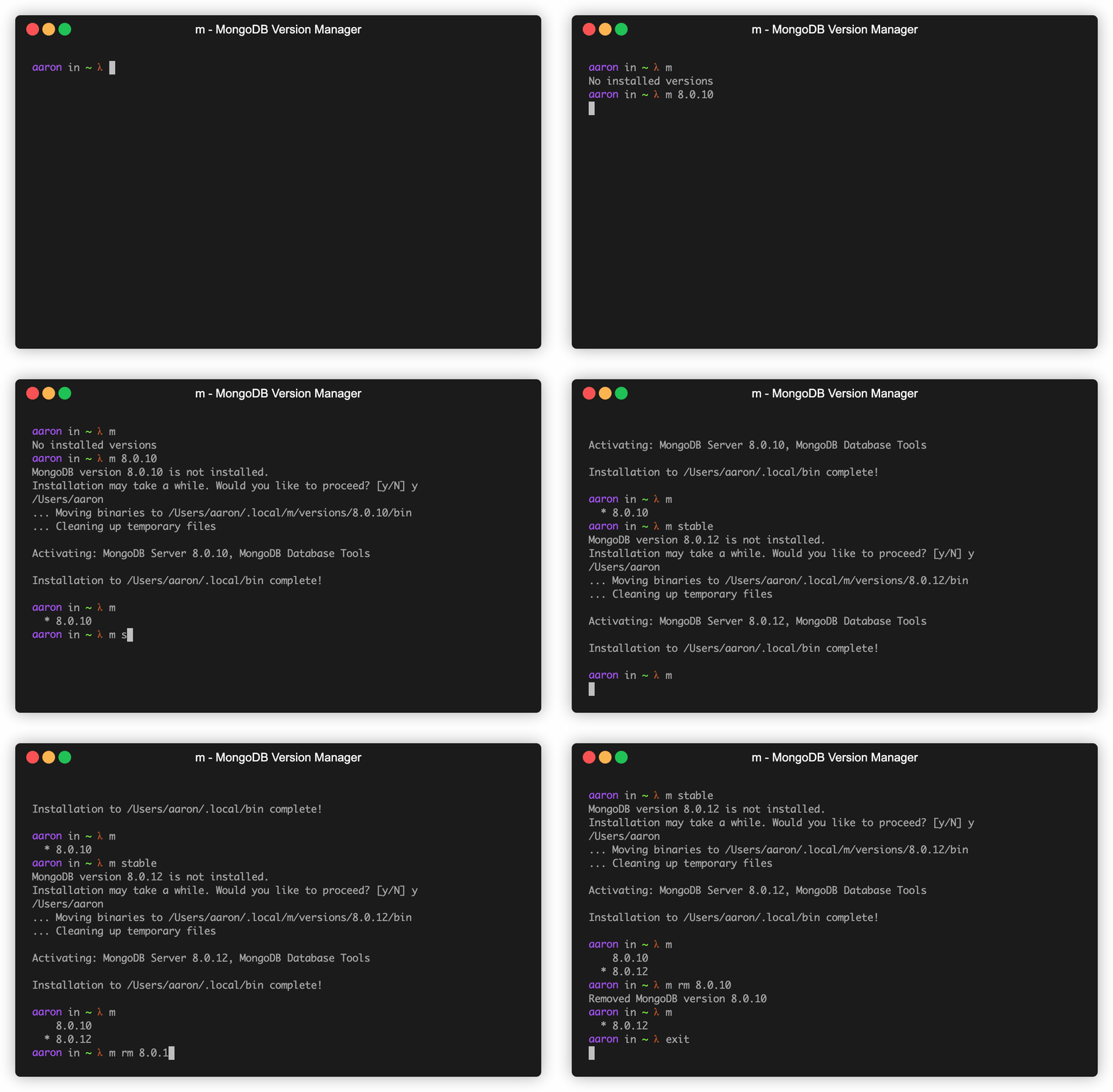 For an excellent deep dive about this project, check out the
[DeepWiki](https://deepwiki.com/aheckmann/m) documentation.
## Prerequisites
To install binary packages, `m` requires a 64-bit OS which:
- is a
[Supported Platform for the version of MongoDB you are trying to install](https://docs.mongodb.com/manual/administration/production-notes/#supported-platforms)
- includes the `bash` shell
Environments that should work include:
- Linux (RHEL/CentOS, Debian/Ubuntu, Amazon Linux)
- macOS 10.14 (Mojave) and later
- Windows 10 with
[Ubuntu on Windows](https://www.microsoft.com/en-us/p/ubuntu/9nblggh4msv6?activetab=pivot%3Aoverviewtab)
- Docker using a supported Linux distro
## Installation
`m` is a `bash` script which can be installed & updated via `npm` for
convenience:
```bash
npm install -g m
# pnpm add -g m
# yarn global add m
```
or installed by cloning the GitHub repo and running `make install`:
```bash
git clone https://github.com/aheckmann/m.git && cd m && make install
```
or fetched via `wget` and copied to a location of your choice:
```bash
wget https://raw.githubusercontent.com/aheckmann/m/master/bin/m && chmod +x ./m
```
### Downloading MongoDB Binaries
To install or activate a previously installed version, run `m `. For
example:
```bash
$ m 7.0.14
```
Afterwards, those binaries will become the default in your install path
(typically `$HOME/.local/bin/`; see [Details](#details) below for more
information).
You can also specify a release series to download the latest available revision:
```bash
$ m 7.0
$ m 8.0
```
List installed binaries:
```bash
$ m
7.0.14
* 8.0.6
```
Use or download the latest official release:
```bash
$ m latest
```
Use or download the stable official release:
```bash
$ m stable
```
Check what the latest available release is:
```bash
$ m --latest
$ m --latest 7.0
```
Check what the current stable release is:
```bash
$ m --stable
$ m --stable 7.0
```
Download an Enterprise release:
```bash
$ m 7.0-ent
```
Select a MongoDB version without prompting for confirmation if a download is
required:
```bash
$ yes | m 7.0
```
#### Notes
Where possible `m` will try to download the distro-specific binaries for your
OS and version. If a binary appears to be unavailable, `m` will ask if you want
to try building from source.
[Building MongoDB from source](https://github.com/mongodb/mongo/wiki/Build-Mongodb-From-Source)
requires you to preinstall all of the relevant dependencies & toolchain to build
the desired version of MongoDB. Installing those is outside the scope of what
`m` does.
### Removing Binaries
Remove some previously installed versions:
```bash
$ m rm 6.0.13 7.0.5
```
### Binary Usage
Multiple versions of MongoDB can be downloaded and targeted directly.
Ask `m` for the binary path for a specific version that has already been
downloaded:
```bash
$ m bin 7.0.6
/Users/bobbytables/.local/m/versions/7.0.6/bin
```
Start up `mongod` 6.0.13 regardless of the active version:
```bash
$ m use 6.0.13 --port 29000 --dbpath ./data/
```
When installing or changing the active version you might want to run custom
scripts:
```bash
$ m pre install /path/to/my/script
$ m post install /path/to/script
$ m pre change /path/to/my/script
$ m post change /path/to/script
```
Multiple scripts may be added for any event. To add two `pre change` scripts:
```bash
$ m pre change /path/to/script1
$ m pre change /path/to/script2
```
Scripts are executed in the order they were added.
List all pre change hooks:
```bash
$ m pre change
/path/to/script1
/path/to/script2
```
List all post install hooks:
```bash
$ m post install
/path/to/scriptA
/path/to/scriptB
/path/to/scriptC
```
To remove a post install hook:
```bash
$ m post install rm /path/to/scriptB
```
To remove all post install hooks:
```bash
$ m post install rm
```
### Downloading MongoDB Database Tools
The Database Tools (mongodump, mongorestore, etc.) are released separately from
the server. You can use `m` to manage your MongoDB Database Tools version
independently of your MongoDB server and shell versions.
List available Database Tools versions:
```bash
$ m tools ls
```
List installed Database Tools versions:
```bash
$ m tools installed
```
Use or download the latest stable release of the Database Tools:
```bash
$ m tools stable
```
Use or download a specific version of the Database Tools:
```bash
$ m tools 100.9.4
```
### Downloading MongoDB Shell
The MongoDB Shell (mongosh) is released separately from the server. You can use
`m` to manage your MongoDB Shell version independently of your MongoDB server
and tools versions.
List available MongoDB Shell versions:
```bash
$ m mongosh ls
```
List installed MongoDB Shell versions:
```bash
$ m mongosh installed
```
Use or download the latest stable release of the MongoDB Shell:
```bash
$ m mongosh stable
```
Use or download a specific version of the MongoDB Shell:
```bash
$ m mongosh 2.3.7
```
Remove previously installed MongoDB Shell versions:
```bash
$ m mongosh rm 2.3.0 2.3.5
```
**Note:** The `m shell [args...]` command will first try to use the
installed mongosh version, and fall back to the legacy `mongo` shell if mongosh
is not installed.
## Usage
Output from `m --help`:
```
Usage: m [options] [COMMAND] [config]
Commands:
m Output versions installed
m stable [config ...] Install or activate the latest stable MongoDB release
m latest [config ...] Install or activate the latest MongoDB release (including dev & RCs)
m X.Y Install or activate the latest patch release for MongoDB X.Y (eg. 7.0)
m [config ...] Install and/or use MongoDB
m --legacy Install generic Linux version (does not include SSL)
m use [args ...] Execute mongod with [args ...]
m shard [args ...] Execute mongos with [args ...]
m shell [args ...] Open a mongo shell with [args ...]
m bin Output bin path for
m rm Remove the given version(s)
m --stable Output the latest stable MongoDB version available
m --stable X.Y .. for release series X.Y (eg. 7.0)
m --latest Output the latest MongoDB version available (including dev & RCs)
m --latest X.Y .. for release series X.Y (eg. 7.0)
m ls Output the versions of MongoDB available
m installed [--json] Output installed versions available (optionally, in JSON format)
m src Output the url for source used for the given
(useful if installed from source)
m pre [script] Declare one or list scripts to execute before
(scripts must use absolute paths)
m post [script] Declare one or list scripts to execute after
(scripts must use absolute paths)
m pre rm [script] Remove pre script
m post rm [script] Remove post script
m tools stable Install or activate the latest stable Database Tools release
m tools X.Y.Z Install or activate the Database Tools X.Y.Z
m tools ls Output the versions of the Database Tools available
m tools rm Remove the given Database Tools versions
m tools installed [--json] Output the installed versions of the Database Tools
m mongosh stable Install or activate the latest stable MongoDB Shell release
m mongosh X.Y.Z Install or activate the MongoDB Shell X.Y.Z
m mongosh ls Output the versions of the MongoDB Shell available
m mongosh rm Remove the given MongoDB Shell versions
m mongosh installed [--json] Output the installed versions of the MongoDB Shell
Events:
change Occurs when switching MongoDB server versions
install Occurs when installing a previously uninstalled MongoDB server version
Options:
-V, --version Output current version of m
-h, --help Display help information
Aliases:
installed lls
shard sd, mongos
shell s, sh, mongo
list ls, available, avail
use as, mongod
which bin
```
## Details
By default, `m` downloads and manages binaries in the `$HOME/.local/m` directory. To
alter where `m` operates, export the **M_PREFIX** environment variable with your
preferred path prefix.
```bash
M_PREFIX=/some/other/path m stable
```
## License
[MIT](https://github.com/aheckmann/m/blob/master/LICENSE)
## Inspiration
Yes tj, this is nearly identical to [n](https://github.com/tj/n). Huge thanks!
## Disclaimer
This software is not supported by MongoDB, Inc. under any of their commercial
support subscriptions or otherwise. Any usage of `m` is at your own risk. Bug
reports, feature suggestions, and questions can be posted in the
[Issues](https://github.com/aheckmann/m/issues) section on GitHub.
For an excellent deep dive about this project, check out the
[DeepWiki](https://deepwiki.com/aheckmann/m) documentation.
## Prerequisites
To install binary packages, `m` requires a 64-bit OS which:
- is a
[Supported Platform for the version of MongoDB you are trying to install](https://docs.mongodb.com/manual/administration/production-notes/#supported-platforms)
- includes the `bash` shell
Environments that should work include:
- Linux (RHEL/CentOS, Debian/Ubuntu, Amazon Linux)
- macOS 10.14 (Mojave) and later
- Windows 10 with
[Ubuntu on Windows](https://www.microsoft.com/en-us/p/ubuntu/9nblggh4msv6?activetab=pivot%3Aoverviewtab)
- Docker using a supported Linux distro
## Installation
`m` is a `bash` script which can be installed & updated via `npm` for
convenience:
```bash
npm install -g m
# pnpm add -g m
# yarn global add m
```
or installed by cloning the GitHub repo and running `make install`:
```bash
git clone https://github.com/aheckmann/m.git && cd m && make install
```
or fetched via `wget` and copied to a location of your choice:
```bash
wget https://raw.githubusercontent.com/aheckmann/m/master/bin/m && chmod +x ./m
```
### Downloading MongoDB Binaries
To install or activate a previously installed version, run `m `. For
example:
```bash
$ m 7.0.14
```
Afterwards, those binaries will become the default in your install path
(typically `$HOME/.local/bin/`; see [Details](#details) below for more
information).
You can also specify a release series to download the latest available revision:
```bash
$ m 7.0
$ m 8.0
```
List installed binaries:
```bash
$ m
7.0.14
* 8.0.6
```
Use or download the latest official release:
```bash
$ m latest
```
Use or download the stable official release:
```bash
$ m stable
```
Check what the latest available release is:
```bash
$ m --latest
$ m --latest 7.0
```
Check what the current stable release is:
```bash
$ m --stable
$ m --stable 7.0
```
Download an Enterprise release:
```bash
$ m 7.0-ent
```
Select a MongoDB version without prompting for confirmation if a download is
required:
```bash
$ yes | m 7.0
```
#### Notes
Where possible `m` will try to download the distro-specific binaries for your
OS and version. If a binary appears to be unavailable, `m` will ask if you want
to try building from source.
[Building MongoDB from source](https://github.com/mongodb/mongo/wiki/Build-Mongodb-From-Source)
requires you to preinstall all of the relevant dependencies & toolchain to build
the desired version of MongoDB. Installing those is outside the scope of what
`m` does.
### Removing Binaries
Remove some previously installed versions:
```bash
$ m rm 6.0.13 7.0.5
```
### Binary Usage
Multiple versions of MongoDB can be downloaded and targeted directly.
Ask `m` for the binary path for a specific version that has already been
downloaded:
```bash
$ m bin 7.0.6
/Users/bobbytables/.local/m/versions/7.0.6/bin
```
Start up `mongod` 6.0.13 regardless of the active version:
```bash
$ m use 6.0.13 --port 29000 --dbpath ./data/
```
When installing or changing the active version you might want to run custom
scripts:
```bash
$ m pre install /path/to/my/script
$ m post install /path/to/script
$ m pre change /path/to/my/script
$ m post change /path/to/script
```
Multiple scripts may be added for any event. To add two `pre change` scripts:
```bash
$ m pre change /path/to/script1
$ m pre change /path/to/script2
```
Scripts are executed in the order they were added.
List all pre change hooks:
```bash
$ m pre change
/path/to/script1
/path/to/script2
```
List all post install hooks:
```bash
$ m post install
/path/to/scriptA
/path/to/scriptB
/path/to/scriptC
```
To remove a post install hook:
```bash
$ m post install rm /path/to/scriptB
```
To remove all post install hooks:
```bash
$ m post install rm
```
### Downloading MongoDB Database Tools
The Database Tools (mongodump, mongorestore, etc.) are released separately from
the server. You can use `m` to manage your MongoDB Database Tools version
independently of your MongoDB server and shell versions.
List available Database Tools versions:
```bash
$ m tools ls
```
List installed Database Tools versions:
```bash
$ m tools installed
```
Use or download the latest stable release of the Database Tools:
```bash
$ m tools stable
```
Use or download a specific version of the Database Tools:
```bash
$ m tools 100.9.4
```
### Downloading MongoDB Shell
The MongoDB Shell (mongosh) is released separately from the server. You can use
`m` to manage your MongoDB Shell version independently of your MongoDB server
and tools versions.
List available MongoDB Shell versions:
```bash
$ m mongosh ls
```
List installed MongoDB Shell versions:
```bash
$ m mongosh installed
```
Use or download the latest stable release of the MongoDB Shell:
```bash
$ m mongosh stable
```
Use or download a specific version of the MongoDB Shell:
```bash
$ m mongosh 2.3.7
```
Remove previously installed MongoDB Shell versions:
```bash
$ m mongosh rm 2.3.0 2.3.5
```
**Note:** The `m shell [args...]` command will first try to use the
installed mongosh version, and fall back to the legacy `mongo` shell if mongosh
is not installed.
## Usage
Output from `m --help`:
```
Usage: m [options] [COMMAND] [config]
Commands:
m Output versions installed
m stable [config ...] Install or activate the latest stable MongoDB release
m latest [config ...] Install or activate the latest MongoDB release (including dev & RCs)
m X.Y Install or activate the latest patch release for MongoDB X.Y (eg. 7.0)
m [config ...] Install and/or use MongoDB
m --legacy Install generic Linux version (does not include SSL)
m use [args ...] Execute mongod with [args ...]
m shard [args ...] Execute mongos with [args ...]
m shell [args ...] Open a mongo shell with [args ...]
m bin Output bin path for
m rm Remove the given version(s)
m --stable Output the latest stable MongoDB version available
m --stable X.Y .. for release series X.Y (eg. 7.0)
m --latest Output the latest MongoDB version available (including dev & RCs)
m --latest X.Y .. for release series X.Y (eg. 7.0)
m ls Output the versions of MongoDB available
m installed [--json] Output installed versions available (optionally, in JSON format)
m src Output the url for source used for the given
(useful if installed from source)
m pre [script] Declare one or list scripts to execute before
(scripts must use absolute paths)
m post [script] Declare one or list scripts to execute after
(scripts must use absolute paths)
m pre rm [script] Remove pre script
m post rm [script] Remove post script
m tools stable Install or activate the latest stable Database Tools release
m tools X.Y.Z Install or activate the Database Tools X.Y.Z
m tools ls Output the versions of the Database Tools available
m tools rm Remove the given Database Tools versions
m tools installed [--json] Output the installed versions of the Database Tools
m mongosh stable Install or activate the latest stable MongoDB Shell release
m mongosh X.Y.Z Install or activate the MongoDB Shell X.Y.Z
m mongosh ls Output the versions of the MongoDB Shell available
m mongosh rm Remove the given MongoDB Shell versions
m mongosh installed [--json] Output the installed versions of the MongoDB Shell
Events:
change Occurs when switching MongoDB server versions
install Occurs when installing a previously uninstalled MongoDB server version
Options:
-V, --version Output current version of m
-h, --help Display help information
Aliases:
installed lls
shard sd, mongos
shell s, sh, mongo
list ls, available, avail
use as, mongod
which bin
```
## Details
By default, `m` downloads and manages binaries in the `$HOME/.local/m` directory. To
alter where `m` operates, export the **M_PREFIX** environment variable with your
preferred path prefix.
```bash
M_PREFIX=/some/other/path m stable
```
## License
[MIT](https://github.com/aheckmann/m/blob/master/LICENSE)
## Inspiration
Yes tj, this is nearly identical to [n](https://github.com/tj/n). Huge thanks!
## Disclaimer
This software is not supported by MongoDB, Inc. under any of their commercial
support subscriptions or otherwise. Any usage of `m` is at your own risk. Bug
reports, feature suggestions, and questions can be posted in the
[Issues](https://github.com/aheckmann/m/issues) section on GitHub.