




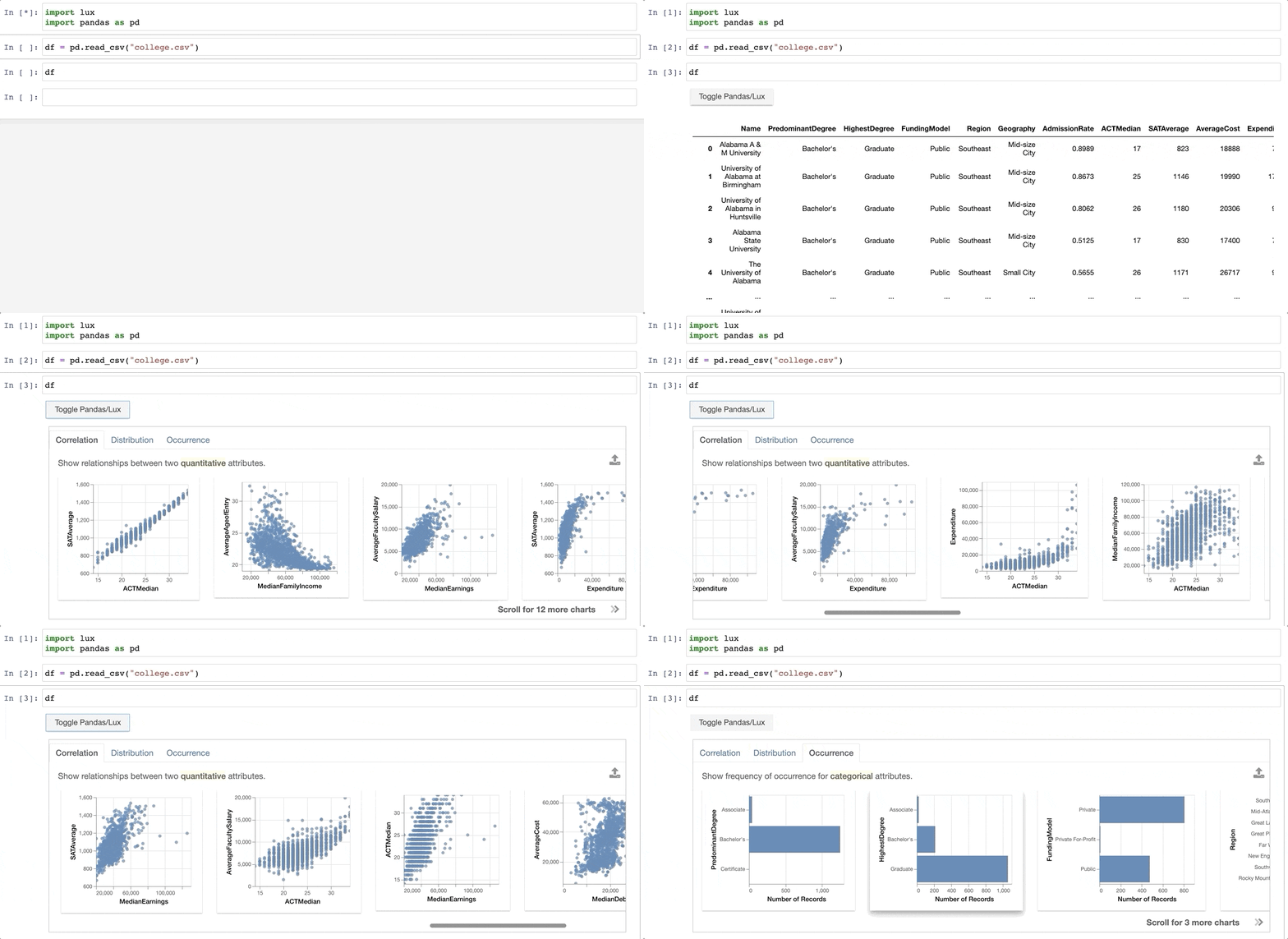
 You can find the full demo example in this live [notebook](https://mybinder.org/v2/gh/lux-org/lux-binder/master?urlpath=tree/examples/demo/college_demo.ipynb).
# Installation
For either Jupyter Notebooks or JupyterLab (versions 3.0 and above), you can install via pip or conda:
```bash
pip install lux-api
```
or
```bash
conda install -c conda-forge lux-api
```
## Setup in Jupyter Notebook, VSCode
## Setup in Jupyter Notebook, VSCode, JupyterHub
To use Lux with any Jupyter notebook-based frontends (e.g., [Jupyter notebook](https://github.com/jupyter/notebook), [JupyterHub](https://github.com/jupyterhub/jupyterhub), or [VSCode](https://code.visualstudio.com/docs/python/jupyter-support)), activate the notebook extension:
```bash
jupyter nbextension install --py luxwidget
jupyter nbextension enable --py luxwidget
```
If the installation happens correctly, you should see two `- Validating: OK` after executing the two lines above.
Note that you may have to restart the Jupyter Notebook server to ensure that the widget is displaying correctly.
## Setup in Jupyter Lab
Lux is compatible with both Jupyter Lab version 2 and 3. To use Lux in [Jupyter Lab](https://github.com/jupyterlab/jupyterlab), activate the lab extension:
```bash
jupyter labextension install @jupyter-widgets/jupyterlab-manager
jupyter labextension install luxwidget
```
Note that JupyterLab and VSCode is supported only for lux-widget version >=0.1.2, if you have an earlier version, please upgrade to the latest version of [lux-widget](https://pypi.org/project/lux-widget/). Lux has only been tested with the Chrome browser.
If you encounter issues with the installation, please refer to [this page](https://lux-api.readthedocs.io/en/latest/source/guide/FAQ.html#troubleshooting-tips) to troubleshoot the installation. Follow [these instructions](https://lux-api.readthedocs.io/en/latest/source/getting_started/installation.html#manual-installation-dev-setup) to set up Lux for development purposes.
# Documentation and Support
For detailed reference, please refer to the [documentation page](https://lux-api.readthedocs.io/en/latest/). Please report any bugs, issues, or requests through [Github Issues](https://github.com/lux-org/lux/issues) or post on the [#help](https://lux-project.slack.com/archives/C0174H16CK0) channel in the Lux Slack org.
Lux has only been tested with Jupyter notebook and Chrome - there have been issues with other browsers and we advise using Chrome.
You can find the full demo example in this live [notebook](https://mybinder.org/v2/gh/lux-org/lux-binder/master?urlpath=tree/examples/demo/college_demo.ipynb).
# Installation
For either Jupyter Notebooks or JupyterLab (versions 3.0 and above), you can install via pip or conda:
```bash
pip install lux-api
```
or
```bash
conda install -c conda-forge lux-api
```
## Setup in Jupyter Notebook, VSCode
## Setup in Jupyter Notebook, VSCode, JupyterHub
To use Lux with any Jupyter notebook-based frontends (e.g., [Jupyter notebook](https://github.com/jupyter/notebook), [JupyterHub](https://github.com/jupyterhub/jupyterhub), or [VSCode](https://code.visualstudio.com/docs/python/jupyter-support)), activate the notebook extension:
```bash
jupyter nbextension install --py luxwidget
jupyter nbextension enable --py luxwidget
```
If the installation happens correctly, you should see two `- Validating: OK` after executing the two lines above.
Note that you may have to restart the Jupyter Notebook server to ensure that the widget is displaying correctly.
## Setup in Jupyter Lab
Lux is compatible with both Jupyter Lab version 2 and 3. To use Lux in [Jupyter Lab](https://github.com/jupyterlab/jupyterlab), activate the lab extension:
```bash
jupyter labextension install @jupyter-widgets/jupyterlab-manager
jupyter labextension install luxwidget
```
Note that JupyterLab and VSCode is supported only for lux-widget version >=0.1.2, if you have an earlier version, please upgrade to the latest version of [lux-widget](https://pypi.org/project/lux-widget/). Lux has only been tested with the Chrome browser.
If you encounter issues with the installation, please refer to [this page](https://lux-api.readthedocs.io/en/latest/source/guide/FAQ.html#troubleshooting-tips) to troubleshoot the installation. Follow [these instructions](https://lux-api.readthedocs.io/en/latest/source/getting_started/installation.html#manual-installation-dev-setup) to set up Lux for development purposes.
# Documentation and Support
For detailed reference, please refer to the [documentation page](https://lux-api.readthedocs.io/en/latest/). Please report any bugs, issues, or requests through [Github Issues](https://github.com/lux-org/lux/issues) or post on the [#help](https://lux-project.slack.com/archives/C0174H16CK0) channel in the Lux Slack org.
Lux has only been tested with Jupyter notebook and Chrome - there have been issues with other browsers and we advise using Chrome.