# Lumina Engine

<div align="center">

  <a href="https://lumina-slides.web.app/">
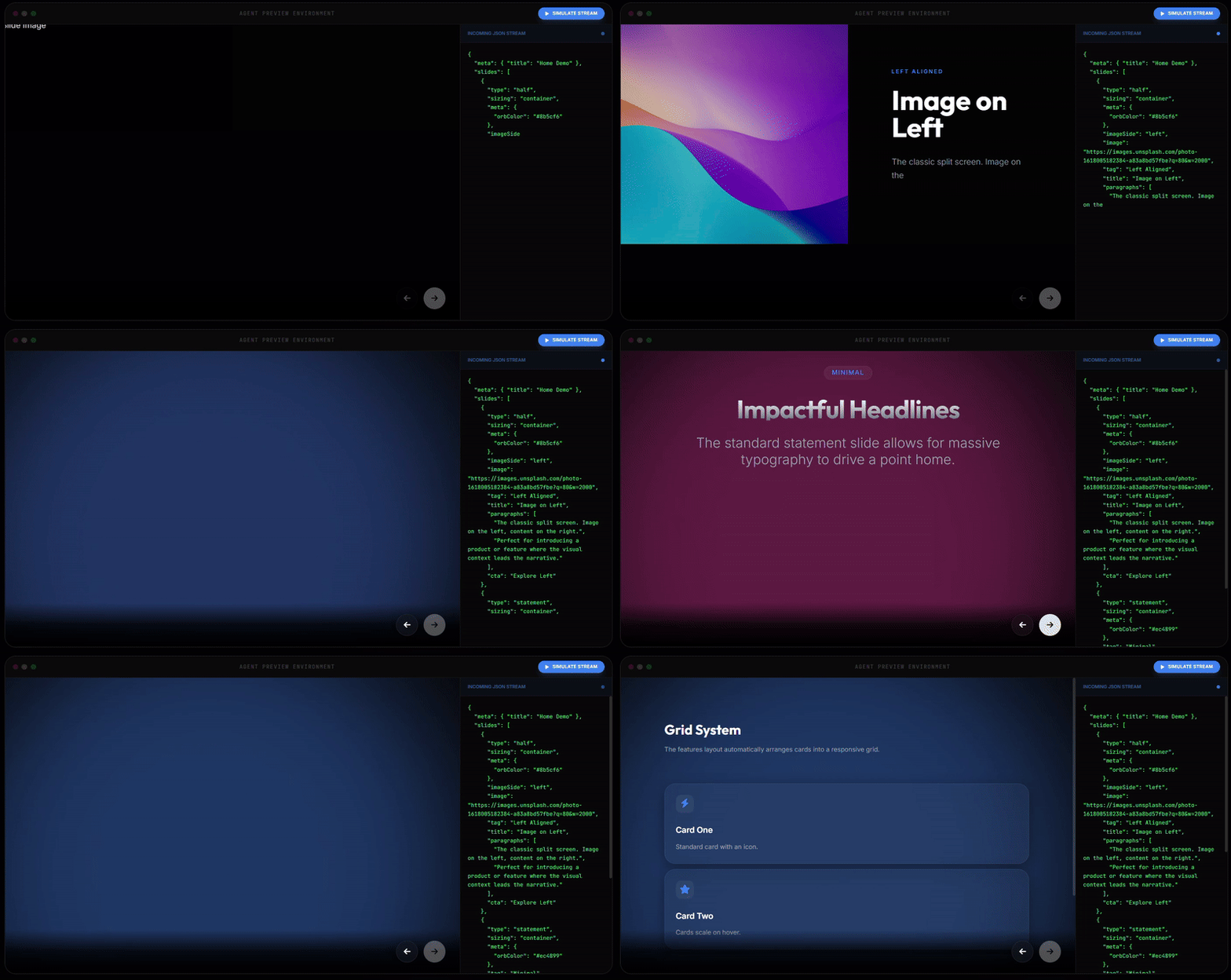
    <img src="https://raw.githubusercontent.com/PailletJuanPablo/lumina-slides/main/public/demo.gif" alt="Lumina Engine Demo" width="100%" style="border-radius: 12px; border: 1px solid rgba(255,255,255,0.1); box-shadow: 0 20px 80px -20px rgba(0,0,0,0.5);" />
  </a>

  <br />
  <br />

  <h1>JSON-Driven Presentation Engine</h1>
  
  <p style="font-size: 1.2em; max-width: 700px;">
    A lightweight, framework-agnostic library that renders beautiful, animated slide decks from simple JSON. 
    Perfect for AI-generated content, dynamic dashboards, and interactive presentations.
  </p>


  <p>
    <a href="#-quick-start"><strong>🚀 Quick Start</strong></a> · 
    <a href="#-layouts--gallery"><strong>🎨 Layout Gallery</strong></a> · 
    <a href="#-studio"><strong>🖼️ Studio</strong></a> · 
    <a href="AGENTS.md"><strong>🤖 Agent Guide</strong></a>
  </p>

[![Version](https://img.shields.io/npm/v/lumina-slides?style=for-the-badge&color=2563EB)](https://www.npmjs.com/package/lumina-slides)
[![Downloads](https://img.shields.io/npm/dt/lumina-slides?style=for-the-badge&color=7C3AED)](https://www.npmjs.com/package/lumina-slides)

[![License: MIT](https://img.shields.io/badge/License-MIT-yellow.svg?style=for-the-badge)](https://opensource.org/licenses/MIT)
[![TypeScript](https://img.shields.io/badge/Written%20In-TypeScript-blue?style=for-the-badge&logo=typescript)](https://www.typescriptlang.org/)


</div>

<div align="center">

### 🤖 Build with AI Instantly

[![Lumina Slides Agent](https://img.shields.io/badge/Try_on-ChatGPT-black?style=for-the-badge&logo=openai&logoColor=white)](https://chatgpt.com/g/g-6951593015fc8191bf8db3ff13ebe986-lumina-slides-agent)

**Need a presentation fast?** The Lumina Slides Agent builds full slide decks from your prompts and shares live preview links in seconds.

</div>

<br />

---

## 🎨 Layouts & Gallery

Lumina includes **7 built-in layouts** ready to use. Just set the `type` property in your JSON:

| Layout        | Description                                                                                                                               | Visual Preview                                                                                                                                                 |
| :------------ | :---------------------------------------------------------------------------------------------------------------------------------------- | :------------------------------------------------------------------------------------------------------------------------------------------------------------- |
| **Statement** | Bold title slides for introductions, transitions, or key messages. Supports title, subtitle, and background. <br><br> `type: "statement"` | [![Statement](https://lumina-slides.web.app/layout-statement.png)](https://lumina-slides.web.app/deck/layout-statement) |
| **Features**  | Auto-grid layout for showcasing features, benefits, or stats. Adapts columns based on item count. <br><br> `type: "features"`             | [![Features](https://lumina-slides.web.app/layout-features.png)](https://lumina-slides.web.app/deck/layout-features)    |
| **Timeline**  | Horizontal timeline with snap navigation. Great for roadmaps, history, or process flows. <br><br> `type: "timeline"`                      | [![Timeline](https://lumina-slides.web.app/layout-timeline.png)](https://lumina-slides.web.app/deck/layout-timeline)    |
| **Steps**     | Numbered step-by-step guide. Perfect for tutorials, instructions, or procedures. <br><br> `type: "steps"`                                 | [![Steps](https://lumina-slides.web.app/layout-steps.png)](https://lumina-slides.web.app/deck/layout-steps)             |
| **Half**      | Split layout with image on one side, content on the other. Fully responsive. <br><br> `type: "half"`                                      | [![Half](https://lumina-slides.web.app/layout-half.png)](https://lumina-slides.web.app/deck/layout-half)                |
| **Chart**     | Data visualization with Chart.js. Supports bar, line, pie, and doughnut charts. <br><br> `type: "chart"` <br>⚠️ _Requires `chart.js`_     | [![Chart](https://lumina-slides.web.app/layout-chart.png)](https://lumina-slides.web.app/deck/layout-chart)             |
| **Flex**      | Declarative auto-layout system. Define structure with rows, columns, and nested containers. <br><br> `type: "flex"`                       | [![Flex](https://lumina-slides.web.app/layout-flex-demo.png)](https://lumina-slides.web.app/deck/layout-flex-demo)      |

> [!TIP] > **Embedded Mode**: All layouts can be rendered in compact containers (dashboards, widgets) by using the `compact: true` option.

> [!TIP] > **See the Code**: Click on the dropdowns below to see the exact JSON used to generate these slides.

---

## 🖼️ Studio

Build decks visually with the built-in **Studio**: edit slides in the inspector, tweak content and styles, then export or copy the JSON. Ideal for prototyping and editing AI-generated decks.

<div align="center">

  <img src="public/studio.gif" alt="Lumina Studio" width="100%" style="border-radius: 12px; border: 1px solid rgba(255,255,255,0.1); box-shadow: 0 20px 80px -20px rgba(0,0,0,0.5);" />

</div>

### How to use Studio

Install the package, mount Lumina with **Studio** enabled on a DOM node, and optionally pass an `initialDeck`. Listen for the `save` event to get the edited deck when the user saves.

```bash
npm install lumina-slides
```

```typescript
import { Lumina } from "lumina-slides";
import "lumina-slides/style.css";

const initialDeck = {
  meta: { title: "My Presentation" },
  slides: [
    { type: "statement", title: "Welcome", subtitle: "Edit in Studio." },
    {
      type: "features",
      title: "Features",
      features: [
        { title: "One", description: "First feature" },
        { title: "Two", description: "Second feature" },
      ],
    },
  ],
};

const engine = new Lumina("#app", {
  studioEmbed: true,
  initialDeck, // omit to start from an empty deck
});

engine.on("save", (deck) => {
  // Persist to your backend, download as JSON, or load elsewhere
  console.log("Deck saved:", deck);
});
```

| Option | Description |
| :----- | :---------- |
| `studioEmbed: true` | Renders the Studio UI (inspector, toolbar) next to the deck. |
| `initialDeck` | Optional. Deck object `{ meta, slides }` to load on init. Omit for an empty deck. |

When the user clicks **Save** in Studio, Lumina emits `save` with the full deck object.

> [!TIP] **Try Studio online**: Run the docs app with Studio enabled or open the [Studio route](https://lumina-slides.web.app/#/studio) to use the visual editor in the browser.

---

<details>
<summary><b>Example: Timeline JSON</b></summary>

```json
{
  "type": "timeline",
  "title": "Project History",
  "timeline": [
    {
      "date": "2023",
      "title": "Inception",
      "description": "The idea is born."
    },
    {
      "date": "2024",
      "title": "Launch",
      "description": "First public release."
    }
  ]
}
```

</details>

<details>
<summary><b>Example: Chart JSON</b></summary>

```json
{
  "type": "chart",
  "chartType": "bar",
  "title": "Quarterly Revenue",
  "data": {
    "labels": ["Q1", "Q2", "Q3", "Q4"],
    "datasets": [
      { "label": "Revenue", "values": [120, 150, 180, 220], "color": "c:p" }
    ]
  }
}
```

</details>

---

## 🎭 Theming

Lumina includes **6 beautiful theme presets** out-of-the-box. Just pass the name:

```typescript
const engine = new Lumina("#app", { theme: "ocean" });
```

| Theme        | Description                         | Preview                                                                                                                                                   |
| :----------- | :---------------------------------- | :-------------------------------------------------------------------------------------------------------------------------------------------------------- |
| **default**  | Clean blue on dark. Professional.   | [![default](https://lumina-slides.web.app/theme-default.png)](https://lumina-slides.web.app/deck/theme-default)    |
| **ocean**    | Cyan on slate. Calm and focused.    | [![ocean](https://lumina-slides.web.app/theme-ocean.png)](https://lumina-slides.web.app/deck/theme-ocean)          |
| **midnight** | Indigo on black. Bold and dramatic. | [![midnight](https://lumina-slides.web.app/theme-midnight.png)](https://lumina-slides.web.app/deck/theme-midnight) |
| **forest**   | Emerald greens. Natural and fresh.  | [![forest](https://lumina-slides.web.app/theme-forest.png)](https://lumina-slides.web.app/deck/theme-forest)       |
| **cyber**    | Neon pink. Sci-fi futuristic.       | [![cyber](https://lumina-slides.web.app/theme-cyber.png)](https://lumina-slides.web.app/deck/theme-cyber)          |
| **latte**    | Light mode. Warm amber on cream.    | [![latte](https://lumina-slides.web.app/theme-latte.png)](https://lumina-slides.web.app/deck/theme-latte)          |

---

## ⚡ Quick Start

### 1. Install

```bash
# Core installation
npm install lumina-slides

# With Chart support (optional - only if using chart slides)
npm install lumina-slides chart.js
```

### 2. Implementation

Lumina is a **Framework Agnostic** class. It mounts to any DOM node.

```typescript
import { Lumina } from "lumina-slides";
import "lumina-slides/style.css";

const engine = new Lumina("#app", {
  theme: "dark",
  loop: true,
});

// Load Data (From your API, or static)
engine.load({
  meta: { title: "Demo Deck" },
  slides: [
    { type: "statement", title: "Hello World", subtitle: "Powered by Lumina" },
  ],
});
```

---

## 🤖 Building Agents?

We have a dedicated guide for that.

> [!IMPORTANT] > **Read the [Agent Integration Guide](./AGENTS.md)**
>
> Learn about:
>
> - **Streaming**: How to pipe token streams directly into the engine.
> - **Aliases**: Improve latency by 30% using `t` instead of `title`.
> - **Feedback Loops**: How to let the AI know what the user is clicking.

### Token Optimization

Lumina includes a built-in normalizer. Your LLM can output "lazy" JSON to save money.

| Concept        | Standard     | Short Alias |
| :------------- | :----------- | :---------- |
| **Header**     | `title`      | `t`         |
| **Sub-Header** | `subtitle`   | `s`         |
| **Picture**    | `image`      | `img`       |
| **Background** | `background` | `bg`        |

---

## 📚 Documentation & Resources

| Resource                                                                                                | Description                                                      |
| :------------------------------------------------------------------------------------------------------ | :--------------------------------------------------------------- |
| 📖 **[Full Documentation](https://lumina-slides.web.app/)**                          | Complete guides, examples, and live playground                   |
| 🔧 **[API Reference](https://lumina-slides.web.app/#/api)**                          | TypeDoc-generated API docs with all methods and types            |
| 🤖 **[Agent Integration Guide](./AGENTS.md)**                                                           | How to integrate Lumina with AI agents (OpenAI, Anthropic, etc.) |
| 📝 **[LLM System Prompt](https://lumina-slides.web.app/lumina-llm-prompt.txt)**      | Ready-to-use system prompt for your AI to generate slides        |
| 🤖 **[Custom GPT Agent](https://chatgpt.com/g/g-6951593015fc8191bf8db3ff13ebe986-lumina-slides-agent)** | Specialized ChatGPT agent to build and preview slides instantly  |
| 🎮 **[Live Playground](https://lumina-slides.web.app/#/playground)**                 | Try Lumina in your browser with live JSON editing                |
| 🖼️ **[Studio](https://lumina-slides.web.app/#/studio)**                              | Visual page builder: edit slides in the inspector and export JSON |

---

<div align="center">
  <p>Built with ❤️ by <a href="https://pailletjp.com">Juan Pablo Paillet</a>.</p>
</div>