# logplease
Simple Javascript logger for Node.js and Browsers
**[DEMO](https://ipfs.io/ipfs/QmRrBe2sp9ha2xypRoz5UDXqBJUB83NcecQU3QpqBJ5hkq)**
*Open the dev tools to see the log output*
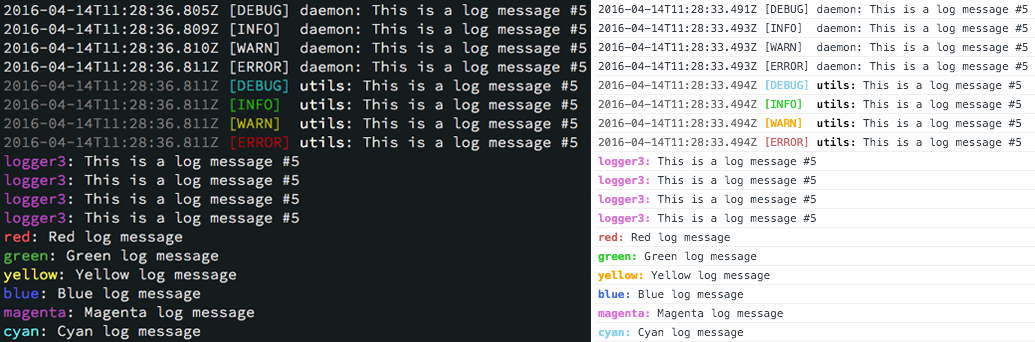
*logplease* does two simple things: output log messages to the console and/or to a file (Node.js only) and display the log messages with nice colors. Inspired by [log4js](https://github.com/stritti/log4js) and [debug](https://github.com/visionmedia/debug).
## Features
- Log messages to stdout or a file
- Customize the log messages
- Log levels
- Colors!
- Work in Node.js and Browsers
## Install
```
npm install logplease
```
### Examples
#### Node.js
```
npm run example
```
#### Browser
Open `example/index.html` in your browser.
## Usage
### Node.js / Webpack
See [example/example.js](https://github.com/haadcode/logplease/blob/master/example/example.js) for details.
```javascript
const Logger = require('logplease');
const logger = Logger.create('utils');
logger.debug(`This is a debug message`);
logger.log(`This is a log message`); // alias for debug()
logger.info(`This is a info message`);
logger.warn(`This is a warning`);
logger.error(`This is an error`);
```
Default log level is `DEBUG`. You can set the log level with `LOG` environment variable, eg. `LOG=debug node example/example.js`. See [Log levels](#log-levels) for available options.
There's an ES5 build in `es5/` which you can include if you need ES5 compatibility, eg. with Webpack.
### Browser
Copy `dist/logplease.min.js` to your javascripts directory and include it in your html. See [example/index.html](https://github.com/haadcode/logplease/blob/master/example/index.html) for details.
```html
```
### Options
You can customize your logger to not show the timestamp or the log level, disable colors or specify, if using a log file, to overwrite the log file at start instead of appending to it.
```javascript
const Logger = require('logplease');
const logger = Logger.create("logger name", options);
```
Available options and defaults:
```javascript
const options = {
useColors: true, // Enable colors
color: Colors.White, // Set the color of the logger
showTimestamp: true, // Display timestamp in the log message
useLocalTime: false, // Display timestamp in local timezone
showLevel: true, // Display log level in the log message
filename: null, // Set file path to log to a file
appendFile: true, // Append logfile instead of overwriting
};
```
### Log levels
```
DEBUG
INFO
WARN
ERROR
NONE
```
Default log level is `DEBUG`. To display errors only, use `ERROR`. To turn off all logging, use `NONE`.
### Global log level
You can set a global log level to display only the wanted log messages.
```javascript
const Logger = require('logplease');
Logger.setLogLevel(Logger.LogLevels.ERROR) // Show only ERROR messages
// or
Logger.setLogLevel('ERROR')
```
You can mute all loggers with log level *NONE*:
```javascript
Logger.setLogLevel(Logger.LogLevels.NONE) // output nothing
```
### Global log file
You can set a global log file to which all loggers write to.
```javascript
const Logger = require('logplease');
const logger1 = Logger.create("logger1");
const logger2 = Logger.create("logger2");
Logger.setLogfile('debug.log');
logger1.debug('hello world 1');
logger2.debug('hello world 2');
// ==> 'debug.log' contains both log messages
```
### Log file
You can set a log file per logger.
```javascript
const Logger = require('logplease');
const logger1 = Logger.create("logger1", { filename: 'debug.log' });
const logger2 = Logger.create("logger2");
logger1.debug('hello world 1'); // writes to 'debug.log'
logger2.debug('hello world 2'); // doesn't write to 'debug.log'
```
### Colors
You can set a color per logger. Default color in Node.js is *White* and in the browser *Black*.
```javascript
const Logger = require('logplease');
const logger = Logger.create("logger name", { color: Logger.Colors.Yellow });
```
Colors:
```
Black, Red, Green, Yellow, Blue, Magenta, Cyan, Grey, White
```
### Tests
Run tests with:
```
npm test
```
### Build
Install build dependencies:
```
npm install
```
Build the browser distributable and examples:
```
npm run build
```
Build the browser distributable only:
```
npm run build:dist
```
The distributable file will be located in [dist/logplease.min.js](https://github.com/haadcode/logplease/tree/master/dist)
Build the browser example:
```
npm run build:examples
```