

![Built With Stencil](https://img.shields.io/badge/-Built%20With%20Stencil-16161d.svg?logo=data%3Aimage%2Fsvg%2Bxml%3Bbase64%2CPD94bWwgdmVyc2lvbj0iMS4wIiBlbmNvZGluZz0idXRmLTgiPz4KPCEtLSBHZW5lcmF0b3I6IEFkb2JlIElsbHVzdHJhdG9yIDE5LjIuMSwgU1ZHIEV4cG9ydCBQbHVnLUluIC4gU1ZHIFZlcnNpb246IDYuMDAgQnVpbGQgMCkgIC0tPgo8c3ZnIHZlcnNpb249IjEuMSIgaWQ9IkxheWVyXzEiIHhtbG5zPSJodHRwOi8vd3d3LnczLm9yZy8yMDAwL3N2ZyIgeG1sbnM6eGxpbms9Imh0dHA6Ly93d3cudzMub3JnLzE5OTkveGxpbmsiIHg9IjBweCIgeT0iMHB4IgoJIHZpZXdCb3g9IjAgMCA1MTIgNTEyIiBzdHlsZT0iZW5hYmxlLWJhY2tncm91bmQ6bmV3IDAgMCA1MTIgNTEyOyIgeG1sOnNwYWNlPSJwcmVzZXJ2ZSI%2BCjxzdHlsZSB0eXBlPSJ0ZXh0L2NzcyI%2BCgkuc3Qwe2ZpbGw6I0ZGRkZGRjt9Cjwvc3R5bGU%2BCjxwYXRoIGNsYXNzPSJzdDAiIGQ9Ik00MjQuNywzNzMuOWMwLDM3LjYtNTUuMSw2OC42LTkyLjcsNjguNkgxODAuNGMtMzcuOSwwLTkyLjctMzAuNy05Mi43LTY4LjZ2LTMuNmgzMzYuOVYzNzMuOXoiLz4KPHBhdGggY2xhc3M9InN0MCIgZD0iTTQyNC43LDI5Mi4xSDE4MC40Yy0zNy42LDAtOTIuNy0zMS05Mi43LTY4LjZ2LTMuNkgzMzJjMzcuNiwwLDkyLjcsMzEsOTIuNyw2OC42VjI5Mi4xeiIvPgo8cGF0aCBjbGFzcz0ic3QwIiBkPSJNNDI0LjcsMTQxLjdIODcuN3YtMy42YzAtMzcuNiw1NC44LTY4LjYsOTIuNy02OC42SDMzMmMzNy45LDAsOTIuNywzMC43LDkyLjcsNjguNlYxNDEuN3oiLz4KPC9zdmc%2BCg%3D%3D&colorA=16161d&style=flat-square)
[![npm version](https://badge.fury.io/js/lite-frames.svg)](https://badge.fury.io/js/lite-frames)
[![](https://data.jsdelivr.com/v1/package/npm/lite-frames/badge)](https://www.jsdelivr.com/package/npm/lite-frames)

# Lite Frames

This is a library of light weight frames UI (device, screens) made into web-components. you are allowed to embed whatever inside the frames

## Why use It?

Lite frame provide quality and light-weight frames for your web project instead of using the conventional image format or building something from scratch.

These frame are build with HTML and CSS so they are definitely lighter than high quality png frames.

Lite Frames have plans to add more frames (and screens) e.g terminal frame, chrome browser frame, and other useful frames.
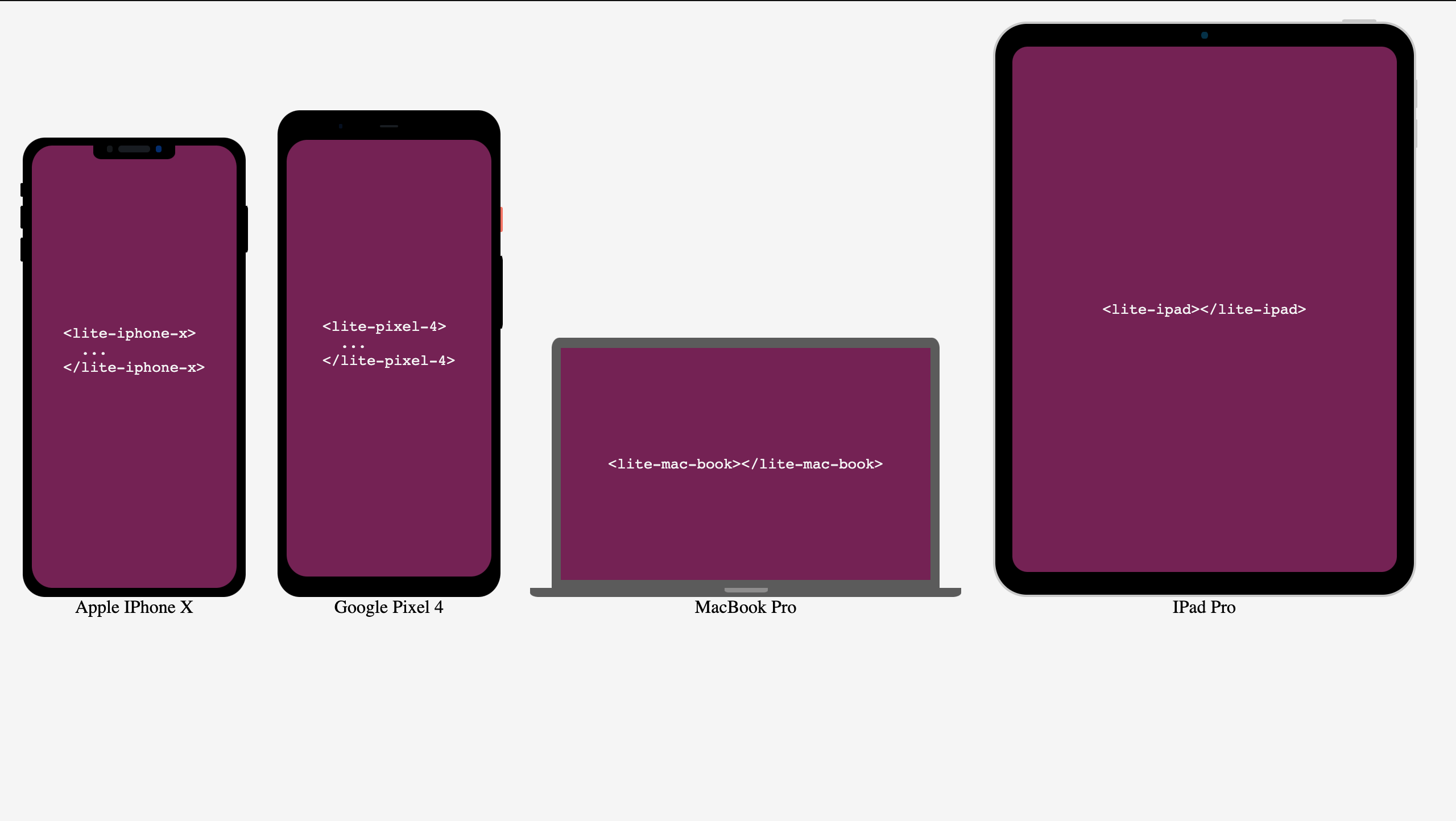
![Images of Frames](https://github.com/Marvinified/lite-frames/blob/master/available.png?raw=true)

## Demo 

[View Live Demo and Playground](https://codesandbox.io/s/ancient-monad-vbhhk) 

## How to use

### Import lite-frames into your project

1.  Using `script` tag:

    ```html
    <script src="https://unpkg.com/lite-frames@1.1.1/dist/lite-frames.js">
    </script>
    ```

2. using npm

    - install lite-frame

      ```sh
      npm i lite-frames
      ```

    - import the package

      ```js
      import 'lite-frames'
      ```

      See Stencils Docs on how to use with any frameworks or libraries when using npm

      👉🏻 [Stencil Integration docs](https://stenciljs.com/docs/overview)


- Every Lite Frame is a individual element, e.g For `Iphone X` we have

  ```html
  <lite-iphone-x></lite-iphone-x>
  ```

- A Lite Frame `inherits` the `width` of it `parent` and must have a parent element with a width greater than 0px

  ```html
  <div style="width:200px;">
    <lite-iphone-x></lite-iphone-x>
  </div>
  ```

- Lite Frame have two theme modes

  - Light mode

  ```html
  <lite-iphone-x theme="light"></lite-iphone-x>
  ```

  - Dark Mode (default)

  ```html
  <lite-iphone-x theme="dark"></lite-iphone-x>
  ```

- Contents to be embedded inside the frame can be added as a decendant of the frame.
  ```html
  <lite-iphone-x theme="dark">
      <!-- Html Content or text content -->
        <h1>This is the content<h1>
  </lite-iphone-x>
  ```

## Available Frames Tags

| Frame Name     | Tag                              |
| -------------- | -------------------------------- |
| Iphone X       | `<lite-iphone-x></lite-iphone-x>` |
| Google pixel 4 | `<lite-pixel-4></lite-pixel-4>`   |
| Macbook        | `<lite-mac-book></lite-mac-book>` |
| IPad Pro        | `<lite-ipad></lite-ipad>` |

## Attributes

| Atribute | Description       | Possible Values |
| -------- | ----------------- | --------------- |
| theme    | Component's theme | dark, light     |
