## link-prevue
> A flexible component for generating a link preview
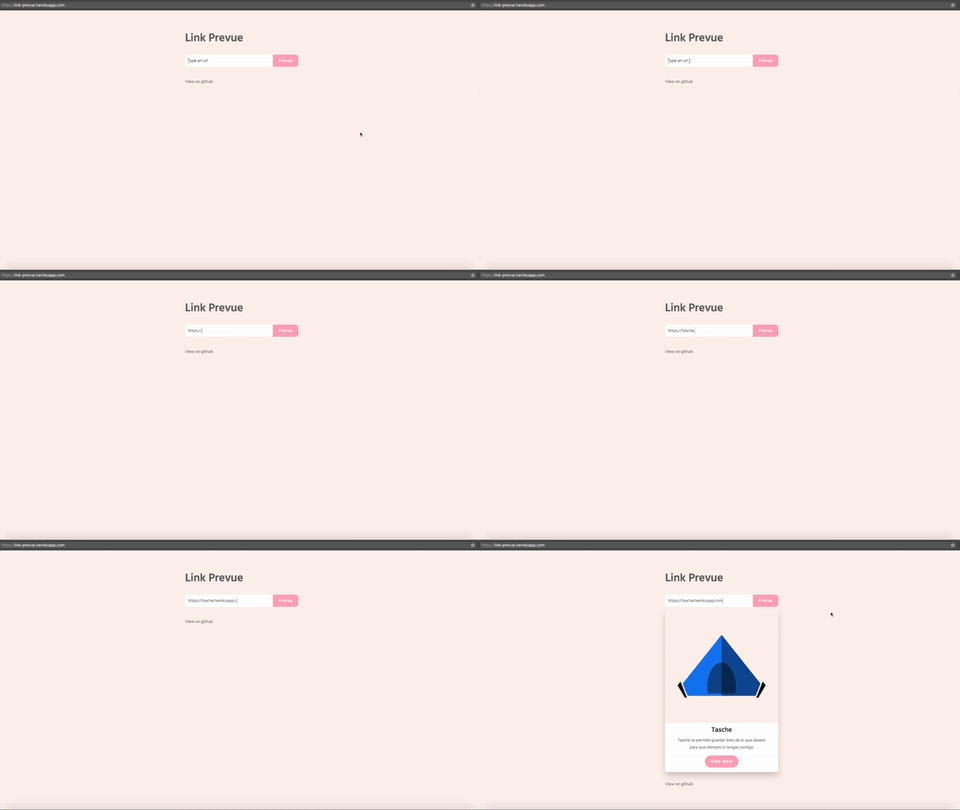
## Intallation
```
npm install link-prevue
```
## Basic usage
> Javascript
```javascript
import LinkPrevue from 'link-prevue'
```
> HTML
```html
```
:+1:
## Custom card
To use a custom card, set your own html code between the aperture tag and the close tag of component. Using the scoped slot.
```html
![]()
{{props.title}}
{{props.description}}
More
```
## Custom loading indicator
To use a custom loading indicator, use the loading slot.
```html
Loading...
```
## Custom button handler
For custom button handler use the onButtonClick property, like.
> HTML
```html
```
> Javascript
```javascript
import LinkPrevue from 'link-prevue'
export default {
components:{
LinkPrevue
},
methods: {
onClick(prevue) {
console.log('click', prevue.images, prevue.title, prevue.url, prevue.description)
}
}
}
```
## Props API
link-prevue have the following props for customize the component
Prop | Type | Required | Default Value | Description
--------------------- | ---------- | -------- | ---------------------------------------- | -----------
**url** | _String_ | yes | _undefined_ | Site url for generate link preview
**onButtonClick** | _Function_ | no | _undefined_ | Function for a custom button handler, params => `prevue`
**cardWidth** | _String_ | no | _'400px'_ | Card width, accept `px` and `%`
**showButton** | _Boolean_ | no | _true_ | Render card button
**showButtonWhileLoading** | _Boolean_ | no | _false_ | Show a button during loading state that opens the URL. Useful when loading multiple links takes time.
**apiUrl** | _String_ | no | _https://link-preview-api.nivaldo.workers.dev/preview_ | Custom API url, link-preview add a query param called ?url= [check this](https://github.com/nivaldomartinez/link-prevue-api-node)
**hideWhenEmpty** | _Boolean_ | no | _false_ | Hide card when image, title, and description are all null in the API response
## API REST
link-prevue uses an API REST for retrieve link data if you want to use your own API REST check [this](https://github.com/nivaldomartinez/link-prevue-api-node).
## Troubleshooting
### 429 Too Many Requests
If you are seeing `429 Too Many Requests` errors, this means the API used by **link-prevue** has exceeded its free usage limits.
This library relies on a Cloudflare Worker running on the **free plan**. Because the API is **public and shared across all users**, the free quota can be exhausted. When this happens, Cloudflare automaticly throttles requests and returns `429` responses.
#### Recomended solution: use a custom API
To avoid rate limits and ensure consistet availability, we strongly recommend use your **own API instance** intead of the shared public one.
You can deploy your own Cloudflare Worker (or compatible backend) and configure **link-prevue** to point to it using `api-url` prop. This gives you:
- A dedicated API for your project or instance
- Full control over limits and usage
- Better reliability in production environments
**Follow this [step-by-step tutorial](https://nivaldomartinez.com/posts/how-to-use-link-prevue-with-external-api/) to set up and use a custom API.**
Once configured, update link-prevue’s API endpoint to your custom URL, and the 429 errors should no longer occur.
## License
This code is distributed under the terms and conditions of the [MIT license](https://opensource.org/licenses/MIT).
## compatibility
| version | vue |
|-|-|
| v2.x | v3.x |
| v1.x | v2.x |