






# lightGallery
lightGallery is a JavaScript lightbox and gallery for images and video,
with native React, Vue and Angular packages. No dependencies, 15 plugins,
and the same features in every stack.
One gallery, four packages with the same features and settings:
| Stack | Package |
| --- | --- |
| Vanilla JS / TypeScript | `lightgallery` |
| React | `@lightgallery/react` |
| Vue 3 | `@lightgallery/vue` |
| Angular | `@lightgallery/angular` |
The framework-free core they share is available on its own as
`@lightgallery/headless`.
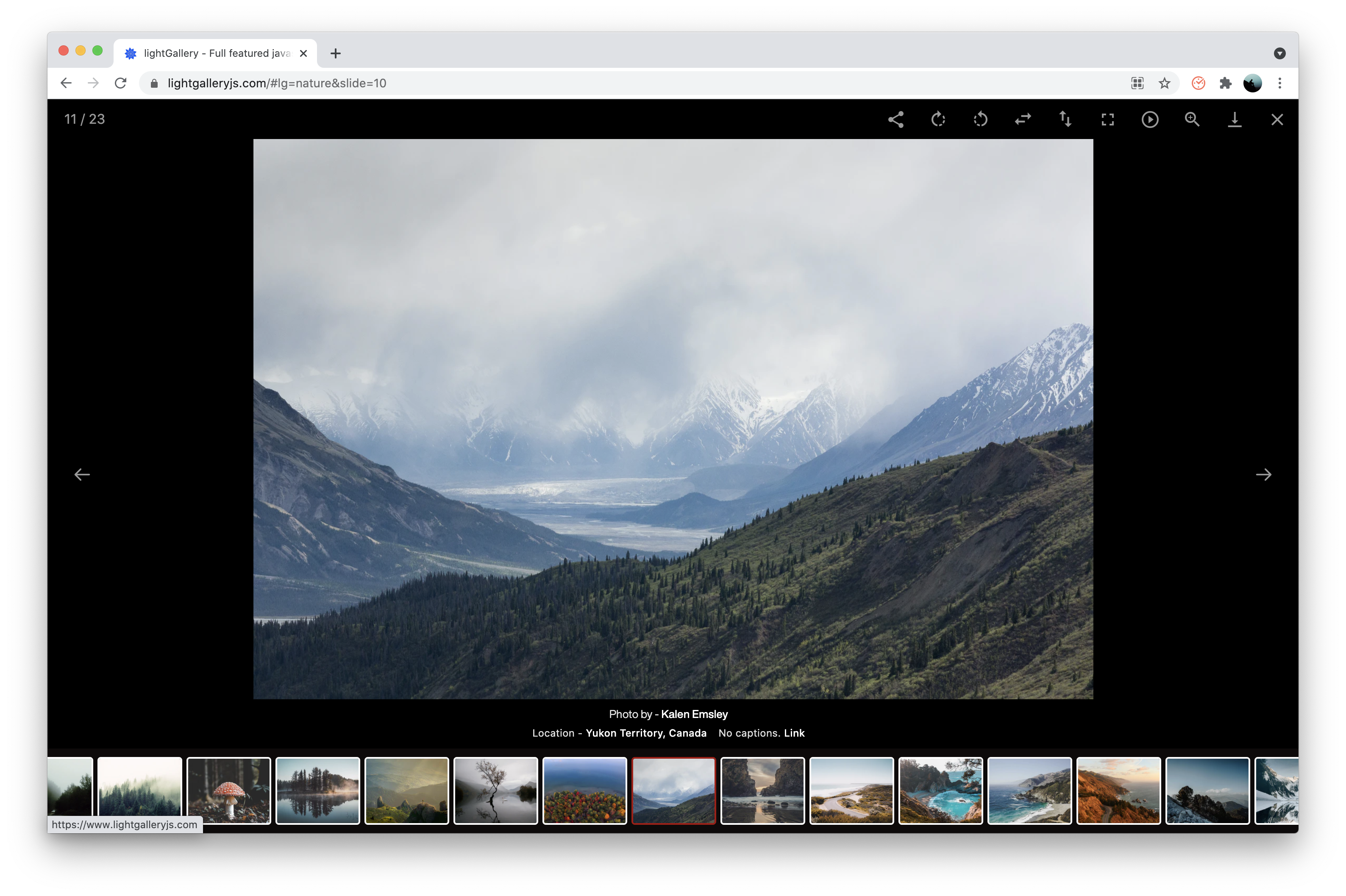
## Core features
#### Works everywhere
- Plain JavaScript or TypeScript, plus native
[React](https://www.lightgalleryjs.com/docs/react/),
[Vue 3](https://www.lightgalleryjs.com/docs/vue/) and
[Angular](https://www.lightgalleryjs.com/docs/angular/) packages. Same
features and settings in every stack.
- No dependencies. Use it with a bundler or drop in a script tag.
- Lightweight. Plugins are separate files, so you only load what you use.
- 15 plugins, and you can
[write your own](https://www.lightgalleryjs.com/docs/creating-plugins/).
- Easy to customize with CSS (or SCSS) and settings. Multiple galleries
on one page.
#### Layout and performance
- Fully responsive, with the
[right image size for every screen](https://www.lightgalleryjs.com/docs/responsive-loading/).
- [Justified layout](https://www.lightgalleryjs.com/docs/justified-layout/):
thumbnails in tidy rows of equal height, no extra library needed.
- [Large galleries](https://www.lightgalleryjs.com/docs/virtualization/)
with thousands of images stay fast.
- [Dynamic mode](https://www.lightgalleryjs.com/demos/dynamic-mode/)
builds a gallery from a list of items, and you can
[add, edit or remove slides](https://www.lightgalleryjs.com/demos/update-slides/)
while it is open.
- Inline gallery and carousel modes.
- Smart preloading of the next slides.
#### Interaction
- Built for touch, with mouse drag on desktop. Swipes glide and settle
smoothly, like a native app.
- Swipe, drag or pinch to close.
- Zoom in and out, pinch to zoom, double-click or double-tap for actual
size. Slides
[open from the thumbnail](https://www.lightgalleryjs.com/demos/zoom-from-origin/)
and close back to it.
- Animated thumbnails you can
[scrub through](https://www.lightgalleryjs.com/docs/thumbnail-scrubbing/).
- 20+ smooth CSS3 transitions, or bring your own.
- Keyboard navigation and full screen support.
- Fits small screens: extra toolbar buttons tuck into a "More" menu.
- [Accessible](https://www.lightgalleryjs.com/docs/accessibility/): works
with screen readers and keyboards, and respects reduced motion.
- [Localization and RTL](https://www.lightgalleryjs.com/docs/localization-rtl/):
translate every label, and the gallery mirrors for right-to-left pages.
#### Media and plugins
- YouTube, Vimeo, Wistia and HTML5 video, with
[lightweight previews](https://www.lightgalleryjs.com/docs/video-facades/)
that load the player only when you press play.
- [Mixed content](https://www.lightgalleryjs.com/demos/mixed-contents/):
photos, videos, maps, iframes and PDFs in one gallery.
- HTML [captions](https://www.lightgalleryjs.com/demos/captions/) for
every slide.
- Rotate and flip images.
- [Share](https://www.lightgalleryjs.com/docs/web-share/) through the
phone's share sheet, or social links on desktop.
- [Deep links](https://www.lightgalleryjs.com/docs/hash-drivers/): every
slide gets its own URL, and the browser back button works.
- Autoplay slideshow with a progress bar, pager dots, comments, and a
[medium-zoom](https://www.lightgalleryjs.com/demos/medium-zoom/)
plugin for zooming images in place.
- SVG icons you can
[replace with your own](https://www.lightgalleryjs.com/docs/custom-icons/).
## Documentation
- [Getting started](https://www.lightgalleryjs.com/docs/getting-started/)
- [Settings](https://www.lightgalleryjs.com/docs/settings/),
[events](https://www.lightgalleryjs.com/docs/events/) and
[methods](https://www.lightgalleryjs.com/docs/methods/)
- [React](https://www.lightgalleryjs.com/docs/react/),
[Vue](https://www.lightgalleryjs.com/docs/vue/),
[Angular](https://www.lightgalleryjs.com/docs/angular/) and the
[headless core](https://www.lightgalleryjs.com/docs/headless/)
- [Accessibility](https://www.lightgalleryjs.com/docs/accessibility/)
- [Migrating from v2](https://www.lightgalleryjs.com/docs/migration/)
- [Troubleshooting](https://www.lightgalleryjs.com/docs/troubleshooting/)
- [Demos](https://www.lightgalleryjs.com/demos/thumbnails/)
Every docs page has a markdown twin at the same URL plus `index.md`, and
[llms.txt](https://www.lightgalleryjs.com/llms.txt) indexes them all.
## For coding agents
- [llms.txt](https://www.lightgalleryjs.com/llms.txt) lists every docs
page in markdown, one request each.
- The [getting-started guide](https://www.lightgalleryjs.com/docs/getting-started/#ask-your-coding-agent)
has a prompt to paste into an agent. It picks the right package for the
stack, imports the CSS, adds the zoom and thumbnail plugins and sets
`lgSize` on every item.
- This repository ships an agent skill at
[`skills/lightgallery/SKILL.md`](skills/lightgallery/SKILL.md) that
teaches the same workflow for all four stacks.
## Installation
lightGallery is available on NPM, Yarn, CDNs, and GitHub. You can use any
of the following methods to download lightGallery.
- [NPM](https://www.npmjs.com/) - NPM is a package manager for the JavaScript
programming language. You can install `lightgallery` using the following
command
```sh
npm install lightgallery
```
- [YARN](https://yarnpkg.com/) - Yarn is another popular package manager for
the JavaScript programming language. If you prefer you can use Yarn instead
of NPM
```sh
yarn add lightgallery
```
- [GitHub](https://github.com/sachinchoolur/lightGallery/releases) -
You can also download a release directly from GitHub
- CDN - If you prefer to use a CDN, you can load files via
[jsdelivr](https://www.jsdelivr.com/package/npm/lightgallery),
[cdnjs](https://cdnjs.com/libraries/lightgallery) or
[unpkg](https://unpkg.com/browse/lightgallery@latest/)
#### Include CSS and Javascript files
First of all, include lightgallery.css in the <head> of the document. If
you want include any lightGallery plugin such as thumbnails or zoom, you need to
include respective css files as well.
Alternatively you can include `lightgallery-bundle.css` which contains
lightGallery and all plugin styles instead of separate stylesheets.
If you like you can also import scss files instead of css files from the `scss`
folder.
```HTML
```
Then include `lightgallery.umd.js` into your document. If you want to include
any lightgallery plugin you can include it after `lightgallery.umd.js`.
```HTML
....
```
lightGallery supports AMD, CommonJS and ES6 modules too.
```JavaScript
import lightGallery from 'lightgallery';
// Plugins
import lgThumbnail from 'lightgallery/plugins/thumbnail'
import lgZoom from 'lightgallery/plugins/zoom'
```
#### The markup
lightgallery does not force you to use any kind of markup. you can use whatever
markup you want.
Here can find
detailed examples of different kinds of markups.
Give each anchor the natural size of its full image via
`data-lg-size="${width}-${height}"`. It drives the
[zoom-from-origin](https://www.lightgalleryjs.com/docs/settings/#zoomFromOrigin)
animation: the slide opens from the clicked thumbnail and closes back to it.
Without the attribute the slide fades in instead.
```HTML
...
```
#### Initialize lightGallery
Finally, you need to initiate the gallery by adding the following code.
```javascript
```
#### License Key
Pass your key with the
[`licenseKey`](https://www.lightgalleryjs.com/docs/settings/#licenseKey)
setting.
- Commercial licenses come with a key by email once you purchase.
lightGallery 3 keys start with `LIG`.
- Upgrading from v1 or v2? Your old key needs an upgrade for v3. The
gallery keeps working in the meantime; see the
[license page](https://www.lightgalleryjs.com/license/) for upgrade
pricing.
- Open-source projects can request a free key at
contact@lightgalleryjs.com.
- While you evaluate, use `0000-0000-000-0000`. It unlocks every feature
and plugin and only prints a reminder in the console.
[More info](https://www.lightgalleryjs.com/docs/license/)
#### Plugins
As shown above, you need to pass the plugins via settings if you want to use any
lightGallery plugins.
If you are including lightGallery files via script tag, please use the same
plugins names as follows.
`lgZoom`, `lgAutoplay`, `lgComment`, `lgFullscreen`, `lgHash`, `lgJustified`,
`lgPager`, `lgRelativeCaption`, `lgRotate`, `lgShare`, `lgThumbnail`, `lgVideo`,
`lgVimeoThumbnail`, `lgMediumZoom`, `lgOriginCrop`
## Browser support
lightGallery works in all modern browsers: Chrome, Edge, Firefox and
Safari on desktop, Safari on iOS and Chrome on Android, with no build
step needed. Internet Explorer is not supported; lightGallery v2
remains available for it.
- Use it with a bundler, as a native ES module, or from a plain script
tag.
- Newer browser features, such as the phone's share sheet, are used where
available and fall back gracefully elsewhere.
If something misbehaves in a browser you care about, please
[open an issue](https://github.com/sachinchoolur/lightGallery/issues) with
the browser and version.
## License
**Is lightGallery free?** Yes. Every package and every plugin is free and
open source under the [GPLv3](LICENSE), for personal and commercial
projects alike, as long as your project is distributed under
GPLv3-compatible terms.
If you want to keep your own source proprietary, choose the
[commercial license](https://www.lightgalleryjs.com/license/). It covers the
same code with every feature and plugin included, nothing is gated, and it
is a one-time payment. See [LICENSE-COMMERCIAL.md](LICENSE-COMMERCIAL.md).
## Support
If the gallery misbehaves, the
[troubleshooting guide](https://www.lightgalleryjs.com/docs/troubleshooting/)
covers the symptoms behind most bug reports, with the fix for each package.
If you have any questions, suggestions, feedback, please reach out to
[contact@lightgalleryjs.com](mailto:contact@lightgalleryjs.com) or DM me on
[X](https://x.com/SachinNeravath)

 ...
...