
[](https://travis-ci.org/plibither8/licensed)
[](https://www.npmjs.com/package/licensed)
[](LICENSE)
[](https://www.npmjs.com/package/licensed?activeTab=dependencies)
[](https://madewithlove.org.in/)

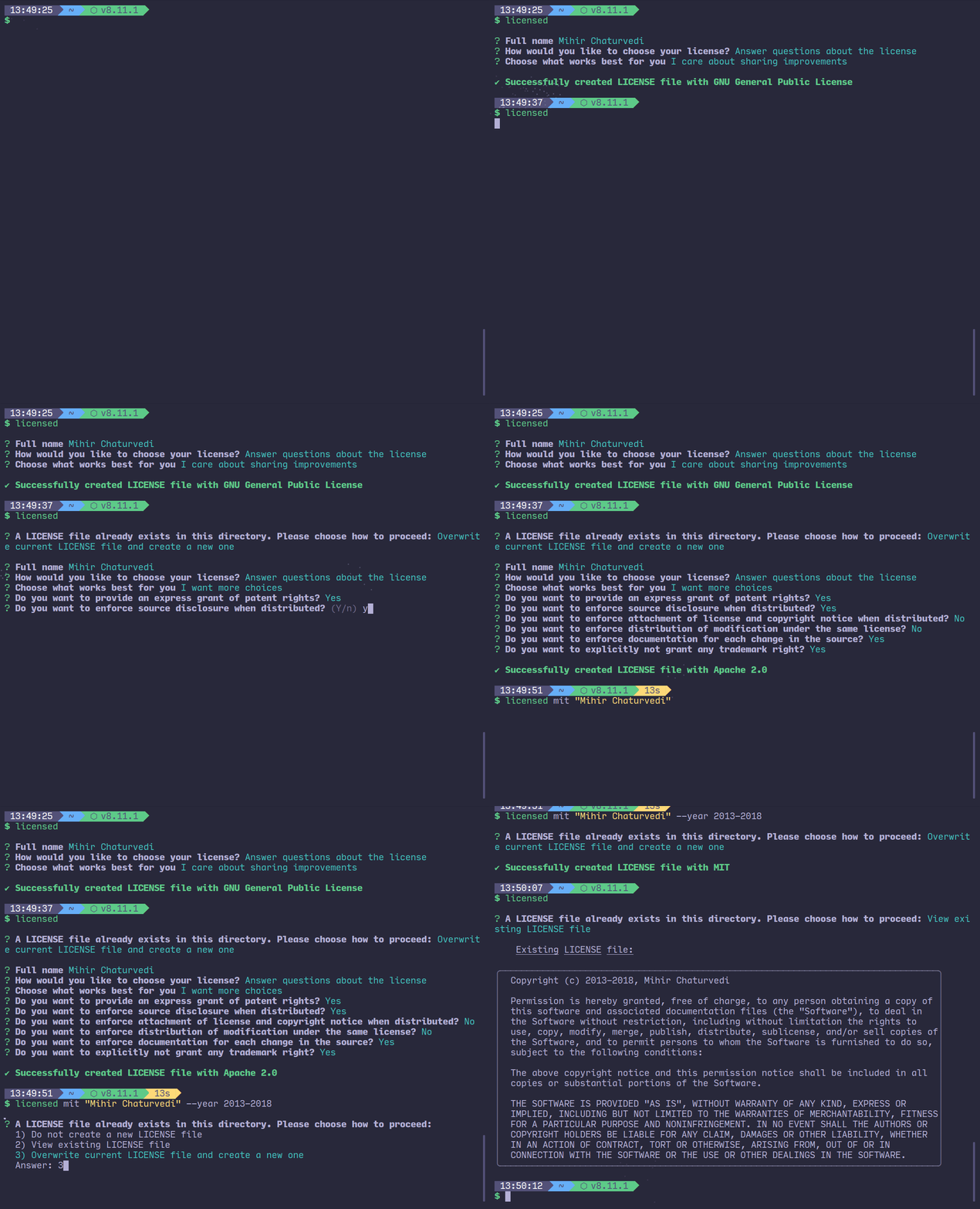
> ⚖ licensed is a simple, interactive command line interface to help you choose and quickly add a `LICENSE` file to your project.
## Setup
Make sure you have [NodeJS](https://nodejs.org/en/) (npm 5.2+) installed on your computer. Then, setup is as simple as:
```sh
$ npx licensed
```
If you've got an older version of node (npm version < 5.2) that doesn't yet have [`npx`](https://www.npmjs.com/package/npx), here's a more traditional setup:
```sh
$ npm i -g licensed
```
## Usage
After installation, navigate to your project directory ie. the directory you want your `LICENSE` file to be placed. Then:
```sh
Usage:
$ licensed # Brings up an option to start a questionnaire or choose from a list of available licenses
$ licensed # Brings prompt to enter your name
$ licensed [--year | -y]
$ licensed [--list | -l]
Options:
--year, -y Manually enter year the license is in effect
--list, -l List all available licenses
--help Show this screen
--version Show version
Examples:
$ licensed mit "Mihir Chaturvedi"
$ licensed apache
$ licensed --year 2013-2018
```
## Development
Run:
```sh
$ git clone https://github.com/plibither8/licensed.git
$ cd licensed
$ npm link
```
This will setup a symbolic link to the CLI. Any changes in source files will now be reflected when running the `licensed` command.
To lint your code, run
```sh
$ npm run lint
```
...and to build your files to `lib/` directory, run
```sh
$ npm run build
```
## Available licenses to choose from (currently):
* Apache 2.0
* BSD-2-Clause
* BSD-3-Clause
* GNU General Public License
* ISC
* MIT
* Mozilla Public License 2.0
* Unlicense
## Contributions
* If you are aware of more licenses, help expand the list by suggesting or creating a pull request with the license text and name added to `assets/licenses`, `src/licenses.js` and other respective files.
* Any other positive suggestions for this project are welcome :)
**Make sure to check out [CONTRIBUTING.md](.github/CONTRIBUTING.md).**
## Acknowledgements
* [Manuel Spagnolo](https://github.com/shikaan) for implementing the questionnaire.
## Donate
licensed was made by me during my study-breaks and free time. If you like and have enjoyed it, please consider donating a small amount (any amount will be really appreciated!) to support and sustain its development. Thank you!
[](https://paypal.me/plibither8)
[](https://www.buymeacoffee.com/plibither8)
---
## License
[MIT](LICENSE)