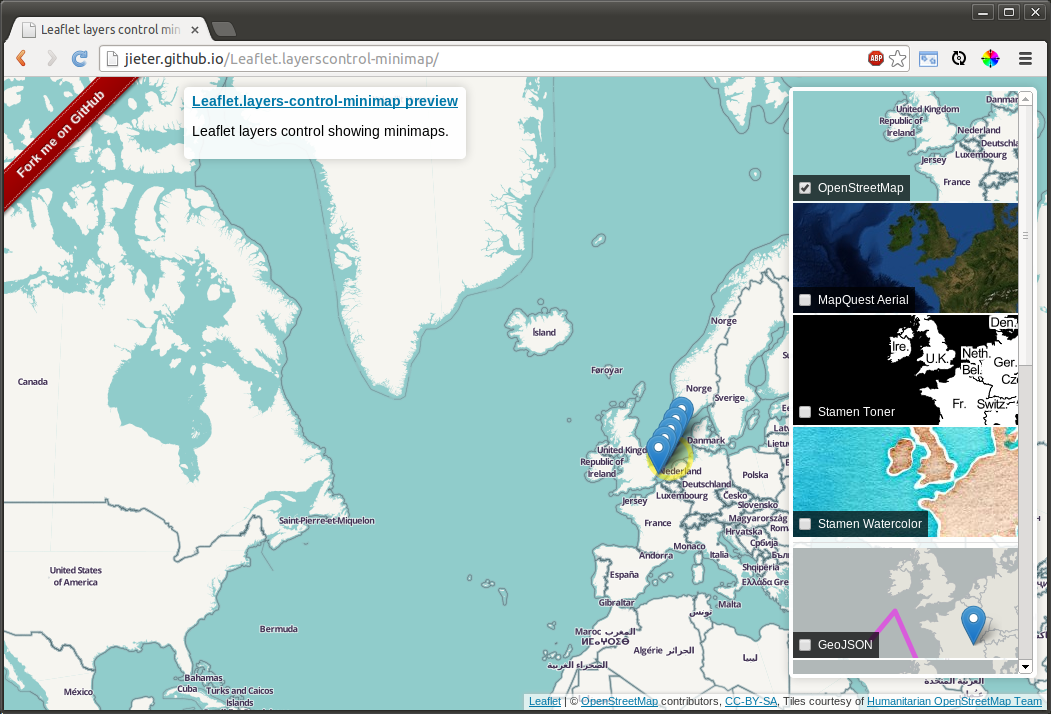
# Leaflet Layers control with minimaps
Displays minimaps in a layers control.
- Only updates layers currently visible in the control.
- Uses [Leaflet.Sync](https://github.com/jieter/Leaflet.Sync) and [leaflet-clonelayer](https://github.com/jieter/leaflet-clonelayer)
- Tested with Leaflet 1.7.1
- [Available on npm](https://www.npmjs.com/package/leaflet.layerscontrol-minimap): `npm install leaflet.layerscontrol-minimap`
## Usage
Exactly like [Leaflets default layers control](http://leafletjs.com/reference.html#control-layers),
with some extra options. Add the scripts + css to your html:
```HTML
```
and add the control to your map:
```JavaScript
L.control.layers.minimap(basemaps, overlays, options).addTo(map);
```
### Extra options
In addition to the options available for `L.Control.Layers`:
- `topPadding`: number of pixels padding to the top of the map. Defaults to `10`.
- `bottomPadding`: number of pixels padding at the bottom of the map. Defaults to `40`.
- `overlayBackgroundLayer` a (tile)layer which is added to the minimap of each overlay as a background. If set to false, no background layer wil be used for overlays. Defaults to [Hydda Base](http://leaflet-extras.github.io/leaflet-providers/preview/#filter=Hydda.Base)
### Extra methods
One extra method is added:
- `filter(string)`: if called with a non-empty string is passed, only layers with a name containing that substring are shown, while the others are set to `display: none`. The method will return a map with the layers currently visible.
## Live example
http://jieter.github.io/Leaflet.layerscontrol-minimap/