# Kurier
A TypeScript framework to create APIs following the [1.1 Spec of JSONAPI](https://jsonapi.org/format/1.1/) + the [Operations proposal spec](https://github.com/json-api/json-api/blob/999e6df77b28549d6c37b163b73c8e9102400020/_format/1.1/index.md#operations).
## Table of contents
- [Getting started](#getting-started)
- [Data flow](#data-flow)
- [Resources](#resources)
- [What is a resource?](#what-is-a-resource)
- [Declaring a resource](#declaring-a-resource)
- [Accepted attribute types](#accepted-attribute-types)
- [Operations](#operations)
- [What is an operation?](#what-is-an-operation)
- [The `get` operation](#the-get-operation)
- [The `add` operation](#the-add-operation)
- [The `update` operation](#the-update-operation)
- [The `remove` operation](#the-remove-operation)
- [Running multiple operations](#running-multiple-operations)
- [Transport layers](#transport-layers)
- [HTTP Protocol](#http-protocol)
- [Using jsonApiKoa](#using-jsonapikoa)
- [Using jsonApiExpress](#using-jsonapiexpress)
- [Converting operations into HTTP endpoints](#converting-operations-into-http-endpoints)
- [Request/response mapping](#requestresponse-mapping)
- [Bulk operations in HTTP](#bulk-operations-in-http)
- [WebSocket Protocol](#websocket-protocol)
- [Using jsonApiWebSocket](#using-jsonapiwebsocket)
- [Executing operations over sockets](#executing-operations-over-sockets)
- [Serverless Functions](#serverless-functions)
- [Using Vercel Functions](#using-vercel-functions)
- [Processors](#processors)
- [What is a processor?](#what-is-a-processor)
- [The `OperationProcessor` class](#the-operationprocessor-class)
- [How does an operation gets executed?](#how-does-an-operation-gets-executed)
- [Controlling errors while executing an operation](#controlling-errors-while-executing-an-operation)
- [Extending the `OperationProcessor` class](#extending-the-operationprocessor-class)
- [The `KnexProcessor` class](#the-knexprocessor-class)
- [Extending the `KnexProcessor` class](#extending-the-knexprocessor-class)
- [Using computed properties in a processor](#using-computed-properties-in-a-processor)
- [The transport layer context](#the-transport-layer-context)
- [Serialization](#serialization)
- [The JsonApiSerializer class](#the-jsonapiserializer-class)
- [Extending the serializer](#extending-the-serializer)
- [Authentication and authorization](#authorization)
- [Defining an `User` resource](#defining-an-user-resource)
- [Using the `@Authorize` decorator](#using-the-authorize-decorator)
- [Using the `UserManagement` addon](#using-the-usermanagement-addon)
- [Configuring roles and permissions](#configuring-roles-and-permissions)
- [Using the `IfUser-*` helpers](#using-the-ifuser--helpers)
- [Front-end requirements](#front-end-requirements)
- [The JSONAPI application](#the-jsonapi-application)
- [What is a JSONAPI application?](#what-is-a-jsonapi-application)
- [Referencing types and processors](#referencing-types-and-processors)
- [Using a default processor](#using-a-default-processor)
- [Extending the framework](#extending-the-framework)
- [What is an addon?](#what-is-an-addon)
- [Using an addon](#using-an-addon)
- [Official addons](#official-addons)
- [Build your own addon](#build-your-own-addon)
- [Using hooks](#using-hooks)
## Getting started
1. Install using either `npm` or `yarn`:
```bash
npm run add kurier
```
2. Create a Resource:
```ts
// resources/author.ts
import { Resource } from "kurier";
export default class Author extends Resource {
static schema = {
attributes: {
firstName: String,
lastName: String,
},
};
}
```
3. Create an Application and inject it into your server. For example, let's say you've installed Koa in your Node application and want to expose JSONAPI via HTTP:
```ts
import { Application, jsonApiKoa, KnexProcessor } from "kurier";
import Koa from "koa";
import Author from "./resources/author";
const app = new Application({
namespace: "api",
types: [Author],
defaultProcessor: new KnexProcessor(/* your knex DB connection settings */),
});
const api = new Koa();
api.use(jsonApiKoa(app));
api.listen(3000);
```
4. Run the Node app, open a browser and navigate to `http://localhost:3000/api/authors`. You should get an empty response like this:
```json
{
"data": [],
"included": []
}
```
5. Add some data to the "authors" table and go back to the previous URL. You'll start seeing your data!
```json
{
"data": [
{
"id": 1,
"type": "author",
"attributes": {
"firstName": "John",
"lastName": "Katzenbach"
}
}
],
"included": []
}
```
## Data flow
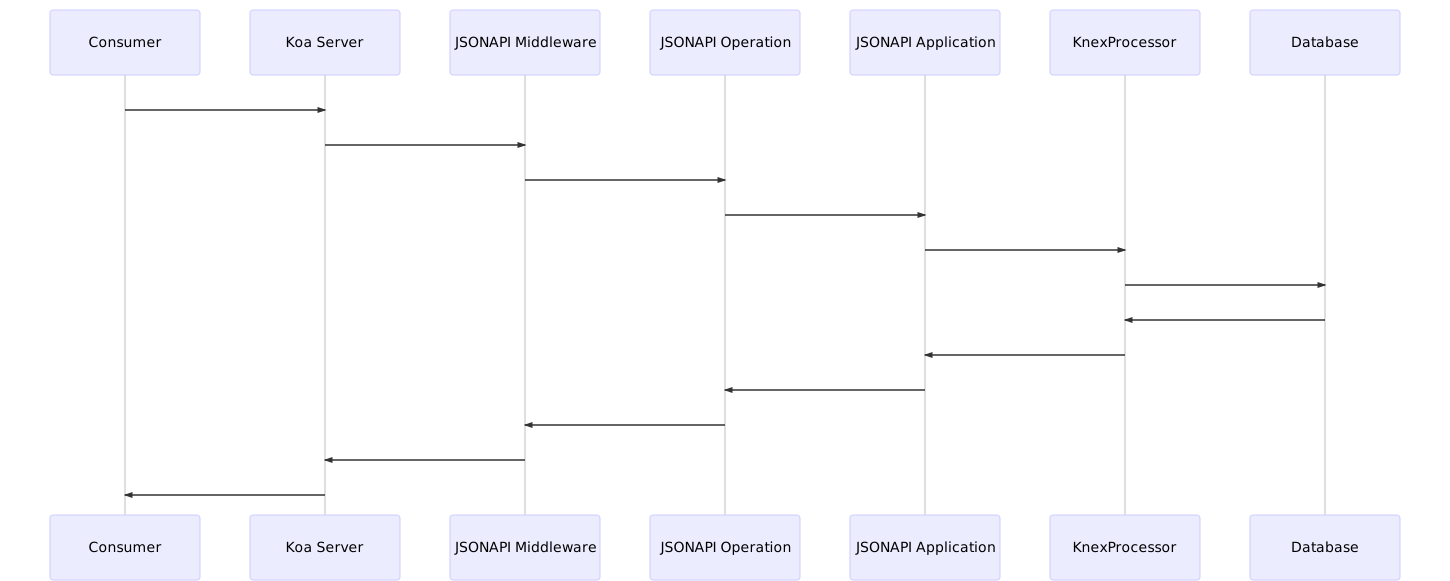
This diagram represents how a full request/response cycle works with Kurier:
 ## Resources
### What is a resource?
A resource can be understood as follows:
> Any information that can be named can be a resource: a document or image, a temporal service (e.g. “today’s weather in Los Angeles”), a collection of other resources, a non-virtual object (e.g. a person), and so on. In other words, (...) A resource is a conceptual mapping to a set of entities (...).
## Resources
### What is a resource?
A resource can be understood as follows:
> Any information that can be named can be a resource: a document or image, a temporal service (e.g. “today’s weather in Los Angeles”), a collection of other resources, a non-virtual object (e.g. a person), and so on. In other words, (...) A resource is a conceptual mapping to a set of entities (...).
Source: Architectural Styles and the Design of Network-based Software Architectures"; Fielding, R.; 2000; p. 88
A resource is comprised of:
#### A unique identifier
It distinguishes a given resource from another. Usually it manifests as auto-incremental integer numbers, [GUIDs or UUIDs](https://en.wikipedia.org/wiki/Universally_unique_identifier).
#### A type
A type is a human-readable name that describes the kind of entity the resource represents.
#### A list of attributes
An attribute is something that helps describe different aspects of a resource. For example, if we're creating a _Book_ resource, some possible attributes would be its _title_, its _year of publication_ and its _price_.
#### A list of relationships
A resource can exist on its own or be expanded through relations with other resources. Following up on our _Book_ resource example, we could state that a book _belongs to_ a certain author. That _author_ could be described as a resource itself. On a reverse point of view, we could also state than an author _has many_ books.
### Declaring a resource
This is how our _Book_ resource would look like, without relationships:
```ts
// resources/book.ts
import { Resource } from "kurier";
import User from "./user";
import Comment from "./comment";
export default class Book extends Resource {
// The *type* is usually inferred automatically from the resource's
// class name. Nonetheless, if we need/want to, we can override it.
static get type(): string {
return "libraryBook";
}
// Every field we declare in a resource is contained in a *schema*.
// A schema comprises attributes and relationships.
static schema = {
primaryKeyName: "_id",
// The primary key for each resource is by default "id", but you can overwrite that default
// with the primaryKeyName property
attributes: {
// An attribute has a name and a primitive type.
// Accepted types are String, Number and Boolean.
title: String,
yearOfPublication: Number,
price: Number,
},
relationships: {
author: {
type: () => User,
belongsTo: true,
foreignKeyName: "authorId",
},
comments: {
type: () => Comment,
hasMany: true,
// for hasMany relationships declarations, the FK is in the related object, so it's
// recommendable to assign a custom FK. In this case, assuming that we use the default serializer,
// the fk name would be "book_id". Read more below this example.
},
},
};
}
```
#### Relationship Declarations
Any number of relationships can be declared for a resource. Each relationship must have a type function which returns a Class, the kind of relationship, which can be **belongsTo** or **hasMany**, and
The expected foreign key depends on the serializer, and the type of relationship, which can be customized, but on a belongsTo relationship, the default FK is `${relationshipName}_${primaryKeyName}`. And for a hasMany relationship, the default FK name expected in the related resource is `${baseType}_${primaryKeyName}`.
A relationship should be defined on its two ends. For example, on the example, with the above code in the _Book_ resource definition, a GET request to `books?include=author`, would include in the response the related user for each book, but for the inverse filter, in the _User_ resource schema definition, we should include:
```json
static schema = {
attributes: { /* ... */ },
relationships: {
// ...,
books: {
type: () => Book,
hasMany: true,
foreignKeyName: "authorId"
},
}
};
```
For a GET request to `users?include=books` to include the books related to each user.
> Declaring a relationship is necessary to parse each resource and return a JSONAPI-compliant response. Also, it gives the API the necessary information so that the `include` clause works correctly.
You can also use relationship helpers to write your relationships easier:
```ts
// resources/book.ts
import { Resource, ResourceSchema, BelongsTo, HasMany } from "kurier";
import User from "./user";
import Comment from "./comment";
export default class Book extends Resource {
static schema: ResourceSchema = {
attributes: { /* ... */ },
relationships: {
author: BelongsTo(Author, { foreignKeyName: "authorId" }),
comments: HasMany(Comments),
},
};
}
```
Both `BelongsTo` and `HasMany` receive two parameters:
- The `Resource` type to relate;
- An optional object with relationships settings (usually `foreignKeyName`).
### Accepted attribute types
The JSONAPI spec restricts any attribute value to "any valid JSON value".
Kurier supports the following primitive types: `String`, `Number`, `Boolean`, `Array` and `Object`. `null` is also a valid value.
Dates are supported in the [ISO 8601](https://en.wikipedia.org/wiki/ISO_8601) format (`YYYY-MM-DDTHH:MM:SS.sss` + the time zone).
> ⚠️ While we support arrays and objects, you might want to reconsider and think of those array/object items as different resources of the same type and relate them to the parent resource.
### Defining custom attribute types
There are some instances when you want the ability to store data as a string in your database, but when it's requested via JSON:API, to present it like a simple object. An example of this would be to store geopositioning data. Let's assume a `MapPin` resource defined like this:
```ts
// resources/map-pin.ts
import { Resource, ResourceSchema } from "kurier";
export default class MapPin extends Resource {
static schema: ResourceSchema = {
attributes: {
title: String,
latitude: Number,
longitude: Number
},
relationships: {}
}
}
```
What if we could represent latitude and longitude as a single `LatitudeLongitude` field like this:
```ts
attributes: {
// ...
location: LatitudeLongitude
}
```
We can define a custom attribute type using the `AttributeType` factory function.
A definition for such an attribute would look like this:
```ts
// attribute-types/latitude-longitude.ts
import { AttributeType } from "kurier";
type LatitudeLongitudeAttribute = { lat: number; lng: number };
const LatitudeLongitude = AttributeType<
string, // The data type used to store the data in the database
LatitudeLongitudeAttribute // The JSON:API representation we want to use
>("LatitudeLongitude", {
// Here we set the native JavaScript type use to present our data in JSON:API.
// For example, a Password field has a jsonType of "string".
jsonType: Object,
// This flag determines whether we want to expose this attribute type to the API or not.
isSensitive: false,
// This function converts the data from the database format to the JSON:API output we want.
serialize(value) {
const [lat, lng] = value.split(",");
return { lat: Number(lat), lng: Number(lng) };
},
// This function converts from our JSON:API format to the data representation for the database.
deserialize({ lat, lng }) {
return `${lat},${lng}`;
},
});
export default LatitudeLongitude;
```
Finally, we can use it in our app:
```ts
app.registerAttributeType(LatitudeLongitude);
```
## Operations
### What is an operation?
An operation is an action that affects one or more resources.
Every operation is written in JSON, and contains the following properties:
- `op`: the type of action to execute _(see [Operation types](#Operation-Types) just below this section)_.
- `ref`: a reference to a resource or kind of resource.
- `id`: the unique identifier of the affected resource.
- `type`: the affected resource's type
- `data`: a Resource object to be written into the data store.
- `params`: a key/value object used to configure how resources should be fetched from the data store. See [the `get` operation](#the-get-operation)
The JSONAPI spec defines four elemental operations:
- **get**: Retrieves a list of resources. Can be filtered by `id` or any defined `attribute`.
- **add**: Inserts a new resource in the data store.
- **remove**: Removes a resource from the data store.
- **update**: Edits one or more attributes of a given resource and saves the changes in the data store.
You can define your own operations as well. See the [Processors](#Processors) section below.
### The `get` operation
A `get` operation can retrieve:
- all resources of a given type:
```json
// Get all books.
{
"op": "get",
"ref": {
"type": "book"
}
}
```
- a subset of resources of given type which satisfy a certain criteria:
```json
// Get all books with a price greater than 100.
{
"op": "get",
"ref": {
"type": "book"
},
"params": {
"filter": {
"price": "gt:100"
}
}
}
```
- a single, uniquely identified resource of a given type:
```json
// Get a single book.
{
"op": "get",
"ref": {
"type": "book",
"id": "ef70e4a4-5016-467b-958d-449ead0ce08e"
}
}
```
The following filter operations are supported:
| Operator | Comparison type |
| -------- | ---------------------------------------------------------------------------- |
| `eq` | Equals |
| `ne` | Not equals |
| `lt` | Less than |
| `gt` | Greater than |
| `le` | Less than or equal |
| `ge` | Greater than or equal |
| `like` | `like:%foo%`: Contains
`like:foo%`: Starts with
`like:%foo`: Ends with |
| `in` | Value is in a list of possible values |
| `nin` | Value is not in a list of possible values |
Results can also be sorted, paginated or partially retrieved using `params.sort`, `params.page` and `params.fields` respectively:
```json
// Get the first 5 books' name, sorted by name.
{
"op": "get",
"ref": {
"type": "book"
},
"params": {
"sort": ["name"],
"fields": ["name"],
"page": {
"number": 0,
"size": 5
}
}
}
```
Also, if the resource being retrieved is related to other resources, it's possible to sideload the related resources using `params.include`:
```json
// Get all books and their respective authors.
{
"op": "get",
"ref": {
"type": "book"
},
"params": {
"include": ["author"]
}
}
```
The response, if successful, will be a list of one or more resources, mathing the specified parameters.
### The `add` operation
An `add` operation represents the intent of writing a new resource of a given type into the data store.
```json
// Add a new book. Notice that by default, you don't need
// to provide an ID. Kurier can generate it automatically.
// Also, we're relating this new resource to an existing
// "author" resource.
{
"op": "add",
"ref": {
"type": "book"
},
"data": {
"type": "book",
"attributes": {
"title": "Learning JSONAPI",
"yearPublished": 2019,
"price": 100.0
},
"relationships": {
"author": {
"data": {
"type": "author",
"id": "888a7106-c797-4b22-b31e-0244483cf108"
}
}
}
}
}
```
The response, if successful, will be a single resource object, with either a generated `id` or the `id` provided in the operation.
### The `update` operation
An `update` operation represents the intent of changing some or all of the data for an existing resource of a given type from the data store.
```json
// Increase the price of "Learning JSONAPI" to 200.
{
"op": "update",
"ref": {
"type": "book",
"id": "ef70e4a4-5016-467b-958d-449ead0ce08e"
},
"data": {
"type": "book",
"id": "ef70e4a4-5016-467b-958d-449ead0ce08e",
"attributes": {
"price": 200.0
}
}
}
```
The response, if successful, will be a single resource object, reflecting the changes the `update` operation requested.
### The `delete` operation
A `delete` operation represents the intent to destroy an existing resources in the data store.
```json
// Remove the "Learning JSONAPI" book.
{
"op": "remove",
"ref": {
"type": "book",
"id": "ef70e4a4-5016-467b-958d-449ead0ce08e"
}
}
```
The response, if successful, will be `typeof void`.
### Running multiple operations
Kurier supports a _bulk_ mode that allows the execution of a list of operations in a single request. This mode is exposed differently according to the transport layer (see the next section for more details on this).
A bulk request payload is essentially a wrapper around a list of operations:
```json
{
"meta": {
// ...
},
"operations": [
// Add a book.
{
"op": "add",
"ref": {
"type": "book"
},
"data": {
// ...
}
},
// Adding an author...
{
"op": "add",
"ref": {
"type": "author"
},
"data": {
// ...
}
},
// Getting all authors.
{
"op": "get",
"ref": {
"type": "author"
}
}
// ...and maybe even more stuff.
]
}
```
## Transport layers
Kurier is built following a decoupled, modular approach, providing somewhat opinionated methodologies regarding how to make the API usable to consumers.
### HTTP Protocol
Currently, for HTTP, we support integrating with [Koa](https://koajs.com) and [Express](http://expressjs.com/) by providing `jsonApiKoa` and `jsonApiExpress` middlewares, respectively, that can be imported and piped through your Koa or Express server, along with other middlewares.
> ℹ️ Most examples in the docs use the jsonApiKoa middleware, but it's up to you which one you use.
#### Using jsonApiKoa
As seen in the [Getting started](#getting-started) section, once your [JSONAPI application](#The-JSONAPI-application) is instantiated, you can simply do:
```ts
// Assume `api` is a Koa server,
// `app` is a JSONAPI application instance.
api.use(jsonApiKoa(app));
```
#### Using jsonApiExpress
Like in the previous example, to pipe the middleware you can simply do:
```ts
// Assume `api` is an Express server,
// `app` is a JSONAPI application instance.
api.use(jsonApiExpress(app));
```
#### Configuring the HTTP transport layer
Every HTTP transport layer in Kurier supports a `transportLayerOptions` parameter that allows to customize some aspects of the transport layer used by the application:
- `httpBodyPayload`: Describes how big the request's `body` can be, expressed in a string i.e. `10mb`. Defaults to `1mb`.
- `httpStrictMode`: If enabled, requires all HTTP incoming requests to use `Content-Type: application/vnd.api+json`. Defaults to `false`.
For example, to change the body payload to 10mb, with strict mode, in `jsonApiExpress`:
```ts
api.use(
jsonApiExpress(app, {
httpBodyPayload: "10mb",
httpStrictMode: true,
}),
);
```
#### Converting operations into HTTP endpoints
Both `jsonApiKoa` and `jsonApiExpress` take care of mapping the fundamental operation types (`get`, `add`, `update`, `remove`) into valid HTTP verbs and endpoints.
This is the basic pattern for any endpoint:
```http
/:type[/:id][?params...]
```
Any operation payload is parsed as follows:
| Operation property | HTTP property | Comments |
| ------------------ | ------------- | -------------------------------------------------------------------------------------------------------------------------------------- |
| `op` | HTTP verb | `get` => `GET`
`add` => `POST`
`update` => `PUT`
`remove` => `DELETE` |
| `data`, `included` | HTTP body | Any resources are returned into the response body. |
| `ref.type` | `:type` | Type is inflected into its plural form, so `book` becomes `books`. |
| `ref.id` | `:id` | ID is used to affect a single resource. |
| `params.*` | `?params...` | Everything related to filters, sorting, pagination,
partial resource retrieval and sideloading
is expressed as query parameters. |
#### Request/response mapping
The following examples show HTTP requests that can be converted into JSONAPI operations.
Any operation can return the following error codes:
- `400 Bad Request`: the operation is malformed and cannot be executed.
- `404 Not Found`: the requested resource does not exist.
- `401 Unauthorized`: the request resource/operation requires authorization.
- `403 Forbidden`: the request's credentials do not have enough privileges to execute the operation.
- `500 Internal Server Error`: an operation crashed and didn't execute properly.
##### `get` operations
```bash
# Get all books.
GET /books
# Get all books with a price greater than 100.
GET /books?filter[price]=gt:100
# Get a single book.
GET /books/ef70e4a4-5016-467b-958d-449ead0ce08e
GET /books?filter[id]=ef70e4a4-5016-467b-958d-449ead0ce08e
# Get the first 5 book names, sorted by name.
GET /books?fields[book]=name&page[number]=0&page[size]=5&sort=name
# Skip 2 books, then get the next 5 books.
GET /books?page[offset]=2&page[limit]=5
```
The middleware, if successful, will respond with a `200 OK` HTTP status code.
##### `add` operations
```json
# Add a new book.
POST /books
Content-Type: application/json; charset=utf-8
{
"data": {
"type": "book",
"attributes": {
"title": "Learning JSONAPI",
"yearPublished": 2019,
"price": 100.0
},
"relationships": {
"author": {
"data": {
"type": "author",
"id": "888a7106-c797-4b22-b31e-0244483cf108"
}
}
}
}
}
```
The middleware, if successful, will respond with a `201 Created` HTTP status code.
##### `update` operations
```json
# Increase the price of "Learning JSONAPI" to 200.
PUT /books/ef70e4a4-5016-467b-958d-449ead0ce08e
Content-Type: application/json; charset=utf-8
{
"data": {
"type": "book",
"id": "ef70e4a4-5016-467b-958d-449ead0ce08e",
"attributes": {
"price": 200.0
}
}
}
```
The middleware, if successful, will respond with a `200 OK` HTTP status code.
##### `delete` operations
```bash
# Remove the "Learning JSONAPI" book.
DELETE /books/ef70e4a4-5016-467b-958d-449ead0ce08e
```
The middleware, if successful, will respond with a `204 No Content` HTTP status code.
#### Bulk operations in HTTP
Both `jsonApiKoa` and `jsonApiExpress` expose a `/bulk` endpoint which can be used to execute multiple operations. The request must use the `PATCH` method, using the JSON payload [shown earlier](#running-multiple-operations).
### Serverless Functions
Since version `1.2.0`, Kurier can be used inside serverless functions.
#### Using Vercel Functions
If you want your API to work with Kurier in a Vercel-hosted environment, you'll need to create a _generic route_ in your `api` directory, like this:
```
/
|__ api/
|__ [...kurier].js
```
In case you don't want all of your endpoints to go through Kurier, you can namespace them:
```
/
|__ api/
|__ kurier/
|__ [...kurier].js
```
In the `[...kurier].js` file, you can import the `jsonApiVercel` middleware to handle the resource endpoints automatically, just like `jsonApiKoa` and `jsonApiExpress` do:
```js
import { Application, jsonApiVercel } from "kurier";
import { knex } from "knex";
const app = new Application({
// The `namespace` property must match your directory structure under `pages/api`.
namespace: "api/kurier",
// ...the rest of the Application properties (types, processors, etc.).
});
// You can also add a database connection with Knex.
app.services.knex = knex({
/* Your DB configuration */
});
// Export the middleware result so Next.js can handle Kurier endpoints.
export default jsonApiVercel(app);
```
### WebSocket Protocol
The framework supports JSONAPI operations via WebSockets, using the [`ws`](http://npmjs.org/package/ws) package.
> We recommend installing the `@types/ws` package as well to have the proper typings available in your IDE.
#### Using jsonApiWebSocket
The wrapper function `jsonApiWebSocket` takes a `WebSocket.Server` instance, bound to an HTTP server (so you can combine it with either the `jsonApiKoa` or `jsonApiExpress` middlewares), and manipulates the `Application` object to wire it up with the `connection` and `message` events provided by `ws`.
So, after instantiating your application, you can enable WebSockets support with just a couple of extra lines of code:
```ts
import { Server as WebSocketServer } from "ws";
import { jsonApiWebSocket } from "kurier";
// Assumes an app has been configured with its resources
// and processors, etc.
// Also, assumes httpServer is a Koa server,
// app is a JSONAPI application instance.
httpServer.use(jsonApiKoa(app));
// Create a WebSockets server.
const ws = new WebSocketServer({ server: httpServer });
// Let Kurier connect your API.
jsonApiWebSocket(ws, app);
```
#### Executing operations over sockets
Unlike its HTTP counterpart, `jsonApiWebSocket` works with [bulk requests](#running-multiple-operations). Since there's no need for a RESTful protocol, you send and receive raw operation payloads.
## Processors
### What is a processor?
A processor is responsible of executing JSONAPI operations for certain resource types. If you're familiar with the Model-View-Controller pattern, processor can be somewhat compared to the `C` in `MVC`.
Kurier includes two built-in processors:
- an abstract `OperationProcessor` which defines an API capable of executing the fundamental operations on a resource;
- a concrete `KnexProcessor`, which is a Knex-powered DB-capable implementation of the `OperationProcessor`.
### The `OperationProcessor` class
This class defines the basic API any processor needs to implement.
Each operation type is handled by a separate async function, which receives the current operation payload as an argument, and returns either a list of resources of a given type, a single resource of that type or nothing at all.
```ts
class OperationProcessor {
async get(op: Operation): Promise;
async remove(op: Operation): Promise;
async update(op: Operation): Promise;
async add(op: Operation): Promise;
}
```
Also, the `OperationProcessor` exposes an `app` property that allows access to the [JSONAPI application](#The-JSONAPI-application) instance.
### How does an operation gets executed?
Any operation is the result of a call to a method named `executeOperations`, which lives in the JSONAPI application instance.
By default, the `OperationProcessor` only offers the methods' signature for every operation, but does not implement any of them. So, for example, for a `get` operation to actually do something, you should extend from this class and write some code that in its return value, returns a list of resources of a given type.
Let's assume for example your data source is the filesystem. For each `type`, you have a subdirectory in a `data` directory, and for each resource, you have a JSON file with a filename of any UUID value.
You could implement a generic `ReadOnlyProcessor` with something like this:
```ts
import { OperationProcessor, Operation } from "kurier";
import { readdirSync, readFileSync } from "fs";
import { resolve as resolvePath, basename } from "path";
export default class ReadOnlyProcessor extends OperationProcessor {
async get(op: Operation): Promise {
const files = readdirSync(resolvePath(__dirname, `data/${op.ref.type}`));
return files.map((file) => ({
type: op.ref.type,
id: basename(file),
attributes: JSON.parse(readFileSync(file).toString()),
}));
}
}
```
### Controlling errors while executing an operation
What happens if in the previous example something goes wrong? For example, a record in our super filesystem-based storage does not contain valid JSON? We can create an error response using try/catch and `JsonApiErrors`:
```ts
import { OperationProcessor, Operation, JsonApiErrors, Resource } from "kurier";
import { readdirSync, readFileSync } from "fs";
import { resolve as resolvePath, basename } from "path";
export default class ReadOnlyProcessor extends OperationProcessor {
async get(op: Operation): Promise {
const files = readdirSync(resolvePath(__dirname, `data/${op.ref.type}`));
return files.map((file: string) => {
try {
const attributes = JSON.parse(readFileSync(file).toString());
return {
type: op.ref.type,
id: basename(file),
attributes,
};
} catch {
throw JsonApiErrors.UnhandledError("Error while reading file");
}
});
}
}
```
> ℹ️ Notice that you can provide details (like in the previous example) but it's not mandatory.
You can also create an error by using the `JsonApiError` type:
```ts
// Assumes you've imported HttpStatusCodes and JsonApiError
// from kurier.
throw {
// At the very least, you must declare a status and a code.
status: HttpStatusCode.UnprocessableEntity,
code: "invalid_json_in_record",
} as JsonApiError;
```
The full JsonApiError type supports the following properties:
- `id`: A unique identifier to this error response. Useful for tracking down a problem via logs.
- `title`: A human-readable, brief summary of what went wrong.
- `detail`: A human-readable, expanded information about the specifics of the error.
- `source`: A reference to locate the code block that triggered the error.
- `pointer`: An expression to point towards the point of failure. It can be anything useful for a developer to track down the problem. Common examples are `filename.ext:line:col` or `filename.ext:methodName()`.
- `parameter`: If the failure occured at a specific method and it's triggered due to a bad parameter value, you can set here which parameter was badly set.
### Extending the `OperationProcessor` class
Our ReadOnlyProcessor class is a fair example of how to extend the OperationProcessor in a generic way. What if we want to build a resource-specific, `OperationProcessor`-derived processor?
Let's assume we have a `Moment` resource:
```ts
import { Resource } from "kurier";
export default class Moment extends Resource {
static schema = {
attributes: {
date: String,
time: String,
},
};
}
```
All you need to do is extend the Processor, set the generic type to `Moment`, and bind the processor to the resource:
```ts
import { OperationProcessor, Operation } from "kurier";
import Moment from "../resources/moment";
export default class MomentProcessor extends OperationProcessor {
// This property binds the processor to the resource. This way the JSONAPI
// application knows how to resolve operations for the `Moment` resource.
public resourceClass = Moment;
// Notice that the return type is `Moment` and not a generic.
async get(op: Operation): Promise {
const now = new Date();
const id = now.valueOf().toString();
const [date] = now.toJSON().split("T");
const [, time] = now.toJSON().replace(/Z/g, "").split("T");
return [
{
type: "moment",
id,
attributes: {
date,
time,
},
},
];
}
}
```
### Using computed properties in a processor
In addition to whatever attributes you declare in a resource, you can use a custom processor to extend it with computed properties.
Every processor derived from `OperationProcessor` includes an `attributes` object, where you can define functions to compute the value of the properties you want the resource to have:
```ts
// Let's create a Comment resource.
class Comment extends Resource {
static schema = {
text: String;
}
static relationships = {
// Assume we also have a Vote resource.
vote: {
type: () => Vote,
hasMany: true
}
}
}
// And a CommentProcessor to handle it.
class CommentProcessor extends KnexProcessor {
public static resourceClass = Comment;
attributes = {
// You can define computed properties with simple logic in them...
async isLongComment(this: CommentProcessor, comment: HasId) {
return comment.text.length > 100;
},
// ...or more, data-driven ones.
async voteCount(this: CommentProcessor, comment: hasId) {
const processor = this.processorFor("vote") as KnexProcessor;
const [result] = await processor
.getQuery()
.where({ comment_id: comment.id })
.count();
return result["count(*)"];
}
}
}
```
Any computed properties you define will be included in the resource on any operation. **Do not** declare these computed properties in the resource's schema, as Kurier will interpret them as columns in a table and fail due to non-existing columns.
## The `KnexProcessor` class
This processor is a fully-implemented, database-driven extension of the `OperationProcessor` class seen before. It takes care of creating the necessary SQL queries to resolve any given operation.
It maps operations to queries like this:
| Operation | SQL command |
| --------- | ---------------------------------------------------- |
| `get` | `SELECT`, supporting `WHERE`, `ORDER BY` and `LIMIT` |
| `add` | `INSERT`, supporting `RETURNING` |
| `update` | `UPDATE`, supporting `WHERE` |
| `remove` | `DELETE`, supporting `WHERE` |
It receives a single argument, `options`, which is passed to the `Knex` constructor. See the [Knex documentation](https://knexjs.org/#Installation-client) for detailed examples.
In addition to the operation handlers, this processor has some other methods that you can use while making custom operations. Note that all operations use these functions, so tread carefully here if you're interested in overriding them.
| Method | Description |
| ----------- | ------------------------------------------------------------------------------------------------------------------------------------------------------------ |
| `getQuery` | Returns an instance of [Knex.QueryBuilder](https://knexjs.org/#Builder), scoped to the table specified by `tableName` (the processor resource's data source) |
| `tableName` | Returns the table name for the resource handled by the processor |
Using these two methods and the standard [Knex functions](https://knexjs.org/#Builder-wheres), you can extend a processor any way you want to.
### Extending the `KnexProcessor` class
Like the `OperationProcessor` class, the `KnexProcessor` can be extended to support custom operations. Suppose we want to count how many books an author has. We could implement a `count()` method.
```ts
import { KnexProcessor, Operation } from "kurier";
import { Book, BookCount } from "./resources";
export default class BookProcessor extends KnexProcessor {
async count(op: Operation): Promise {
return {
type: "bookCount",
attributes: {
count: (await super.get(op)).length,
},
};
}
}
```
The call to `super.get(op)` allows to reuse the behaviour of the KnexProcessor and then do other actions around it.
> ℹ️ Naturally, there are better ways to do a count. This is just an example to show the extensibility capabilities of the processor.
> ℹ️ A thing to remember, is that neither JsonApiKoa nor JsonApiExpress will parse the custom operations into endpoints, so to reach the custom operation from a HTTP request, you should use the _bulk_ endpoint (or a JsonApiWebsockets operation), or execute the operation inside some of the default methods of the processor (with an if inside a GET, for example).
## Serialization
When converting a request or an operation into a database query, there are several transformations that occur in order to match attribute and type names to column and table names, respectively.
### The JsonApiSerializer class
This class implements the default serialization behaviour for the framework through several functions.
Let's use our [Book resource](#declaring-a-resource) as an example.
| Function | Description | Default behaviour | Example |
| ------------------------------- | ------------------------------------------------ | --------------------------------------- | ------------------------------------------------- |
| **`resourceTypeToTableName()`** | Transforms a type name into a table name. | `underscore` then `pluralize` | `book` => `books`
`comicBook` => `comic_books` |
| **`attributeToColumn()`** | Converts an attribute name into a column name. | `underscore` | `datePublished` => `date_published` |
| **`relationshipToColumn()`** | Converts a relationship type into a column name. | `underscore(type + primaryKeyName)` | `authorId` => `author_id` |
| **`columnToAttribute()`** | Transforms a column name into an attribute name. | `camelize` | `date_published` => `datePublished` |
| **`columnToRelationship()`** | Converts a column name into a relationship type. | `camelize(columnName - primaryKeyName)` | `author_id` => `author` |
### Extending the serializer
You can modify the serializer's behaviour to adapt to an existing database by overriding the previously described functions and then passing it to the App:
`serializer.ts`
```ts
import {
JsonApiSerializer,
camelize, capitalize, classify, dasherize, underscore, pluralize, singularize
} from "kurier";
export default MySerializer extends JsonApiSerializer {
// Overrides here...
}
```
`app.ts`
```ts
// ...
import MySerializer from "./serializer";
// ...
const app = new Application({
// ...other settings...
serializer: MySerializer, // Pass the serializer here.
});
```
Kurier exports the following string utilities:
| Function | Example |
| ----------------- | ---------------------------------------- |
| **`camelize`** | `camelized text` => `camelizedText` |
| **`capitalize`** | `capitalized text` => `Capitalized Text` |
| **`classify`** | `classified text` => `Classified text` |
| **`dasherize`** | `dasherized text` => `dasherized-text` |
| **`underscore`** | `underscored text` => `underscored_text` |
| **`pluralize`** | `book` => `books` |
| **`singularize`** | `books` => `book` |
## Authentication and authorization
Kurier supports authentication and authorization capabilities by using [JSON Web Tokens](https://www.jsonwebtoken.io/). Basically, it allows you to allow or deny operation execution based on user/role presence in a token.
For this feature to work, you'll need at least to:
- Declare an `User` resource
- Apply the `@Authorize` decorator and the `IfUser()` helper where necessary
- Apply the `UserManagement` addon to your application
- Have your front-end send requests with an `Authorization` header
### Defining an `User` resource
A minimal, bare-bones declaration of an `User` resource could look something like this:
```ts
import { User as JsonApiUser, Password } from "kurier";
export default class User extends JsonApiUser {
static schema = {
attributes: {
username: String,
emailAddress: String,
passphrase: Password,
},
};
}
```
Note that the resource must extend from `JsonApiUser` instead of `Resource`.
> ⚠️ Be sure to mark sensitive fields such as the user's password with the `Password` type! This prevents the data in those fields to be leaked through the transport layer.
### Using the `@Authorize` decorator
Now, for any processor you have in your API, for example, our BookProcessor, we can use `@Authorize` to reject execution if there's no user detected:
```ts
import { KnexProcessor, Operation, Authorize } from "kurier";
import { Book } from "./resources";
export default class BookProcessor extends KnexProcessor {
// This operation will return an `Unauthorized` error if there's
// no user in the JSONAPI application instance.
@Authorize()
async get(op: Operation): Promise {
// You can use `this.app.user` to get user data.
console.log(`User ${this.app.user.id} is reading data`);
return super.get(op);
}
}
```
### Using the `UserManagement` addon
In order to put all the pieces together, Kurier provides an [addon](#what-is-an-addon) to manage both user and session concerns.
You'll need to define at least two functions:
- **A `login` callback which allows a user to identify itself with their credentials.** Internally, it receives an `add` operation for the `session` resource and an attribute hash containing user data. This callback must return a boolean and somehow compare if the user and password (or whatever identification means you need) are a match:
```ts
// Assume `hash` is a function that takes care of hashing a plain-text
// password with a given salt.
export default async function login(op: Operation, user: ResourceAttributes) {
return (
op.data.attributes.email === user.email &&
hash(op.data.attributes.password, process.env.SESSION_KEY) === user.password
);
}
```
- **An `encryptPassword` callback which takes care of transforming the plain-text password when the API receives a request to create a new user.** Internally, it receives an `add` operation for the `user` resource. This callback must return an object containing a key with the column name for your password field, with a value of an encrypted version of your password, using a cryptographic algorithm of your choice:
```ts
// Assume `hash` is a function that takes care of hashing a plain-text
// password with a given salt.
export default async function encryptPassword(op: Operation) {
return {
password: hash(op.data.attributes.password, process.env.SESSION_KEY),
};
}
```
Optionally, you can define a `generateId` callback, which must return a string with a unique ID, used when a new user is being registered. An example of it could be:
```ts
// This is not production-ready.
export default async function generateId() {
return Date.now().toString();
}
```
Once you've got these functions, you can apply the `UserManagementAddon` like this:
```ts
// ...other imports...
import { UserManagementAddon, UserManagementAddonOptions } from "kurier";
import { login, encryptPassword, generateId } from "./user-callbacks";
import User from "./resources/user";
// ...app definition...
app.use(UserManagementAddon, {
userResource: User,
userLoginCallback: login,
userEncryptPasswordCallback: encryptPassword,
userGenerateIdCallback: generateId, // optional
} as UserManagementAddonOptions);
```
If you don't want to use loose functions like this, you can create a `UserProcessor` that implements these functions and pass it to the addon options as `userProcessor`:
```ts
// Note that MyVeryOwnUserProcessor extends from Kurier's own UserProcessor.
import { UserProcessor, Operation } from "kurier";
import User from "./resources/user";
export default class MyVeryOwnUserProcessor extends UserProcessor {
protected async generateId() {
return Date.now().toString();
}
protected async encryptPassword(op: Operation) {
// Assume `hash` is a function that takes care of hashing a plain-text
// password with a given salt.
return {
password: hash(op.data.attributes.password, process.env.SESSION_KEY),
};
}
// Login is not here because it's part of the Session resource's operations.
}
```
Then, you can simply do:
```ts
app.use(UserManagementAddon, {
userResource: User,
userProcessor: MyVeryOwnUserProcessor,
userLoginCallback: login,
} as UserManagementAddonOptions);
```
### Configuring roles and permissions
This framework provides support for more granular access control via _roles_ and _permissions_. These layers allow to fine-tune the `@Authorize` decorator to more specific conditions.
In order to enable this feature, you'll need to supply two additional callbacks, called _providers_: `userRolesProvider` and `userPermissionsProvider`. These functions operate with the scope of an `ApplicationInstance` and receive a `User` resource; they must return an array of strings, containing the names of the roles and permissions, respectively.
> 👆️ Depending on your data sources, you might need to define a `Role` and a `Permission` resource.
For example, a role provider could look like this:
`role-provider.ts`
```ts
import { ApplicationInstance, User } from "kurier";
export default async function roleProvider(this: ApplicationInstanceInterface, user: User): Promise {
const userRoleProcessor = this.processorFor("userRole");
return (await roleProcessor.getQuery().where({ user_id: user.id }).select("role_name")).map(
(record) => record["role_name"],
);
}
```
This will inject the roles into the ApplicationInstance object, specifically in `appInstance.user.data.attributes.roles` and `appInstance.user.data.attributes.permissions`. Note that these two special attributes are only available in the context of the `@Authorize` decorator. They won't be part of any JSONAPI response.
Once you've defined your providers, you can pass them along the rest of the UserManagementAddon options:
```ts
app.use(UserManagementAddon, {
userResource: User,
userProcessor: MyVeryOwnUserProcessor,
userLoginCallback: login,
userRolesProvider: roleProvider,
userPermissionsProvider: permissionsProvider,
} as UserManagementAddonOptions);
```
### Using the `IfUser-*` helpers
You might want to restrict an operation to a specific subset of users who match a certain criteria. For that purpose, you can augment the `@Authorize` decorator with the `IfUser()` helper:
```ts
import { KnexProcessor, Operation, Authorize, IfUser } from "kurier";
import { Book } from "./resources";
export default class BookProcessor extends KnexProcessor {
// This operation will return an `Unauthorized` error if there's
// no user with the role "librarian" in the JSONAPI application
// instance.
@Authorize(IfUser("role", "librarian"))
async get(op: Operation): Promise {
return super.get(op);
}
}
```
These are the available helpers:
| Helper | Parameters | Description |
| --------------------------------- | ------------------------------------------------------------ | ----------------------------------------------------------------------------- |
| **`IfUser`** | `attribute` _(string)_
`value`: any primitive value/array | Checks if a user's attribute matches at least one of the provided values. |
| **`IfUserDoesNotMatches`** | `attribute` _(string)_
`value`: any primitive value/array | Checks if a user's attribute does _not_ matches _any_ of the provided values. |
| **`IfUserMatchesEvery`** | `attribute` _(string)_
`value`: any primitive value/array | Checks if a user's attribute matches every single one of the provided values. |
| **`IfUserHasRole`** | `roleName` _(string, string[])_ | Checks if a user has at least one of the provided roles. |
| **`IfUserHasEveryRole`** | `roleNames` _(string[])_ | Checks if a user has all of the provided roles. |
| **`IfUserDoesNotHaveRole`** | `roleName` _(string, string[])_ | Checks if a user has none of the provided roles. |
| **`IfUserHasPermission`** | `permissionName` _(string, string[])_ | Checks if a user has at least one of the provided permissions. |
| **`IfUserHasEveryPermission`** | `permissionNames` _(string[])_ | Checks if a user has all of the provided permissions. |
| **`IfUserDoesNotHavePermission`** | `permissionName` _(string, string[])_ | Checks if a user has none of the provided permissions. |
### Front-end requirements
In order for authorization to work, whichever app is consuming the JSONAPI exposed via HTTP will need to send the token created with the `SessionProcessor` in an `Authorization` header, like this:
```http
Authorization: Bearer JWT_HASH_GOES_HERE
```
For authorization with websockets, the token should be provided inside a _meta_ object property, like this:
```jsonc
{
"meta": {
"token": "JWT_HASH_GOES_HERE"
},
"operations": [
// ...
]
}
```
## The JSONAPI Application
The last piece of the framework is the `Application` object. This component wraps and connects everything we've described so far.
### What is a JSONAPI application?
It's what orchestrates, routes and executes operations. In code, we're talking about something like this:
```ts
import { Application, jsonApiKoa as jsonApi, KnexProcessor } from "kurier";
import Koa from "koa";
import Author from "./resources/author";
// This is what any transport layer like jsonApiKoa will use
// to process all operations.
const app = new Application({
namespace: "api",
types: [Author],
defaultProcessor: new KnexProcessor(/* knex options */),
});
const api = new Koa();
api.use(jsonApi(app));
api.listen(3000);
```
The `Application` object is instantiated with the following settings:
- `namespace`: Used in HTTP transport layers. It prefixes the resource URI with a string. If set, the base URI pattern is `:namespace/:type/:id`. If not, it goes straight to `:type/:id`.
- `types`: A list of all resource types declared and handled by this app.
- `processors`: If you define custom processors, they have to be registered here as instances.
- `defaultProcessor`: All non-bound-to-processor resources will be handled by this processor.
### Referencing types and processors
This is how you register your resources and processors in an application:
```ts
// Assumes all necessary imports are in place.
const app = new Application({
namespace: "api",
types: [Author, Book, BookCount],
processors: {
new BookProcessor(/* processor args */)
}
});
```
### Using a default processor
If you do not need custom processors, you can simply declare your resources and have them all work with a built-in processor:
```ts
const app = new Application({
namespace: "api",
types: [Author, Book, BookCount],
defaultProcessor: new KnexProcessor(/* db settings */),
});
```
## Extending the framework
Beyond the fact that Kurier allows you to extend any of its primitives, the framework provides a simple yet effective way of injecting custom behavior with an _addon system_.
### What is an addon?
An _addon_ is a piece of code that is aware of a JSONAPI Application object that can be tweaked externally, without subclassing it directly.
You can build an addon by deriving a new class extending from the `Addon` primitive type:
```ts
export default class MyAddon extends Addon {
constructor(public readonly app: ApplicationInterface, public readonly options?: MyAddonOptions) {
super(app, options);
}
async install() {}
}
```
You're required to implement an async method called `install()`, which will take care of any manipulation you intend to apply through the addon.
You can inject resources and processors or alter any element of the public API.
> You can take a look at the [UserManagementAddon](#using-the-usermanagement-addon) provided with the framework as a blueprint for building your own addons.
### Using an addon
Once you've finished working on your addon, you can use with your JSONAPI Application following a similar pattern to those of HTTP middlewares:
```ts
import { MyAddon, MyAddonOptions } from "./my-addon";
// Assume `app` is a JSONAPI {Application} object.
app.use(MyAddon, {
// Addon options.
foo: 3,
} as MyAddonOptions);
```
### Official addons
Extend Kurier's features with these addons:
- [`@kurier/addon-many-to-many`](https://github.com/kurierjs/kurier-addon-many-to-many) creates intermediate resource types for many-to-many relationships.
- [`@kurier/addon-auto-include`](https://github.com/kurierjs/kurier-addon-auto-include) alters GET operations to automatically include relationships.
- [`@kurier/addon-nextjs-auth0`](https://github.com/kurierjs/kurier-addon-nextjs-auth0) integrates authorization mechanisms provided by [`nextjs-auth0`](https://github.com/auth0/nextjs-auth0) into Kurier.
- [`@kurier/addon-transport-layer-context`](https://github.com/kurierjs/kurier-addon-transport-layer-context) allows Kurier processors to know the client's IP address and request headers via ApplicationInstance.
### Build your own addon!
We've created a template repository for developers who want to build their own addons. Check it out [here](https://github.com/kurierjs/kurier-addon-starter)!
### Using hooks
Hooks are a basic way for addons to extend behavior in the request-response pipeline, at the middleware layer. A hook can be registered from the `app` object, which receives two parameters: the `appInstance` and a hash containing a variety of properties. For example:
```ts
app.hook("beforeAuthentication", async (appInstance: ApplicationInstanceInterface, parameters: Record) => {
// Do your magic here.
});
app.hook(
"beforeRequestHandling",
async (appInstance: ApplicationInstanceInterface, parameters: Record) => {
// Do your magic here.
},
);
```
You can register as many hook functions as you need by calling `app.hook` for each hook function you define.
#### `beforeAuthentication`
Triggered prior to calling the `authenticate()` method on any transport layer.
**Parameters:**
| Field Name | Description |
| ------------ | ------------------------------------------------------------------------------------------------------ |
| `connection` | A legacy object used to obtain information about the client's connection. |
| `headers` | A collection of headers provided by the request. |
| `socket` | A built-in property of the `http` module referring to the underlying socket supporting the connection. |
#### `beforeRequestHandling`
Triggered before calling the `handleBulkEndpoint()` or `handleJsonApiEndpoint()` methods on any transport layer.
**Parameters:**
| Field Name | Description |
| ------------ | ------------------------------------------------------------------------------------------------------ |
| `connection` | A legacy object used to obtain information about the client's connection. |
| `headers` | A collection of headers provided by the request. |
| `socket` | A built-in property of the `http` module referring to the underlying socket supporting the connection. |
#### `beforeResponse`
Triggered prior to sending the API response on any transport layer. Any changes made to the parameters will be reflected in the response sent to the requestor.
**Parameters:**
| Field Name | Description |
| -------------- | ------------------------------------------------------------------------------------------------------ |
| `headers` | A mutable collection of headers that will be provided on the response. |
| `responseBody` | The response body to send. |
| `socket` | A built-in property of the `http` module referring to the underlying socket supporting the connection. |
| `status` | The HTTP status code that will be sent with the response. |
#### `afterOpCreated`
Triggered for each operation generated by `handleBulkEndpoint()` or `handleJsonApiEndpoint()`, but prior to their execution. See [the documentation regarding operators](#what-is-an-operation) for more details.
**Parameters:**
| Field Name | Description |
| --------------- | --------------------------------------------------- |
| `headers` | A collection of headers provided by the request. |
| `op` | The generated API operation as part of the request. |
| `requestBody` | The body of the underlying request. |
| `requestQuery` | The query parameters of the underlying request. |
| `requestMethod` | The HTTP method associated to the request. |
#### `afterError`
Triggered after an Error is thrown inside `handleBulkEndpoint()` or `handleJsonApiEndpoint()`.
**Parameters:**
| Field Name | Description |
| ---------- | -------------------------------------------------------------- |
| `error` | The error object that was raised when executing the operation. |
| `op` | The generated API operation as part of the request. |
## License
[MIT](./license)