

## The worldwide KNX Engine node package
KNX protocol implementation for Node.js. It supports KNX/IP Tunneling/Routing, KNX/IP Secure and Data Secure, and FT1.2/KBerry TP — both plain KNX and the full secure KNX stack.
This is the official engine of Node-Red's node [node-red-contrib-knx-ultimate](https://flows.nodered.org/node/node-red-contrib-knx-ultimate)
[](https://github.com/Supergiovane/KNXUltimate/actions/workflows/ci.yml)
[![NPM version][npm-version-image]][npm-url]
[![NPM downloads per month][npm-downloads-month-image]][npm-url]
[![NPM downloads total][npm-downloads-total-image]][npm-url]
[![MIT License][license-image]][license-url]
[](https://standardjs.com)
[![Youtube][youtube-image]][youtube-url]

```bash
npm i knxultimate
```

 Authorized KNX logo by KNX Association*
## Features
- **KNX/IP Tunnelling** over UDP (plain) and TCP (secure)
- **KNX/IP Routing** over multicast (plain and secure)
- **KNX/IP Secure** full stack (session handshake + Secure Wrapper)
- **KNX Data Secure** — per-GA end-to-end encryption via ETS keyring
- **KNX TP serial** FT1.2 / KBerry / BAOS, with Data Secure on TP
- **Datapoint (DPT) encoding/decoding** for a massive number of datapoints
- **Discovery** of interfaces/routers (multicast + unicast)
- **Winston-based log stream** you can intercept programmatically
## Requirements
- **Node.js 18+**
- For **KNX Secure / Data Secure**: an ETS keyring (`.knxkeys`) file and its password, or the manual tunnel credentials (plus `groupKeys` for Data Secure)
- For **TP serial (FT1.2/KBerry)**: a supported serial interface (the `serialport` dependency is used under the hood)
## Table of Contents
- [Changes in v6.1.0](#changes-in-v610-protocol-and-knx-secure-hardening)
- [Breaking changes in v6.0.0](#️-breaking-changes-in-v600-knx-secure-validation)
- [Changelog](#changelog)
- [Support this project](#support-this-project)
- [Connection setup](#connection-setup)
- [Supported datapoints](#supported-datapoints)
- [Methods / properties](#methodsproperties-of-knxultimate)
- [Events](#events)
- [Log stream](#log-stream)
- [Plain KNX: quick examples](#plain-knx-quick-examples)
- [KNX/IP Secure: quick examples](#knxip-secure-quick-examples)
- [Decoding telegrams from the bus](#decoding-the-telegrams-from-bus)
- [Examples folder](#examples)
- [Using kBerry on Raspberry Pi (UART / FT1.2)](#using-knx-ultimate-with-kberry-on-raspberry-pi-3-uart--ft12)
- [How to collaborate](#how-to-collaborate)
- [License](#license)
## Changes in v6.2.0 (protocol and KNX Secure hardening)
Version 6.1.0 includes fixes and improvements based on an external audit against the
KNXnet/IP specification (ISO 22510:2019), aligned with XKNX where appropriate. Most
stricter receive checks remain opt-in. These are the changes users may notice:
- **Keyring signature:** keyrings are verified as XKNX does. A wrong `knxkeys_password`
now fails with `Keyring signature verification failed`. A keyring **without a
signature** (not exported by ETS) is rejected unless you set
`secureTunnelConfig.knxkeys_validate_signature: false`. Keyring passwords shorter than
8 characters now work.
- **Data Secure:** a secure telegram for a keyed group address that is truncated, has an
unsupported SCF or fails decryption is dropped instead of being delivered undecrypted.
- **TCP tunnelling:** no `TUNNELING_ACK` is sent over TCP (as the specification and XKNX
require). `TunnelTCP` with `isSecureKNXEnabled: false` now tunnels over plain TCP.
Manual secure configurations (no keyring) no longer need
`tunnelInterfaceIndividualAddress`.
- **UDP tunnelling:** a frame repeating the previous sequence number is ACKed but not
emitted twice; the connect timeout runs the full 10 s from the request; after
`E_NO_MORE_CONNECTIONS` reconnects back off up to 60 s; a failed heartbeat sends a
`DISCONNECT_REQUEST`.
- **New options:** `secureTunnelConfig.groupKeys`, `requireDeviceAuthentication`,
`strictSecurity` and `knxkeys_validate_signature` (see
[Additional secure options](#additional-secure-options)).
Full list in the [CHANGELOG](./CHANGELOG.md).
## CHANGELOG
- [Changelog](https://github.com/Supergiovane/KNXUltimate/blob/master/CHANGELOG.md)
| Technology | Supported |
| --------------------- | -------------------------------------------------------------------- |
| KNX IP Full Stack |  |
| KNX IP Secure Full stack |  |
| KNX TP Serial FT1.2/KBERRY/BAOS |  |
| KNX TP Secure Full stack|  |
Please subscribe to my channel, to learn how to use it [![Youtube][youtube-image]][youtube-url]
## SUPPORT THIS PROJECT
> KNXUltimate is developed and maintained in my free time, and I also cover infrastructure, devices, test setup, and development costs to keep it available for everyone.
>
> If this project saves you time, helps your work, or is part of your installation, please consider supporting it with a PayPal donation.
>
> **Even a small donation makes a real difference and helps keep the project alive, maintained, and free for the whole community.**
[](https://www.paypal.com/donate/?hosted_button_id=S8SKPUBSPK758)
## CONNECTION SETUP
If you are starting out, you usually need only a few properties.
Start from one of these 4 cases:
| Use case | Minimum config |
| -------- | -------------- |
| Plain tunnelling over UDP | `hostProtocol: 'TunnelUDP'`, `ipAddr`, `ipPort` |
| Plain routing over multicast | `hostProtocol: 'Multicast'`, `ipAddr: '224.0.23.12'`, `ipPort: 3671`, `physAddr` |
| KNX/IP Secure over TCP | `hostProtocol: 'TunnelTCP'`, `ipAddr`, `ipPort`, `isSecureKNXEnabled: true`, `secureTunnelConfig` |
| Plain tunnelling over TCP | `hostProtocol: 'TunnelTCP'`, `ipAddr`, `ipPort`, `isSecureKNXEnabled: false` |
| Direct KNX TP serial (FT1.2 / KBerry / BAOS) | `hostProtocol: 'SerialFT12'`, `serialInterface`, `physAddr` |
If you're unsure, start with `TunnelUDP`.
Smallest possible starting point:
```ts
import KNXClient from 'knxultimate'
const client = new KNXClient({
hostProtocol: 'TunnelUDP',
ipAddr: '192.168.1.117',
ipPort: 3671,
})
client.Connect()
```
### Core properties
These are the properties most people will touch first:
| Property | Applies to | Description |
| -------- | ---------- | ----------- |
| `hostProtocol` (string) | all | One of: `"TunnelUDP"` (plain tunnelling via UDP), `"Multicast"` (plain routing via multicast `224.0.23.12`), `"TunnelTCP"` (tunnelling over TCP: KNX/IP Secure with `isSecureKNXEnabled: true`, plain otherwise), `"SerialFT12"` (direct TP/FT1.2 serial interface such as `/dev/ttyAMA0`). |
| `ipAddr` (string) | IP transports | KNX/IP peer address. Use `"224.0.23.12"` for routing (multicast), or the interface/router IP for tunnelling. |
| `ipPort` (number/string) | IP transports | KNX/IP port. Default `3671`. |
| `physAddr` (string) | multicast, serial, optional elsewhere | Source IA on bus (for example `"1.1.200"`). Multicast: required. TunnelUDP: used as cEMI source. TunnelTCP secure: ignored as bus source, because the gateway assigns the tunnel IA. |
| `loglevel` (string) | all | One of: `disable`, `error`, `warn`, `info`, `debug`, `trace`. |
### Usually optional
You can ignore this section until you actually need one of these behaviors.
| Property | Applies to | Description |
| -------- | ---------- | ----------- |
| `localIPAddress` (string) | TunnelUDP, Multicast | Local IPv4 address for UDP tunnel binding and multicast interface selection. Takes precedence over `interface` for local address selection; leave blank to select automatically. |
| `interface` (string) | IP transports | Local interface name to select the NIC. When `localIPAddress` is blank, uses the first non-internal IPv4 address reported for this interface. |
| `autoReconnect` (bool) | all | After the first `Connect()`, reconnect indefinitely every 5 seconds following an unexpected disconnection or failed connection attempt. An explicit `Disconnect()` stops retrying. Default `false`. |
| `suppress_ack_ldatareq` (bool) | tunnelling, serial | Controls the cEMI `L_DATA_REQ` bus ACK bit. In plain `TunnelUDP`, when `false` the client also waits for the corresponding tunnelling ACK; set `true` only if your interface needs it. Default `false`. |
| `theGatewayIsKNXVirtual` (bool) | tunnelling | Special handling for ETS KNX Virtual (adds `localIPAddress` to the tunnel endpoint). Default `false`. |
If an interface has multiple IPv4 addresses (for example, a host address plus a VRRP/keepalived VIP), later addresses no longer replace its first suitable IPv4. Node.js does not expose primary/secondary or VRRP flags, so automatic selection still depends on the order reported by the OS. For UDP tunnelling with a fixed host address, set `localIPAddress: '192.168.178.252'` in the `KNXClient` options to select that address regardless of ordering. The address must be assigned locally. TCP socket source selection follows the OS routing table.
### Queue pacing
You can ignore this unless you want to tune send pacing.
| Property | Applies to | Description |
| -------- | ---------- | ----------- |
| `KNXQueueSendIntervalMilliseconds` (number) | all | Inter-telegram delay in ms. Default about `25`. Don't go below `20`. In `TunnelUDP`, ACKs, heartbeats and disconnect packets are sent immediately and do not affect application telegram spacing. |
### Secure options
Read this only if you are using KNX Secure.
| Property | Applies to | Description |
| -------- | ---------- | ----------- |
| `isSecureKNXEnabled` (bool) | IP secure, serial Data Secure | Enable KNX/IP Secure. With `TunnelTCP`: session handshake + Secure Wrapper. With `Multicast`: secure routing (Secure Wrapper, timer sync). With `SerialFT12`: enable KNX Data Secure on TP (group keys only, no IP wrapper). |
| `secureTunnelConfig` (object) | secure tunnelling, routing, serial | KNX Secure configuration. For `TunnelTCP`/routing it drives both tunnel auth and Data Secure; for `SerialFT12` only the keyring fields (`knxkeys_file_path` or `knxkeys_buffer`, plus `knxkeys_password`) are used to load group keys for Data Secure on TP. |
| `secureRoutingWaitForTimer` (bool) | secure routing (multicast) | Wait for first timer sync (`0955` / `0950`) before sending. Default `true`. |
### Serial FT1.2 options
Read this only if you are using `hostProtocol: 'SerialFT12'`.
| Property | Applies to | Description |
| -------- | ---------- | ----------- |
| `serialInterface` (object) | SerialFT12 | Serial port settings used when `hostProtocol === 'SerialFT12'`. Supports `path` (default `/dev/ttyAMA0`), `baudRate` (default `19200`), `dataBits`, `stopBits`, `parity` (`'even'` by default), `rtscts`, `dtr`, `timeoutMs`, `lock` (forwarded to `serialport`), and `isKBERRY` (default `true`, enable Weinzierl KBerry/BAOS initialisation). |
### Serial FT1.2 (TP) mode / KBerry (see below how to setup the RPi and KBERRY)
Choose `hostProtocol: 'SerialFT12'` to connect directly to KNX TP via a serial FT1.2 interface. This mode is primarily designed and tested for **Weinzierl KBerry / BAOS** modules running in Link Layer (`cEMI`) mode over FT1.2. Configure the serial line via the `serialInterface` option; by default `/dev/ttyAMA0`, 19200 baud, 8E1, DTR on, RTS/CTS off are used.
This transport supports KNX Data Secure on TP: set `isSecureKNXEnabled: true` and provide an ETS keyring via `secureTunnelConfig.knxkeys_file_path` (or `secureTunnelConfig.knxkeys_buffer`) plus `secureTunnelConfig.knxkeys_password`. Verified with **Weinzierl KBerry / BAOS** modules; leave `serialInterface.isKBERRY` at its default `true` to run their FT1.2 init sequence automatically.
List all available serial devices before connecting:
```ts
import KNXClient from 'knxultimate'
async function connectSerial() {
const ports = await KNXClient.listSerialInterfaces()
ports.forEach((p) => console.log('Serial port:', p.path))
const client = new KNXClient({
hostProtocol: 'SerialFT12',
serialInterface: {
path: '/dev/ttyAMA0',
baudRate: 19200,
dataBits: 8,
stopBits: 1,
parity: 'even',
// KBerry / BAOS helpers:
isKBERRY: true, // default
lock: false, // optional, useful on macOS
},
physAddr: '15.15.255', // source IA on the bus
loglevel: 'info',
// Optional: enable KNX Data Secure on TP using an ETS keyring
isSecureKNXEnabled: true,
secureTunnelConfig: {
knxkeys_file_path: '/path/to/Project.knxkeys',
// Alternatively: knxkeys_buffer: fs.readFileSync('/path/to/Project.knxkeys'),
knxkeys_password: 'your-ets-password',
// tunnel* fields are ignored in SerialFT12 mode (no IP tunnel auth); only group keys are used.
},
})
client.on('connected', () => console.log('Serial FT1.2 ready'))
client.on('indication', (packet) => console.log('Telegram:', packet))
client.Connect()
}
```
Remember to configure the physical address (`physAddr`) that ETS assigns to your TP interface; the serial transport uses that IA on the bus. In KBerry mode (`isKBERRY: true`) the driver automatically:
- Sends an FT1.2 reset
- Switches the BAOS communication mode to Link Layer (`cEMI`)
- Enables indication sending
- Sets the Address Table length to 0 (no GA filter, all group telegrams are forwarded)
- If `isSecureKNXEnabled: true` and an ETS keyring is configured in `secureTunnelConfig`, loads group keys and applies **KNX Data Secure** on TP for those Group Addresses (cEMI `L_Data.req` / `L_Data.ind` are encrypted/decrypted end-to-end). No IP Secure wrapper is used on the serial line; only the APDU is protected.
## SUPPORTED DATAPOINTS
For each Datapoint, there is a sample on how to format the payload (telegram) to be passed.
For example, pass a *true* for datapoint "1.001", or *{ red: 125, green: 0, blue: 0 }* for datapoint "232.600".
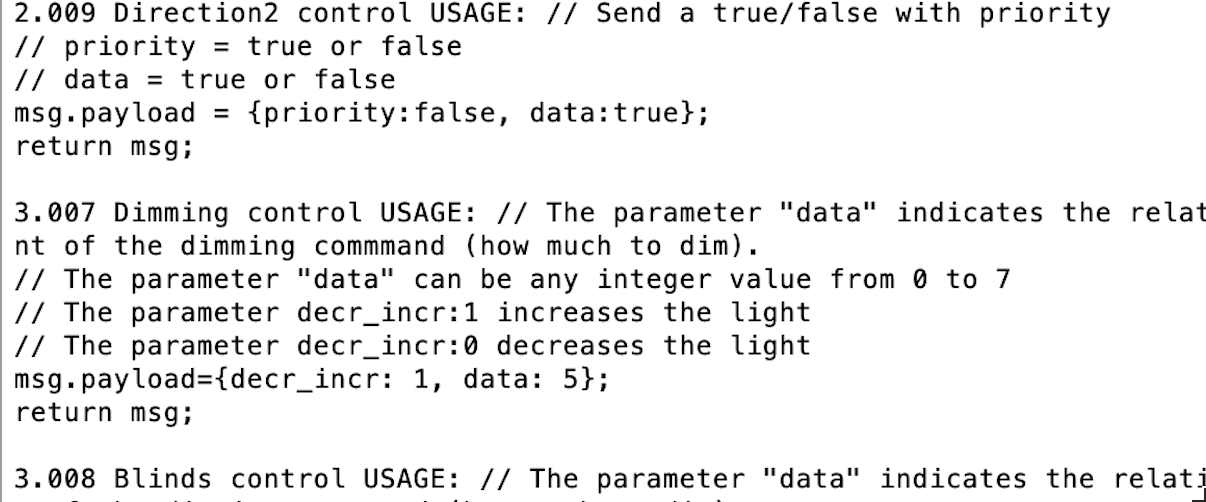
It support a massive number of Datapoints. Please run the examples/showDatapoints.ts file to view all datapoints in the output console.
Be aware, that the descriptions you'll see, are taken from Node-Red KNX-Ultimate node, so there is more code than you need here. Please take only the *msg.payload* part in consideration.
You should see something like this in the console window (the **msg.payload** is what you need to pass as payload):
 ## METHODS/PROPERTIES OF KNXULTIMATE
| Method | Description |
| ---------------------------------- | ---------------------------------------------------------------------------------------------------- |
| .Connect() | Connects to the KNX Gateway |
| .Disconnect() | Gracefully disconnects from the KNX Gateway |
| .write (GA, payload, datapoint) | Sends a WRITE telegram to the BUS. **GA** is the group address (for example "0/0/1"), **payload** is the value you want to send (for example true), **datapoint** is a string representing the datapoint (for example "5.001") |
| .writeRaw (GA, payload, bitlength) | Sends a WRITE telegram to the BUS. **GA** is the group address (for example "0/0/1"), **payload** is the raw buffer you want to send, **bitlength** is the payload length in bits (used especially for payloads <= 6 bits) |
| .respond (GA, payload, datapoint) | Sends a RESPONSE telegram to the BUS. **GA** is the group address (for example "0/0/1"), **payload** is the value you want to send (for example true), **datapoint** is a string representing the datapoint (for example "5.001") |
| .respondRaw (GA, payload, bitlength) | Sends a RESPONSE telegram to the BUS. **GA** is the group address (for example "0/0/1"), **payload** is the raw buffer you want to send, **bitlength** is the payload length in bits (used especially for payloads <= 6 bits) |
| .read (GA) | Sends a READ telegram to the BUS. **GA** is the group address (for example "0/0/1"). |
| .discover() | Sends a discover request on the KNX default multicast port and returns the results as an array. This is an async method. See the example in the **examples** folder |
| .getGatewayDescription() | Sends a gateway description request. It works after an established connection. The async results will be sent to the *descriptionResponse* event. There is an example in the **examples** folder named **gatewaydescription.ts** . |
| .getCurrentItemHandledByTheQueue() | Returns the sequence number awaiting a tunnelling ACK, or `undefined` when none is pending. Retained for compatibility with Node-RED queue diagnostics; calling it does not change the queue or ACK state. |
### writeRaw notes
`writeRaw(GA, payloadBuffer, bitlength)` sends a GroupValue_Write with a raw APDU payload.
- Use `bitlength <= 6` for "6-bit" payloads (the value is encoded into the low APCI bits, so `payloadBuffer` should be 1 byte and `<= 0x3f`).
- For normal datapoints, you can build `(payloadBuffer, bitlength)` with `dptlib.populateAPDU(...)` and pass them to `writeRaw`.
- See `examples/writeRaw.ts`.
### respondRaw notes
`respondRaw(GA, payloadBuffer, bitlength)` sends a GroupValue_Response with a raw APDU payload.
- Payload rules are the same as `writeRaw` (including `bitlength <= 6` handling).
- See `examples/respondRaw.ts`.
| Property | Description |
| -------------- | ---------------------------------------------------------------------------------------------------- |
| .isConnected() | Returns **true** if you the client is connected to the KNX Gateway Router/Interface, **false** if not connected. |
| .clearToSend | **true** if you can send a telegram, **false** if the client is still waiting for the last telegram's ACK or whenever the client cannot temporary send the telegram. In tunneling mode, you could also refer to the event **KNXClientEvents.ackReceived**, that is fired everytime a telegram has been succesfully acknowledge or not acknowledge. See the sample.js file. |
| .channelID | The actual Channel ID. Only defined after a successfull connection |
## EVENTS
List of events raised by KNXultimate, in proper order. For the signatures, please see the **examples** folder.
| Event | Description |
| ------------ | ---------------------------------------------------------------------------------------------------- |
| connecting | KNXUltimate is connecting to the KNX/IP Gateway. Please wait for the *connected* event to start sending KNX telegrams. |
| connected | KNXUltimate has successfully connected with the KNX/IP Gateway. |
| indication | KNXUltimate has received a KNX telegram, that's available in the **datagram** variable. Please see the examples. |
| ackReceived | Reports `(packet, success)` for a tunnelling request. `success` is `true` after a matching successful gateway ACK, or `false` after two retries without a successful ACK. On retry exhaustion, `TunnelUDP` closes the tunnel and emits `error` and `disconnected`; `autoReconnect` reconnects when enabled. |
| disconnected | The KNX connection has been disconnected. |
| close | The main KNXUltimate socket has been closed. |
| error | KNXUltimate has raised an error. The error description is provided as well. |
| descriptionResponse | Gather the *getGatewayDescription* responses. There is an example in the **examples** folder named **gatewaydescription.ts** . |
## LOG STREAM
KNXUltimate logging is managed by [Winston](https://github.com/winstonjs/winston) logger. In case you want to intercept library logs you can use our `logStream` exported from default entrypoint. Example:
```typescript
import { logStream } from 'knxultimate'
logStream.on('data', (log) => {
// handle log
if(log.level === 'ERROR')
console.log(`${log.timestamp} ${log.message}`)
})
```
| Field | Description |
| ------------------------------ | ------------------------------------------------------------- |
| timestamp | ISO formatted date (YYYY-MM-DD HH:mm:ss.SSS) |
| level | Log level in uppercase (ERROR, WARN, INFO, DEBUG) |
| label | Module name in uppercase (specified when creating logger) |
| message | Log message content |
| stack | Error stack trace (only present for errors) |
## Plain KNX: Quick Examples
Below are short, progressively richer examples to connect in plain (non-secure) KNX and listen or interact with the bus. Copy/paste inline; no extra files are created.
### 1) Minimal tunnelling (UDP) listener
```ts
import KNXClient from 'knxultimate'
const client = new KNXClient({
hostProtocol: 'TunnelUDP',
ipAddr: '192.168.1.117', // your KNX/IP interface IP
ipPort: 3671,
loglevel: 'info',
})
client.on('connected', () => console.log('✓ Plain tunnelling connected'))
client.on('error', (e) => console.error('Error:', e.message))
client.on('disconnected', (reason) => console.log('Disconnected:', reason))
client.on('indication', (packet) => {
const cemi = packet?.cEMIMessage
if (!cemi) return
const src = cemi.srcAddress?.toString?.()
const dst = cemi.dstAddress?.toString?.()
const isWrite = cemi.npdu?.isGroupWrite
const isResp = cemi.npdu?.isGroupResponse
const raw: Buffer | undefined = cemi.npdu?.dataValue
console.log('indication', { src, dst, isWrite, isResp, raw: raw?.toString('hex') })
})
client.Connect()
```
### 2) Decode a boolean datapoint (1.001)
```ts
import KNXClient, { KNXClientEvents } from 'knxultimate'
import { dptlib } from 'knxultimate'
const client = new KNXClient({ hostProtocol: 'TunnelUDP', ipAddr: '192.168.1.117', ipPort: 3671 })
client.on(KNXClientEvents.indication, (packet) => {
const cemi = packet?.cEMIMessage
if (!cemi?.npdu) return
const dst = cemi.dstAddress?.toString?.()
const raw: Buffer | undefined = cemi.npdu?.dataValue
if (!dst || !raw) return
if (dst === '0/1/25') { // for example: a status GA known to be 1.001
const cfg = dptlib.resolve('1.001')
const value = dptlib.fromBuffer(raw, cfg)
console.log(`dst=${dst} ->`, value)
}
})
client.Connect()
```
### 3) Plain routing (Multicast) listener
```ts
import KNXClient from 'knxultimate'
const client = new KNXClient({
hostProtocol: 'Multicast',
ipAddr: '224.0.23.12',
ipPort: 3671,
physAddr: '1.1.200', // set your device IA for routing
loglevel: 'info',
})
client.on('connected', () => console.log('✓ Plain multicast ready'))
client.on('error', (e) => console.error('Error:', e.message))
client.on('indication', (packet) => {
const cemi = packet?.cEMIMessage
if (!cemi?.npdu) return
const dst = cemi.dstAddress?.toString?.()
const raw: Buffer | undefined = cemi.npdu?.dataValue
console.log('routing ind', { dst, raw: raw?.toString('hex') })
})
client.Connect()
```
### 4) Write and then READ a status (plain)
```ts
import KNXClient from 'knxultimate'
import { dptlib } from 'knxultimate'
const client = new KNXClient({ hostProtocol: 'TunnelUDP', ipAddr: '192.168.1.117', ipPort: 3671 })
function waitForStatus(ga: string, timeoutMs = 3000): Promise {
return new Promise((resolve, reject) => {
const t = setTimeout(() => { client.off('indication', onInd); reject(new Error('Timeout')) }, timeoutMs)
const onInd = (packet: any) => {
const cemi = packet?.cEMIMessage
if (!cemi || cemi.dstAddress?.toString?.() !== ga) return
const npdu = cemi.npdu
if (!(npdu?.isGroupResponse || npdu?.isGroupWrite)) return
const raw: Buffer = npdu?.dataValue ?? Buffer.alloc(1, 0)
const bit = (raw.readUInt8(0) ?? 0) & 0x01
clearTimeout(t)
client.off('indication', onInd)
resolve(bit)
}
client.on('indication', onInd)
})
}
async function main() {
client.Connect()
await new Promise((res) => client.once('connected', () => res()))
// Write ON
client.write('0/1/1', true, '1.001')
// Read status
client.read('0/1/25')
const val = await waitForStatus('0/1/25', 3000)
console.log('Status:', val ? 'ON' : 'OFF')
}
main().catch(console.error)
```
## KNX/IP Secure: Quick Examples
Below are progressively richer examples to connect to a KNX/IP Secure gateway and listen for telegrams with decrypted payloads. These are meant to be copy-pasted inline (no files are added under `examples/`). All snippets assume TypeScript/Node 18+.
Important notes
- The client emits the full datagram on `indication`, and its `cEMIMessage` is already plain (decrypted) when keys are available in your ETS keyring.
- Never commit your `.knxkeys` file. Keep its path/password in environment variables or local config.
- Alternative to `knxkeys_file_path`: pass the raw keyring bytes via `secureTunnelConfig.knxkeys_buffer` (still requires `knxkeys_password`).
- Secure TCP tunnel auto-select: if `secureTunnelConfig.tunnelInterfaceIndividualAddress` is omitted or empty, the client tries all interfaces found in the ETS keyring until authentication and connect succeed, then proceeds and keeps the tunnel open. The chosen IA is exposed on `client._options.secureTunnelConfig.tunnelInterfaceIndividualAddress` after connect.
### 1) Minimal secure tunnelling (TCP) listener
```ts
import KNXClient, { SecureConfig } from 'knxultimate'
// 1) Configure ETS keyring + the interface IA used in your project
const secureCfg: SecureConfig = {
// tunnelInterfaceIndividualAddress: '1.1.254', // Optional: omit to auto-select a free tunnel
knxkeys_file_path: process.env.KNX_KEYS_PATH || '/path/to/Project.knxkeys',
knxkeys_password: process.env.KNX_KEYS_PASSWORD || 'your-ets-password',
}
// 2) Create a KNX/IP Secure TCP client
const client = new KNXClient({
hostProtocol: 'TunnelTCP',
ipAddr: '192.168.1.4',
ipPort: 3671,
isSecureKNXEnabled: true,
secureTunnelConfig: secureCfg,
loglevel: 'info',
})
client.on('connected', () => console.log('✓ Secure tunnel connected'))
client.on('error', (e) => console.error('Error:', e.message))
client.on('disconnected', (reason) => console.log('Disconnected:', reason))
// 3) Listen: cEMI payload is already decrypted when Data Secure is used
client.on('indication', (packet) => {
const cemi = packet?.cEMIMessage
if (!cemi) return
const dst = cemi.dstAddress?.toString?.()
const src = cemi.srcAddress?.toString?.()
const isWrite = cemi.npdu?.isGroupWrite
const isResp = cemi.npdu?.isGroupResponse
const raw: Buffer | undefined = cemi.npdu?.dataValue
console.log('indication', { src, dst, isWrite, isResp, raw: raw?.toString('hex') })
})
async function main() {
client.Connect()
await new Promise((res) => client.once('connected', () => res()))
console.log('Listening… Press Ctrl+C to exit')
}
main().catch(console.error)
```
### 1b) Secure tunnelling with only tunnel password
When you do not have access to the ETS keyring you can still negotiate KNX/IP Secure by providing the tunnel IA and password directly. This gives you encrypted tunnelling, while Data Secure and secure multicast stay disabled. `2` is the standard KNX Secure tunnel account and a common default, but ETS assigns a dedicated `tunnelUserId` per interface, so always verify yours in ETS and set it explicitly (see the note below).
```ts
import KNXClient, { SecureConfig } from 'knxultimate'
const tunnelPassword = process.env.KNX_TUNNEL_PASSWORD
if (!tunnelPassword) {
throw new Error('Set KNX_TUNNEL_PASSWORD with your secure tunnel password')
}
const secureCfg: SecureConfig = {
tunnelInterfaceIndividualAddress: '1.1.254',
tunnelUserPassword: tunnelPassword,
tunnelUserId: 2, // Replace with your tunnel user ID from ETS (number or numeric string)
}
const client = new KNXClient({
hostProtocol: 'TunnelTCP',
ipAddr: '192.168.1.4',
ipPort: 3671,
isSecureKNXEnabled: true,
secureTunnelConfig: secureCfg,
})
client.on('connected', () => console.log('✓ Secure tunnel connected (manual password)'))
client.on('error', (e) => console.error('Error:', e.message))
client.Connect()
```
> **Note:** ETS assigns a dedicated `tunnelUserId` to each secure tunnel. Set `secureTunnelConfig.tunnelUserId` (number or numeric string) together with the password, otherwise the gateway replies with `Secure Session Status = 1` and the connection is closed.
### Secure workflow recap
- **KNX IP Tunnelling Secure** protects the TCP channel. The gateway authenticates a tunnel user by ID + password during the `Secure Session Authenticate (0x0953)` step. Provide the password either from the keyring (`secureTunnelConfig.knxkeys_*`) or manually via `secureTunnelConfig.tunnelUserPassword`; in both cases the `tunnelUserId` must match the ETS commissioning data.
- **KNX Data Secure** protects group-address telegrams. It relies on group keys, taken from the ETS keyring or passed directly with `secureTunnelConfig.groupKeys` (see below).
- **Supported combinations**
- *Keyring only*: set `knxkeys_file_path` (or `knxkeys_buffer`) + `knxkeys_password` and omit `tunnelUserPassword`. Both the tunnel password and the group keys are loaded from the keyring.
- *Manual tunnel password only*: set both `tunnelUserPassword` and `tunnelUserId` without a keyring. The IP channel is secured; Data Secure works only for the group addresses listed in `secureTunnelConfig.groupKeys`.
- *Keyring + manual password*: provide the keyring for Data Secure and override the tunnelling password with `tunnelUserPassword` (useful when the ETS export does not include the tunnel password). Ensure `knxkeys_*` and `tunnelUserPassword` are both configured.
- To retrieve the tunnel user ID/password pair, open the secure tunnelling interface in ETS (or inspect the `.knxkeys` entry). Default ETS IDs are typically small integers (e.g. `2`, `3`, …) but may differ per installation.
### Additional secure options
| Option (`secureTunnelConfig.*`) | Default | Description |
| --- | --- | --- |
| `knxkeys_validate_signature` | `true` | Verify the ETS keyring signature (as XKNX). A keyring without a signature is rejected unless this is `false`; set it only for keyrings that were not exported by ETS. |
| `groupKeys` | – | Data Secure group keys as `{ "1/2/3": key }`, where the key is a 16-byte `Buffer`, a 32-character hex string, or a base64 string that decodes to 16 bytes. Works with or without a keyring; on conflict these keys win over the keyring ones. |
| `requireDeviceAuthentication` | `false` | Refuse the `TunnelTCP` handshake when no device authentication code is available (keyring or `deviceAuthenticationPassword`). Without the code the gateway is not authenticated, so a forged gateway would be accepted. |
| `strictSecurity` | `false` | Stricter receive checks: drop plain telegrams sent to a group address that has a Data Secure key; when the keyring has a sender list for a group address, drop Data Secure telegrams from senders outside that list; with secure routing, drop frames whose timer is older than the backbone latency tolerance. |
Keyring loading checks the ETS keyring signature, as XKNX does: a wrong `knxkeys_password` now fails with `Keyring signature verification failed` instead of loading unusable keys. Keyrings exported by ETS are always signed; a keyring without a signature is rejected unless you set `secureTunnelConfig.knxkeys_validate_signature: false`.
### 2) Decode datapoints (boolean 1.001) from decrypted payloads
```ts
import KNXClient, { SecureConfig } from 'knxultimate'
import { dptlib } from 'knxultimate'
const secureCfg: SecureConfig = {
// tunnelInterfaceIndividualAddress: '1.1.254', // Optional (auto-select if omitted)
knxkeys_file_path: process.env.KNX_KEYS_PATH || '/path/to/Project.knxkeys',
knxkeys_password: process.env.KNX_KEYS_PASSWORD || 'your-ets-password',
}
const client = new KNXClient({
hostProtocol: 'TunnelTCP',
ipAddr: '192.168.1.4',
ipPort: 3671,
isSecureKNXEnabled: true,
secureTunnelConfig: secureCfg,
loglevel: 'info',
})
client.on('indication', (packet) => {
const cemi = packet?.cEMIMessage
if (!cemi?.npdu) return
const dst = cemi.dstAddress?.toString?.()
const raw: Buffer | undefined = cemi.npdu?.dataValue
if (!dst || !raw) return
// Example: decode boolean status for GA 1/1/2 as DPT 1.001
if (dst === '1/1/2') {
const cfg = dptlib.resolve('1.001')
const value = dptlib.fromBuffer(raw, cfg)
console.log(`dst=${dst} ->`, value)
}
})
client.Connect()
```
### 3) Secure routing (multicast) listener
For routers supporting KNX Secure routing (multicast 224.0.23.12). The ETS keyring must include the Backbone key; the client will automatically use it to decrypt SecureWrapper frames and present decrypted cEMI payloads.
```ts
import KNXClient, { SecureConfig } from 'knxultimate'
const secureCfg: SecureConfig = {
knxkeys_file_path: process.env.KNX_KEYS_PATH || '/path/to/Project.knxkeys',
knxkeys_password: process.env.KNX_KEYS_PASSWORD || 'your-ets-password',
}
const client = new KNXClient({
hostProtocol: 'Multicast',
ipAddr: '224.0.23.12',
ipPort: 3671,
physAddr: '1.1.250', // your device IA used as source on bus
isSecureKNXEnabled: true,
secureTunnelConfig: secureCfg,
loglevel: 'info',
})
client.on('connected', () => console.log('✓ Secure multicast ready'))
client.on('error', (e) => console.error('Error:', e.message))
client.on('indication', (packet) => {
const cemi = packet?.cEMIMessage
if (!cemi?.npdu) return
const dst = cemi.dstAddress?.toString?.()
const raw: Buffer | undefined = cemi.npdu?.dataValue
console.log('routing ind', { dst, raw: raw?.toString('hex') })
})
client.Connect()
```
### 4) Send a READ and get a decrypted status
```ts
import KNXClient, { SecureConfig } from 'knxultimate'
import { dptlib } from 'knxultimate'
const secureCfg: SecureConfig = {
tunnelInterfaceIndividualAddress: '1.1.254',
knxkeys_file_path: process.env.KNX_KEYS_PATH || '/path/to/Project.knxkeys',
knxkeys_password: process.env.KNX_KEYS_PASSWORD || 'your-ets-password',
}
const client = new KNXClient({
hostProtocol: 'TunnelTCP',
ipAddr: '192.168.1.4',
ipPort: 3671,
isSecureKNXEnabled: true,
secureTunnelConfig: secureCfg,
})
function waitForStatus(ga: string, timeoutMs = 5000): Promise {
return new Promise((resolve, reject) => {
const t = setTimeout(() => {
client.off('indication', onInd)
reject(new Error('Timeout waiting for status'))
}, timeoutMs)
const onInd = (packet: any) => {
const cemi = packet?.cEMIMessage
if (!cemi || cemi.dstAddress?.toString?.() !== ga) return
const npdu = cemi.npdu
const isResp = npdu?.isGroupResponse
const isWrite = npdu?.isGroupWrite
if (!(isResp || isWrite)) return
const raw: Buffer = npdu?.dataValue ?? Buffer.alloc(1, 0)
const bit = (raw.readUInt8(0) ?? 0) & 0x01
clearTimeout(t)
client.off('indication', onInd)
resolve(bit)
}
client.on('indication', onInd)
})
}
async function main() {
client.Connect()
await new Promise((res) => client.once('connected', () => res()))
// Example: query a status GA and decode as boolean 1.001
const statusGA = '1/1/2'
client.read(statusGA)
const val = await waitForStatus(statusGA, 5000)
console.log(`Status on ${statusGA}:`, val ? 'ON' : 'OFF')
}
main().catch(console.error)
```
Tips
- For tunnelling (TCP), the source IA is assigned by the gateway. For routing (multicast), set `physAddr` in options.
- If you see decrypted payloads as null, verify that the GA has a Data Secure key in your `.knxkeys` and that the ETS keyring and password are correct.
### Log Levels
| Level | Description |
| ------------------------------ | ------------------------------------------------------------- |
| disable | No logging |
| error | Only logs errors |
| warn | Logs errors and warnings |
| info | Logs normal operations |
| debug | Logs detailed information |
| trace | Most verbose logging level |
For a complete example of logging usage, see [logging.ts](./examples/logging.ts) in the examples folder.
## DECODING THE TELEGRAMS FROM BUS
Decoding is very simple.
Just require the dptlib and use it to decode the RAW telegram
```javascript
import { dptlib } from "knxultimate";
let dpt = dptlib.resolve("1.001");
let jsValue = dptlib.fromBuffer(RAW VALUE (SEE SAMPLES), dpt); // THIS IS THE DECODED VALUE
```
## EXAMPLES
All examples live in the [examples](./examples/) folder. You can run them directly with TypeScript via esbuild-register (no build step needed).
- Generic command: `node -r esbuild-register -e "require('./examples/.ts')"`
- For secure samples, npm scripts are available:
- `npm run example:secure:tunnel` (secure tunnelling TCP)
- `npm run example:secure:multicast` (secure routing multicast)
Examples overview:
- **Recommended starting point → [template](./examples/template.ts):** well-commented skeleton showing how to configure plain vs secure connections, wire up core events, and encode/decode datapoint payloads. Use this file as a base for new scripts.
- [sample](./examples/sample.ts): Full walkthrough — connect, read/write, decode values. Warning: sends telegrams to your KNX BUS.
- [simpleSample](./examples/simpleSample.ts): Minimal connect + single write. Warning: sends telegrams.
- [test-toggle](./examples/test-toggle.ts): Interactive ON/OFF toggle from CLI. Warning: sends telegrams.
- [disconnection](./examples/disconnection.ts): Demonstrates clean disconnects and error handling.
- [autoReconnect](./examples/autoReconnect.ts): Keeps a KNX/IP tunnel available by reconnecting every 5 seconds after unexpected connection loss. Safe: does not send telegrams.
- [logging](./examples/logging.ts): Shows how to attach to the log stream and change log levels.
- [monitorBusMinimal](./examples/monitorBusMinimal.ts): Minimal listener that connects and prints incoming telegrams. Warning: connects to the bus but does not send telegrams.
- [showDatapoints](./examples/showDatapoints.ts): Lists supported datapoints and shows how payloads are built. Safe: does not send to the bus.
- [datapointBasics](./examples/datapointBasics.ts): Demonstrates encoding and decoding a few datapoint values locally. Safe.
- [discovery](./examples/discovery.ts): Discovers KNX/IP interfaces/routers (SEARCH_REQUEST). Safe.
- [discoverInterfacesSimple](./examples/discoverInterfacesSimple.ts): Uses `discoverInterfaces()` to print a concise summary of each gateway. Safe.
- Run: `node -r esbuild-register -e "require('./examples/discoverInterfacesSimple.ts')" [iface] [timeoutMs]`
- [gatewaydescription](./examples/gatewaydescription.ts): Requests and prints extended gateway information. Safe.
- [samplePlainTunnelUPD](./examples/samplePlainTunnelUPD.ts): Plain KNX/IP tunnelling over UDP (`hostProtocol: 'TunnelUDP'`). ON/OFF + status read via a KNX interface.
- Run: `node -r esbuild-register -e "require('./examples/samplePlainTunnelUPD.ts')"`
- [samplePlainTunnelTCP](./examples/samplePlainTunnelTCP.ts): Plain KNX/IP tunnelling over TCP (`hostProtocol: 'TunnelTCP'` + `isSecureKNXEnabled: false`), for interfaces that offer TCP tunnelling. Writes ON/OFF and prints incoming telegrams. Warning: sends telegrams.
- Configure: `KNX_GATEWAY_IP`, optional `KNX_GA_COMMAND`.
- Run: `npm run example:tunnel:tcp`
- [samplePlainMulticast](./examples/samplePlainMulticast.ts): Plain KNX routing over multicast (`hostProtocol: 'Multicast'`). Uses RoutingIndication with cEMI L_DATA_REQ. ON/OFF + status read via a KNX router (no secure).
- Run: `node -r esbuild-register -e "require('./examples/samplePlainMulticast.ts')"`
- [sampleSecureTunnelTCP](./examples/sampleSecureTunnelTCP.ts): KNX/IP Secure tunnelling over TCP (`hostProtocol: 'TunnelTCP'` + `isSecureKNXEnabled: true`). Performs session handshake + Secure Wrapper. Applies Data Secure for GA present in the ETS keyring. ON/OFF + status read.
- Requires: set `.knxkeys` path + password in the example file. Optionally omit `tunnelInterfaceIndividualAddress` to auto-select a free tunnel from the keyring. The file also shows the optional `requireDeviceAuthentication` and `strictSecurity` settings.
- Run: `npm run example:secure:tunnel` or `node -r esbuild-register -e "require('./examples/sampleSecureTunnelTCP.ts')"`
- [sampleSecureTunnelTCPKeyringBuffer](./examples/sampleSecureTunnelTCPKeyringBuffer.ts): Connects using the keyring as a Buffer (`knxkeys_buffer`) and logs incoming indications; it does not send telegrams. Settings come from environment variables.
- Run: `KNX_GATEWAY_IP=… KNX_KEYS_PASSWORD=… node -r esbuild-register -e "require('./examples/sampleSecureTunnelTCPKeyringBuffer.ts')"`
- [sampleSecureTunnelTCPKeepAlive](./examples/sampleSecureTunnelTCPKeepAlive.ts): Keeps a secure TCP tunnel open and logs connection events, to check heartbeat and reconnection behaviour. Safe: does not send telegrams.
- [sampleSecureTunnelTCPGroupKeys](./examples/sampleSecureTunnelTCPGroupKeys.ts): KNX/IP Secure tunnelling **without a keyring**: manual tunnel user/password, the gateway's device authentication code (with `requireDeviceAuthentication: true`) and Data Secure keys passed in `secureTunnelConfig.groupKeys`. Sends ON/OFF commands and checks status; this writes to the KNX bus.
- Configure: `KNX_GATEWAY_IP`, `KNX_TUNNEL_USER_ID`, `KNX_TUNNEL_PASSWORD`, `KNX_DEVICE_AUTH_CODE`, `KNX_GROUP_KEYS` (JSON containing every protected GA used, e.g. `{"1/1/1":"<32 hex>","1/1/2":"<32 hex>"}`), optional `KNX_GA_COMMAND` / `KNX_GA_STATUS`.
- Run: `npm run example:secure:tunnel:groupkeys`
- [sampleSecureTunnelTCPNoDataSecure](./examples/sampleSecureTunnelTCPNoDataSecure.ts): KNX/IP Secure tunnelling over TCP using manual credentials without group keys: the IP channel is secured and plain group addresses work. For Data Secure group addresses see `sampleSecureTunnelTCPGroupKeys`. This example sends ON/OFF commands to the bus.
- Configure: `KNX_GATEWAY_IP`, `KNX_TUNNEL_USER_ID`, `KNX_TUNNEL_PASSWORD`; optionally `KNX_DEVICE_AUTH_CODE`, `KNX_GA_COMMAND` and `KNX_GA_STATUS`.
- Run: `KNX_GATEWAY_IP=192.168.1.10 KNX_TUNNEL_USER_ID=2 KNX_TUNNEL_PASSWORD='your-password' node -r esbuild-register -e "require('./examples/sampleSecureTunnelTCPNoDataSecure.ts')"`
- [sampleSecureMulticast](./examples/sampleSecureMulticast.ts): KNX/IP Secure routing over multicast (`hostProtocol: 'Multicast'` + `isSecureKNXEnabled: true`). Synchronizes timer via 0x0955, wraps frames in Secure Wrapper, and applies Data Secure per GA. ON/OFF + status read.
- Requires: set `.knxkeys` path + password in the example file.
- Run: `npm run example:secure:multicast` or `node -r esbuild-register -e "require('./examples/sampleSecureMulticast.ts')"`
- [listSecureGroups](./examples/listSecureGroups.ts): Lists the Data Secure group addresses of a keyring and, per tunnelling interface, the allowed senders of each group address (used by `strictSecurity`). Safe.
- [dumpKeyringCredentials](./examples/dumpKeyringCredentials.ts): Loads a `.knxkeys` file, decrypts all stored tunnel passwords, authentication codes, device credentials, group keys, and backbone keys, and prints them to the console. Safe.
- Run: `node -r esbuild-register -e "require('./examples/dumpKeyringCredentials.ts')" [path/to/keyring.knxkeys] [ets-password]`
### Discovery details
- Functions: `KNXClient.discover()`, `KNXClient.discoverDetailed()`, `KNXClient.discoverInterfaces()`.
- Default port: if a KNX interface does not advertise a port in the `SEARCH_RESPONSE` HPAI (missing or zero), discovery uses `3671` as the port.
- Each helper now fires both multicast and unicast search bursts concurrently on every selected NIC so interfaces that only answer one transport are still found.
- Return formats:
- `discover()` → strings formatted as `ip:port:name:ia:Security:Transport`; highlights whether the result is plain/secure and which transport to use.
- Example: `192.168.1.4:3671:MyGW:1.1.1:Secure KNX:TCP`, `224.0.23.12:3671:MyRouter:1.1.0:Plain KNX:Multicast`.
- `discoverDetailed()` → strings formatted as `ip:port:name:ia:service1,service2:type`; focuses on human-readable service families (`routing`, `tunnelling`, etc.) and whether the entry corresponds to tunnelling or routing.
- `discoverInterfaces()` → array of objects `{ ip, port, name, ia, services, type, transport }`, giving parsed fields and an inferred transport, with `services` exposed as an array of service names.
Example usage
```ts
import KNXClient from 'knxultimate'
// Simple list with security + transport
const list = await KNXClient.discover(5000)
for (const entry of list) {
const [ip, port, name, ia, security, transport] = entry.split(':')
console.log({ ip, port, name, ia, security, transport })
}
// Detailed strings
const detailed = await KNXClient.discoverDetailed(5000)
// ip:port:name:ia:service1,service2:type
// Structured objects
const objects = await KNXClient.discoverInterfaces(5000)
// [{ ip, port, name, ia, services, type, transport }, ...]
```
### Source Individual Address (IA): UDP vs TCP
- TunnelUDP: uses `physAddr` as the source IA on the bus.
- TunnelTCP (secure): after a successful connect, uses the tunnel-assigned IA as the cEMI source on the bus; the Data Secure authentication, however, uses the interface IA from the ETS keyring (not the dynamic tunnel IA).
- Tips for UDP tunnelling:
- If your interface times out waiting ACKs on plain `TunnelUDP`, try `suppress_ack_ldatareq: true`.
- With multiple NICs, set `localIPAddress` (or `interface`) to bind the correct local interface.
- A `TUNNELING_REQUEST` that repeats the previous sequence number (the gateway did not get our ACK) is ACKed again but not emitted twice. Frames with any other unexpected sequence number (gaps, older numbers) are still ACKed and emitted, unlike XKNX which drops them: this keeps gateways that number frames loosely working, but an old or reordered frame can reach the application.
### KNX IP Secure (tunnelling & routing) and Data Secure
`KNXClient` supports KNX/IP Secure and Data Secure.
- Requirements: KNX Secure router/interface and an ETS keyring (`.knxkeys`), or, for `TunnelTCP`, the manual tunnel credentials (`tunnelUserId` + `tunnelUserPassword`, optionally `deviceAuthenticationPassword` and `groupKeys`). With a keyring, the interface IA is optional — if omitted, the client auto-selects a usable tunnel from the keyring; without a keyring it is not needed.
- Data Secure: Group Addresses with a key (in the keyring or in `secureTunnelConfig.groupKeys`) are encrypted end-to-end; GA without a key remain plain.
- Modes:
- `TunnelTCP` + `isSecureKNXEnabled: true` → secure session (Secure Wrapper) + Data Secure per GA.
- `TunnelTCP` + `isSecureKNXEnabled: false` → plain tunnelling over TCP (no `TUNNELING_ACK` over TCP, as the specification requires).
- `Multicast` + `isSecureKNXEnabled: true` → secure routing (Secure Wrapper over multicast with timer synchronization via 0x0955) + Data Secure per GA.
Routing (Multicast) specifics
- Outgoing frames are injected as `L_DATA_IND` when using routing (both plain and secure). This mirrors ETS and xKNX behavior and ensures devices react correctly to injected telegrams. Do not use `L_DATA_REQ` for routing injection.
- Secure routing needs a synchronized timer. By default the client waits until the timer is authenticated before sending. Additionally, on secure multicast startup the client proactively sends a `TimerNotify (0x0955)` once, so the timer can authenticate immediately even if the router doesn't broadcast it right away. Plain multicast is unaffected.
- The client ignores its own `TimerNotify` when multicast loopback delivers it back, so the timer is taken from the router. If no router answers within the backbone latency tolerance (at least 1 s), the local timer is used and the client connects anyway.
- Option: `secureRoutingWaitForTimer` (default `true`) controls gating of outgoing frames until the timer is authenticated.
Authorized senders (Data Secure, secure routing)
- When sending to a Data Secure Group Address over routing, KNX routers enforce an "authorized senders" list per GA. If your current `physAddr` is not authorized for that GA, the router will drop the telegram.
- The client automatically avoids this problem by selecting an allowed sender IA for each secure GA based on the ETS keyring. If the configured `physAddr` is not in the GA's Senders list, the library overrides the source IA with one that is authorized for that GA (taken from the keyring's Senders for that GA) before building the Secure APDU.
- Prerequisites: your `.knxkeys` (ETS Project Keyring) must include the target GA and its Senders list. If no Senders are present for that GA in the keyring, the client keeps `physAddr` and the router may still drop the frame as unauthorized.
- This behavior is automatic whenever `hostProtocol: 'Multicast'` and `isSecureKNXEnabled: true` and the GA is protected by a Data Secure key in the keyring. No additional option is required.
Mixed secure/plain on one instance
- A single `KNXClient` instance can handle Data Secure and plain Group Addresses at the same time. Data Secure is applied per-GA: if a GA has a key in the ETS keyring, the APDU is encrypted; if not, the APDU stays plain.
- Secure routing (multicast): when `isSecureKNXEnabled: true`, all routing frames are transported inside the KNX/IP Secure Wrapper (`0x0950`). "Plain" APDUs still travel inside that wrapper. This allows mixing secure and plain GA on the same instance. If you also need to emit non-wrapped plain routing frames simultaneously, run a second `KNXClient` with `isSecureKNXEnabled: false`.
- Secure tunnelling (TCP): the tunnel is always wrapped (Secure Wrapper). APDU encryption (Data Secure) remains per-GA; GA without keys remain plain.
- Receive path: with secure enabled, the client decrypts `0x0950` frames and forwards the inner plain cEMI; it also accepts non-wrapped routing frames if present on the bus. The `indication` event always exposes a plain (decrypted) cEMI when keys are available.
Troubleshooting (routing)
- If an actuator doesn't react to writes sent over routing, verify that your app injects `L_DATA_IND` (not `L_DATA_REQ`). From version 5.0.0-beta the library automatically uses `L_DATA_IND` for multicast writes/reads/responses.
- For secure routing, ensure your ETS keyring contains a Backbone key and that the target Group Addresses are present with keys (Data Secure). You can list them with the example `examples/listSecureGroups.ts`.
Behavior when fields are unset
- secureTunnelConfig.tunnelInterfaceIndividualAddress (TunnelTCP): with a keyring, if omitted/empty, the client auto-selects a tunnel from the ETS keyring and retries interfaces until authentication and connect succeed. Without a keyring (manual credentials) it is not needed. The chosen IA is exposed runtime in `client._options.secureTunnelConfig.tunnelInterfaceIndividualAddress` after connect.
- physAddr:
- Multicast: must be provided; it's your node's source IA on the bus.
- TunnelUDP: optional; used as cEMI source if set.
- TunnelTCP: optional and ignored for the bus source (gateway provides the tunnel IA); Data Secure signs as the interface IA from the keyring.
Secure TCP auto-selection details
- IA selection: the client runs discovery for `ipAddr:ipPort`, reads the gateway "Host" IA, and selects keyring interfaces whose `Host` matches it. Candidates are sorted descending (e.g. …255, …254, …253). If no match by `Host`, it falls back to all keyring interfaces of type `Tunneling`.
- Single-NIC discovery: when `options.interface` is empty/undefined, discovery is executed only on the local NIC that shares the same subnet of `ipAddr` (no scan across all OS interfaces).
- Timeouts: detailed discovery runs ~3s on the chosen NIC; if nothing is found, a lightweight simple discovery runs ~5s on the same NIC and is adapted to the detailed format.
- Logging: look for lines starting with "Secure TCP:" to follow selection steps (discovered Host IA, candidates, chosen IA).
- Override: set `secureTunnelConfig.tunnelInterfaceIndividualAddress` and/or `interface` explicitly to skip the auto-selection.
## METHODS/PROPERTIES OF KNXULTIMATE
| Method | Description |
| ---------------------------------- | ---------------------------------------------------------------------------------------------------- |
| .Connect() | Connects to the KNX Gateway |
| .Disconnect() | Gracefully disconnects from the KNX Gateway |
| .write (GA, payload, datapoint) | Sends a WRITE telegram to the BUS. **GA** is the group address (for example "0/0/1"), **payload** is the value you want to send (for example true), **datapoint** is a string representing the datapoint (for example "5.001") |
| .writeRaw (GA, payload, bitlength) | Sends a WRITE telegram to the BUS. **GA** is the group address (for example "0/0/1"), **payload** is the raw buffer you want to send, **bitlength** is the payload length in bits (used especially for payloads <= 6 bits) |
| .respond (GA, payload, datapoint) | Sends a RESPONSE telegram to the BUS. **GA** is the group address (for example "0/0/1"), **payload** is the value you want to send (for example true), **datapoint** is a string representing the datapoint (for example "5.001") |
| .respondRaw (GA, payload, bitlength) | Sends a RESPONSE telegram to the BUS. **GA** is the group address (for example "0/0/1"), **payload** is the raw buffer you want to send, **bitlength** is the payload length in bits (used especially for payloads <= 6 bits) |
| .read (GA) | Sends a READ telegram to the BUS. **GA** is the group address (for example "0/0/1"). |
| .discover() | Sends a discover request on the KNX default multicast port and returns the results as an array. This is an async method. See the example in the **examples** folder |
| .getGatewayDescription() | Sends a gateway description request. It works after an established connection. The async results will be sent to the *descriptionResponse* event. There is an example in the **examples** folder named **gatewaydescription.ts** . |
| .getCurrentItemHandledByTheQueue() | Returns the sequence number awaiting a tunnelling ACK, or `undefined` when none is pending. Retained for compatibility with Node-RED queue diagnostics; calling it does not change the queue or ACK state. |
### writeRaw notes
`writeRaw(GA, payloadBuffer, bitlength)` sends a GroupValue_Write with a raw APDU payload.
- Use `bitlength <= 6` for "6-bit" payloads (the value is encoded into the low APCI bits, so `payloadBuffer` should be 1 byte and `<= 0x3f`).
- For normal datapoints, you can build `(payloadBuffer, bitlength)` with `dptlib.populateAPDU(...)` and pass them to `writeRaw`.
- See `examples/writeRaw.ts`.
### respondRaw notes
`respondRaw(GA, payloadBuffer, bitlength)` sends a GroupValue_Response with a raw APDU payload.
- Payload rules are the same as `writeRaw` (including `bitlength <= 6` handling).
- See `examples/respondRaw.ts`.
| Property | Description |
| -------------- | ---------------------------------------------------------------------------------------------------- |
| .isConnected() | Returns **true** if you the client is connected to the KNX Gateway Router/Interface, **false** if not connected. |
| .clearToSend | **true** if you can send a telegram, **false** if the client is still waiting for the last telegram's ACK or whenever the client cannot temporary send the telegram. In tunneling mode, you could also refer to the event **KNXClientEvents.ackReceived**, that is fired everytime a telegram has been succesfully acknowledge or not acknowledge. See the sample.js file. |
| .channelID | The actual Channel ID. Only defined after a successfull connection |
## EVENTS
List of events raised by KNXultimate, in proper order. For the signatures, please see the **examples** folder.
| Event | Description |
| ------------ | ---------------------------------------------------------------------------------------------------- |
| connecting | KNXUltimate is connecting to the KNX/IP Gateway. Please wait for the *connected* event to start sending KNX telegrams. |
| connected | KNXUltimate has successfully connected with the KNX/IP Gateway. |
| indication | KNXUltimate has received a KNX telegram, that's available in the **datagram** variable. Please see the examples. |
| ackReceived | Reports `(packet, success)` for a tunnelling request. `success` is `true` after a matching successful gateway ACK, or `false` after two retries without a successful ACK. On retry exhaustion, `TunnelUDP` closes the tunnel and emits `error` and `disconnected`; `autoReconnect` reconnects when enabled. |
| disconnected | The KNX connection has been disconnected. |
| close | The main KNXUltimate socket has been closed. |
| error | KNXUltimate has raised an error. The error description is provided as well. |
| descriptionResponse | Gather the *getGatewayDescription* responses. There is an example in the **examples** folder named **gatewaydescription.ts** . |
## LOG STREAM
KNXUltimate logging is managed by [Winston](https://github.com/winstonjs/winston) logger. In case you want to intercept library logs you can use our `logStream` exported from default entrypoint. Example:
```typescript
import { logStream } from 'knxultimate'
logStream.on('data', (log) => {
// handle log
if(log.level === 'ERROR')
console.log(`${log.timestamp} ${log.message}`)
})
```
| Field | Description |
| ------------------------------ | ------------------------------------------------------------- |
| timestamp | ISO formatted date (YYYY-MM-DD HH:mm:ss.SSS) |
| level | Log level in uppercase (ERROR, WARN, INFO, DEBUG) |
| label | Module name in uppercase (specified when creating logger) |
| message | Log message content |
| stack | Error stack trace (only present for errors) |
## Plain KNX: Quick Examples
Below are short, progressively richer examples to connect in plain (non-secure) KNX and listen or interact with the bus. Copy/paste inline; no extra files are created.
### 1) Minimal tunnelling (UDP) listener
```ts
import KNXClient from 'knxultimate'
const client = new KNXClient({
hostProtocol: 'TunnelUDP',
ipAddr: '192.168.1.117', // your KNX/IP interface IP
ipPort: 3671,
loglevel: 'info',
})
client.on('connected', () => console.log('✓ Plain tunnelling connected'))
client.on('error', (e) => console.error('Error:', e.message))
client.on('disconnected', (reason) => console.log('Disconnected:', reason))
client.on('indication', (packet) => {
const cemi = packet?.cEMIMessage
if (!cemi) return
const src = cemi.srcAddress?.toString?.()
const dst = cemi.dstAddress?.toString?.()
const isWrite = cemi.npdu?.isGroupWrite
const isResp = cemi.npdu?.isGroupResponse
const raw: Buffer | undefined = cemi.npdu?.dataValue
console.log('indication', { src, dst, isWrite, isResp, raw: raw?.toString('hex') })
})
client.Connect()
```
### 2) Decode a boolean datapoint (1.001)
```ts
import KNXClient, { KNXClientEvents } from 'knxultimate'
import { dptlib } from 'knxultimate'
const client = new KNXClient({ hostProtocol: 'TunnelUDP', ipAddr: '192.168.1.117', ipPort: 3671 })
client.on(KNXClientEvents.indication, (packet) => {
const cemi = packet?.cEMIMessage
if (!cemi?.npdu) return
const dst = cemi.dstAddress?.toString?.()
const raw: Buffer | undefined = cemi.npdu?.dataValue
if (!dst || !raw) return
if (dst === '0/1/25') { // for example: a status GA known to be 1.001
const cfg = dptlib.resolve('1.001')
const value = dptlib.fromBuffer(raw, cfg)
console.log(`dst=${dst} ->`, value)
}
})
client.Connect()
```
### 3) Plain routing (Multicast) listener
```ts
import KNXClient from 'knxultimate'
const client = new KNXClient({
hostProtocol: 'Multicast',
ipAddr: '224.0.23.12',
ipPort: 3671,
physAddr: '1.1.200', // set your device IA for routing
loglevel: 'info',
})
client.on('connected', () => console.log('✓ Plain multicast ready'))
client.on('error', (e) => console.error('Error:', e.message))
client.on('indication', (packet) => {
const cemi = packet?.cEMIMessage
if (!cemi?.npdu) return
const dst = cemi.dstAddress?.toString?.()
const raw: Buffer | undefined = cemi.npdu?.dataValue
console.log('routing ind', { dst, raw: raw?.toString('hex') })
})
client.Connect()
```
### 4) Write and then READ a status (plain)
```ts
import KNXClient from 'knxultimate'
import { dptlib } from 'knxultimate'
const client = new KNXClient({ hostProtocol: 'TunnelUDP', ipAddr: '192.168.1.117', ipPort: 3671 })
function waitForStatus(ga: string, timeoutMs = 3000): Promise {
return new Promise((resolve, reject) => {
const t = setTimeout(() => { client.off('indication', onInd); reject(new Error('Timeout')) }, timeoutMs)
const onInd = (packet: any) => {
const cemi = packet?.cEMIMessage
if (!cemi || cemi.dstAddress?.toString?.() !== ga) return
const npdu = cemi.npdu
if (!(npdu?.isGroupResponse || npdu?.isGroupWrite)) return
const raw: Buffer = npdu?.dataValue ?? Buffer.alloc(1, 0)
const bit = (raw.readUInt8(0) ?? 0) & 0x01
clearTimeout(t)
client.off('indication', onInd)
resolve(bit)
}
client.on('indication', onInd)
})
}
async function main() {
client.Connect()
await new Promise((res) => client.once('connected', () => res()))
// Write ON
client.write('0/1/1', true, '1.001')
// Read status
client.read('0/1/25')
const val = await waitForStatus('0/1/25', 3000)
console.log('Status:', val ? 'ON' : 'OFF')
}
main().catch(console.error)
```
## KNX/IP Secure: Quick Examples
Below are progressively richer examples to connect to a KNX/IP Secure gateway and listen for telegrams with decrypted payloads. These are meant to be copy-pasted inline (no files are added under `examples/`). All snippets assume TypeScript/Node 18+.
Important notes
- The client emits the full datagram on `indication`, and its `cEMIMessage` is already plain (decrypted) when keys are available in your ETS keyring.
- Never commit your `.knxkeys` file. Keep its path/password in environment variables or local config.
- Alternative to `knxkeys_file_path`: pass the raw keyring bytes via `secureTunnelConfig.knxkeys_buffer` (still requires `knxkeys_password`).
- Secure TCP tunnel auto-select: if `secureTunnelConfig.tunnelInterfaceIndividualAddress` is omitted or empty, the client tries all interfaces found in the ETS keyring until authentication and connect succeed, then proceeds and keeps the tunnel open. The chosen IA is exposed on `client._options.secureTunnelConfig.tunnelInterfaceIndividualAddress` after connect.
### 1) Minimal secure tunnelling (TCP) listener
```ts
import KNXClient, { SecureConfig } from 'knxultimate'
// 1) Configure ETS keyring + the interface IA used in your project
const secureCfg: SecureConfig = {
// tunnelInterfaceIndividualAddress: '1.1.254', // Optional: omit to auto-select a free tunnel
knxkeys_file_path: process.env.KNX_KEYS_PATH || '/path/to/Project.knxkeys',
knxkeys_password: process.env.KNX_KEYS_PASSWORD || 'your-ets-password',
}
// 2) Create a KNX/IP Secure TCP client
const client = new KNXClient({
hostProtocol: 'TunnelTCP',
ipAddr: '192.168.1.4',
ipPort: 3671,
isSecureKNXEnabled: true,
secureTunnelConfig: secureCfg,
loglevel: 'info',
})
client.on('connected', () => console.log('✓ Secure tunnel connected'))
client.on('error', (e) => console.error('Error:', e.message))
client.on('disconnected', (reason) => console.log('Disconnected:', reason))
// 3) Listen: cEMI payload is already decrypted when Data Secure is used
client.on('indication', (packet) => {
const cemi = packet?.cEMIMessage
if (!cemi) return
const dst = cemi.dstAddress?.toString?.()
const src = cemi.srcAddress?.toString?.()
const isWrite = cemi.npdu?.isGroupWrite
const isResp = cemi.npdu?.isGroupResponse
const raw: Buffer | undefined = cemi.npdu?.dataValue
console.log('indication', { src, dst, isWrite, isResp, raw: raw?.toString('hex') })
})
async function main() {
client.Connect()
await new Promise((res) => client.once('connected', () => res()))
console.log('Listening… Press Ctrl+C to exit')
}
main().catch(console.error)
```
### 1b) Secure tunnelling with only tunnel password
When you do not have access to the ETS keyring you can still negotiate KNX/IP Secure by providing the tunnel IA and password directly. This gives you encrypted tunnelling, while Data Secure and secure multicast stay disabled. `2` is the standard KNX Secure tunnel account and a common default, but ETS assigns a dedicated `tunnelUserId` per interface, so always verify yours in ETS and set it explicitly (see the note below).
```ts
import KNXClient, { SecureConfig } from 'knxultimate'
const tunnelPassword = process.env.KNX_TUNNEL_PASSWORD
if (!tunnelPassword) {
throw new Error('Set KNX_TUNNEL_PASSWORD with your secure tunnel password')
}
const secureCfg: SecureConfig = {
tunnelInterfaceIndividualAddress: '1.1.254',
tunnelUserPassword: tunnelPassword,
tunnelUserId: 2, // Replace with your tunnel user ID from ETS (number or numeric string)
}
const client = new KNXClient({
hostProtocol: 'TunnelTCP',
ipAddr: '192.168.1.4',
ipPort: 3671,
isSecureKNXEnabled: true,
secureTunnelConfig: secureCfg,
})
client.on('connected', () => console.log('✓ Secure tunnel connected (manual password)'))
client.on('error', (e) => console.error('Error:', e.message))
client.Connect()
```
> **Note:** ETS assigns a dedicated `tunnelUserId` to each secure tunnel. Set `secureTunnelConfig.tunnelUserId` (number or numeric string) together with the password, otherwise the gateway replies with `Secure Session Status = 1` and the connection is closed.
### Secure workflow recap
- **KNX IP Tunnelling Secure** protects the TCP channel. The gateway authenticates a tunnel user by ID + password during the `Secure Session Authenticate (0x0953)` step. Provide the password either from the keyring (`secureTunnelConfig.knxkeys_*`) or manually via `secureTunnelConfig.tunnelUserPassword`; in both cases the `tunnelUserId` must match the ETS commissioning data.
- **KNX Data Secure** protects group-address telegrams. It relies on group keys, taken from the ETS keyring or passed directly with `secureTunnelConfig.groupKeys` (see below).
- **Supported combinations**
- *Keyring only*: set `knxkeys_file_path` (or `knxkeys_buffer`) + `knxkeys_password` and omit `tunnelUserPassword`. Both the tunnel password and the group keys are loaded from the keyring.
- *Manual tunnel password only*: set both `tunnelUserPassword` and `tunnelUserId` without a keyring. The IP channel is secured; Data Secure works only for the group addresses listed in `secureTunnelConfig.groupKeys`.
- *Keyring + manual password*: provide the keyring for Data Secure and override the tunnelling password with `tunnelUserPassword` (useful when the ETS export does not include the tunnel password). Ensure `knxkeys_*` and `tunnelUserPassword` are both configured.
- To retrieve the tunnel user ID/password pair, open the secure tunnelling interface in ETS (or inspect the `.knxkeys` entry). Default ETS IDs are typically small integers (e.g. `2`, `3`, …) but may differ per installation.
### Additional secure options
| Option (`secureTunnelConfig.*`) | Default | Description |
| --- | --- | --- |
| `knxkeys_validate_signature` | `true` | Verify the ETS keyring signature (as XKNX). A keyring without a signature is rejected unless this is `false`; set it only for keyrings that were not exported by ETS. |
| `groupKeys` | – | Data Secure group keys as `{ "1/2/3": key }`, where the key is a 16-byte `Buffer`, a 32-character hex string, or a base64 string that decodes to 16 bytes. Works with or without a keyring; on conflict these keys win over the keyring ones. |
| `requireDeviceAuthentication` | `false` | Refuse the `TunnelTCP` handshake when no device authentication code is available (keyring or `deviceAuthenticationPassword`). Without the code the gateway is not authenticated, so a forged gateway would be accepted. |
| `strictSecurity` | `false` | Stricter receive checks: drop plain telegrams sent to a group address that has a Data Secure key; when the keyring has a sender list for a group address, drop Data Secure telegrams from senders outside that list; with secure routing, drop frames whose timer is older than the backbone latency tolerance. |
Keyring loading checks the ETS keyring signature, as XKNX does: a wrong `knxkeys_password` now fails with `Keyring signature verification failed` instead of loading unusable keys. Keyrings exported by ETS are always signed; a keyring without a signature is rejected unless you set `secureTunnelConfig.knxkeys_validate_signature: false`.
### 2) Decode datapoints (boolean 1.001) from decrypted payloads
```ts
import KNXClient, { SecureConfig } from 'knxultimate'
import { dptlib } from 'knxultimate'
const secureCfg: SecureConfig = {
// tunnelInterfaceIndividualAddress: '1.1.254', // Optional (auto-select if omitted)
knxkeys_file_path: process.env.KNX_KEYS_PATH || '/path/to/Project.knxkeys',
knxkeys_password: process.env.KNX_KEYS_PASSWORD || 'your-ets-password',
}
const client = new KNXClient({
hostProtocol: 'TunnelTCP',
ipAddr: '192.168.1.4',
ipPort: 3671,
isSecureKNXEnabled: true,
secureTunnelConfig: secureCfg,
loglevel: 'info',
})
client.on('indication', (packet) => {
const cemi = packet?.cEMIMessage
if (!cemi?.npdu) return
const dst = cemi.dstAddress?.toString?.()
const raw: Buffer | undefined = cemi.npdu?.dataValue
if (!dst || !raw) return
// Example: decode boolean status for GA 1/1/2 as DPT 1.001
if (dst === '1/1/2') {
const cfg = dptlib.resolve('1.001')
const value = dptlib.fromBuffer(raw, cfg)
console.log(`dst=${dst} ->`, value)
}
})
client.Connect()
```
### 3) Secure routing (multicast) listener
For routers supporting KNX Secure routing (multicast 224.0.23.12). The ETS keyring must include the Backbone key; the client will automatically use it to decrypt SecureWrapper frames and present decrypted cEMI payloads.
```ts
import KNXClient, { SecureConfig } from 'knxultimate'
const secureCfg: SecureConfig = {
knxkeys_file_path: process.env.KNX_KEYS_PATH || '/path/to/Project.knxkeys',
knxkeys_password: process.env.KNX_KEYS_PASSWORD || 'your-ets-password',
}
const client = new KNXClient({
hostProtocol: 'Multicast',
ipAddr: '224.0.23.12',
ipPort: 3671,
physAddr: '1.1.250', // your device IA used as source on bus
isSecureKNXEnabled: true,
secureTunnelConfig: secureCfg,
loglevel: 'info',
})
client.on('connected', () => console.log('✓ Secure multicast ready'))
client.on('error', (e) => console.error('Error:', e.message))
client.on('indication', (packet) => {
const cemi = packet?.cEMIMessage
if (!cemi?.npdu) return
const dst = cemi.dstAddress?.toString?.()
const raw: Buffer | undefined = cemi.npdu?.dataValue
console.log('routing ind', { dst, raw: raw?.toString('hex') })
})
client.Connect()
```
### 4) Send a READ and get a decrypted status
```ts
import KNXClient, { SecureConfig } from 'knxultimate'
import { dptlib } from 'knxultimate'
const secureCfg: SecureConfig = {
tunnelInterfaceIndividualAddress: '1.1.254',
knxkeys_file_path: process.env.KNX_KEYS_PATH || '/path/to/Project.knxkeys',
knxkeys_password: process.env.KNX_KEYS_PASSWORD || 'your-ets-password',
}
const client = new KNXClient({
hostProtocol: 'TunnelTCP',
ipAddr: '192.168.1.4',
ipPort: 3671,
isSecureKNXEnabled: true,
secureTunnelConfig: secureCfg,
})
function waitForStatus(ga: string, timeoutMs = 5000): Promise {
return new Promise((resolve, reject) => {
const t = setTimeout(() => {
client.off('indication', onInd)
reject(new Error('Timeout waiting for status'))
}, timeoutMs)
const onInd = (packet: any) => {
const cemi = packet?.cEMIMessage
if (!cemi || cemi.dstAddress?.toString?.() !== ga) return
const npdu = cemi.npdu
const isResp = npdu?.isGroupResponse
const isWrite = npdu?.isGroupWrite
if (!(isResp || isWrite)) return
const raw: Buffer = npdu?.dataValue ?? Buffer.alloc(1, 0)
const bit = (raw.readUInt8(0) ?? 0) & 0x01
clearTimeout(t)
client.off('indication', onInd)
resolve(bit)
}
client.on('indication', onInd)
})
}
async function main() {
client.Connect()
await new Promise((res) => client.once('connected', () => res()))
// Example: query a status GA and decode as boolean 1.001
const statusGA = '1/1/2'
client.read(statusGA)
const val = await waitForStatus(statusGA, 5000)
console.log(`Status on ${statusGA}:`, val ? 'ON' : 'OFF')
}
main().catch(console.error)
```
Tips
- For tunnelling (TCP), the source IA is assigned by the gateway. For routing (multicast), set `physAddr` in options.
- If you see decrypted payloads as null, verify that the GA has a Data Secure key in your `.knxkeys` and that the ETS keyring and password are correct.
### Log Levels
| Level | Description |
| ------------------------------ | ------------------------------------------------------------- |
| disable | No logging |
| error | Only logs errors |
| warn | Logs errors and warnings |
| info | Logs normal operations |
| debug | Logs detailed information |
| trace | Most verbose logging level |
For a complete example of logging usage, see [logging.ts](./examples/logging.ts) in the examples folder.
## DECODING THE TELEGRAMS FROM BUS
Decoding is very simple.
Just require the dptlib and use it to decode the RAW telegram
```javascript
import { dptlib } from "knxultimate";
let dpt = dptlib.resolve("1.001");
let jsValue = dptlib.fromBuffer(RAW VALUE (SEE SAMPLES), dpt); // THIS IS THE DECODED VALUE
```
## EXAMPLES
All examples live in the [examples](./examples/) folder. You can run them directly with TypeScript via esbuild-register (no build step needed).
- Generic command: `node -r esbuild-register -e "require('./examples/.ts')"`
- For secure samples, npm scripts are available:
- `npm run example:secure:tunnel` (secure tunnelling TCP)
- `npm run example:secure:multicast` (secure routing multicast)
Examples overview:
- **Recommended starting point → [template](./examples/template.ts):** well-commented skeleton showing how to configure plain vs secure connections, wire up core events, and encode/decode datapoint payloads. Use this file as a base for new scripts.
- [sample](./examples/sample.ts): Full walkthrough — connect, read/write, decode values. Warning: sends telegrams to your KNX BUS.
- [simpleSample](./examples/simpleSample.ts): Minimal connect + single write. Warning: sends telegrams.
- [test-toggle](./examples/test-toggle.ts): Interactive ON/OFF toggle from CLI. Warning: sends telegrams.
- [disconnection](./examples/disconnection.ts): Demonstrates clean disconnects and error handling.
- [autoReconnect](./examples/autoReconnect.ts): Keeps a KNX/IP tunnel available by reconnecting every 5 seconds after unexpected connection loss. Safe: does not send telegrams.
- [logging](./examples/logging.ts): Shows how to attach to the log stream and change log levels.
- [monitorBusMinimal](./examples/monitorBusMinimal.ts): Minimal listener that connects and prints incoming telegrams. Warning: connects to the bus but does not send telegrams.
- [showDatapoints](./examples/showDatapoints.ts): Lists supported datapoints and shows how payloads are built. Safe: does not send to the bus.
- [datapointBasics](./examples/datapointBasics.ts): Demonstrates encoding and decoding a few datapoint values locally. Safe.
- [discovery](./examples/discovery.ts): Discovers KNX/IP interfaces/routers (SEARCH_REQUEST). Safe.
- [discoverInterfacesSimple](./examples/discoverInterfacesSimple.ts): Uses `discoverInterfaces()` to print a concise summary of each gateway. Safe.
- Run: `node -r esbuild-register -e "require('./examples/discoverInterfacesSimple.ts')" [iface] [timeoutMs]`
- [gatewaydescription](./examples/gatewaydescription.ts): Requests and prints extended gateway information. Safe.
- [samplePlainTunnelUPD](./examples/samplePlainTunnelUPD.ts): Plain KNX/IP tunnelling over UDP (`hostProtocol: 'TunnelUDP'`). ON/OFF + status read via a KNX interface.
- Run: `node -r esbuild-register -e "require('./examples/samplePlainTunnelUPD.ts')"`
- [samplePlainTunnelTCP](./examples/samplePlainTunnelTCP.ts): Plain KNX/IP tunnelling over TCP (`hostProtocol: 'TunnelTCP'` + `isSecureKNXEnabled: false`), for interfaces that offer TCP tunnelling. Writes ON/OFF and prints incoming telegrams. Warning: sends telegrams.
- Configure: `KNX_GATEWAY_IP`, optional `KNX_GA_COMMAND`.
- Run: `npm run example:tunnel:tcp`
- [samplePlainMulticast](./examples/samplePlainMulticast.ts): Plain KNX routing over multicast (`hostProtocol: 'Multicast'`). Uses RoutingIndication with cEMI L_DATA_REQ. ON/OFF + status read via a KNX router (no secure).
- Run: `node -r esbuild-register -e "require('./examples/samplePlainMulticast.ts')"`
- [sampleSecureTunnelTCP](./examples/sampleSecureTunnelTCP.ts): KNX/IP Secure tunnelling over TCP (`hostProtocol: 'TunnelTCP'` + `isSecureKNXEnabled: true`). Performs session handshake + Secure Wrapper. Applies Data Secure for GA present in the ETS keyring. ON/OFF + status read.
- Requires: set `.knxkeys` path + password in the example file. Optionally omit `tunnelInterfaceIndividualAddress` to auto-select a free tunnel from the keyring. The file also shows the optional `requireDeviceAuthentication` and `strictSecurity` settings.
- Run: `npm run example:secure:tunnel` or `node -r esbuild-register -e "require('./examples/sampleSecureTunnelTCP.ts')"`
- [sampleSecureTunnelTCPKeyringBuffer](./examples/sampleSecureTunnelTCPKeyringBuffer.ts): Connects using the keyring as a Buffer (`knxkeys_buffer`) and logs incoming indications; it does not send telegrams. Settings come from environment variables.
- Run: `KNX_GATEWAY_IP=… KNX_KEYS_PASSWORD=… node -r esbuild-register -e "require('./examples/sampleSecureTunnelTCPKeyringBuffer.ts')"`
- [sampleSecureTunnelTCPKeepAlive](./examples/sampleSecureTunnelTCPKeepAlive.ts): Keeps a secure TCP tunnel open and logs connection events, to check heartbeat and reconnection behaviour. Safe: does not send telegrams.
- [sampleSecureTunnelTCPGroupKeys](./examples/sampleSecureTunnelTCPGroupKeys.ts): KNX/IP Secure tunnelling **without a keyring**: manual tunnel user/password, the gateway's device authentication code (with `requireDeviceAuthentication: true`) and Data Secure keys passed in `secureTunnelConfig.groupKeys`. Sends ON/OFF commands and checks status; this writes to the KNX bus.
- Configure: `KNX_GATEWAY_IP`, `KNX_TUNNEL_USER_ID`, `KNX_TUNNEL_PASSWORD`, `KNX_DEVICE_AUTH_CODE`, `KNX_GROUP_KEYS` (JSON containing every protected GA used, e.g. `{"1/1/1":"<32 hex>","1/1/2":"<32 hex>"}`), optional `KNX_GA_COMMAND` / `KNX_GA_STATUS`.
- Run: `npm run example:secure:tunnel:groupkeys`
- [sampleSecureTunnelTCPNoDataSecure](./examples/sampleSecureTunnelTCPNoDataSecure.ts): KNX/IP Secure tunnelling over TCP using manual credentials without group keys: the IP channel is secured and plain group addresses work. For Data Secure group addresses see `sampleSecureTunnelTCPGroupKeys`. This example sends ON/OFF commands to the bus.
- Configure: `KNX_GATEWAY_IP`, `KNX_TUNNEL_USER_ID`, `KNX_TUNNEL_PASSWORD`; optionally `KNX_DEVICE_AUTH_CODE`, `KNX_GA_COMMAND` and `KNX_GA_STATUS`.
- Run: `KNX_GATEWAY_IP=192.168.1.10 KNX_TUNNEL_USER_ID=2 KNX_TUNNEL_PASSWORD='your-password' node -r esbuild-register -e "require('./examples/sampleSecureTunnelTCPNoDataSecure.ts')"`
- [sampleSecureMulticast](./examples/sampleSecureMulticast.ts): KNX/IP Secure routing over multicast (`hostProtocol: 'Multicast'` + `isSecureKNXEnabled: true`). Synchronizes timer via 0x0955, wraps frames in Secure Wrapper, and applies Data Secure per GA. ON/OFF + status read.
- Requires: set `.knxkeys` path + password in the example file.
- Run: `npm run example:secure:multicast` or `node -r esbuild-register -e "require('./examples/sampleSecureMulticast.ts')"`
- [listSecureGroups](./examples/listSecureGroups.ts): Lists the Data Secure group addresses of a keyring and, per tunnelling interface, the allowed senders of each group address (used by `strictSecurity`). Safe.
- [dumpKeyringCredentials](./examples/dumpKeyringCredentials.ts): Loads a `.knxkeys` file, decrypts all stored tunnel passwords, authentication codes, device credentials, group keys, and backbone keys, and prints them to the console. Safe.
- Run: `node -r esbuild-register -e "require('./examples/dumpKeyringCredentials.ts')" [path/to/keyring.knxkeys] [ets-password]`
### Discovery details
- Functions: `KNXClient.discover()`, `KNXClient.discoverDetailed()`, `KNXClient.discoverInterfaces()`.
- Default port: if a KNX interface does not advertise a port in the `SEARCH_RESPONSE` HPAI (missing or zero), discovery uses `3671` as the port.
- Each helper now fires both multicast and unicast search bursts concurrently on every selected NIC so interfaces that only answer one transport are still found.
- Return formats:
- `discover()` → strings formatted as `ip:port:name:ia:Security:Transport`; highlights whether the result is plain/secure and which transport to use.
- Example: `192.168.1.4:3671:MyGW:1.1.1:Secure KNX:TCP`, `224.0.23.12:3671:MyRouter:1.1.0:Plain KNX:Multicast`.
- `discoverDetailed()` → strings formatted as `ip:port:name:ia:service1,service2:type`; focuses on human-readable service families (`routing`, `tunnelling`, etc.) and whether the entry corresponds to tunnelling or routing.
- `discoverInterfaces()` → array of objects `{ ip, port, name, ia, services, type, transport }`, giving parsed fields and an inferred transport, with `services` exposed as an array of service names.
Example usage
```ts
import KNXClient from 'knxultimate'
// Simple list with security + transport
const list = await KNXClient.discover(5000)
for (const entry of list) {
const [ip, port, name, ia, security, transport] = entry.split(':')
console.log({ ip, port, name, ia, security, transport })
}
// Detailed strings
const detailed = await KNXClient.discoverDetailed(5000)
// ip:port:name:ia:service1,service2:type
// Structured objects
const objects = await KNXClient.discoverInterfaces(5000)
// [{ ip, port, name, ia, services, type, transport }, ...]
```
### Source Individual Address (IA): UDP vs TCP
- TunnelUDP: uses `physAddr` as the source IA on the bus.
- TunnelTCP (secure): after a successful connect, uses the tunnel-assigned IA as the cEMI source on the bus; the Data Secure authentication, however, uses the interface IA from the ETS keyring (not the dynamic tunnel IA).
- Tips for UDP tunnelling:
- If your interface times out waiting ACKs on plain `TunnelUDP`, try `suppress_ack_ldatareq: true`.
- With multiple NICs, set `localIPAddress` (or `interface`) to bind the correct local interface.
- A `TUNNELING_REQUEST` that repeats the previous sequence number (the gateway did not get our ACK) is ACKed again but not emitted twice. Frames with any other unexpected sequence number (gaps, older numbers) are still ACKed and emitted, unlike XKNX which drops them: this keeps gateways that number frames loosely working, but an old or reordered frame can reach the application.
### KNX IP Secure (tunnelling & routing) and Data Secure
`KNXClient` supports KNX/IP Secure and Data Secure.
- Requirements: KNX Secure router/interface and an ETS keyring (`.knxkeys`), or, for `TunnelTCP`, the manual tunnel credentials (`tunnelUserId` + `tunnelUserPassword`, optionally `deviceAuthenticationPassword` and `groupKeys`). With a keyring, the interface IA is optional — if omitted, the client auto-selects a usable tunnel from the keyring; without a keyring it is not needed.
- Data Secure: Group Addresses with a key (in the keyring or in `secureTunnelConfig.groupKeys`) are encrypted end-to-end; GA without a key remain plain.
- Modes:
- `TunnelTCP` + `isSecureKNXEnabled: true` → secure session (Secure Wrapper) + Data Secure per GA.
- `TunnelTCP` + `isSecureKNXEnabled: false` → plain tunnelling over TCP (no `TUNNELING_ACK` over TCP, as the specification requires).
- `Multicast` + `isSecureKNXEnabled: true` → secure routing (Secure Wrapper over multicast with timer synchronization via 0x0955) + Data Secure per GA.
Routing (Multicast) specifics
- Outgoing frames are injected as `L_DATA_IND` when using routing (both plain and secure). This mirrors ETS and xKNX behavior and ensures devices react correctly to injected telegrams. Do not use `L_DATA_REQ` for routing injection.
- Secure routing needs a synchronized timer. By default the client waits until the timer is authenticated before sending. Additionally, on secure multicast startup the client proactively sends a `TimerNotify (0x0955)` once, so the timer can authenticate immediately even if the router doesn't broadcast it right away. Plain multicast is unaffected.
- The client ignores its own `TimerNotify` when multicast loopback delivers it back, so the timer is taken from the router. If no router answers within the backbone latency tolerance (at least 1 s), the local timer is used and the client connects anyway.
- Option: `secureRoutingWaitForTimer` (default `true`) controls gating of outgoing frames until the timer is authenticated.
Authorized senders (Data Secure, secure routing)
- When sending to a Data Secure Group Address over routing, KNX routers enforce an "authorized senders" list per GA. If your current `physAddr` is not authorized for that GA, the router will drop the telegram.
- The client automatically avoids this problem by selecting an allowed sender IA for each secure GA based on the ETS keyring. If the configured `physAddr` is not in the GA's Senders list, the library overrides the source IA with one that is authorized for that GA (taken from the keyring's Senders for that GA) before building the Secure APDU.
- Prerequisites: your `.knxkeys` (ETS Project Keyring) must include the target GA and its Senders list. If no Senders are present for that GA in the keyring, the client keeps `physAddr` and the router may still drop the frame as unauthorized.
- This behavior is automatic whenever `hostProtocol: 'Multicast'` and `isSecureKNXEnabled: true` and the GA is protected by a Data Secure key in the keyring. No additional option is required.
Mixed secure/plain on one instance
- A single `KNXClient` instance can handle Data Secure and plain Group Addresses at the same time. Data Secure is applied per-GA: if a GA has a key in the ETS keyring, the APDU is encrypted; if not, the APDU stays plain.
- Secure routing (multicast): when `isSecureKNXEnabled: true`, all routing frames are transported inside the KNX/IP Secure Wrapper (`0x0950`). "Plain" APDUs still travel inside that wrapper. This allows mixing secure and plain GA on the same instance. If you also need to emit non-wrapped plain routing frames simultaneously, run a second `KNXClient` with `isSecureKNXEnabled: false`.
- Secure tunnelling (TCP): the tunnel is always wrapped (Secure Wrapper). APDU encryption (Data Secure) remains per-GA; GA without keys remain plain.
- Receive path: with secure enabled, the client decrypts `0x0950` frames and forwards the inner plain cEMI; it also accepts non-wrapped routing frames if present on the bus. The `indication` event always exposes a plain (decrypted) cEMI when keys are available.
Troubleshooting (routing)
- If an actuator doesn't react to writes sent over routing, verify that your app injects `L_DATA_IND` (not `L_DATA_REQ`). From version 5.0.0-beta the library automatically uses `L_DATA_IND` for multicast writes/reads/responses.
- For secure routing, ensure your ETS keyring contains a Backbone key and that the target Group Addresses are present with keys (Data Secure). You can list them with the example `examples/listSecureGroups.ts`.
Behavior when fields are unset
- secureTunnelConfig.tunnelInterfaceIndividualAddress (TunnelTCP): with a keyring, if omitted/empty, the client auto-selects a tunnel from the ETS keyring and retries interfaces until authentication and connect succeed. Without a keyring (manual credentials) it is not needed. The chosen IA is exposed runtime in `client._options.secureTunnelConfig.tunnelInterfaceIndividualAddress` after connect.
- physAddr:
- Multicast: must be provided; it's your node's source IA on the bus.
- TunnelUDP: optional; used as cEMI source if set.
- TunnelTCP: optional and ignored for the bus source (gateway provides the tunnel IA); Data Secure signs as the interface IA from the keyring.
Secure TCP auto-selection details
- IA selection: the client runs discovery for `ipAddr:ipPort`, reads the gateway "Host" IA, and selects keyring interfaces whose `Host` matches it. Candidates are sorted descending (e.g. …255, …254, …253). If no match by `Host`, it falls back to all keyring interfaces of type `Tunneling`.
- Single-NIC discovery: when `options.interface` is empty/undefined, discovery is executed only on the local NIC that shares the same subnet of `ipAddr` (no scan across all OS interfaces).
- Timeouts: detailed discovery runs ~3s on the chosen NIC; if nothing is found, a lightweight simple discovery runs ~5s on the same NIC and is adapted to the detailed format.
- Logging: look for lines starting with "Secure TCP:" to follow selection steps (discovered Host IA, candidates, chosen IA).
- Override: set `secureTunnelConfig.tunnelInterfaceIndividualAddress` and/or `interface` explicitly to skip the auto-selection.
### Using KNX Ultimate with kBerry on Raspberry Pi 3 (UART / FT1.2)
This guide explains how to connect a **kBerry** KNX interface directly
to a **Raspberry Pi 3** and use it with **KNX Ultimate** over the
**hardware UART** (`ttyAMA0`) using the **FT1.2 (TPUART)** protocol.
> This procedure is tested with Raspberry Pi OS Bookworm on a
> Raspberry Pi 3 and has been written on November, 25, 2025.
### 1. Prerequisites
- Raspberry Pi 3 (Model B or B+)
- Raspberry Pi OS (Bookworm recommended)
- kBerry KNX interface mounted on the GPIO header
- Node-RED with KNX Ultimate installed
- Basic terminal access (SSH or local console)
### 2. Wiring / Hardware Overview
The kBerry uses the Raspberry Pi's primary UART:
- **TX / RX**: GPIO14 (TXD) and GPIO15 (RXD)
- **GND**: A common ground between Raspberry Pi and kBerry
- **Power**: Provided via the GPIO header
Make sure the kBerry is properly seated on the Raspberry Pi GPIO header
and that no other HAT is conflicting with those pins.
### 3. Disable Bluetooth and Enable the Hardware UART
#### 3.1 Edit the correct config file (Bookworm)
```bash
sudo nano /boot/firmware/config.txt
```
Add:
```ini
enable_uart=1
dtoverlay=pi3-disable-bt
```
#### 3.2 Disable ModemManager
```bash
sudo systemctl disable --now ModemManager
```
#### 3.3 Disable Bluetooth service
```bash
sudo systemctl disable --now bluetooth.service
```
### 4. Disable Serial Login Console / Enable Hardware UART
```bash
sudo raspi-config
```
- Disable login shell on serial → **No**
- Enable serial hardware → **Yes**
Reboot.
### 5. Verify UART
```bash
ls -l /dev/serial0
ls -l /dev/ttyAMA0
dmesg | grep tty
```
Expected:
/dev/serial0 -> ttyAMA0
/dev/ttyAMA0 exists
### 6. Add Node-RED User to dialout
```bash
sudo usermod -aG dialout nodered
sudo reboot
```
### 7. Configure KNX Ultimate
- **Interface type**: Serial FT1.2 / TPUART
- **Serial port**: `/dev/ttyAMA0`
- **Baud rate**: 19200
- **Data bits**: 8
- **Parity**: Even
- **Stop bits**: 1
### 8. Troubleshooting
#### No `/dev/ttyAMA0`
- Check `/boot/firmware/config.txt` entries
- Reboot
- Re-check `dmesg`
#### `/dev/serial0` → `ttyS0`
- `dtoverlay=pi3-disable-bt` not applied
- Re-check config file path
- Reboot
#### Serial cannot be opened
- Ensure user is in `dialout`
- Check that no other program uses `/dev/ttyAMA0`
---
Done.
## HOW TO COLLABORATE
If you want to help us in this project, you're welcome!
Please refer to the development page.
- [Development's page](https://github.com/Supergiovane/KNXUltimate/blob/master/DEVELOPMENT.md)
## SUGGESTION
>
> Why not to try Node-Red and the awesome KNX-Ultimate node ?

## License
Released under the [MIT License](https://github.com/Supergiovane/KNXUltimate/blob/master/LICENSE).
[license-image]: https://img.shields.io/badge/license-MIT-blue.svg
[license-url]: https://github.com/Supergiovane/KNXUltimate/blob/master/LICENSE
[npm-url]: https://npmjs.org/package/knxultimate
[npm-version-image]: https://img.shields.io/npm/v/knxultimate.svg
[npm-downloads-month-image]: https://img.shields.io/npm/dm/knxultimate.svg
[npm-downloads-total-image]: https://img.shields.io/npm/dt/knxultimate.svg
[youtube-image]: https://img.shields.io/badge/Visit%20me-Youtube-red
[youtube-url]: https://www.youtube.com/channel/UCA9RsLps1IthT7fDSeUbRZw/playlists