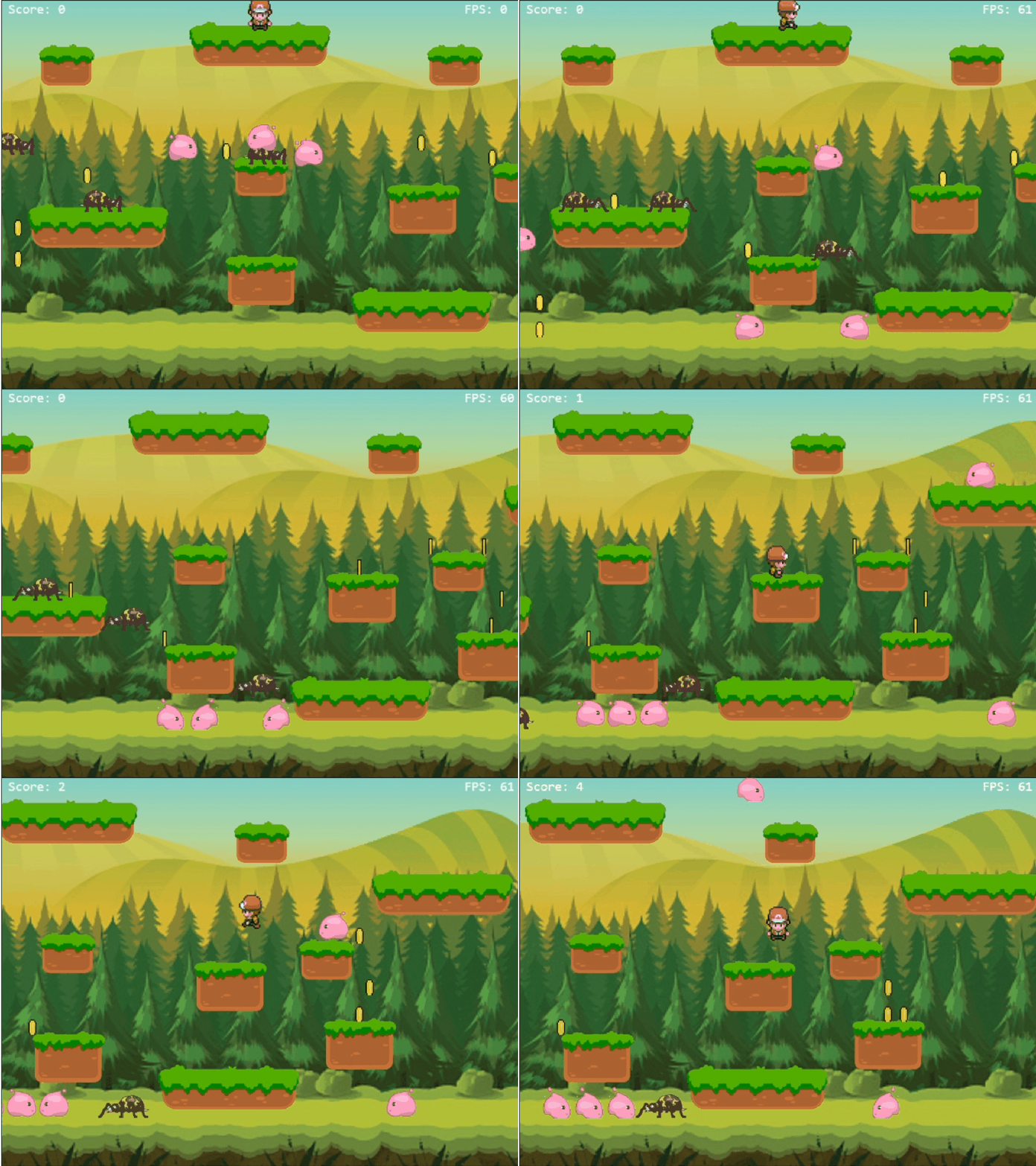
# KernelPlayJS
A **2D/3D JavaScript game engine** that feels like Unity — but lives in your browser.
Built on an Entity–Component architecture, fast, flexible, and surprisingly fun to use.
> **v0.3.0-alpha** · MIT License · Built by Soubhik Mukherjee
---
---
## 🔴 Live Demo
👉 https://soubhik-rjs.github.io/kernelplay-js-demo/examples/Canvas2D/
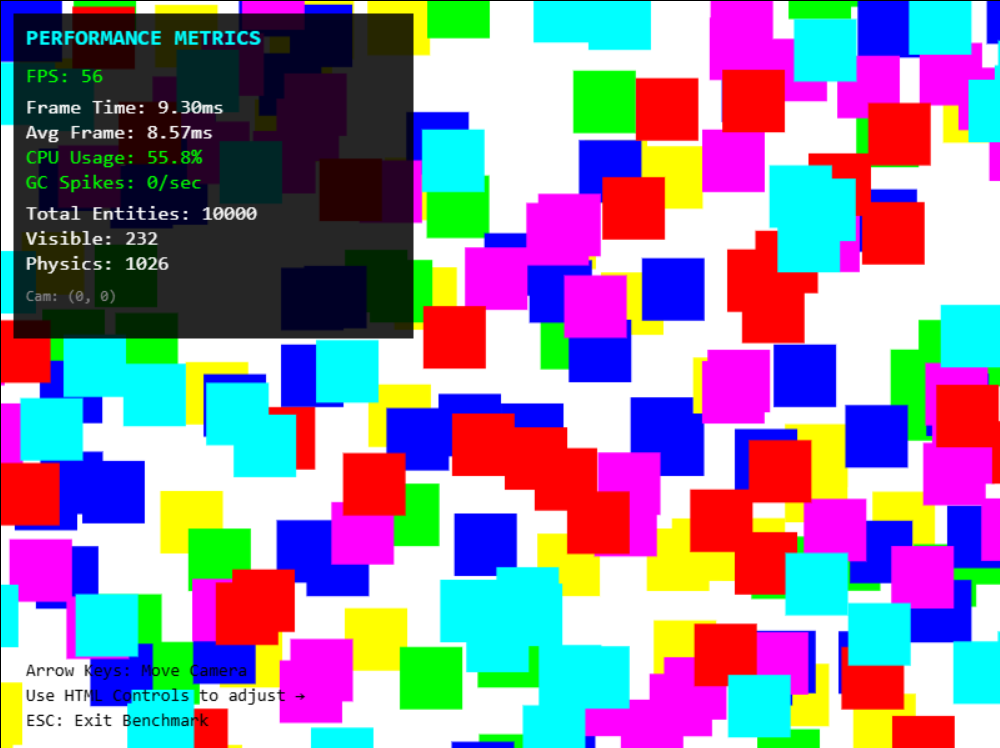
🏁 **[Benchmark Demo](https://soubhik-rjs.github.io/kernelplay-js-demo/examples/BenchmarkCanvas2D/)** · 📚 **[Full Documentation](https://soubhik-rjs.github.io/kernelplay-js-demo/docs/)**
---
## ⚡ Why KernelPlayJS?
Most browser game engines either hold your hand too much or leave you drowning in boilerplate. KernelPlayJS hits the sweet spot — it handles the hard stuff so you can focus on making your game fun.
- **Entity–Component–Script** architecture — just like Unity
- **3 renderer backends** — Canvas 2D, Pixi.js, Three.js — swap with one line
- **10,000+ objects at 60 FPS** on a 7th gen i3
- **Full animation state machine** — triggers, transitions, crossfades
- **Zero config** object pooling, spatial grid, frustum culling
---
## 📦 Installation
```bash
npm install kernelplay-js
```
Or use a CDN:
```html
```
### Optional Renderer Plugins
```bash
npm install @kernelplay/pixi-renderer # GPU-accelerated 2D sprites & effects
npm install @kernelplay/three-renderer # Full 3D — lights, meshes, shadows
```
---
## 🚀 Quick Start
```js
import { Game, Scene, Entity, TransformComponent, BoxRenderComponent } from "kernelplay-js";
class MyScene extends Scene {
init() {
const box = new Entity();
box.addComponent("transform", new TransformComponent({ position: { x: 300, y: 200 } }));
box.addComponent("renderer", new BoxRenderComponent({ color: "red" }));
this.addEntity(box);
}
}
class MyGame extends Game {
init() {
this.sceneManager.addScene(new MyScene("Main"));
this.sceneManager.startScene("Main");
}
}
new MyGame({ width: 800, height: 600, fps: 60 }).start();
```
---
## 🎮 Core Concepts
Everything in KernelPlayJS is built around three ideas:
- **Entities** — your game objects (player, bullet, enemy, tree)
- **Components** — data attached to entities (position, physics, renderer)
- **Scripts** — the brains; custom logic that runs every frame
```js
export class Player extends Entity {
constructor(x, y) {
super("Player");
this.tag = "player";
this.zIndex = 10;
this.addComponent("transform", new TransformComponent({ position: { x, y } }));
this.addComponent("rigidbody2d", new Rigidbody2DComponent({ mass: 1, gravityScale: 1 }));
this.addComponent("collider", new ColliderComponent({ width: 50, height: 50 }));
this.addComponent("renderer", new BoxRenderComponent({ color: "red" }));
this.addComponent("controller", new PlayerController());
}
}
```
**Script lifecycle:** `onAttach → onStart → update → lateUpdate → onDestroy`
---
## 🎞️ Animation System *(New in v0.3.0)*
The animation system has three layers that work together:
```
AnimationClip — pure data (frames, tracks, timing)
AnimatorController — state machine (states, transitions, parameters)
AnimatorComponent — runtime (drives sprites or 3D properties each frame)
```
### AnimationClip
Define a clip from a sprite sheet using **frame indices** (KernelPlayJS calculates the source rect for you):
```js
const walkClip = new AnimationClip({
name: "walk",
frames: [8, 9, 10, 11, 12, 13],
frameRate: 12,
loop: true,
gridWidth: 8,
frameWidth: 32,
frameHeight: 32,
});
```
Or use **explicit pixel rects** per frame:
```js
const walkClip = new AnimationClip({
frames: [
{ x: 0, y: 32, w: 32, h: 32 },
{ x: 32, y: 32, w: 32, h: 32 },
],
frameRate: 12,
loop: true,
});
```
For **3D / property animation**, use tracks (no sprite needed):
```js
const bobClip = new AnimationClip({
name: "bob", loop: true, length: 1.5,
tracks: {
"transform.position.y": [
{ time: 0.0, value: 0 },
{ time: 0.75, value: 1.5 },
{ time: 1.5, value: 0 },
],
},
});
```
Track values are linearly interpolated between keyframes. Supported types: `number`, `{ x, y, z }` vectors.
---
### AnimatorController — State Machine
```js
const controller = new AnimatorController()
// Parameters drive transitions
.addParameter("speed", "float", 0)
.addParameter("isGrounded", "bool", false)
.addParameter("jump", "trigger") // auto-resets after firing
// States (first added = entry state)
.addState("idle", idleClip)
.addState("walk", walkClip)
.addState("jump", jumpClip)
// Transitions — all conditions must be true
.addTransition("idle", "walk", {
conditions: [{ param: "speed", op: ">", value: 0.1 }],
hasExitTime: false,
duration: 0,
})
.addTransition("walk", "idle", {
conditions: [{ param: "speed", op: "<=", value: 0.1 }],
hasExitTime: false,
duration: 0,
})
// AnyState → fires from any state (great for jump, hurt, death)
.addAnyStateTransition("jump", {
conditions: [{ param: "jump", op: "trigger" }],
priority: 10,
});
```
**Condition operators:** `"true"` `"false"` `">"` `"<"` `">="` `"<="` `"=="` `"!="` `"trigger"`
---
### AnimatorComponent — Runtime
```js
entity.addComponent("sprite", new SpriteComponent({ image: "./assets/player.png", width: 32, height: 32 }));
entity.addComponent("animator", new AnimatorComponent({ controller, autoPlay: true }));
```
Driving it from a script each frame:
```js
update(dt) {
this.animator.setParameter("speed", this.rb.velocity.x !== 0 ? 1 : 0);
this.animator.setParameter("isGrounded", this.rb.isGrounded);
if (Keyboard.wasPressed(KeyCode.Space) && this.rb.isGrounded) {
this.rb.addForce(0, -600, "impulse");
this.animator.setTrigger("jump");
}
}
```
**Useful methods:**
```js
animator.play("idle") // jump to state immediately
animator.crossFade("run", 0.2) // smooth 200ms blend
animator.stop() // freeze on current frame
animator.currentState // string — current state name
animator.isInState("walk") // bool
```
**Callbacks:**
```js
animator.onStateEnter = (state) => { if (state === "attack") this.hitbox.enabled = true; };
animator.onStateExit = (state) => { if (state === "attack") this.hitbox.enabled = false; };
animator.onAnimationEnd = (state) => { if (state === "death") this.entity.destroy(); };
```
---
### Legacy Shorthand
Don't need a state machine? Pass clips directly — a simple controller is built automatically:
```js
entity.addComponent("animator", new AnimatorComponent({
animations: {
idle: { frames: [0,1,2,3], frameRate: 8, loop: true, gridWidth: 8, frameWidth: 32, frameHeight: 32 },
walk: { frames: [8,9,10,11], frameRate: 12, loop: true, gridWidth: 8, frameWidth: 32, frameHeight: 32 },
},
defaultAnimation: "idle",
}));
animator.play("walk");
animator.play("idle");
```
---
### Full Platformer Example
```js
const GRID = { gridWidth: 8, frameWidth: 32, frameHeight: 32 };
const idleClip = new AnimationClip({ name: "idle", frames: [0,1,2,3], frameRate: 8, loop: true, ...GRID });
const walkClip = new AnimationClip({ name: "walk", frames: [8,9,10,11,12,13], frameRate: 12, loop: true, ...GRID });
const jumpClip = new AnimationClip({ name: "jump", frames: [16], frameRate: 10, loop: false, length: 0.5, ...GRID });
const hurtClip = new AnimationClip({ name: "hurt", frames: [24,25], frameRate: 10, loop: false, ...GRID });
const controller = new AnimatorController()
.addParameter("speed", "float", 0)
.addParameter("isGrounded", "bool", false)
.addParameter("jump", "trigger")
.addParameter("hurt", "trigger")
.addState("idle", idleClip)
.addState("walk", walkClip)
.addState("jump", jumpClip)
.addState("hurt", hurtClip)
.addTransition("idle", "walk", { conditions: [{ param: "speed", op: ">", value: 0.1 }, { param: "isGrounded", op: "true" }], hasExitTime: false, duration: 0 })
.addTransition("walk", "idle", { conditions: [{ param: "speed", op: "<=", value: 0.1 }], hasExitTime: false, duration: 0 })
.addTransition("walk", "jump", { conditions: [{ param: "isGrounded", op: "false" }], hasExitTime: false, duration: 0 })
.addTransition("jump", "idle", { conditions: [{ param: "isGrounded", op: "true" }], hasExitTime: false, duration: 0 })
.addAnyStateTransition("jump", { conditions: [{ param: "jump", op: "trigger" }], priority: 10 })
.addAnyStateTransition("hurt", { conditions: [{ param: "hurt", op: "trigger" }], priority: 20 });
entity.addComponent("sprite", new SpriteComponent({ image: "./assets/player.png", width: 32, height: 32 }));
entity.addComponent("animator", new AnimatorComponent({ controller }));
entity.addComponent("script", new PlayerScript());
```
---
## ⚡ Performance
Tested on **i3 7th Gen, 8GB RAM** — a deliberately modest machine:
| Scenario | Objects | Physics | FPS |
|----------|---------|---------|-----|
| Light | 1,000 | 10% | 60 |
| Medium | 5,000 | 10% | 60 |
| Heavy | 10,000 | 10% | 50–60 |
| Extreme | 20,000 | 5% | 30–40 |
| Physics Heavy | 3,000 | 100% | 40–45 |
*On modern hardware (i5 10th gen+), 60 FPS holds even at Extreme.*
**How it stays fast:**
- **Spatial grid** — turns O(n²) collision into O(n), automatically
- **Frustum culling** — skips anything off-screen entirely
- **Object pooling** — spawn 1000+ bullets/sec with zero GC stutters
- **Dirty flag system** — 91% fewer transform recalculations for static objects
- **Batch rendering** — groups draws by color, cuts canvas state changes by 100×
---
## 🎥 Camera System *(New in v0.2.3)*
The camera is now a full Entity in your scene:
```js
const camera = new Entity("MainCamera");
camera.addComponent("transform", new TransformComponent({ position: { x: 400, y: 300, z: 0 } }));
camera.addComponent("camera", new CameraComponent({
width: this.game.config.width,
height: this.game.config.height,
target: player, // smooth follow
followSpeed: 5,
offset: { x: 0, y: -50, z: 0 },
bounds: { minX: 0, maxX: 2000, minY: 0, maxY: 1500 },
isPrimary: true,
}));
this.addEntity(camera);
```
**Useful methods:**
```js
this.camera.shake(20, 0.5); // screen shake — intensity, duration
this.camera.screenToWorld(Mouse.x, Mouse.y); // screen → world coords
this.camera.worldToScreen(pos.x, pos.y); // world → screen coords
this.camera.isInView(x, y); // visibility check
this.setPrimaryCamera(this.camera2); // switch cameras
```
---
## 🔫 Object Pooling
No setup needed — KernelPlayJS silently recycles destroyed entities:
```js
this.instantiate(Bullet, x, y); // reuses a pooled entity if one exists
this.destroy(); // returns to pool, not the garbage collector
```
Bullet prefabs must use the function form (not `class extends Entity`):
```js
export function Bullet(entity, x = 0, y = 0) {
entity.name = "Bullet";
entity.tag = "bullet";
entity.addComponent("transform", new TransformComponent({ position: { x, y } }));
entity.addComponent("rigidbody2d", new Rigidbody2DComponent({ useGravity: false }));
entity.addComponent("collider", new ColliderComponent({ isTrigger: true }));
entity.addComponent("renderer", new BoxRenderComponent({ color: "#00ff11" }));
entity.addComponent("script", new BulletScript());
}
```
---
## 🖥️ Renderers
Swap the backend with one line — your ECS, physics, and scripts stay identical.
| | Canvas 2D | Pixi.js 2D | Three.js 3D |
|---|---|---|---|
| Install | None | `@kernelplay/pixi-renderer` | `@kernelplay/three-renderer` |
| Rendering | CPU | GPU (WebGL) | GPU (WebGL) |
| Best for | Prototypes, logic-heavy | Sprite games, VFX | 3D, isometric |
| Object ceiling | ~10,000 | 20,000+ | Scene-dependent |
```js
// Canvas 2D — default, zero dependencies
new MyGame({ width: 800, height: 600, fps: 60 }).start();
// Pixi.js — GPU-accelerated sprites
import { PixiRenderer } from "@kernelplay/pixi-renderer";
new MyGame({ renderer: new PixiRenderer(), width: 800, height: 600 }).start();
// Three.js — full 3D
import { ThreeRenderer } from "@kernelplay/three-renderer";
new MyGame({ renderer: new ThreeRenderer(), width: 800, height: 600 }).start();
```
---
## 🛠️ Helpers & Utilities
### Shorthand API (inside ScriptComponent)
```js
this.destroy() // entity.destroy()
this.findByTag("wall") // scene.findByTag("wall")
this.findAllByTag("wall") // scene.findAllByTag("wall")
this.raycast(Mouse.x, Mouse.y) // scene.raycast(...)
this.camera // scene.game.camera
```
### Input
```js
if (Keyboard.isDown(KeyCode.ArrowRight)) rb.velocity.x = speed;
if (Keyboard.wasPressed(KeyCode.Space)) rb.velocity.y = -jumpForce;
if (Mouse.wasPressed(MouseButton.Left)) this.instantiate(Bullet, x, y);
```
### Math & Vectors
```js
Vector2.add(a, b) // → Vector2
Vector2.distance(a, b) // → number
Vector2.lerp(a, b, 0.5) // → smooth midpoint
Mathf.clamp(health, 0, 100)
Mathf.lerp(current, target, 0.1)
Mathf.degToRad(90)
```
### Timer & Cooldown
```js
const waveTimer = new Timer(5.0, true); // 5s, auto-starts
const fireCooldown = new Cooldown(0.2); // 5 shots/sec
update(dt) {
waveTimer.update(dt);
if (waveTimer.isFinished()) { spawnNextWave(); waveTimer.start(); }
fireCooldown.update(dt);
if (Mouse.wasPressed(MouseButton.Left) && fireCooldown.trigger()) {
this.instantiate(Bullet, x, y);
}
}
```
### Prop Injection
```js
import { ref } from "kernelplay-js";
player.addComponent("controller", new PlayerController({
enemy: ref(5), // entity ID 5
camera1: ref(100),
force: 800,
}));
// Inside PlayerController — available as this.enemy, this.camera1, this.force
```
### Debug Mode
```js
game.config.debugPhysics = true; // or press F1 in-game
// 🟢 Green = grounded · 🔴 Red = airborne · 🟡 Yellow = trigger
```
---
## 🗺️ Roadmap
**v0.3.0** *(Current)* — Animation System
✅ AnimationClip · ✅ AnimatorController · ✅ AnimatorComponent · ✅ State machine · ✅ Triggers & crossfades · ✅ 3D property tracks
**v0.3.x** — Audio system · Particle effects · Scene save/load · Static object optimization · Continuous collision detection
**v0.4.0** — UI system · State machine component · Physics constraints · Tilemap support
---
## 🤝 Contributing
Contributions welcome — especially: audio system, particle effects, documentation, bug fixes, renderer plugins.
See [CONTRIBUTING.md](./CONTRIBUTING.md) to get started.
---
## 🔗 Links
- **GitHub:** https://github.com/Soubhik1000/kernelplay
- **NPM:** https://www.npmjs.com/package/kernelplay-js
- **Docs:** https://soubhik-rjs.github.io/kernelplay-js-demo/docs/
---
Built with ❤️ by **Soubhik Mukherjee** · *KernelPlayJS — Production speed, Unity feel*