# JZZ-gui-Select
MIDI Input/Output pickers for HTML projects


[](https://www.npmjs.com/package/jzz-gui-select)
[](https://www.npmjs.com/package/jzz-gui-select)
[](https://github.com/jazz-soft/JZZ-gui-Select/actions)
[](https://coveralls.io/github/jazz-soft/JZZ-gui-Select?branch=main)
[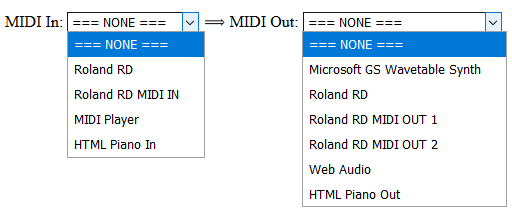](https://jazz-soft.github.io/modules/select/index.html)
See the [**demo**](https://jazz-soft.github.io/modules/select/index.html)...
## Install
`npm install jzz-gui-select --save`
or `yarn add jzz-gui-select`
or get the full development version and minified scripts from [**GitHub**](https://github.com/jazz-soft/JZZ-gui-Select)
## Usage
##### Plain HTML
```html
//...
```
##### CDN (jsdelivr)
```html
//...
```
##### CDN (unpkg)
```html
//...
```
##### CommonJS
```js
var JZZ = require('jzz');
require('jzz-gui-select')(JZZ);
//...
```
##### AMD
```js
require(['JZZ', 'JZZ.gui.Select'], function(JZZ, select) {
// ...
});
```
## Example
```html
```
## API
All calls are identical for both Input/Output pickers
except of the `In`/`Out` name suffixes where appropriate.
##### constructor
`JZZ.gui.SelectMidiIn(options)`
`JZZ.gui.SelectMidiOut(options)`
Can be used with or without the `new` keyword.
`options` is the obect with the following properties:
- `at:` (required) HTML DOM <SELECT> object to be associated with the picker.
Either a DOM obect or its string ID.
- `none:` text string for the "no port opened" option.
Default: `'=== NONE ==='`
##### select
`midi_in.select(arg)`
`midi_out.select(arg)`
Programmatically select MIDI port.
`arg` is an option name or any other argument accepted
by `JZZ().openMidiIn(arg)` or `JZZ().openMidiOut(arg)`.
*e.g.:*
```js
// select the "no port" option and close the current port if it was open:
midi_in.select('=== NONE ===');
midi_out.select(); // open the default MIDI-Out port.
```
##### standard calls
MIDI Input/Output pickers are regular JZZ MIDI nodes,
and therefore, can be used with all [standard calls](https://jazz-soft.net/doc/JZZ/reference.html).
*e.g.:*
```js
midi_in.connect(function(msg) { console.log('MIDI received: ' + msg); });
midi_out.noteOn(0, 'C#5', 127).wait(500).noteOff(0, 'C#5');
// etc...
```
##### user hooks
`midi_in.onSelect(name)`
`midi_out.onSelect(name)`
Called when the MIDI port is successfully selected; `name` is the port name.
*e.g.:*
```js
midi_in.onSelect = function(name) {
console.log('MIDI-In selected:', name);
};
midi_out.onSelect = function() {
this.noteOn(0, 'C#5', 127).wait(500).noteOff(0, 'C#5');
};
```
## More information
Please visit [**https://jazz-soft.net**](https://jazz-soft.net) for more information.