Build Excel-like data grids and spreadsheets in your web applications
**Note:** This is the **PRO/Commercial** version. For the open-source MIT version, see [jspreadsheet-ce](https://github.com/jspreadsheet/ce)
[🚀 **Try Live Demo**](https://jspreadsheet.com/demo/integration) | [📖 **Documentation**](https://jspreadsheet.com/docs) | [💬 **Community**](https://github.com/jspreadsheet/pro/issues)
---
## 📑 Table of Contents
- [What is Jspreadsheet?](#-what-is-jspreadsheet)
- [Quick Start](#-quick-start)
- [What's New in v12](#-whats-new-in-version-12)
- [Key Features](#-key-features)
- [Framework Integration](#️-framework-integration)
- [Live Examples](#-live-examples)
- [Use Cases](#-use-cases)
- [Documentation](#-documentation--resources)
- [FAQ](#-frequently-asked-questions)
- [Changelog](#-changelog)
- [Package Information](#-package-information)
- [Community & Support](#-community--support)
- [License](#-license)
---
## 🌟 What is Jspreadsheet?
Jspreadsheet is a **lightweight, high-performance data grid and spreadsheet engine** that enables developers to deliver rich, Excel-style editing experiences in modern web applications **without any framework dependencies**.
Whether you're building a SaaS dashboard, financial modeller, admin portal, or collaborative web app, Jspreadsheet gives you everything you need to create fast, professional, and user-friendly spreadsheet solutions.
### 🏢 Trusted by Leading Companies
**Virgin Media** • **Samsung** • **Deloitte** • **Nissan** • **Johnson & Johnson** • **General Electric** • **Kawasaki** • **BP** • **Comcast** • **Asahikasei** • **Denso Wave** • **Moody's** • **Verizon** • **Kyocera** • **Mizuho** • **Noritz** • **Lexisnexis**
---
## ⚡ Quick Start
### System Requirements
- **Node.js**: 14.x or higher
- **Browsers**: Chrome 70+, Firefox 65+, Safari 12+, Edge 79+
- **Dependencies**: jsuites v6.x
### Installation
[](https://bundlephobia.com/package/jspreadsheet)
[](https://www.npmjs.com/package/jsuites)
#### Via npm
```bash
npm install jspreadsheet@12
```
#### Via CDN
```html
```
### Basic Usage
```html
```
```javascript
// Set your license (required for PRO version)
// Get a free trial license at: https://jspreadsheet.com
jspreadsheet.setLicense('YOUR-LICENSE-KEY');
// Create a spreadsheet
const spreadsheet = jspreadsheet(document.getElementById('spreadsheet'), {
worksheets: [{
data: [
['Product', 'Price', 'Quantity', 'Total'],
['Laptop', 999.99, 5, '=B2*C2'],
['Mouse', 29.99, 10, '=B3*C3'],
['Keyboard', 79.99, 3, '=B4*C4']
],
columns: [
{ type: 'text', title: 'Product', width: 120 },
{ type: 'number', title: 'Price', width: 100, mask: '#,##0.00' },
{ type: 'number', title: 'Quantity', width: 80 },
{ type: 'number', title: 'Total', width: 100, mask: '#,##0.00' }
]
}]
});
```
[🔗 **See More Examples**](https://jspreadsheet.com/demo/)
---
## 🎬 Live Demo
Experience Jspreadsheet in action with interactive examples:
[Live Demo](https://jspreadsheet.com/demo/integration)
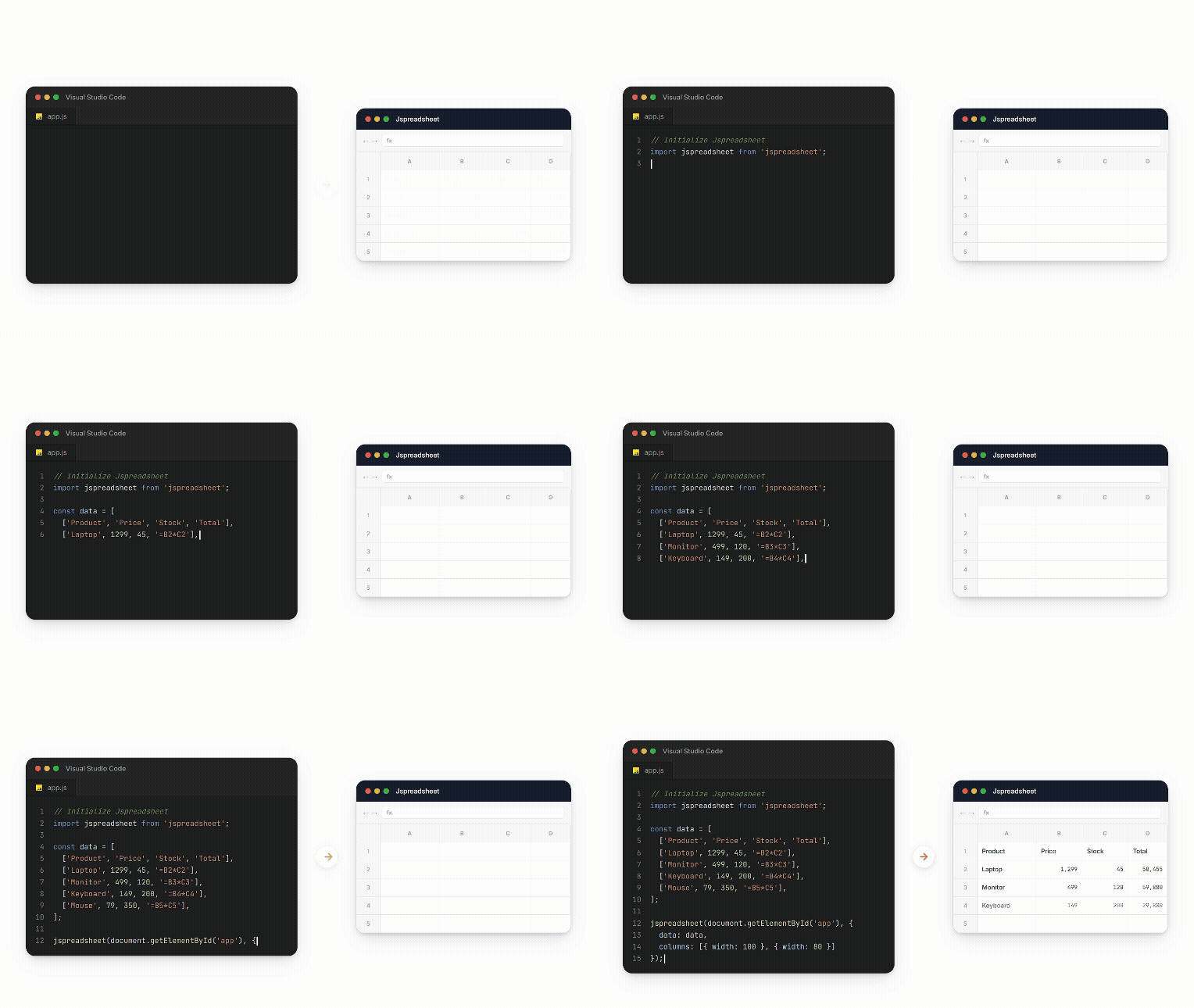
### 🎯 Try These Features:
✏️ Edit cells • 🧮 Use formulas • 📋 Copy/paste • ➕ Add rows/columns • 🎨 Format cells • 📊 Sort data
### 🚀 More Examples:
[📈 Charts](https://jspreadsheet.com/demo/integration) • [👥 Collaboration](https://jspreadsheet.com/demo/collaboration) • [⚡ Performance](https://jspreadsheet.com/demo/performance)
[**📚 View All Examples →**](https://jspreadsheet.com/demo)
---
## 🎯 Why Choose Jspreadsheet?
### ⚡ **Pure JavaScript Implementation**
Built with vanilla JavaScript, Jspreadsheet has **zero dependencies** and works with any build system or no build system at all. Integrate seamlessly into existing applications without worrying about framework conflicts or version compatibility issues.
### 🚀 **Unmatched Performance & Scalability**
Handle massive datasets confidently. Our **virtual rendering engine** delivers smooth scrolling and interaction, even with hundreds of thousands of rows and columns. Enhanced memory management and smart caching ensure your application's responsiveness.
### 👥 **Excel Compatible User Experience**
Your users already know how to use spreadsheets. Jspreadsheet provides the exact keyboard shortcuts, mouse interactions, copy/paste behavior, and visual feedback that users expect from Excel and Google Sheets.
### 🏢 **Enterprise Ready Architecture**
Jspreadsheet adapts to organizations of all sizes, from startups to Fortune 500 firms. It offers robust security features, detailed audit trails, real-time collaboration, and enterprise-level support.
---
## 🆕 What's New in Version 12
Version 12 delivers unprecedented performance and powerful new features:
### 🚀 Major Enhancements
| Feature | Description |
| :---- | :---- |
| **🎯 1M+ Rows** | Handle over 1 million rows with real DOM elements |
| **📊 Pivot Tables** | Dynamic data summarization with drag-and-drop field configuration |
| **📋 Worksheet Tables** | Structured data management with built-in sorting/filtering |
| **✨ Style Preservation** | Copy/paste from Excel & Google Sheets with full formatting |
| **🧩 Web Components** | Modern web-components-based editor architecture |
| **📱 Mobile Navigation** | Completely redesigned touch experience |
| **⌨️ Accessibility** | Enhanced keyboard navigation with IME support |
### 🔧 New Extensions
- **@jspreadsheet/extensions** - Complete collection of all extensions
- **@jspreadsheet/format** - Advanced custom editors and cell masking
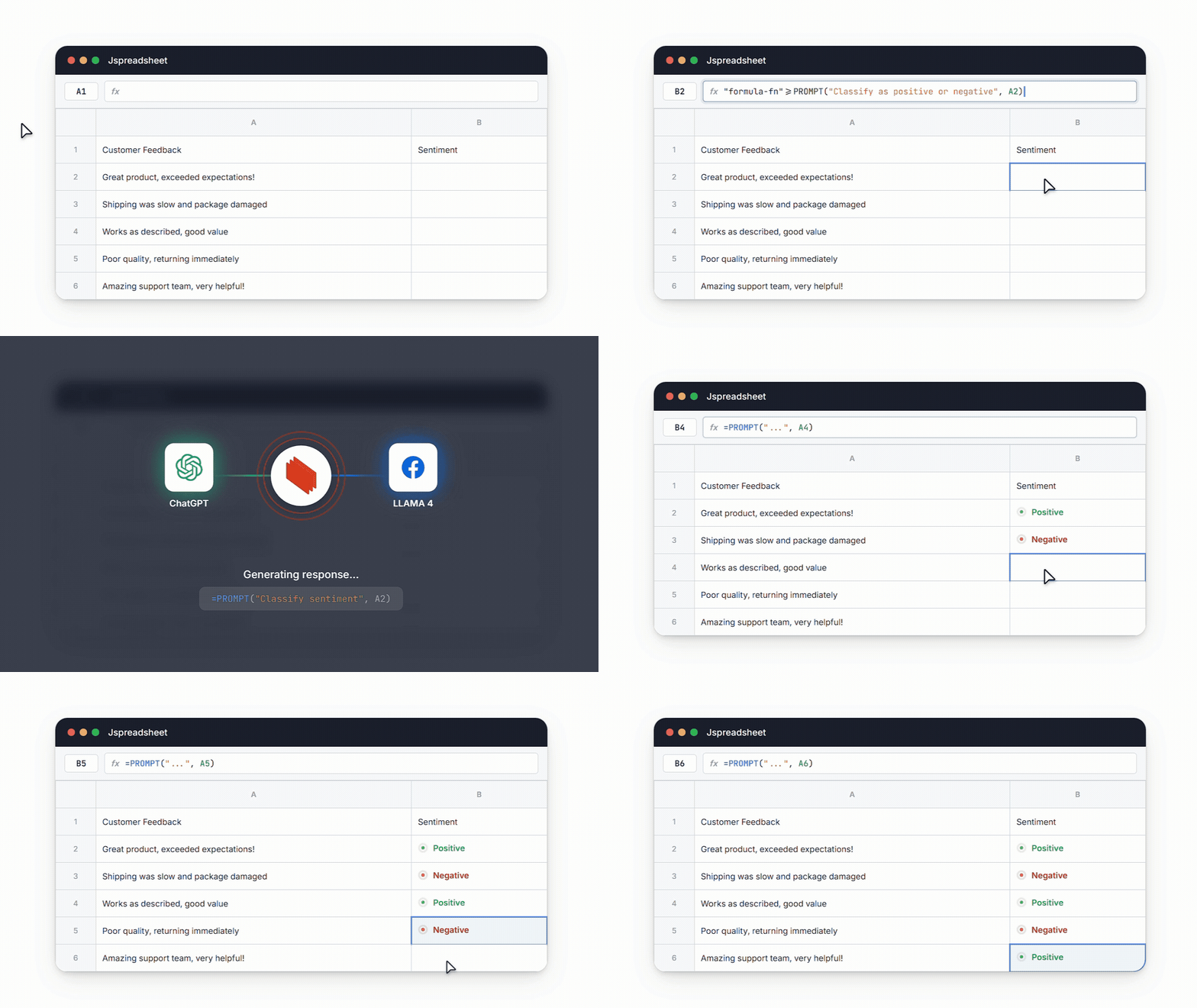
### 🤖 AI Integration
Integrate your data grid with AI to enable intelligent data processing, natural language queries, and automated insights.
[📖 **See All v12 Features →**](https://jspreadsheet.com/docs/upgrades)
---
## 🔥 Key Features
### 📊 Core Spreadsheet Functionality
**500+ Excel-Compatible Formulas** Every formula your users know and love, implemented with complete Excel compatibility. From basic arithmetic to advanced statistical functions, financial calculations, and text manipulation – if it works in Excel, it works in Jspreadsheet.
**Advanced Cell Selection & Editing** Multi-cell selection with Ctrl+click, range selection with Shift+click, and full keyboard navigation. Support for cell references, formula auto-completion, and intelligent cell addressing that adapts as you insert or delete rows and columns.
**Professional Data Entry** Auto-fill sequences, drag-and-drop cell ranges, smart formatting detection, and automatic data type recognition. Your users can work as efficiently as they do in desktop spreadsheet applications.
**Undo/Redo System** Comprehensive action history with unlimited undo/redo capabilities. Every cell edit, formula change, formatting adjustment, and structural modification is tracked and reversible.
**Copy/Paste** Full clipboard integration supporting rich formatting, formulas, and cross-application data transfer. Paste from Excel, Google Sheets, or any other spreadsheet application with formatting preservation.
### 🎨 Advanced Cell Types & Editors
**Rich Input Controls** Transform static cells into interactive and user-friendly elements:
- Dropdown lists with search and custom validation
- Checkbox and radio button groups
- Date and time pickers with localization
- Color pickers with custom palettes
- Numeric steppers and sliders
- Rich text editors with formatting
- File upload cells with preview
- Rating controls and progress bars
**Custom Editor Framework** Build your own cell editors using our comprehensive API. Create specialized input controls for your domain-specific data types, integrate with external services, or build complex multi-field editors for structured data.
**Data Validation Engine** Enforce specific business rules and input constraints directly within your spreadsheet:
- Numeric ranges and precision validation
- Date range constraints
- Text pattern matching with regex
- Custom validation functions
- Dropdown value restrictions
- Cross-cell validation rules
### 🎯 Visual Formatting & Styling
**Themes & Customization** Personalize the appearance of your spreadsheet to fit your exact needs or your brand's identity, with built-in light and dark themes and complete CSS customization capabilities.
**Complete Formatting Control** Customize your spreadsheet's appearance and behavior:
- Font families, sizes, and weights
- Text color and background colors
- Borders and cell alignment
- Number formatting (currency, percentage, scientific)
- Date and time formatting with localization
- Conditional formatting with custom rules
- Cell merging and text wrapping
**Charts & Visualization** Turn your spreadsheet data into different types of graphical charts:
- Line, bar, column, and area charts
- Pie and doughnut charts with customizable segments
- Scatter plots and bubble charts
- Combo charts mixing multiple chart types
- Sparklines for in-cell visualizations
- Real-time chart updates as data changes
### 📊 Pivot Tables
Transform raw data into meaningful insights with powerful pivot table functionality:
- Drag-and-drop field configuration for rows, columns, values, and filters
- Multiple aggregation functions (sum, count, average, min, max, etc.)
- Dynamic filtering and sorting capabilities
- Expandable/collapsible row and column groups
- Custom calculated fields and items
- Export pivot table results to various formats
### ⚡ Performance & Scalability Features
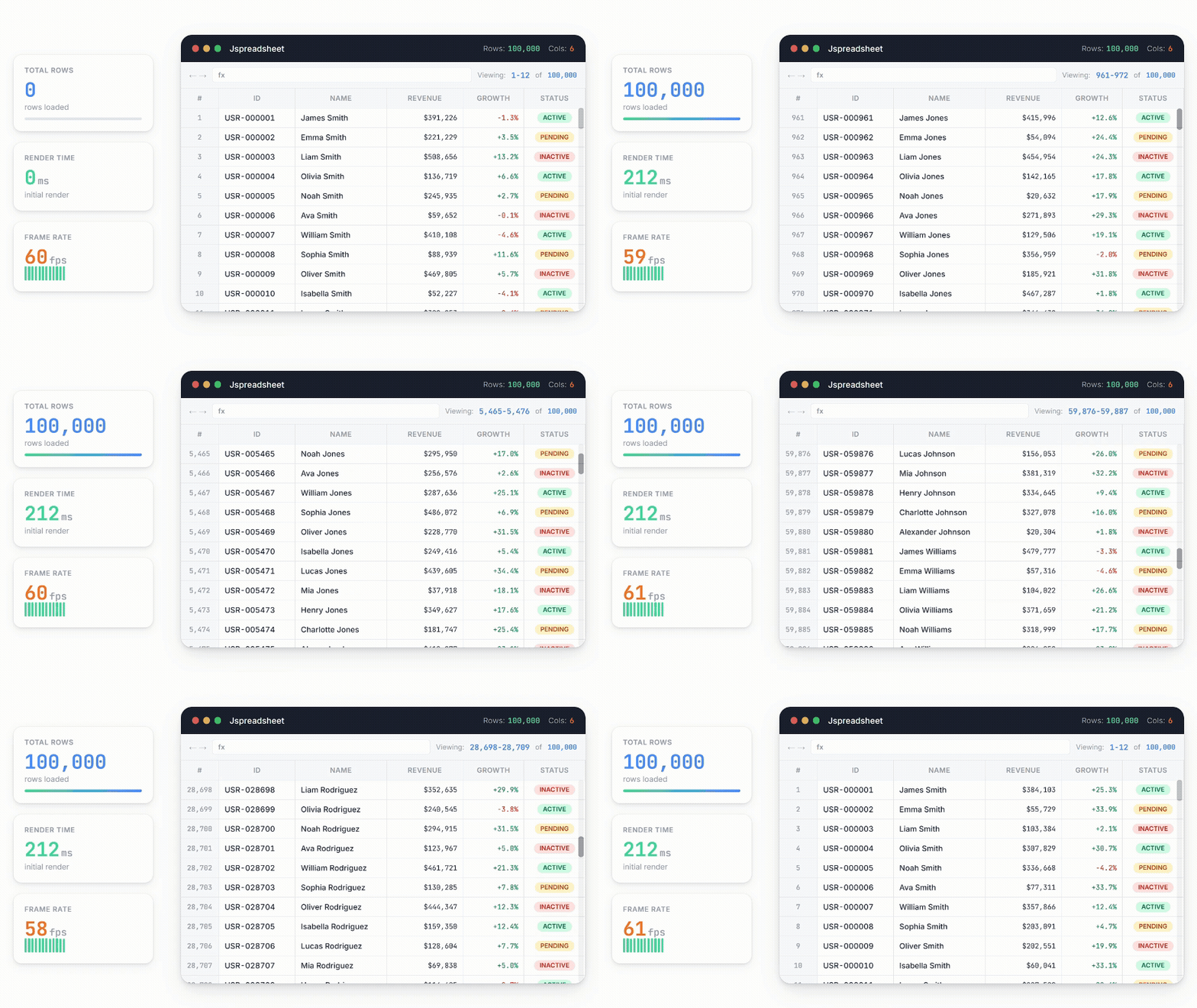
**Virtual Rendering Engine** Only visible cells are rendered in the DOM, enabling smooth performance with unlimited data sizes. Scroll through millions of rows without lag or memory issues.
**Intelligent Caching** Smart caching algorithms ensure frequently accessed data remains instantly available while optimizing memory usage for large datasets.
**Lazy Loading Support** Load data on demand as users scroll or navigate, ideal for server-side data sources and real-time feeds.
**Mobile Optimization** Jspreadsheet is designed to work comfortably on mobile devices:
- Pinch-to-zoom for detailed viewing
- Touch scrolling with momentum
- Long-press context menus
- Responsive layout adaptation
### 📁 Data Import & Export
**Excel File Support** Powerful Excel file support for .XLS and .XLSX formats with:
- All formulas and calculations
- Cell formatting and styles
- Charts and embedded objects
- Multiple worksheets
- Named ranges and defined names
- Data validation rules
**CSV Handling** Advanced CSV processing with:
- Custom delimiter detection
- Encoding handling (UTF-8, Latin-1, etc.)
- Quote and escape character processing
- Header row detection
- Data type inference
**JSON Integration** Native JSON import/export for seamless integration with REST APIs and modern data sources.
### 👥 Collaboration Features *(Enterprise Edition)*
**Real-Time Multi-User Editing** Multiple users can edit the same spreadsheet simultaneously with:
- Conflict resolution algorithms
- User presence indicators
- Live cursor tracking
- Automatic change synchronization
- Offline editing with sync on reconnect
**Advanced Comments & Annotations** Threaded commenting system with:
- Rich text comments
- @mentions and notifications
- Comment resolution tracking
- Audit trail maintenance
**Version Control** Every change is automatically recorded:
- Point-in-time restoration
- Change highlighting
- User attribution
- Branching and merging capabilities
**Permissions & Security** Advanced features to protect your data:
- Cell-level permissions
- Sheet protection
- User role management
- Field-level encryption
- Audit logging
[📖 **Complete Feature Documentation →**](https://jspreadsheet.com/docs)
---
## 🛠️ Framework Integration
Jspreadsheet works seamlessly with all major frameworks:
### React
```bash
npm install @jspreadsheet/react
```
```jsx
import React, { useRef } from "react";
import { Spreadsheet } from '@jspreadsheet/react';
import "jsuites/dist/jsuites.css";
import "jspreadsheet/dist/jspreadsheet.css";
const license = 'YOUR-LICENSE-KEY';
function App() {
const spreadsheet = useRef();
const worksheets = { data: [[1, 2, 3]] };
return ;
}
```
[📖 Docs](https://jspreadsheet.com/docs/react) • [🎮 Examples](https://jspreadsheet.com/docs/react#examples)
### Vue.js
```bash
npm install @jspreadsheet/vue
```
```vue
```
[📖 Docs](https://jspreadsheet.com/docs/vue) • [🎮 Examples](https://jspreadsheet.com/docs/vue#examples)
### Angular
```bash
npm install jspreadsheet
```
```typescript
import { Component, ViewChild, ElementRef } from "@angular/core";
import jspreadsheet from "jspreadsheet";
jspreadsheet.setLicense('YOUR-LICENSE-KEY');
@Component({
selector: 'app-root',
standalone: true,
template: ``,
})
export class AppComponent {
@ViewChild('spreadsheet') spreadsheet!: ElementRef;
worksheets: jspreadsheet.worksheetInstance[] = [];
ngAfterViewInit() {
this.worksheets = jspreadsheet(this.spreadsheet.nativeElement, {
worksheets: [{ data: [[1, 2, 3]] }]
});
}
}
```
[📖 Docs](https://jspreadsheet.com/docs/angular) • [🎮 Examples](https://jspreadsheet.com/docs/angular#examples)
### All Frameworks
| Framework | Package | Docs |
| :---- | :---- | :---- |
| **React** | `@jspreadsheet/react` | [Documentation](https://jspreadsheet.com/docs/react) |
| **Vue.js** | `@jspreadsheet/vue` | [Documentation](https://jspreadsheet.com/docs/vue) |
| **Angular** | `jspreadsheet` | [Documentation](https://jspreadsheet.com/docs/angular) |
| **Vanilla JS** | `jspreadsheet` | [Documentation](https://jspreadsheet.com/docs) |
---
## 🎮 Live Examples
Explore interactive examples organized by category:
| Category | Description |
| :---- | :---- |
| [**Performance**](https://jspreadsheet.com/demo/performance) | Handle millions of rows with smooth scrolling |
| [**Integration**](https://jspreadsheet.com/demo/integration) | Charts, formulas, and data binding |
| [**Collaboration**](https://jspreadsheet.com/demo/collaboration) | Real-time multi-user editing |
| [**Supply Chain**](https://jspreadsheet.com/demo/supply-chain) | Dashboard with inventory tracking |
| [**Project Management**](https://jspreadsheet.com/demo/project-management) | Task tracking and Gantt charts |
| [**Financial**](https://jspreadsheet.com/demo/financial) | Investment portfolio tracker |
| [**HR Planner**](https://jspreadsheet.com/demo/fiscal-year) | Fiscal year planning tool |
| [**Sales Dashboard**](https://jspreadsheet.com/demo/sales-dashboard) | Revenue and metrics visualization |
[🚀 **View All Examples**](https://jspreadsheet.com/demo)
---
## 🎯 Use Cases
| Industry | Applications |
| :---- | :---- |
| **Finance & Accounting** | Budgeting tools, balance sheets, forecasting apps, loan calculators |
| **Data Analysis** | KPI monitoring, ad hoc reporting, analytics front-ends |
| **Operations & Logistics** | Inventory tracking, scheduling, project management boards |
| **Healthcare & Research** | Clinical data collection, experiment logs, scientific modelling |
| **Education** | Interactive exercises, grading sheets, collaborative workbooks |
| **Enterprise SaaS** | Admin panels, CRMs, HR tools, product configurators |
---
## 💬 What Our Customers Say
> *"At SplitC we struggled sometimes when users wanted to bulk insert/edit things (sometimes over 100k rows) and we needed performance. Jspreadsheet is probably the fastest spreadsheet component you'll find out there, and with a small bundle size. By the way, support is awesome."*
>
> **— Lucas Segers, SplitC**
> *"We vetted 10 JavaScript components and we must say that Jspreadsheet comes out as the best."*
>
> **— Lode Cools, Bizz Control**
> *"The latest version of Jspreadsheet is a powerful data grid tool, providing an excellent front end for our spreadsheet interface. The Jspreadsheet team is helpful and quick to respond."*
>
> **— Dana Stoesz, PharmacyWire**
---
## 📚 Documentation & Resources
### 📖 Getting Started
- [Installation Guide](https://jspreadsheet.com/docs)
- [Quick Start Tutorial](https://jspreadsheet.com/docs/getting-started)
- [Basic Examples](https://jspreadsheet.com/demo)
### 🔧 Advanced Topics
- [Formula Reference](https://jspreadsheet.com/docs/formulas)
- [Custom Cell Editors](https://jspreadsheet.com/docs/editors)
- [Real-time Collaboration](https://jspreadsheet.com/products/server)
- [Performance Optimization](https://jspreadsheet.com/docs/performance)
### 🎨 Customization
- [Themes & Styling](https://jspreadsheet.com/docs/themes)
- [Custom Plugins](https://jspreadsheet.com/docs/plugins)
- [API Reference](https://jspreadsheet.com/docs/methods)
---
## ❓ Frequently Asked Questions
Does Jspreadsheet work with any build system or bundler?
Yes, Jspreadsheet is built with vanilla JavaScript and has zero dependencies, making it compatible with any build system including Webpack, Rollup, Parcel, Vite, or no build system at all.
What browsers are supported?
Jspreadsheet supports all modern browsers including Chrome 70+, Firefox 65+, Safari 12+, and Edge 79+. Mobile browsers (iOS Safari, Android Chrome) are fully supported with touch-optimized interactions.
How many rows can Jspreadsheet handle?
Version 12 can handle **over 1 million rows** with real DOM elements while maintaining smooth scrolling and editing performance. The virtual rendering engine ensures only visible cells impact performance.
Does it work with TypeScript?
Yes, Jspreadsheet includes comprehensive TypeScript definitions with full type safety for all APIs, events, and configuration options.
Can I import Excel files?
Yes, Excel import (.XLS and .XLSX) is available in Standard, Enterprise, and Ultimate editions with support for formulas, formatting, charts, multiple worksheets, and data validation rules.
Is real-time collaboration supported?
Real-time collaboration is available in the Enterprise Edition with features including simultaneous multi-user editing, live cursor tracking, conflict resolution, and offline editing with sync.
[**View Full FAQ →**](https://jspreadsheet.com/docs/faq)
---
## 📋 Changelog
### v12.0.0 - September 2024 🎉
**Major Release Highlights:**
- ✨ **1M+ Rows** - Support for over 1 million rows with real DOM elements
- ✨ **Pivot Tables** - Dynamic data summarization with drag-and-drop configuration
- ✨ **Worksheet Tables** - New table feature for structured data management
- ✨ **Style Preservation** - Copy/paste from Excel/Google Sheets with formatting
- ✨ **Web Components** - Modern web-components-based editors
- ✨ **Multi-Selection** - Drag & drop for multiple columns/rows
- ✨ **Mobile Navigation** - Completely redesigned touch experience
- ✨ **Accessibility** - Enhanced keyboard navigation with IME support
**New Extensions:**
- `@jspreadsheet/extensions` - Complete collection of extensions
- `@jspreadsheet/format` - Advanced custom editors and cell masking
[📖 **Full Changelog**](https://jspreadsheet.com/docs/upgrades)
---
## 📦 Package Information
### NPM Package
- **Package Name**: `jspreadsheet`
- **Current Version**: 12.x
- **Bundle Size**: ~200KB minified + gzipped
- **Dependencies**: jsuites v6.x
- **TypeScript**: Full type definitions included
- **Module Formats**: ESM, CommonJS, UMD
### Repository
- **Homepage**: [https://jspreadsheet.com](https://jspreadsheet.com)
- **Documentation**: [https://jspreadsheet.com/docs](https://jspreadsheet.com/docs)
- **Issues**: [https://github.com/jspreadsheet/pro/issues](https://github.com/jspreadsheet/pro/issues)
- **Community Edition**: [https://github.com/jspreadsheet/ce](https://github.com/jspreadsheet/ce)
### Keywords
`spreadsheet`, `datagrid`, `data-grid`, `excel`, `table`, `data-table`, `vanilla-js`, `javascript`, `typescript`, `react`, `vue`, `angular`, `pivot-table`, `formulas`, `charts`, `data-visualization`, `collaboration`, `real-time`
---
## 💬 Community & Support
### 👋 Join Our Community
- [GitHub Discussions](https://github.com/jspreadsheet/pro/issues) - Ask questions and share ideas
- [Stack Overflow](https://stackoverflow.com/questions/tagged/jspreadsheet) - Technical Q&A
### 📞 Get Support
- **Standard Edition**: Priority email support with 48-hour response time
- **Enterprise Edition**: Dedicated support team and phone support
- **Ultimate Edition**: SLA guarantees with 4-hour response for critical issues
[Contact Support](https://jspreadsheet.com/contact)
---
## 📄 License
**Jspreadsheet PRO** is available under commercial license options:
- **Standard Edition**: Commercial license for small teams
- **Enterprise Edition**: Full commercial license with premium features
- **Ultimate Edition**: Complete solution with collaboration and advanced features
**Looking for the open-source version?** Check out [jspreadsheet-ce](https://github.com/jspreadsheet/ce) (Community Edition) under MIT License.
[View License Details](https://jspreadsheet.com/docs/license) | [Compare Editions](https://jspreadsheet.com/pricing)
---
## 🌍 Join Thousands of Developers
Jspreadsheet powers spreadsheet applications across industries — from fintech startups to Fortune 500 enterprises. Join our growing community of developers who are building the future of data manipulation on the web.
**Transform your data, empower your users, and accelerate your development with Jspreadsheet.**
---




