# json-render for Pi
A Pi extension that renders a constrained **json-render Ink spec** with Pi's
native `@earendil-works/pi-tui` component system.
Pi and Ink both control the terminal screen, so mounting `@json-render/ink`
inside Pi would conflict with Pi's TUI. This adapter pins the upstream Ink
catalog as its declarative contract, narrows it to reliable read-only
components, and translates the result into Pi TUI lines.
## Start locally
Load the complete package—extension and skill—from this repository:
```bash
pi -e .
```
Or install it persistently:
```bash
pi install .
pi
```
## Inline UI generation
The model-invocable `json-ui` skill teaches Pi when and how to call
`render_json_ui`: compact dashboards, status cards, progress, trends,
comparisons, tables, and checklists when visual structure is more scannable
than prose.
There is no `/json-ui` command and no dialog or overlay. Tool results render
inline in Pi's conversation transcript.
## Render examples
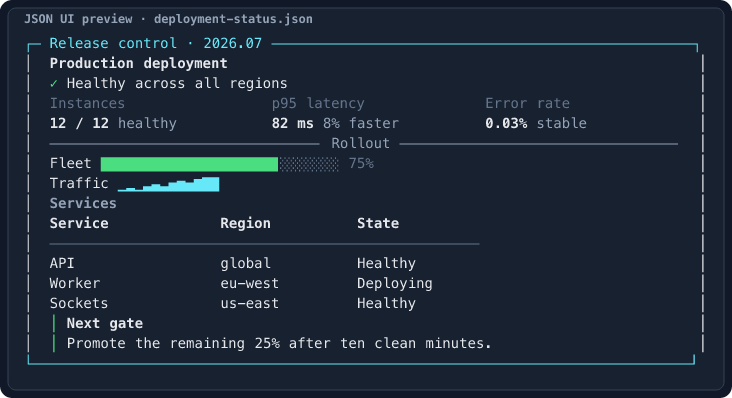
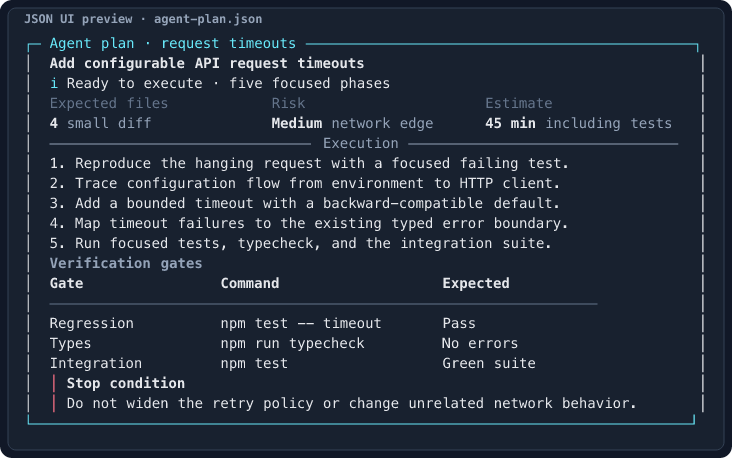
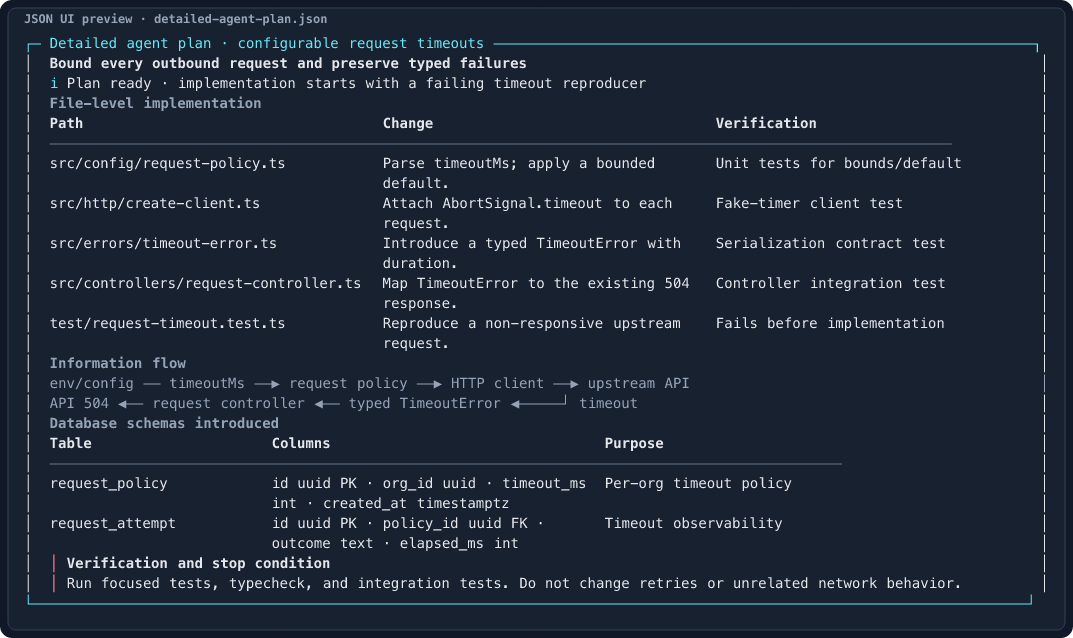
Each screenshot is generated by the standalone harness from the linked JSON
spec and inspected at its target terminal width.
### Deployment status · 80 columns
[Source spec](examples/deployment-status.json)
 ### Compact agent plan · 80 columns
[Source spec](examples/agent-plan.json)
### Compact agent plan · 80 columns
[Source spec](examples/agent-plan.json)
 ### Detailed agent plan · 120 columns
Includes concrete file paths, an information-flow diagram, proposed database
schemas, verification steps, and a stop condition.
[Source spec](examples/detailed-agent-plan.json)
### Detailed agent plan · 120 columns
Includes concrete file paths, an information-flow diagram, proposed database
schemas, verification steps, and a stop condition.
[Source spec](examples/detailed-agent-plan.json)
 ## Reliability constraints
The tool exposes its exact component schema to the model and validates it again
at runtime. It rejects unknown components and props, invalid child placement,
missing or unreachable elements, cycles, excessive nesting, and oversized
specs. Current limits include 30 elements, six nesting levels, two cards, and
bounded table/list/chart data.
Only `Box` and `Card` may contain children. Supported leaves are `Text`,
`Heading`, `Divider`, `Badge`, `KeyValue`, `StatusLine`, `Metric`,
`ProgressBar`, `Sparkline`, `BarChart`, `Table`, `List`, and `Callout`.
Interactive controls and action bindings are rejected rather than pretending
to work in a static transcript.
Rendering is parent-width-aware. Long text wraps with ANSI styling preserved,
table cells wrap within their columns, and row boxes retain multi-line child
alignment. The tool uses Pi's self-rendering shell so the UI stays on the normal
terminal background instead of inheriting the green `toolSuccessBg` surface.
## Standalone visual development loop
Validate and render without invoking a model or starting Pi:
```bash
npm run ui:dev -- examples/deployment-status.json \
--width 80 \
--ascii .artifacts/deployment-status.txt \
--png .artifacts/deployment-status.png \
--report .artifacts/deployment-status.report.json \
--strict
```
The harness uses the same validator and renderer as the extension, prints an
ANSI terminal preview, runs design heuristics, and can write ASCII, SVG, PNG,
and JSON reports. PNG screenshots open automatically in macOS Preview. Pass
`--no-open` only for CI or automated tests.
Use watch mode for a short edit–inspect–iterate loop:
```bash
npm run ui:dev -- examples/agent-plan.json \
--watch \
--width 80 \
--png .artifacts/agent-plan.png \
--strict
```
Run `npm run ui:dev -- --help` for every option. Curated examples include a
production deployment dashboard, a compact coding-task plan, and a detailed
120-column plan with file paths, information flow, and proposed database schemas.
## Develop
```bash
npm test
npm run typecheck
```
The tests include regressions for malformed generated specs, schema exposure,
complexity budgets, nested wrapping, row layout, snapshot generation, design
auditing, the complete CLI workflow, and package skill discovery.
## License
[MIT](LICENSE) © 2026 Sharan Yalburgi
## Reliability constraints
The tool exposes its exact component schema to the model and validates it again
at runtime. It rejects unknown components and props, invalid child placement,
missing or unreachable elements, cycles, excessive nesting, and oversized
specs. Current limits include 30 elements, six nesting levels, two cards, and
bounded table/list/chart data.
Only `Box` and `Card` may contain children. Supported leaves are `Text`,
`Heading`, `Divider`, `Badge`, `KeyValue`, `StatusLine`, `Metric`,
`ProgressBar`, `Sparkline`, `BarChart`, `Table`, `List`, and `Callout`.
Interactive controls and action bindings are rejected rather than pretending
to work in a static transcript.
Rendering is parent-width-aware. Long text wraps with ANSI styling preserved,
table cells wrap within their columns, and row boxes retain multi-line child
alignment. The tool uses Pi's self-rendering shell so the UI stays on the normal
terminal background instead of inheriting the green `toolSuccessBg` surface.
## Standalone visual development loop
Validate and render without invoking a model or starting Pi:
```bash
npm run ui:dev -- examples/deployment-status.json \
--width 80 \
--ascii .artifacts/deployment-status.txt \
--png .artifacts/deployment-status.png \
--report .artifacts/deployment-status.report.json \
--strict
```
The harness uses the same validator and renderer as the extension, prints an
ANSI terminal preview, runs design heuristics, and can write ASCII, SVG, PNG,
and JSON reports. PNG screenshots open automatically in macOS Preview. Pass
`--no-open` only for CI or automated tests.
Use watch mode for a short edit–inspect–iterate loop:
```bash
npm run ui:dev -- examples/agent-plan.json \
--watch \
--width 80 \
--png .artifacts/agent-plan.png \
--strict
```
Run `npm run ui:dev -- --help` for every option. Curated examples include a
production deployment dashboard, a compact coding-task plan, and a detailed
120-column plan with file paths, information flow, and proposed database schemas.
## Develop
```bash
npm test
npm run typecheck
```
The tests include regressions for malformed generated specs, schema exposure,
complexity budgets, nested wrapping, row layout, snapshot generation, design
auditing, the complete CLI workflow, and package skill discovery.
## License
[MIT](LICENSE) © 2026 Sharan Yalburgi