# json-editor-vue3
[![NPM version][npm-image]][npm-url]
[![npm download][download-image]][download-url]
[npm-image]: https://img.shields.io/npm/v/json-editor-vue3.svg?style=flat-square
[npm-url]: https://www.npmjs.com/package/json-editor-vue3
[download-image]: https://img.shields.io/npm/dm/json-editor-vue3.svg?style=flat-square
[download-url]: https://www.npmjs.com/package/json-editor-vue3
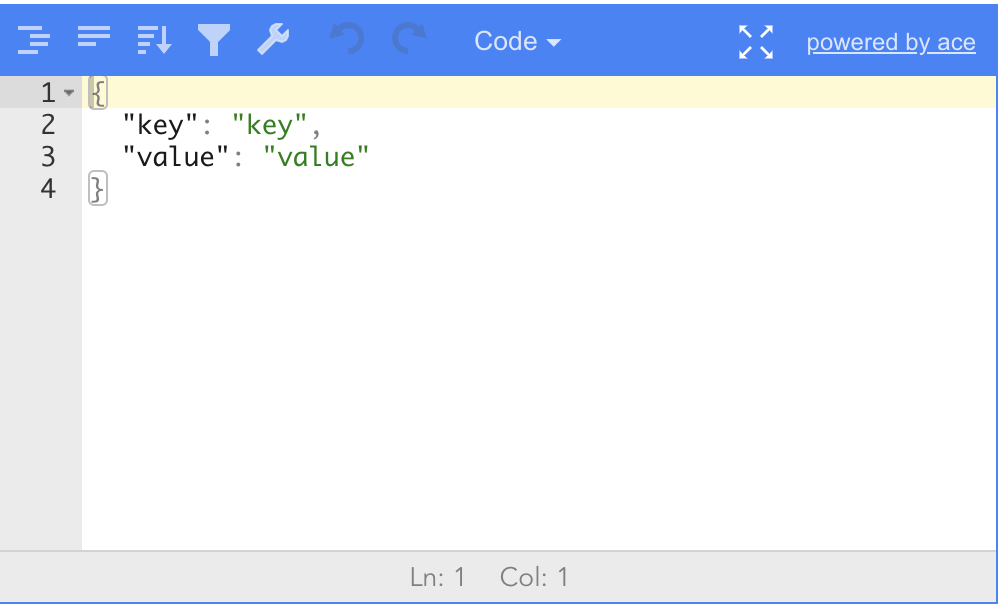
基于 `jsoneditor` 开发的vue3 json editor,支持全屏编辑,有完善的事件回调,可以在失去焦点时,对编辑器内容做校验。
 ## 安装
```bash
npm install json-editor-vue3
```
## 使用
### 全局引入
```javascript
import Vue from 'vue'
import JsonEditorVue from 'json-editor-vue3'
Vue.use(JsonEditorVue)
```
### 组件引入
```javascript
import JsonEditorVue from 'json-editor-vue3'
export default {
name: 'app',
components: {
JsonEditorVue
},
data() {
return {
data: {
"hello": "vue"
}
}
},
methods: {}
}
```
### 模板使用
```html
```
### 参数
| Name | Type | Description | Default |
| ---- | ---- | ----------- | ------- |
| modelValue | Object | 要编辑的json值 |--|
| options | Object | jsoneditor 的options,参考[configuration-options](https://github.com/josdejong/jsoneditor/blob/master/docs/api.md#configuration-options) |--|
| currentMode | String | 当前编辑模式 | code |
| modeList | Array | 可选的编辑模式列表 | ["tree", "code", "form", "text", "view"] |
| language | Array | 语言 | en |
### 事件
| Name | Type | Description |
| ----- | ---------|-------------- |
| update:modelValue|(json: Object) => void | json 更新 |
| change |(json: Object) => void; | json 更新 |
| textSelectionChange|(editor:Editor, start: number, end: number, text: string) => void; | 选择文本时触发的回调函数 |
| selectionChange| (editor:Editor, start: number, end: number) => void; | 选择节点时触发的回调函数 |
| focus |(editor:Editor, target: HTMLElement) => void; | 获取焦点 |
| blur |(editor:Editor, target: HTMLElement) => void; | 时区焦点 |
| colorPicker| (editor:Editor, parent: any, color: string, onChange: any) => void; | 当用户点击颜色时触发回调函数 |
| validationError| (editor:Editor, errors: ValidationError[]) => void; | 如果发现任何类型的错误,则会使用错误数据调用此回调 |
## 常见问题
### vue3+ts无法渲染,报错`jsoneditor does not provide an export named 'default'`
这是因为vite对commonjs兼容性太差,导致无法引入`jsoneditor`,可以使用`@originjs/vite-plugin-commonjs`插件解决。
```javascript
// vite.config.js
import { viteCommonjs } from '@originjs/vite-plugin-commonjs'
export default defineConfig({
plugins: [vue(),viteCommonjs()],
})
```
Vite的 [官方文档](https://vitejs.dev/guide/features.html) 也有提到:Pre-bundle them to improve page loading speed and convert CommonJS / UMD modules to ESM.所以不需要这个plugin,不过得直接在项目源代码里 import 'jsoneditor' 才会转换。
参考 [issue #4](https://github.com/guyue88/json-editor-vue3/issues/4)
## 公众号
欢迎关注作者公众号`前端方程式`,如果您有任何问题,也可以通过该公众号联系作者。
## 安装
```bash
npm install json-editor-vue3
```
## 使用
### 全局引入
```javascript
import Vue from 'vue'
import JsonEditorVue from 'json-editor-vue3'
Vue.use(JsonEditorVue)
```
### 组件引入
```javascript
import JsonEditorVue from 'json-editor-vue3'
export default {
name: 'app',
components: {
JsonEditorVue
},
data() {
return {
data: {
"hello": "vue"
}
}
},
methods: {}
}
```
### 模板使用
```html
```
### 参数
| Name | Type | Description | Default |
| ---- | ---- | ----------- | ------- |
| modelValue | Object | 要编辑的json值 |--|
| options | Object | jsoneditor 的options,参考[configuration-options](https://github.com/josdejong/jsoneditor/blob/master/docs/api.md#configuration-options) |--|
| currentMode | String | 当前编辑模式 | code |
| modeList | Array | 可选的编辑模式列表 | ["tree", "code", "form", "text", "view"] |
| language | Array | 语言 | en |
### 事件
| Name | Type | Description |
| ----- | ---------|-------------- |
| update:modelValue|(json: Object) => void | json 更新 |
| change |(json: Object) => void; | json 更新 |
| textSelectionChange|(editor:Editor, start: number, end: number, text: string) => void; | 选择文本时触发的回调函数 |
| selectionChange| (editor:Editor, start: number, end: number) => void; | 选择节点时触发的回调函数 |
| focus |(editor:Editor, target: HTMLElement) => void; | 获取焦点 |
| blur |(editor:Editor, target: HTMLElement) => void; | 时区焦点 |
| colorPicker| (editor:Editor, parent: any, color: string, onChange: any) => void; | 当用户点击颜色时触发回调函数 |
| validationError| (editor:Editor, errors: ValidationError[]) => void; | 如果发现任何类型的错误,则会使用错误数据调用此回调 |
## 常见问题
### vue3+ts无法渲染,报错`jsoneditor does not provide an export named 'default'`
这是因为vite对commonjs兼容性太差,导致无法引入`jsoneditor`,可以使用`@originjs/vite-plugin-commonjs`插件解决。
```javascript
// vite.config.js
import { viteCommonjs } from '@originjs/vite-plugin-commonjs'
export default defineConfig({
plugins: [vue(),viteCommonjs()],
})
```
Vite的 [官方文档](https://vitejs.dev/guide/features.html) 也有提到:Pre-bundle them to improve page loading speed and convert CommonJS / UMD modules to ESM.所以不需要这个plugin,不过得直接在项目源代码里 import 'jsoneditor' 才会转换。
参考 [issue #4](https://github.com/guyue88/json-editor-vue3/issues/4)
## 公众号
欢迎关注作者公众号`前端方程式`,如果您有任何问题,也可以通过该公众号联系作者。
 ## 捐赠 json-editor-vue3 的开发
json-editor-vue3 的文档和代码完全开源,如果该项目有帮助到你的开发工作,你可以捐赠json-editor-vue3的研发工作,捐赠无门槛,哪怕是一杯可乐也好。
## 捐赠 json-editor-vue3 的开发
json-editor-vue3 的文档和代码完全开源,如果该项目有帮助到你的开发工作,你可以捐赠json-editor-vue3的研发工作,捐赠无门槛,哪怕是一杯可乐也好。