### JScripty
A simple REPL for transpiling & executing ES6/ES7 code.
Stolen from Inspired by the excellent [esbox](https://github.com/callumlocke/esbox)
written by [Callum Locke](https://twitter.com/callumlocke).
**Beware**: This project is not intended to be used for anything productive!
I'm __only using it to learn and test__ several frameworks and libraries [*Ractive, Inferno, React & Redux*]
JScripty creates a fully functional `headless` browser environment in the console. Although there's no browser you still have the complete DOM functionality.
#### Current Status
- Compiles ES6 & ES7. [[Babel](https://babeljs.io/) presets & plugins]
- Compiles [TypeScript](http://www.typescriptlang.org)
- Runs [React](https://github.com/facebook/react) from the console.
- Runs [Inferno](https://github.com/trueadm/inferno) from the console. [latest version [0.6.0](https://github.com/trueadm/inferno/releases/tag/0.6.0)]
- Runs [Ractive](http://www.ractivejs.org/) from the console.
- Uses [WebPack](https://webpack.github.io/) to create a fully operational environment for `headless` live testing. :smile:
- Uses [jsdom](https://github.com/tmpvar/jsdom) to provide a complete DOM environment in the console.
- Offers a simple **REPL** for direct access. [namespace *jscripty*]
 #### Installation
```
git clone https://github.com/brakmic/JScripty.git
npm install
```
#### Running
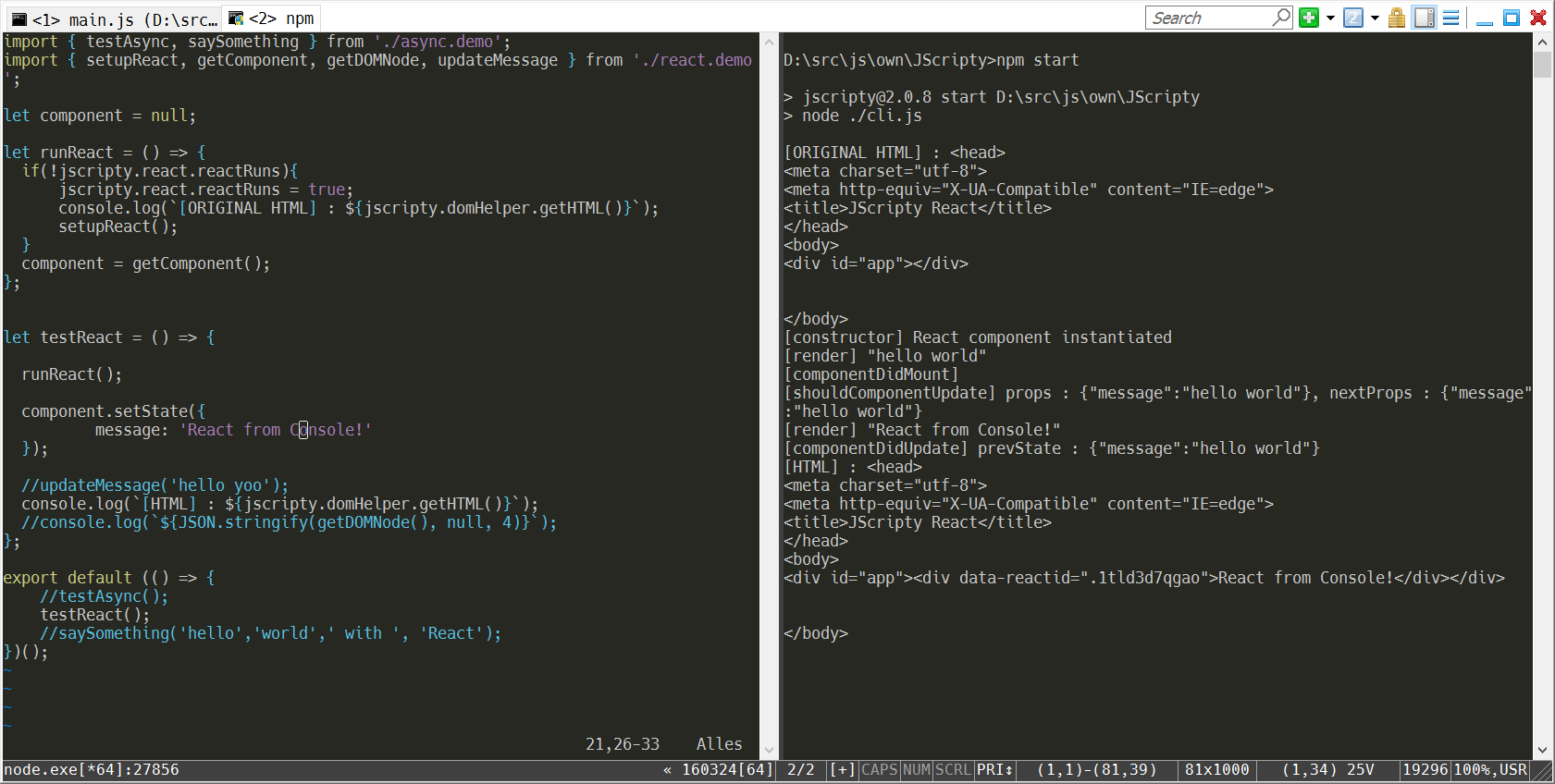
Open two consoles.
If you're running under Windows I recommend [ConEmu](https://conemu.github.io/).
In the first console open a script with your preferred editor.
In the second console run JScripty with your preferred UI-Engine by executing
```
node cli.js --react
or
node cli.js --inferno
```
**Ractive.js** can run with both of them. Just append an additional `--ractive` flag. :smile:
Now edit the file and save it to kick-off the **transpile-process**.
After a few moments your code will be executed and shown in the console.
#### REPL
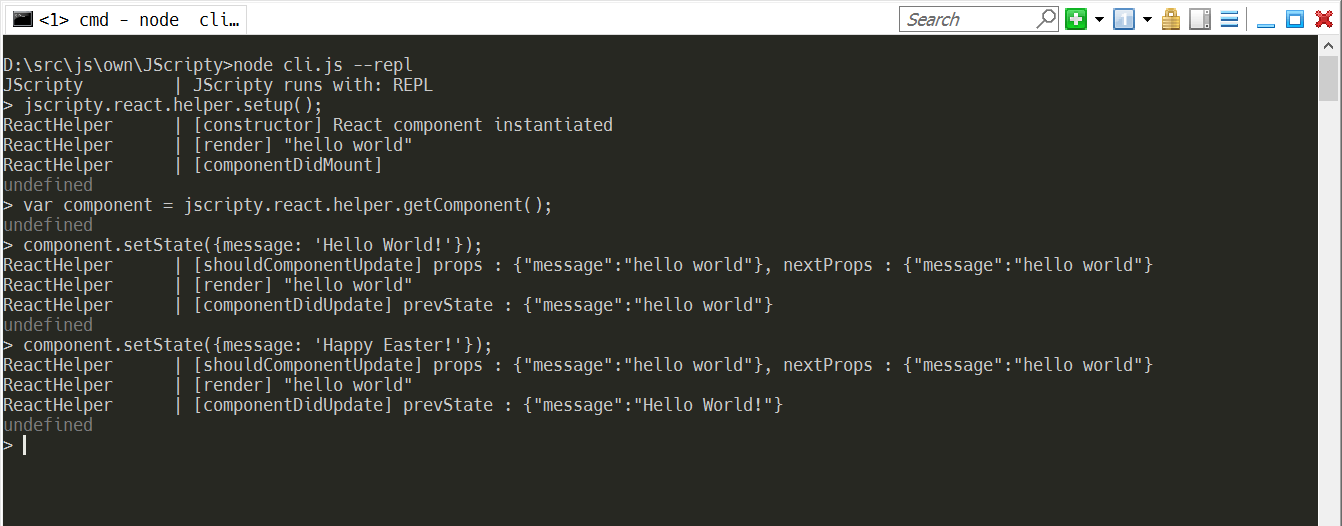
There's also a simple REPL available. All functions are located inside the namespace *jscripty*.
```
node cli.js --repl
```
Here's an example with **React**.
#### Installation
```
git clone https://github.com/brakmic/JScripty.git
npm install
```
#### Running
Open two consoles.
If you're running under Windows I recommend [ConEmu](https://conemu.github.io/).
In the first console open a script with your preferred editor.
In the second console run JScripty with your preferred UI-Engine by executing
```
node cli.js --react
or
node cli.js --inferno
```
**Ractive.js** can run with both of them. Just append an additional `--ractive` flag. :smile:
Now edit the file and save it to kick-off the **transpile-process**.
After a few moments your code will be executed and shown in the console.
#### REPL
There's also a simple REPL available. All functions are located inside the namespace *jscripty*.
```
node cli.js --repl
```
Here's an example with **React**.
 #### Playing with Inferno, Ractive & React
Change some piece of code, for example a component property, and press CTRL+S. Your running Ractive, Inferno or React instances will calculate the `diffs` and update accordingly. With a few simple `logging commands` you can now trace the data flows and interactions of your components.
#### IDE Integration
You don't have to run JScripty in a console. For example, I configured it as an `External Tool` in my Visual Studio 2015.
Just go to menu `Tools\External Tools` and type in the following (notice: use **your** Node install-path)
#### Playing with Inferno, Ractive & React
Change some piece of code, for example a component property, and press CTRL+S. Your running Ractive, Inferno or React instances will calculate the `diffs` and update accordingly. With a few simple `logging commands` you can now trace the data flows and interactions of your components.
#### IDE Integration
You don't have to run JScripty in a console. For example, I configured it as an `External Tool` in my Visual Studio 2015.
Just go to menu `Tools\External Tools` and type in the following (notice: use **your** Node install-path)
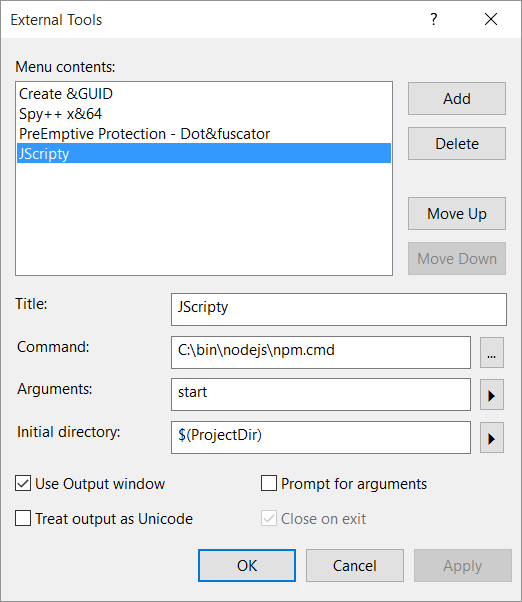 Now you'll get a new menu option `JScripty` under `Tools`.
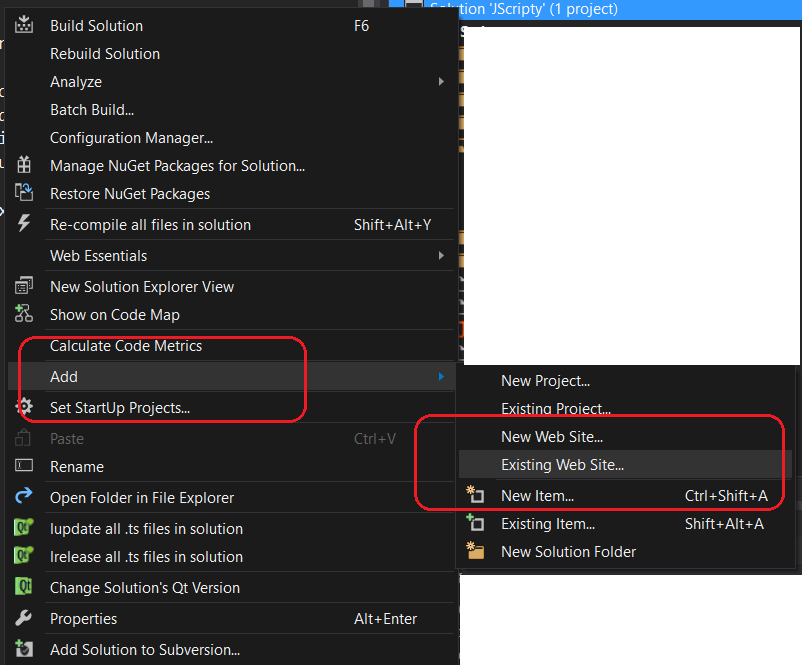
Create a **new, blank solution** and **import** the JScripty folder as an `Existing Web Site`.
First *right-click* the Solution itself then select following options:
Now you'll get a new menu option `JScripty` under `Tools`.
Create a **new, blank solution** and **import** the JScripty folder as an `Existing Web Site`.
First *right-click* the Solution itself then select following options:
 Go to the **root folder** of your JScripty project and select it.
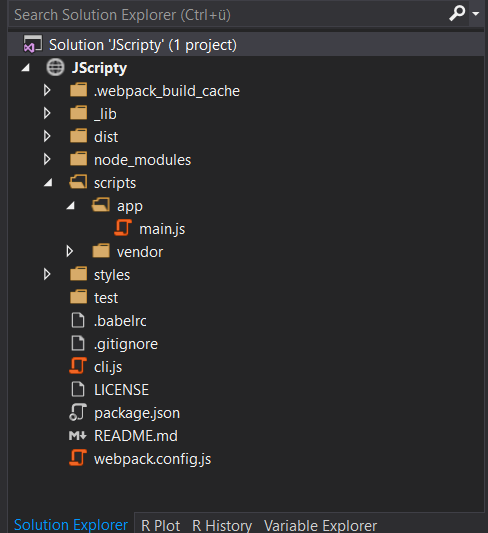
The import will take a few moments and in the end you should get the following project settings:
Go to the **root folder** of your JScripty project and select it.
The import will take a few moments and in the end you should get the following project settings:
 You can now select the `JScripty` menu option to start the watcher. Now change something in your *main.js* and watch the output.
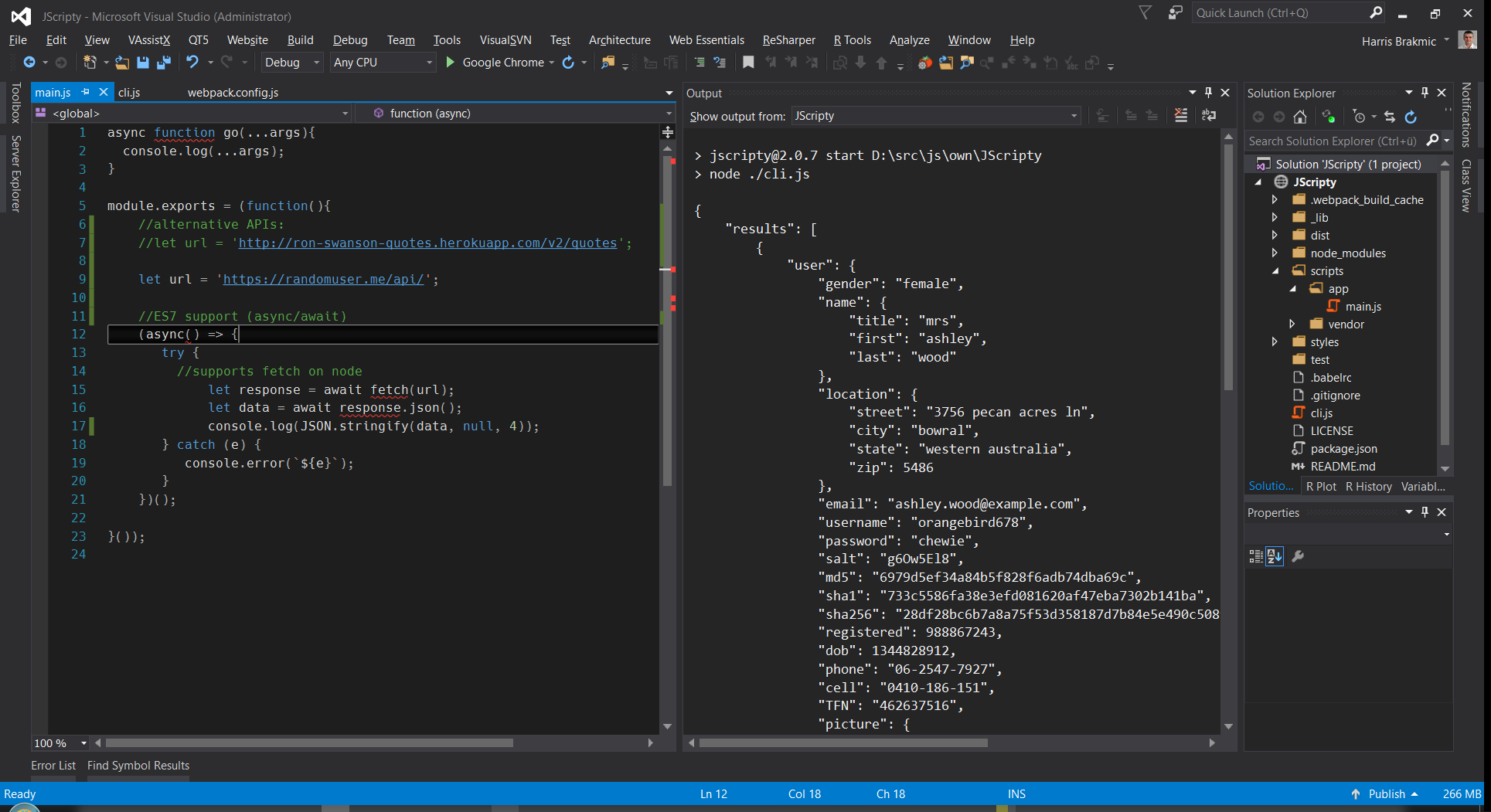 **Notice**: Visual Studio's Output Window doesn't recognize **ANSI Escape Commands** which makes the `clearScreen` function unusable. In `scripts/env/jscripty.js` you can find a variable to silent the ANSI-output.
#### Background info
Originally, this project had used much of the code from [Callum's](https://github.com/callumlocke/esbox) project which is a great tool for experimenting with newest JavaScript features. However, I didn't like the slow compilation times.
This is because on each save the running `node` instance has to restart and reload the complete environment again.
Therefore I thought it'd be much nicer to let **webpack** do all the heavy lifting. :smile:
After some experimentation with `hot-reloading`, `webpack-dev-server` and a few other things this solution now comprises of following `ingredients`:
- [require-from-string](https://www.npmjs.com/package/require-from-string) module for loading changed scripts as a string
- a simple asynchronous `file reload` function in `webpack.config.js` to be called after each successful build
- [babel-loader](https://www.npmjs.com/package/babel-loader) combined with the usual presets like `es2015`, `stage-0`, `react` and transformers for ES7 `async` syntax.
- [on-build webpack plugin](https://www.npmjs.com/package/on-build-webpack) to reload the rebuilt scripts.
- [isomorphic-fetch](https://www.npmjs.com/package/isomorphic-fetch) to execute web requests.
- [es6-promise polyfill](https://github.com/stefanpenner/es6-promise) to provide a globally available Promise API.
- [React](https://www.npmjs.com/package/react) directly from the console.
- [Inferno](https://github.com/trueadm/inferno) directly from the console.
- [Ractive](http://www.ractivejs.org/) directly from the console.
- [TypeScript](http://www.typescriptlang.org)
- **REPL**
#### License
[MIT](https://github.com/brakmic/JScripty/blob/master/LICENSE)
**Notice**: Visual Studio's Output Window doesn't recognize **ANSI Escape Commands** which makes the `clearScreen` function unusable. In `scripts/env/jscripty.js` you can find a variable to silent the ANSI-output.
#### Background info
Originally, this project had used much of the code from [Callum's](https://github.com/callumlocke/esbox) project which is a great tool for experimenting with newest JavaScript features. However, I didn't like the slow compilation times.
This is because on each save the running `node` instance has to restart and reload the complete environment again.
Therefore I thought it'd be much nicer to let **webpack** do all the heavy lifting. :smile:
After some experimentation with `hot-reloading`, `webpack-dev-server` and a few other things this solution now comprises of following `ingredients`:
- [require-from-string](https://www.npmjs.com/package/require-from-string) module for loading changed scripts as a string
- a simple asynchronous `file reload` function in `webpack.config.js` to be called after each successful build
- [babel-loader](https://www.npmjs.com/package/babel-loader) combined with the usual presets like `es2015`, `stage-0`, `react` and transformers for ES7 `async` syntax.
- [on-build webpack plugin](https://www.npmjs.com/package/on-build-webpack) to reload the rebuilt scripts.
- [isomorphic-fetch](https://www.npmjs.com/package/isomorphic-fetch) to execute web requests.
- [es6-promise polyfill](https://github.com/stefanpenner/es6-promise) to provide a globally available Promise API.
- [React](https://www.npmjs.com/package/react) directly from the console.
- [Inferno](https://github.com/trueadm/inferno) directly from the console.
- [Ractive](http://www.ractivejs.org/) directly from the console.
- [TypeScript](http://www.typescriptlang.org)
- **REPL**
#### License
[MIT](https://github.com/brakmic/JScripty/blob/master/LICENSE)