# jQuery Images Compare
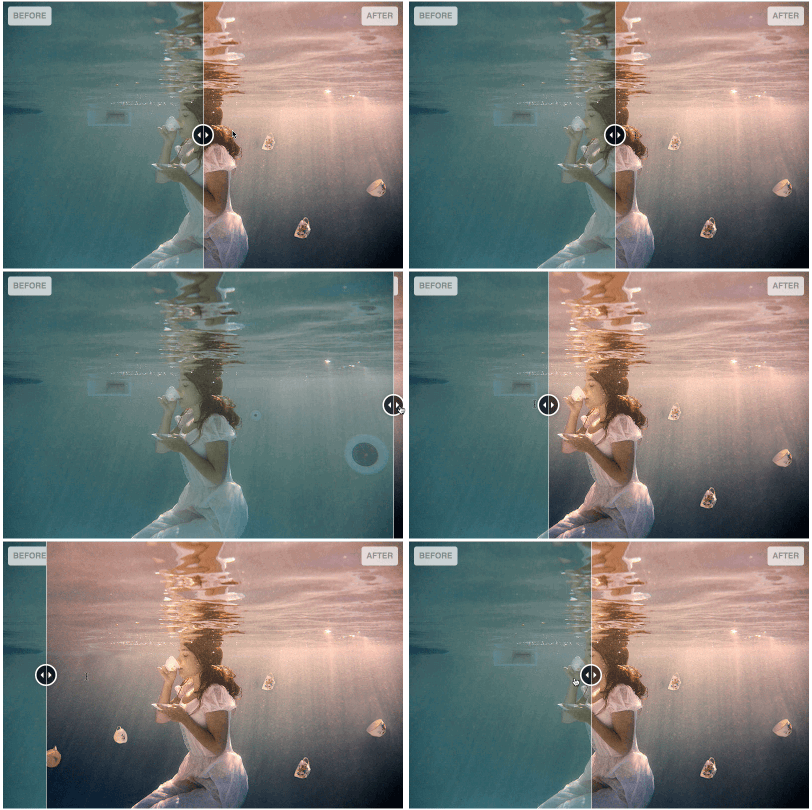
A jQuery plugin for comparing two images
Prefer a no-dependency version? A vanilla alternative will be available as `vanilla-images-compare` and should be preferred when you do not need jQuery.
[](https://github.com/sylvaincombes/jquery-images-compare/actions/workflows/ci.yml) [](https://www.npmjs.com/package/jquery-images-compare) [](https://www.npmjs.com/package/jquery-images-compare) [](https://raw.githubusercontent.com/sylvaincombes/jquery-images-compare/master/LICENSE.md)
## Features
- compatibility : Chrome 80+, Edge 80+, Firefox 74+, Safari 13.1+ (no IE)
- Dependency footprint: jQuery only.
- Effort to put appearance via css (easier to skin / override)
- Touch friendly, mouse drag (Pointer Events)
- Responsive
- You can listen to change event to add some of your logic
- You can change the value from external code
- Animation option when changing the value
- Optional alternative interaction modes : drag by default (the recommended one), click and mousemove (warning desktop friendly only for this settings)
- Size : ~2k of js and ~0.5k of css (minified and gzipped)
> NB : This library only does horizontal slide
## Quick start
### Via CDN
The easiest way to get started — no installation required. Both [jsDelivr](https://www.jsdelivr.com/) and [unpkg](https://unpkg.com/) serve the package directly from npm.
**jsDelivr:**
```html
```
```html
```
**unpkg:**
```html
```
```html
```
### Via local files
In your head section, include the css (a minified version is also provided) :
```html
```
Include the required javascript, before the body closing tag :
```html
```
Note: use the full jQuery build (not the slim build). The slim build excludes the Ajax and effects modules, and this plugin relies on jQuery effects for animation.
Note: jQuery 4 is the supported baseline. Older jQuery versions are not officially supported; use jQuery Migrate when upgrading from jQuery 3.x.
Setup your html (minimal example) :
```html
```
Call the plugin :
```js
$("#myImageCompare").imagesCompare();
```
## Documentation
### Install via npm
```sh
npm install jquery-images-compare
```
### Tooling (optional)
This repo includes a `mise.toml` for pinning Bun. If you use `mise`, run:
```sh
mise install
```
You can also install Bun directly if you do not use `mise`.
### Git Hooks (optional)
To enable the pre-commit lint hook:
```sh
git config core.hooksPath .githooks
```
### Plugin settings
You can change plugin settings by passing an option object, example :
```js
$("#myImageCompare").imagesCompare({
initVisibleRatio: 0.2,
interactionMode: "mousemove",
addSeparator: false,
addDragHandle: false,
animationDuration: 450,
animationEasing: "linear",
precision: 2,
});
```
List of available options :
| key | Description | Default value |
| ----------------- | ---------------------------------------------------------------------------------------- | ----------------------------------- |
| initVisibleRatio | Visible ratio of front element on init, float value between 0 and 1 | 0.5 (front element is half visible) |
| interactionMode | The interaction mode to use, valid values are "drag" (recommended), "mousemove", "click" | "drag" |
| addSeparator | Add a html separator element ? (thin vertical blank line) - _boolean_ | true |
| addDragHandle | Add a html "drag handle" element ? - _boolean_ | true |
| animationDuration | default animation duration in ms | 400 |
| animationEasing | default animation easing to use ("linear", "swing") | "swing" |
| precision | Ratio precision, numbers after the decimal point | 4 |
### Changing appearance
The styling is done via css, to let you change it by css overrides.
#### Css classes
Basic list of main css classes, for full details please have a look at the css file.
| Selector | Description |
| -------------------------------------------------------- | ------------------------------------ |
| \.images-compare-container | Container of the elements |
| \.images-compare-before | Front element |
| \.images-compare-after | Back element |
| \.images-compare-separator | Separator (thin vertical blank line) |
| \.images-compare-handle | Drag handle (circle) |
| \.images-compare-left-arrow, .images-compare-right-arrow | Drag handle arrows |
| \.images-compare-label | Label class element |
#### Markup example with labels
You can add labels, add the class _images-compare-label_ to your elements.
A default styling will be applied, you can override css rules to customize to your needs.
```html
Before
After
```
### Events
List of events the plugin triggers :
| Event name | Description |
| ------------------------- | ---------------------------------------------------------------------------- |
| imagesCompare:initialised | This event is fired when init is done |
| imagesCompare:changed | This event is fired when the value of visible front element is changed |
| imagesCompare:resized | This event is fired when a resize window event has been received and treated |
#### Example listening to change event
```js
// important call data('imagesCompare') to get the real object and not the jquery one
var test = $("#myImageCompare").imagesCompare().data("imagesCompare");
test.on("imagesCompare:changed", function (event) {
console.log("change");
console.log(event);
if (event.ratio < 0.4) {
console.log("We see more than half of the back image");
}
if (event.ratio > 0.6) {
console.log("We see more than half of the front image");
}
if (event.ratio <= 0) {
console.log("We see completely back image");
}
if (event.ratio >= 1) {
console.log("We see completely front image");
}
});
```
### Changing value
You can change value of visible front part via code :
```javascript
// important call data('imagesCompare') to get the real object and not the jquery one
var test = $("#myImageCompare").imagesCompare().data("imagesCompare");
test.setValue(0);
```
### Changing value with animation
You can change value of visible front part via code and request an animation :
```js
// important call data('imagesCompare') to get the real object and not the jquery one
var test = $("#myImageCompare").imagesCompare().data("imagesCompare");
// here we pass true in second argument to say we want animation
test.setValue(0, true);
// you can change some settings via the plugin settings (see plugin settings section)
// you can too override duration and easing for one call :
// test.setValue(ratio, animate, duration, easing);
```
### Contribute
Clone the repository, then launch an :
```sh
bun install
```
To lint js and css use :
```sh
bun run lint
```
To build use :
```sh
bun run build
```
To test use :
```sh
bun run test
bun run test:serve
```
(Then open `http://localhost:41721/src/tests/test.html` in a browser.)
On macOS you can also run:
```sh
bun run test:open
```
To open the example page:
```sh
bun run example:serve
```
```sh
bun run example:open
```
_Too look available scripts look at the scripts part in the package.json file_
## Contributors
- [@sylvaincombes](https://github.com/sylvaincombes) (Maintainer)
- [@drenawak](https://github.com/drenawak)
- [Céline Skowron](https://celine-skowron.fr)
- [Iván Pérez](https://github.com/Ivan-Perez)
## Credits
### External libs and code
#### Libraries
- [jQuery](https://jquery.com)
#### Code snippets
- Drag Handle look and feel taken from [zurb twentytwenty](https://github.com/zurb/twentytwenty)
## Browser Support
This plugin uses Pointer Events for drag interactions and targets modern evergreen browsers:
- Chrome 55+
- Edge 12+
- Firefox 59+
- Safari 13+
Older browsers (including Internet Explorer) are not supported.
### jQuery 4 Support Policy
Because this project uses jQuery 4, browser support follows the jQuery 4 policy:
- Chrome/Edge/Firefox/Safari: current and current-1
- Opera: current
- iOS Safari: current, current-1, current-2
- Android Chrome: current and current-1
- Internet Explorer: 11 only
### Images in examples
Images used in example are kindly provided by [Céline Skowron](https://celine-skowron.fr), all rights belong to her so you can't use them anywhere without contacting her.
## License
Released under the MIT license.
## Other libraries on the same subject
- [zurb twentytwenty](https://github.com/zurb/twentytwenty)
- [jquery-beforeafter-plugin](http://www.catchmyfame.com/catchmyfame-jquery-plugins/jquery-beforeafter-plugin/)
- [juxtapose](https://juxtapose.knightlab.com/)

