# Shortlink Jodit plugin
[](https://www.npmjs.com/package/jodit-plugin-shortlink)
[](https://www.npmjs.com/package/jodit-plugin-shortlink)
[](https://www.jsdelivr.com/package/npm/jodit-plugin-shortlink)
[](https://github.com/TimurSeyidov/jodit-plugins/actions/workflows/ci.yml)
[](https://codecov.io/gh/TimurSeyidov/jodit-plugins)
[](https://github.com/TimurSeyidov/jodit-plugins/blob/main/LICENSE)
Short links for the [Jodit](https://xdsoft.net/jodit/) editor. The plugin adds a "Shorten" button next to the URL field of the built-in link form, and a "Shorten link" button to the toolbar of an existing link. The short link comes from [da.gd](https://da.gd/), [clck.ru](https://clck.ru/) or your own service, chosen right in the form or the link toolbar; when the service fails, the editor shows its error message.
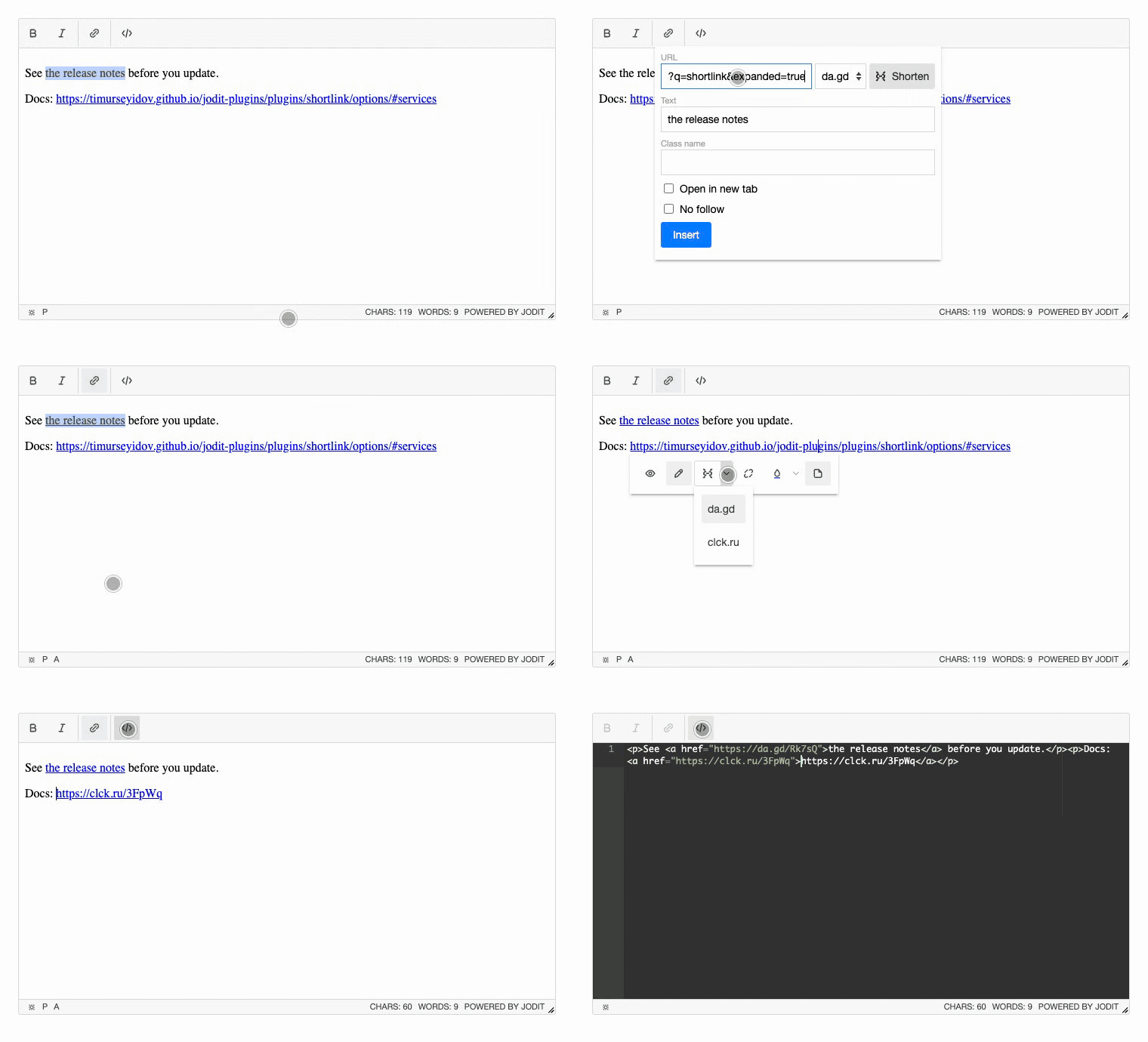
**[Documentation and live demo](https://timurseyidov.github.io/jodit-plugins/plugins/shortlink/)**
## Install
```shell
npm install jodit jodit-plugin-shortlink
```
```js
import { Jodit } from 'jodit';
import 'jodit/es2021/jodit.min.css';
import 'jodit-plugin-shortlink';
Jodit.make('#editor', {
shortlink: { service: 'clck' }
});
```
## CDN
```html
```
Loading through the Jodit `extraPlugins` option is supported too; see [Installation](https://timurseyidov.github.io/jodit-plugins/plugins/shortlink/installation/).
## Options
| Option | Default | Description |
| --- | --- | --- |
| `service` | `'dagd'` | `'dagd'` (da.gd), `'clck'` (clck.ru) or a function `(url, signal) => Promise` |
| `services` | `{ dagd: true, clck: true }` | Services the user chooses from in the form and the link toolbar; `{ title, service }` adds your own |
| `remember` | `true` | Remember the chosen service in the browser |
| `timeout` | `10000` | Time to wait for the service, in milliseconds |
| `replaceText` | `true` | When the text of a link is its URL, put the short link into the text too |
Details: [Options](https://timurseyidov.github.io/jodit-plugins/plugins/shortlink/options/).
The URL of the link is sent to the chosen service. Choose the one your site's privacy policy allows, or use your own.
## Changelog
See [CHANGELOG.md](https://github.com/TimurSeyidov/jodit-plugins/blob/main/packages/shortlink/CHANGELOG.md) or the [releases](https://github.com/TimurSeyidov/jodit-plugins/releases).
## License
[MIT](https://github.com/TimurSeyidov/jodit-plugins/blob/main/LICENSE)