# Data generation Jodit plugin
[](https://www.npmjs.com/package/jodit-plugin-datagen)
[](https://www.npmjs.com/package/jodit-plugin-datagen)
[](https://www.jsdelivr.com/package/npm/jodit-plugin-datagen)
[](https://github.com/TimurSeyidov/jodit-plugins/actions/workflows/ci.yml)
[](https://codecov.io/gh/TimurSeyidov/jodit-plugins)
[](https://github.com/TimurSeyidov/jodit-plugins/blob/main/LICENSE)
Sample content for the [Jodit](https://xdsoft.net/jodit/) editor. A toolbar button opens a dialog that inserts posts, quotes, comments, to-do lists, people, products, reviews, recipes, an order with totals or placeholder images, with data from [DummyJSON](https://dummyjson.com/). Choose a ready layout — headings and paragraphs, lists, tables, cards — or write your own template with placeholders like `{{title}}` and filters like `{{tags|ul}}`, check the preview and insert.
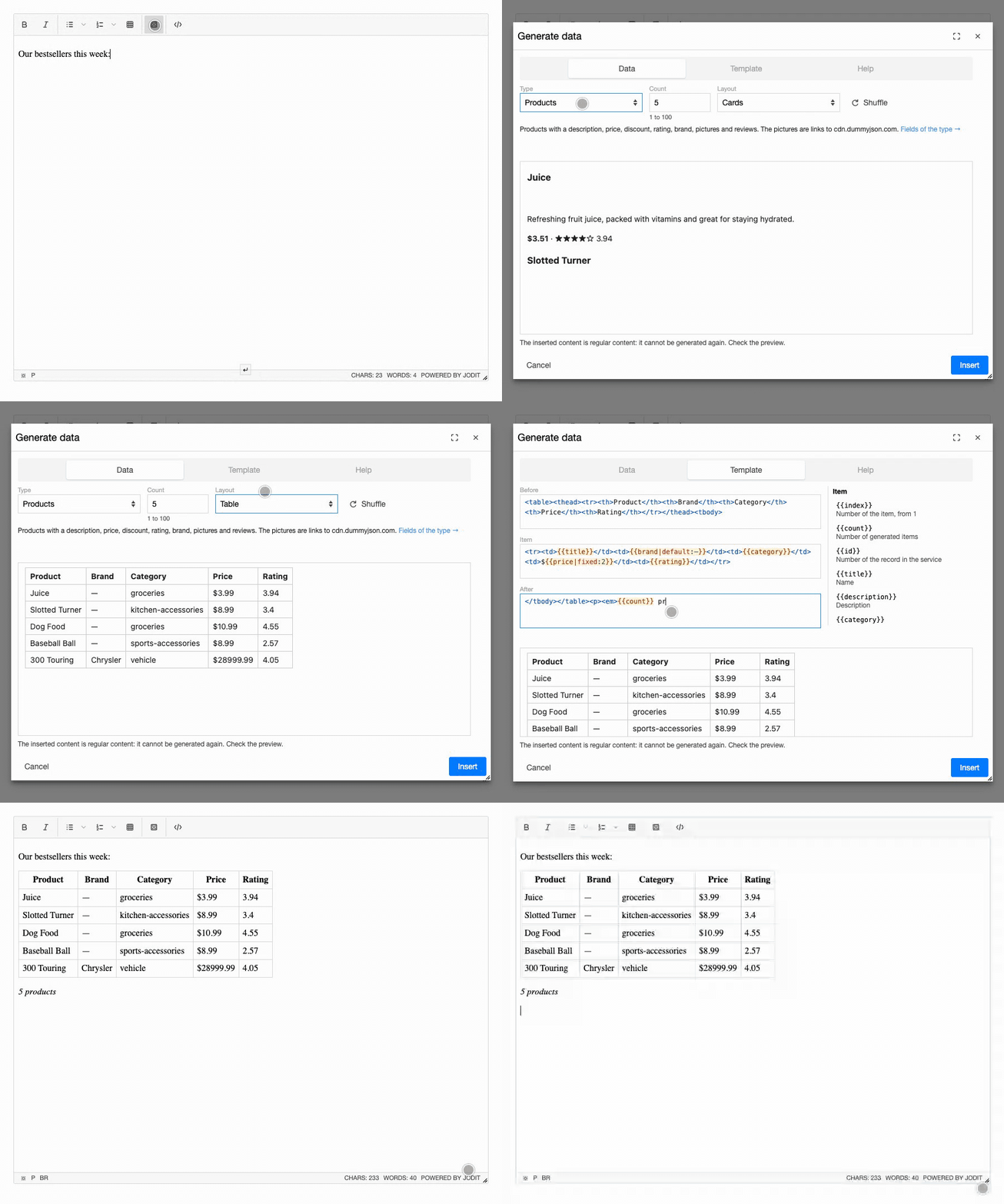
**[Documentation and live demo](https://timurseyidov.github.io/jodit-plugins/plugins/datagen/)**
## Install
```shell
npm install jodit jodit-plugin-datagen
```
```js
import { Jodit } from 'jodit';
import 'jodit/es2021/jodit.min.css';
import 'jodit-plugin-datagen';
Jodit.make('#editor', {
datagen: { maxCount: 20 }
});
```
## CDN
```html
```
Loading through the Jodit `extraPlugins` option is supported too; see [Installation](https://timurseyidov.github.io/jodit-plugins/plugins/datagen/installation/).
## Options
| Option | Default | Description |
| --- | --- | --- |
| `baseUrl` | `'https://dummyjson.com'` | Address of the data service; DummyJSON is open source and can run on your servers |
| `types` | all types | Types offered in the dialog: `{ users: false }` hides one |
| `layouts` | none | Layouts of your site: `{ key: { type, title, before, item, after } }` |
| `maxCount` | `100` | Most items generated at once |
| `defaultCount` | `5` | Number of items offered the first time |
| `remember` | `true` | Remember the type, the number, the layouts and your templates in the browser |
| `timeout` | `10000` | Time to wait for the data service, in milliseconds |
Details: [Options](https://timurseyidov.github.io/jodit-plugins/plugins/datagen/options/), [Templates](https://timurseyidov.github.io/jodit-plugins/plugins/datagen/templates/), [Types of data](https://timurseyidov.github.io/jodit-plugins/plugins/datagen/types/).
The inserted content is plain HTML with no marks of the plugin: it cannot be generated again, so check the preview. The data is loaded from dummyjson.com (or your `baseUrl`) in the browser of the person who edits the text; nothing from the editor is sent.
## Changelog
See [CHANGELOG.md](https://github.com/TimurSeyidov/jodit-plugins/blob/main/packages/datagen/CHANGELOG.md) or the [releases](https://github.com/TimurSeyidov/jodit-plugins/releases).
## License
[MIT](https://github.com/TimurSeyidov/jodit-plugins/blob/main/LICENSE)