# jest-image-snapshot
[
](https://badge.fury.io/js/jest-image-snapshot
) [
](https://travis-ci.org/americanexpress/jest-image-snapshot
)
Jest matcher that performs image comparisons using [pixelmatch](https://github.com/mapbox/pixelmatch) and behaves just like [Jest snapshots](https://facebook.github.io/jest/docs/snapshot-testing.html) do! Very useful for visual regression testing.
This fork uses gaussian blur at 2px radius for noise reduction.
## Installation:
```bash
npm i --save-dev jest-image-gaussian-snapshot
```
Please note that `Jest` `>=20 <=22` is a peerDependency. `jest-image-gaussian-snapshot` will **not** work with anything below Jest 20.x.x
## Usage:
1. Extend Jest's `expect`
```javascript
const { toMatchImageSnapshot } = require('jest-image-gaussian-snapshot');
expect.extend({ toMatchImageSnapshot });
```
2. Use `toMatchImageSnapshot()` in your tests!
```javascript
it('should demonstrate this matcher`s usage', () => {
...
expect(image).toMatchImageSnapshot();
});
```
See [the examples](./examples/README.md) for more detailed usage
### Optional configuration:
`toMatchImageSnapshot()` takes an optional options object with the following properties:
* `customDiffConfig`: Custom config passed to [pixelmatch](https://github.com/mapbox/pixelmatch#pixelmatchimg1-img2-output-width-height-options) (See options section)
* By default we have set the `threshold` to 0.01, you can increase that value by passing a customDiffConfig as demonstrated below.
* Please note the `threshold` set in the `customDiffConfig` is the per pixel sensitivity threshold. For example with a source pixel colour of `#ffffff` (white) and a comparison pixel colour of `#fcfcfc` (really light grey) if you set the threshold to 0 then it would trigger a failure *on that pixel*. However if you were to use say 0.5 then it wouldn't, the colour difference would need to be much more extreme to trigger a failure on that pixel, say `#000000` (black)
* `customSnapshotsDir`: A custom absolute path of a directory to keep this snapshot in
* `customSnapshotIdentifier`: A custom name to give this snapshot. If not provided one is computed automatically
* `noColors`: (default `false`) Removes colouring from console output, useful if storing the results in a file
* `failureThreshold`: (default `0`) Sets the threshold that would trigger a test failure based on the `failureThresholdType` selected. This is different to the `customDiffConfig.threshold` above, that is the per pixel failure threshold, this is the failure threshold for the entire comparison.
* `failureThresholdType`: (default `pixel`) (options `percent` or `pixel`) Sets the type of threshold that would trigger a failure.
```javascript
it('should demonstrate this matcher`s usage with a custom pixelmatch config', () => {
...
const customConfig = { threshold: 0.5 };
expect(image).toMatchImageSnapshot({
customDiffConfig: customConfig,
customSnapshotIdentifier: 'customSnapshotName',
noColors: true
});
});
```
The failure threshold can be set in percent, in this case if the difference is over 1%.
```javascript
it('should fail if there is more than a 1% difference', () => {
...
expect(image).toMatchImageSnapshot({
failureThreshold: '0.01',
failureThresholdType: 'percent'
});
});
```
Custom defaults can be set with a configurable extension. This will allow for customization of this module's defaults. For example, a 0% default threshold can be shared across all tests with the configuration below:
```javascript
const { configureToMatchImageSnapshot } = require('jest-image-gaussian-snapshot');
const customConfig = { threshold: 0 };
const toMatchImageSnapshot = configureToMatchImageSnapshot({
customDiffConfig: customConfig,
noColors: true,
});
expect.extend({ toMatchImageSnapshot });
```
## How it works
Given an image (Buffer instance with PNG image data) the `toMatchImageSnapshot()` matcher will create a `__image_snapshots__` directory in the directory the test is in and will store the baseline snapshot image there on the first run. Note that if `customSnapshotsDir` option is given then it will store baseline snapshot there instead.
On subsequent test runs the matcher will compare the image being passed against the stored snapshot.
To update the stored image snapshot run Jest with `--updateSnapshot` or `-u` argument. All this works the same way as [Jest snapshots](https://facebook.github.io/jest/docs/snapshot-testing.html).
## See it in action
Typically this matcher is used to for visual tests that run on a browser. For example let's say I finish working on a feature and want to write a test to prevent visual regressions:
```javascript
...
it('renders correctly', async () => {
const page = await browser.newPage();
await page.goto('https://localhost:3000');
const image = await page.screenshot();
expect(image).toMatchImageSnapshot();
});
...
```
 Then after a few days as I finish adding another feature to my component I notice one of my tests failing!
 Oh no! I must have introduced a regression! Let's see what the diff looks like to identify what I need to fix:
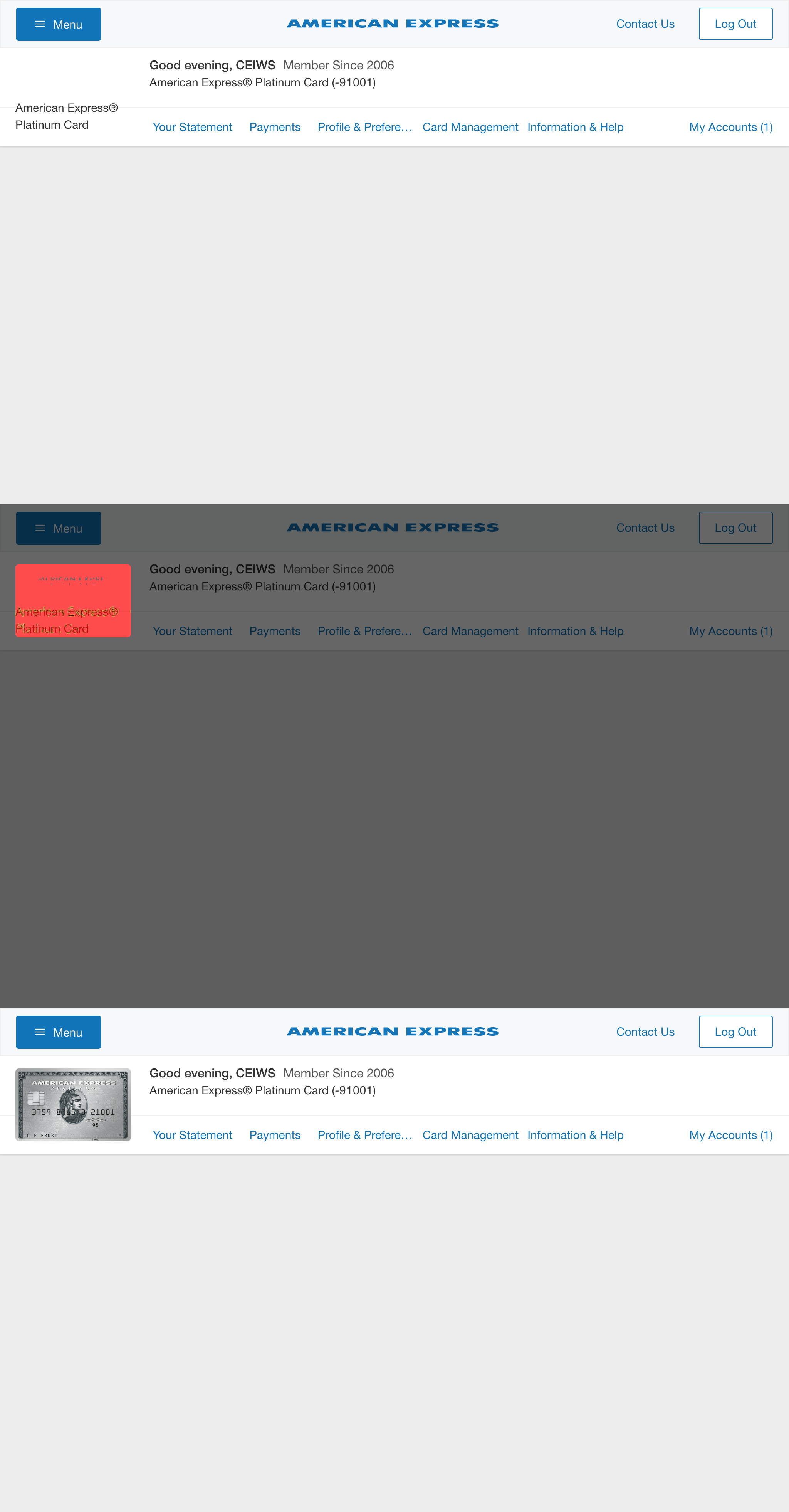 And now that I know that I broke the card art I can fix it!
Thanks `jest-image-gaussian-snapshot`, that broken header would not have looked good in production!
## Contributing
We welcome Your interest in the American Express Open Source Community on Github.
Any Contributor to any Open Source Project managed by the American Express Open
Source Community must accept and sign an Agreement indicating agreement to the
terms below. Except for the rights granted in this Agreement to American Express
and to recipients of software distributed by American Express, You reserve all
right, title, and interest, if any, in and to Your Contributions. Please [fill
out the Agreement](https://cla-assistant.io/americanexpress/jest-image-snapshot).
Please feel free to open pull requests and see [CONTRIBUTING.md](./CONTRIBUTING.md) for commit formatting details.
## License
Any contributions made under this project will be governed by the [Apache License
2.0](https://github.com/americanexpress/jest-image-snapshot/blob/master/LICENSE.txt).
## Code of Conduct
This project adheres to the [American Express Community Guidelines](https://github.com/americanexpress/jest-image-snapshot/wiki/Code-of-Conduct).
By participating, you are expected to honor these guidelines.
And now that I know that I broke the card art I can fix it!
Thanks `jest-image-gaussian-snapshot`, that broken header would not have looked good in production!
## Contributing
We welcome Your interest in the American Express Open Source Community on Github.
Any Contributor to any Open Source Project managed by the American Express Open
Source Community must accept and sign an Agreement indicating agreement to the
terms below. Except for the rights granted in this Agreement to American Express
and to recipients of software distributed by American Express, You reserve all
right, title, and interest, if any, in and to Your Contributions. Please [fill
out the Agreement](https://cla-assistant.io/americanexpress/jest-image-snapshot).
Please feel free to open pull requests and see [CONTRIBUTING.md](./CONTRIBUTING.md) for commit formatting details.
## License
Any contributions made under this project will be governed by the [Apache License
2.0](https://github.com/americanexpress/jest-image-snapshot/blob/master/LICENSE.txt).
## Code of Conduct
This project adheres to the [American Express Community Guidelines](https://github.com/americanexpress/jest-image-snapshot/wiki/Code-of-Conduct).
By participating, you are expected to honor these guidelines.