# Jarallax
 
Parallax scrolling for modern browsers. Supported <img> tags, background images, YouTube, Vimeo and Self-Hosted Videos.
## [Online Demo](https://jarallax.nkdev.info/)
## Table of Contents
- [WordPress Plugin](#wordpress-plugin)
- [Quick Start](#quick-start)
- [Import Jarallax](#import-jarallax)
- [ESM](#esm)
- [ESM CDN](#esm-cdn)
- [UMD](#umd)
- [UMD CDN](#umd-cdn)
- [Package Imports (Bundlers / Node)](#package-imports-bundlers--node)
- [TypeScript](#typescript)
- [React / Next.js](#react--nextjs)
- [Prepare HTML](#prepare-html)
- [Run Jarallax](#run-jarallax)
- [A. JavaScript way](#a-javascript-way)
- [B. Data attribute way](#b-data-attribute-way)
- [C. jQuery way](#c-jquery-way)
- [Background Video Usage Examples](#background-video-usage-examples)
- [A. JavaScript way](#a-javascript-way-1)
- [B. Data attribute way](#b-data-attribute-way-1)
- [Options](#options)
- [Reduced motion](#reduced-motion)
- [Disable on mobile devices](#disable-on-mobile-devices)
- [Additional options for video extension](#additional-options-for-video-extension)
- [Events](#events)
- [Additional events for video extension](#additional-events-for-video-extension)
- [onScroll event](#onscroll-event)
- [Methods](#methods)
- [Call methods example](#call-methods-example)
- [A. JavaScript way](#a-javascript-way-2)
- [B. jQuery way](#b-jquery-way)
- [For Developers](#for-developers)
- [Real Usage Examples](#real-usage-examples)
- [Credits](#credits)
## WordPress Plugin
[](https://wordpress.org/plugins/advanced-backgrounds/)
We made WordPress plugin to easily add backgrounds for content in your blog with all Jarallax features.
Demo:
Download:
## Quick Start
There are a set of examples, which you can use as a starting point with Jarallax.
- [ES Modules](examples/es-modules)
- [React](examples/react)
- [React Hooks](examples/react-hooks)
- [JavaScript](examples/javascript)
- [Next.js App Router](examples/next)
- [Next.js App Router Advanced Usage](examples/next-advanced)
- [HTML](examples/html)
- [jQuery](examples/jquery)
## Import Jarallax
Use one of the following examples to import jarallax.
### ESM
We ship self-hosted ESM bundles (`dist/jarallax.esm.js` and `dist/jarallax.esm.min.js`) for browsers that support ES modules.
```html
```
### ESM CDN
```html
```
### UMD
Jarallax may be also used in a traditional way by including script in HTML and using library by accessing `window.jarallax`.
```html
```
### UMD CDN
```html
```
### Package Imports (Bundlers / Node)
Install Jarallax as a Node.js module using npm.
```
npm install jarallax
```
Use the package root in modern bundlers:
```javascript
import { jarallax, jarallaxVideo } from "jarallax";
import 'jarallax/dist/jarallax.min.css';
// Optional video extension
jarallaxVideo();
jarallax(document.querySelectorAll('.jarallax'));
```
The package root is safe to import in SSR and Node toolchains, but Jarallax is still a frontend-only runtime and must only be initialized once a real browser DOM exists.
The CommonJS entry point remains available for older bundlers and browser-targeted build setups:
```javascript
const { jarallax, jarallaxVideo } = require('jarallax');
require('jarallax/dist/jarallax.min.css');
jarallaxVideo();
jarallax(document.querySelectorAll('.jarallax'));
```
In SSR frameworks such as React or Next.js, keep the import at module scope if you want, but call `jarallax()` only in a client-only lifecycle or behind a `typeof window !== 'undefined'` guard.
### TypeScript
Generated declarations are published from `dist/types`, while `typings/index.d.ts` remains as a compatibility re-export.
```ts
import { jarallax, jarallaxVideo, type JarallaxOptions } from 'jarallax';
import 'jarallax/dist/jarallax.min.css';
const options: JarallaxOptions = {
speed: 0.2,
videoSrc: 'https://www.youtube.com/watch?v=ab0TSkLe-E0',
};
jarallaxVideo();
jarallax(document.querySelectorAll('.jarallax'), options);
```
### React / Next.js
The `jarallax/react` subpath keeps imports SSR-safe while delaying all DOM work until `useEffect` runs on the client.
The built-in React components apply the required base Jarallax styles automatically, so you do not need to import `jarallax.css` manually when using `Jarallax`, `JarallaxImage`, or `JarallaxVideo`.
Component API:
```tsx
'use client';
import {
Jarallax,
JarallaxImage,
JarallaxVideo,
} from 'jarallax/react';
export function Hero() {
return (
Jarallax React
);
}
export function VideoHero() {
return (
);
}
```
Hook API for custom markup:
```tsx
'use client';
import { useJarallax } from 'jarallax/react';
export function CustomMarkupHero() {
const ref = useJarallax({
options: {
speed: 0.4,
},
});
return (
Hook-based markup control
);
}
```
Video hook API:
```tsx
'use client';
import { useJarallaxVideo } from 'jarallax/react';
export function CustomVideoHero() {
const ref = useJarallaxVideo({
options: {
speed: 0.2,
},
videoSrc: 'https://youtu.be/mru3Q5m4lkY',
});
return ;
}
```
`useJarallax` and `useJarallaxVideo` are part of the React API when you want full control over the rendered markup.
For Next.js App Router, keep these components in files marked with `'use client';`. Server rendering only outputs regular HTML, and the parallax instance is created after hydration on the client.
## Prepare HTML
```html
Your content here...
Your content here...
Your content here...
```
## Run Jarallax
Note: automatic data-attribute initialization and jQuery integration are available in UMD mode only.
### A. JavaScript way
```javascript
jarallax(document.querySelectorAll('.jarallax'), {
speed: 0.2,
});
```
### B. Data attribute way
```html
Your content here...
```
Note: You can use all available options as data attributes. For example: `data-speed`, `data-img-src`, `data-img-size`, etc...
### C. jQuery way
```javascript
$('.jarallax').jarallax({
speed: 0.2,
});
```
#### No conflict (only if you use jQuery)
Sometimes to prevent existing namespace collisions you may call `.noConflict` on the script to revert the value of.
```javascript
const jarallaxPlugin = $.fn.jarallax.noConflict() // return $.fn.jarallax to previously assigned value
$.fn.newJarallax = jarallaxPlugin // give $().newJarallax the Jarallax functionality
```
## Background Video Usage Examples
### A. JavaScript way
```javascript
import { jarallax, jarallaxVideo } from 'jarallax';
jarallaxVideo();
jarallax(document.querySelectorAll('.jarallax'), {
speed: 0.2,
videoSrc: 'https://www.youtube.com/watch?v=ab0TSkLe-E0'
});
```
```html
```
### B. Data attribute way
```html
Your content here...
Your content here...
Your content here...
```
Note: self-hosted videos require 1 video type only, not necessarily using all mp4, webm, and ogv. This is only needed for maximum compatibility with all browsers.
## Options
Options can be passed in data attributes or in object when you initialize jarallax from script.
Name | Type | Default | Description
:--- | :--- | :------ | :----------
type | string | `scroll` | scroll, scale, opacity, scroll-opacity, scale-opacity.
speed | float | `0.5` | Parallax effect speed. Provide numbers from -1.0 to 2.0.
containerClass | string | `jarallax-container` | Container block class attribute.
imgSrc | path | `null` | Image url. By default used image from background.
imgElement | dom / selector | `.jarallax-img` | Image tag that will be used as background.
imgSize | string | `cover` | Image size. If you use `` tag for background, you should add `object-fit` values, else use `background-size` values.
imgPosition | string | `50% 50%` | Image position. If you use `` tag for background, you should add `object-position` values, else use `background-position` values.
imgRepeat | string | `no-repeat` | Image repeat. Supported only `background-position` values.
keepImg | boolean | `false` | Keep `` tag in it's default place after Jarallax inited.
elementInViewport | dom | `null` | Use custom DOM / jQuery element to check if parallax block in viewport. More info here - [Issue 13](https://github.com/nk-o/jarallax/issues/13).
zIndex | number | `-100` | z-index of parallax container.
disableParallax | boolean / RegExp / function | - | Disable parallax on specific user agents (using regular expression) or with function return value. The image will be set on the background.
### Disable on mobile devices
You can disable parallax effect and/or video background on mobile devices using option `disableParallax` and/or `disableVideo`.
Example:
```javascript
jarallax(document.querySelectorAll('.jarallax'), {
disableParallax: /iPad|iPhone|iPod|Android/,
disableVideo: /iPad|iPhone|iPod|Android/
});
```
Or using function. Example:
```javascript
jarallax(document.querySelectorAll('.jarallax'), {
disableParallax: function () {
return /iPad|iPhone|iPod|Android/.test(navigator.userAgent);
},
disableVideo: function () {
return /iPad|iPhone|iPod|Android/.test(navigator.userAgent);
}
});
```
### Reduced motion
Nothing to configure. When the reader's system asks for reduced motion, Jarallax stops on its own: the image is still covered and positioned, it just does not move with the scroll, and background video never plays. The block always keeps something to look at:
| Background | Reduced motion shows |
| :--- | :--- |
| Image | The image, positioned as usual, not moving |
| YouTube / Vimeo | The provider thumbnail; the player iframe is never requested |
| Self-hosted, with a fallback image | That image; the video is never requested |
| Self-hosted, no fallback image | The video's own first frame, inserted paused |
The parallax side matches what `disableParallax: true` already does, so the layout is the one that path has always produced. `disableVideo` keeps meaning only what you asked for — reduced motion is decided separately, because what replaces the video depends on the provider.
A fallback image (`imgSrc`, a `.jarallax-img` element, or a CSS `background-image`) is still worth adding for a self-hosted video: it gives you control over the frame and it loads faster than the video does.
Read from `(prefers-reduced-motion: reduce)` when the instance is created; changing the system setting applies on the next page load.
### Additional options for video extension
Requires the video extension bundle. In package-based apps call `jarallaxVideo()` after importing from `jarallax`. In script-tag usage load `dist/jarallax-video(.min).js` after the core bundle.
Name | Type | Default | Description
:--- | :--- | :------ | :----------
videoClass | string | `jarallax-video` | Video frame class attribute. Will also contain the type of the video, for example `jarallax-video jarallax-video-youtube`
videoSrc | string | `null` | You can use Youtube, Vimeo or Self-Hosted videos. Also you can use data attribute `data-jarallax-video`.
videoStartTime | float | `0` | Start time in seconds when video will be started (this value will be applied also after loop).
videoEndTime | float | `0` | End time in seconds when video will be ended.
videoLoop | boolean | `true` | Loop video to play infinitely.
videoPlayOnlyVisible | boolean | `true` | Play video only when it is visible on the screen.
videoLazyLoading | boolean | `true` | Preload videos only when it is visible on the screen.
videoYoutubeHost | string | - | Origin the YouTube embed is loaded from, for example `https://www.youtube-nocookie.com`. Left empty, video-worker picks its own default.
videoVimeoHost | string | - | Origin the Vimeo embed is loaded from. Left empty, video-worker picks its own default.
disableVideo | boolean / RegExp / function | - | Disable video load on specific user agents (using regular expression) or with function return value. The image will be set on the background.
## Events
Events used the same way as Options.
Name | Description
:--- | :----------
onScroll | Called when parallax working. Use first argument with calculations. More info [see below](#onscroll-event).
onInit | Called after init end.
onDestroy | Called after destroy.
onCoverImage | Called after cover image.
### Additional events for video extension
Requires the video extension bundle. In package-based apps call `jarallaxVideo()` after importing from `jarallax`. In script-tag usage load `dist/jarallax-video(.min).js` after the core bundle.
Name | Description
:--- | :----------
onVideoInsert | Called right after video is inserted in the parallax block. Video can be accessed by `this.$video`
onVideoWorkerInit | Called after VideoWorker script initialized. Available parameter with videoWorkerObject.
### onScroll event
```javascript
jarallax(document.querySelectorAll('.jarallax'), {
onScroll: function(calculations) {
console.log(calculations);
}
});
```
Console Result:
```javascript
{
// parallax section client rect (top, left, width, height)
rect : object,
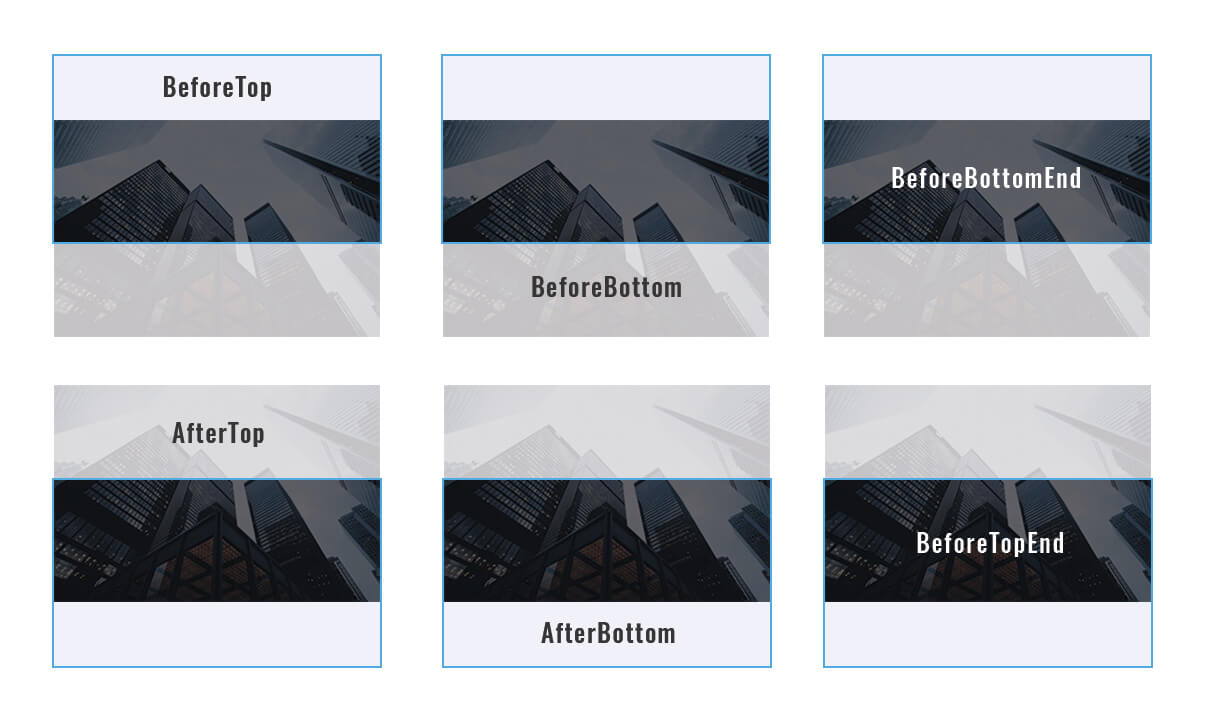
// see image below for more info
beforeTop : float,
beforeTopEnd : float,
afterTop : float,
beforeBottom : float,
beforeBottomEnd : float,
afterBottom : float,
// percent of visible part of section (from 0 to 1)
visiblePercent : float,
// percent of block position relative to center of viewport from -1 to 1
fromViewportCenter: float
}
```
Calculations example:
[](https://a.nkdev.info/jarallax/jarallax-calculations.jpg)
## Methods
Name | Result | Description
:--- | :----- | :----------
destroy | - | Destroy Jarallax and set block as it was before plugin init.
isVisible | boolean | Check if parallax block is in viewport.
onResize | - | Fit image and clip parallax container. Called on window resize and load.
onScroll | - | Calculate parallax image position. Called on window scroll.
### Call methods example
#### A. JavaScript way
```javascript
jarallax(document.querySelectorAll('.jarallax'), 'destroy');
```
#### B. jQuery way
```javascript
$('.jarallax').jarallax('destroy');
```
## For Developers
### Installation
* Run `npm install` in the repository root
### Core workflows
* `npm run dev` to run build and start local server with files watcher
* `npm run build` to build all distributable bundles and declarations
* `npm run typecheck` to type-check source and Vitest coverage
### Quality checks
* `npm run lint` to run Biome lint checks
* `npm run lint:fix` to apply Biome lint fixes
* `npm run format:check` to verify formatting
* `npm run format` to apply formatting
### Test
* `npm run test` for interactive Vitest
* `npm run test:run` for a single CI-style test run
* `npm run test:coverage` for coverage output
* `npm run test:artifacts` to validate the published package contract
### Examples in this repository
* The HTML, JavaScript, jQuery, and ES modules examples under `examples/` use CDN assets so they can be opened without a local package build
* In `examples/es-modules`, run `npm install` and `npm run dev` to serve the example through BrowserSync while keeping CDN imports
* In `examples/next`, run `npm install` and `npm run dev` to test the published package shape through Next.js
* In `examples/next-advanced`, run `npm install` and `npm run dev` to test dynamic block updates against the published package shape
## Real Usage Examples
* [AWB](https://wpbackgrounds.com/)
* [Godlike](https://demo.nkdev.info/#godlike)
* [Youplay](https://demo.nkdev.info/#youplay)
* [Skylith](https://demo.nkdev.info/#skylith)
* [Khaki](https://demo.nkdev.info/#khaki)
## Credits
* Images
* Videos