
发送微博
内部通过node-weibo-twitter实现
现阶段仅支持发文字微博,并不支持网络代理
token: 字符串 必填项 微博账户的access token
text: 字符串 微博内容
status: 布尔值 如果发送成功,输出true,反之输出false
发送了内容为hello的微博。微博的账号和发送设备都是通过token决定的。
从新浪微博接收信息。
被Request实现。
有两种接收信息的方式,一种是‘all’方式:每次都会接收所有的信息;另一种是‘new’方式:只接收距上一次接收信息到现在更新的消息。
‘token’:字符串,进入微博账户的权限‘token’。
‘type’:字符串,接收信息的方式,必须是‘all’或者‘new’中的一种。
‘proxy’:字符串,可选参数,可以手动设置代理。
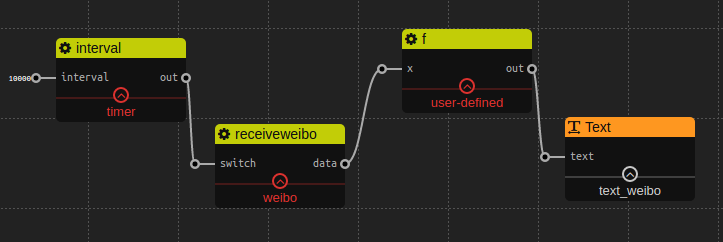
‘switch’:布尔型,判断是否接收微博,如果值为true,就会发送请求并格式化响应数据。
‘data’:对象,从微博接收的消息。注意:数据格式是对象,所以不能用‘Text’widget来显示,而需要用用户自定义的‘f’去显示。
[
    {
        "created_at": "Tue May 31 17:46:55 +0800 2011",
        "id": 11488058246,
        "text": "求关注。",
        "source": "<a href="http://weibo.com" rel="nofollow">新浪微博</a>",
        "favorited": false,
        "truncated": false,
        "in_reply_to_status_id": "",
        "in_reply_to_user_id": "",
        "in_reply_to_screen_name": "",
        "geo": null,
        "mid": "5612814510546515491",
        "reposts_count": 8,
        "comments_count": 9,
        "annotations": [],
        "user": {
            "id": 1404376560,
            "screen_name": "zaku",
            "name": "zaku",
            "province": "11",
            "city": "5",
            "location": "北京 朝阳区",
            "description": "人生五十年,乃如梦如幻;有生斯有死,壮士复何憾。",
            "url": "http://blog.sina.com.cn/zaku",
            "profile_image_url": "http://tp1.sinaimg.cn/1404376560/50/0/1",
            "domain": "zaku",
            "gender": "m",
            "followers_count": 1204,
            "friends_count": 447,
            "statuses_count": 2908,
            "favourites_count": 0,
            "created_at": "Fri Aug 28 00:00:00 +0800 2009",
            "following": false,
            "allow_all_act_msg": false,
            "remark": "",
            "geo_enabled": true,
            "verified": false,
            "allow_all_comment": true,
            "avatar_large": "http://tp1.sinaimg.cn/1404376560/180/0/1",
            "verified_reason": "",
            "follow_me": false,
            "online_status": 0,
            "bi_followers_count": 215
        }
    },
    ...
]想了解更多关于数据格式的信息,可以访问weibo