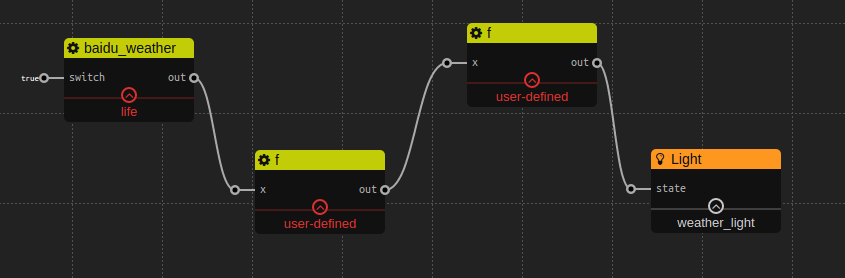
百度天气服务通过使用百度天气API获取天气预报。
我们的百度天气服务只支持百度天气API支持的城市查询天气。
‘city’: 字符串, 要查询天气的某个城市名(精确值), 并不是所有的城市都支持。
‘key’: 字符串, 百度天气API的权限key。
‘out’: 对象, 查询到的天气数据, 格式为对象。
下面这个简单的例子,展示的是,如果明天下雨,则开灯。
第一个函数的代码是:
return x['results'][0]['weather_data'][0]['date'] + x['results'][0]['weather_data'][0]['weather']第二个函数的代码是:
 if(x.indexOf("雨") === -1) {
     return false;
 } else {
     return true;
}{
"error": "0",
"status": "success",
"date": "2013-07-17",
"results": [{
"currentCity": "北京市",
"pm25": "166",
"index": [{
"title": "穿衣",
"zs": "舒适",
"tipt": "穿衣指数",
"des": "建议着长袖T恤、衬衫加单裤等服装。年老体弱者宜着针织长袖衬衫、马甲和长裤。"
}, {
"title": "洗车",
"zs": "不宜",
"tipt": "洗车指数",
"des": "不宜洗车,未来24小时内有雨,如果在此期间洗车,雨水和路上的泥水可能会再次弄脏您的爱车。"
}, {
"title": "感冒",
"zs": "较易发",
"tipt": "感冒指数",
"des": "相对今天出现了较大幅度降温,较易发生感冒,体质较弱的朋友请注意适当防护。"
}, {
"title": "运动",
"zs": "较不宜",
"tipt": "运动指数",
"des": "有降水,推荐您在室内进行健身休闲运动;若坚持户外运动,须注意携带雨具并注意避雨防滑。"
}, {
"title": "紫外线强度",
"zs": "弱",
"tipt": "紫外线强度指数",
"des": "紫外线强度较弱,建议出门前涂擦SPF在12-15之间、PA+的防晒护肤品。"
}],
"weather_data": [{
"date": "周三(今天, 实时:24℃)",
"dayPictureUrl": "http://api.map.baidu.com/images/weather/day/duoyun.png",
"nightPictureUrl": "http://api.map.baidu.com/images/weather/night/duoyun.png",
"weather": "多云",
"wind": "微风",
"temperature": "23℃~ 15℃"
}, {
"date": "明天(周四)",
"dayPictureUrl": "http://api.map.baidu.com/images/weather/day/leizhenyu.png",
"nightPictureUrl": "http://api.map.baidu.com/images/weather/night/zhongyu.png",
"weather": "雷阵雨转中雨",
"wind": "微风",
"temperature": "29~22℃"
}, {
"date": "后天(周五)",
"dayPictureUrl": "http://api.map.baidu.com/images/weather/day/yin.png",
"nightPictureUrl": "http://api.map.baidu.com/images/weather/night/duoyun.png",
"weather": "阴转多云",
"wind": "微风",
"temperature": "31~23℃"
}, {
"date": "大后天(周六)",
"dayPictureUrl": "http://api.map.baidu.com/images/weather/day/duoyun.png",
"nightPictureUrl": "http://api.map.baidu.com/images/weather/night/duoyun.png",
"weather": "多云",
"wind": "微风",
"temperature": "31~24℃"
}]
}]
}想要了解更多关于百度API的信息, 可以访问baidu weather api
通过rss服务可以订阅rss消息, 就像一个简单的rss阅读器。 支持ATOM和RSS。
‘url’: 字符串, rss源url。 ‘proxy’: 字符串, 可选参数, 可以配置代理。
‘switch’: 布尔型, 判断是否启动rss服务, 如果值为‘true’,则会发送订阅消息请求,并格式化返回数据。
‘out’: 对象, 来自配置参数‘url’网站的Rss内容, 注意: 返回的格式化数据是对象类型,所以不能简单的用‘Text’widget来显示它,而应该用用户自定义的‘f’去显示。
下面是一个关于订阅知乎上rss信息的例子。RSS url 是:
http://www.zhihu.com/rss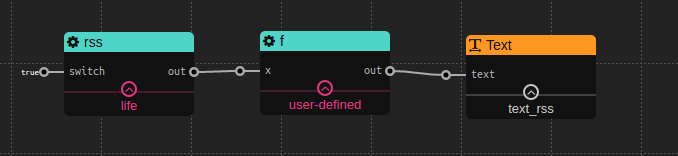
函数代码是:
return JSON.stringify(x);[
{
"title": "NBA明星们的专属logo有哪些?",
"content": "作为一个Sneaker,很多球星logo都是烂熟于心。<br>有些logo的设计令人叹为观止,在icon设计上的水平,完全不啻于球鞋的工业设计水准...",
"published": "2016-08-04T10:30:00.000Z",
"link": 'http://www.zhihu.com/question/49195604/answer/114767321?utm_campaign=rss&utm_medium=rss&utm_source=rss&utm_content=title'
}
...
]通过阿里大于短信服务可以发送信息。 可以访问阿里大于去了解怎样使用阿里大于和获得配置。
‘app_key’: 字符串,与阿里大于的公共参数一样。
’sms_free_sign_name‘: 字符串, 与阿里大于的请求参数一样。
’sms_template_code‘:字符串, 与阿里大于的请求参数一样。
’secret‘:字符串,用于产生签名的app密钥。
‘proxy’:字符串,可选参数,可以手动配置代码。
to_number:字符串, 阿里大于短信服务发送信息的目的地。
sms_param:对象或者字符串, 如果它是字符串,本服务便会将它转化为对象, 使用时必须确保sms_param满足在阿里大于上的配置。
‘out’:对象, 发送状态, 更多的细节,可以查看‘output Format’。
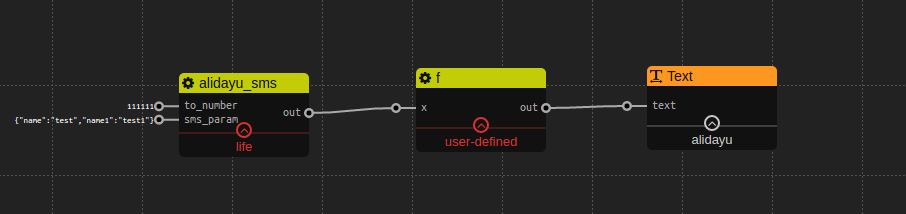
//成功
{
    "status": true,
    "detail": {
        "alibaba_aliqin_fc_sms_num_send_response":{
            "result":{
                "err_code":"0",
                "model":"134523^4351232",
                "success":false,
                "msg":"成功"
            }
        }
    }
}

//失败
{
    "status": false,
    "detail"; "fail reason"
}