# 📅 ion2-calendar
[](https://travis-ci.org/HsuanXyz/ion2-calendar)
[](https://david-dm.org/HsuanXyz/ion2-calendar)
[![NPM version][npm-image]][npm-url]
[![Downloads][downloads-image]][downloads-url]
[![MIT License][license-image]][license-url]
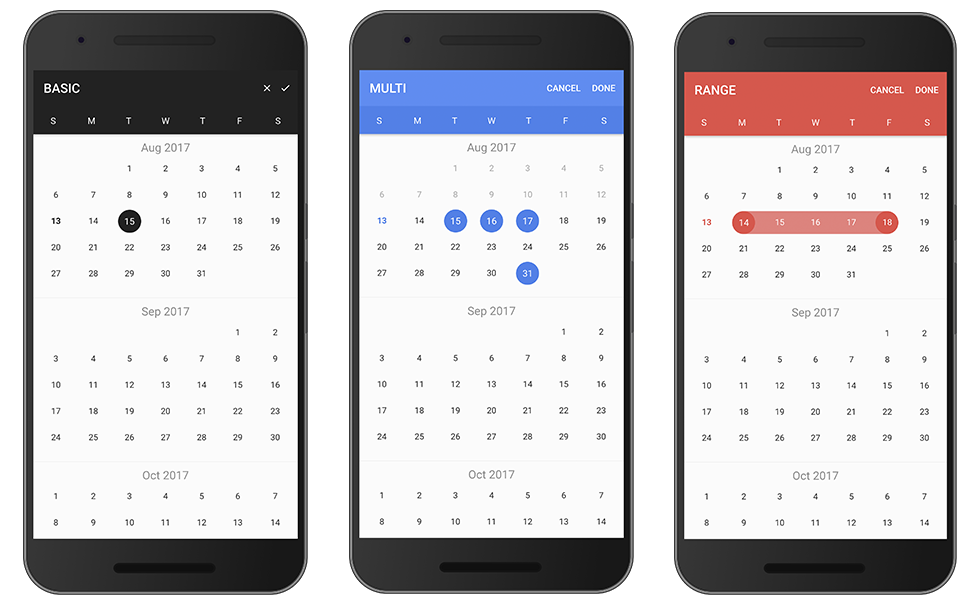

- 支持日期范围
- 支持多选
- 支持HTML组件
- 可按周数禁用日期
- 可按天设置事件
- 支持本地化
- Material 风格
# 支持
- ionic-angular `^3.0.0` [2.x](https://github.com/HsuanXyz/ion2-calendar/tree/v2)
- @ionic/angular `4.0.0`
# Demo
live demo [click me](https://www-yefjsqmtmv.now.sh/).
# 使用
### 安装
`$ npm install ion2-calendar moment --save`
### 引入模块
```typescript
import { NgModule } from '@angular/core';
import { IonicApp, IonicModule } from '@ionic/angular';
import { MyApp } from './app.component';
...
import { CalendarModule } from 'ion2-calendar';
@NgModule({
declarations: [
MyApp,
...
],
imports: [
IonicModule.forRoot(),
CalendarModule
],
bootstrap: [MyApp],
...
})
export class AppModule {}
```
# HTML 组件模式
### 基本
```html
```
```typescript
import { Component } from '@angular/core';
@Component({
selector: 'page-home',
templateUrl: 'home.html'
})
export class HomePage {
date: string;
type: 'string'; // 'string' | 'js-date' | 'moment' | 'time' | 'object'
constructor() { }
onChange($event) {
console.log($event);
}
...
}
```
### 日期范围
```html
```
```typescript
import { Component } from '@angular/core';
import { CalendarComponentOptions } from 'ion2-calendar';
@Component({
selector: 'page-home',
templateUrl: 'home.html'
})
export class HomePage {
dateRange: { from: string; to: string; };
type: 'string'; // 'string' | 'js-date' | 'moment' | 'time' | 'object'
optionsRange: CalendarComponentOptions = {
pickMode: 'range'
};
constructor() { }
...
}
```
### 日期多选
```html
```
```typescript
import { Component } from '@angular/core';
import { CalendarComponentOptions } from 'ion2-calendar';
@Component({
selector: 'page-home',
templateUrl: 'home.html'
})
export class HomePage {
dateMulti: string[];
type: 'string'; // 'string' | 'js-date' | 'moment' | 'time' | 'object'
optionsMulti: CalendarComponentOptions = {
pickMode: 'multi'
};
constructor() { }
...
}
```
### 输入属性
| Name | Type | Default | Description |
| -------- | ------------------------ | ------------ | ------------ |
| options | CalendarComponentOptions | null | 配置选项对象 |
| format | string | 'YYYY-MM-DD' | 格式 |
| type | string | 'string' | 类型 |
| readonly | boolean | false | 只读 |
### 输出属性
| Name | Type | Description |
| ----------- | ------------ | ----------- |
| change | EventEmitter | 模型被改变 |
| monthChange | EventEmitter | 月份被改变 |
| select | EventEmitter | 点击天按钮 |
| selectStart | EventEmitter | 点击天按钮 |
| selectEnd | EventEmitter | 点击天按钮 |
### CalendarComponentOptions
| Name | Type | Default | Description |
| ----------------- | ----------------------- | -------------------------------------------------------------------------------------- | ------------------------------------------------------ |
| from | Date | `new Date()` | 开始日期 |
| to | Date | 0 (Infinite) | 结束日期 |
| color | string | `'primary'` | 颜色 'primary', 'secondary', 'danger', 'light', 'dark' |
| pickMode | string | `single` | 模式 'multi', 'range', 'single' |
| showToggleButtons | boolean | `true` | 显示月份切换按钮 |
| showMonthPicker | boolean | `true` | 显示月份选择器 |
| monthPickerFormat | Array | `['JAN', 'FEB', 'MAR', 'APR', 'MAY', 'JUN', 'JUL', 'AUG', 'SEP', 'OCT', 'NOV', 'DEC']` | 月份选择器格式 |
| defaultTitle | string | '' | 每天的默认标题 |
| defaultSubtitle | string | '' | 每天的默认副标题 |
| disableWeeks | Array | `[]` | 按周数禁用 (0-6) |
| monthFormat | string | `'MMM YYYY'` | 标题格式 |
| weekdays | Array | `['S', 'M', 'T', 'W', 'T', 'F', 'S']` | 每周显示文本 |
| weekStart | number | `0` (0 or 1) | 每周从星期几开始 |
| daysConfig | Array<**_DaysConfig_**> | `[]` | 按天配置 |
# 模态框模式
### 基本
引入 ion2-calendar 到你的组件控制器。
```typescript
import { Component } from '@angular/core';
import { ModalController } from '@ionic/angular';
import {
CalendarModal,
CalendarModalOptions,
DayConfig,
CalendarResult
} from 'ion2-calendar';
@Component({
selector: 'page-home',
templateUrl: 'home.html'
})
export class HomePage {
constructor(public modalCtrl: ModalController) {}
openCalendar() {
const options: CalendarModalOptions = {
title: 'BASIC'
};
const myCalendar = await this.modalCtrl.create({
component: CalendarModal,
componentProps: { options }
});
myCalendar.present();
const event: any = await myCalendar.onDidDismiss();
const date: CalendarResult = event.data;
console.log(date);
}
}
```
### 日期范围
设置 pickMode 为 'range'.
```typescript
openCalendar() {
const options: CalendarModalOptions = {
pickMode: 'range',
title: 'RANGE'
};
const myCalendar = await this.modalCtrl.create({
component: CalendarModal,
componentProps: { options }
});
myCalendar.present();
const event: any = await myCalendar.onDidDismiss();
const date = event.data;
const from: CalendarResult = date.from;
const to: CalendarResult = date.to;
console.log(date, from, to);
}
```
### 多选日期
设置 pickMode 为 'multi'。
```typescript
openCalendar() {
const options = {
pickMode: 'multi',
title: 'MULTI'
};
const myCalendar = await this.modalCtrl.create({
component: CalendarModal,
componentProps: { options }
});
myCalendar.present();
const event: any = await myCalendar.onDidDismiss();
const date: CalendarResult = event.data;
console.log(date);
}
```
### 禁用周
使用周索引 例子: `[0, 6]` 禁用周末.
```typescript
openCalendar() {
const options: CalendarModalOptions = {
disableWeeks: [0, 6]
};
const myCalendar = await this.modalCtrl.create({
component: CalendarModal,
componentProps: { options }
});
myCalendar.present();
const event: any = await myCalendar.onDidDismiss();
const date: CalendarResult = event.data;
console.log(date);
}
```
### 本地化
你的根模块
```typescript
import { NgModule, LOCALE_ID } from '@angular/core';
...
@NgModule({
...
providers: [{ provide: LOCALE_ID, useValue: "zh-CN" }]
})
...
```
```typescript
openCalendar() {
const options: CalendarModalOptions = {
monthFormat: 'YYYY 年 MM 月 ',
weekdays: ['天', '一', '二', '三', '四', '五', '六'],
weekStart: 1,
defaultDate: new Date()
};
const myCalendar = await this.modalCtrl.create({
component: CalendarModal,
componentProps: { options }
});
myCalendar.present();
const event: any = await myCalendar.onDidDismiss();
const date: CalendarResult = event.data;
console.log(date);
}
```
### Days config
单独设置某一天或者多天
```javascript
openCalendar() {
let _daysConfig: DayConfig[] = [];
for (let i = 0; i < 31; i++) {
_daysConfig.push({
date: new Date(2017, 0, i + 1),
subTitle: `$${i + 1}`
})
}
const options: CalendarModalOptions = {
from: new Date(2017, 0, 1),
to: new Date(2017, 11.1),
daysConfig: _daysConfig
};
const myCalendar = await this.modalCtrl.create({
component: CalendarModal,
componentProps: { options }
});
myCalendar.present();
const event: any = await myCalendar.onDidDismiss();
const date: CalendarResult = event.data;
console.log(date);
}
```
# API
## 模态框控制器选项
### Options
| Name | Type | Default | Description |
| -------------------- | ------------------------ | ------------------------------------- | ------------------------------------------------------ |
| from | Date | `new Date()` | 开始日期 |
| to | Date | 0 (Infinite) | 结束日期 |
| title | string | `'CALENDAR'` | 标题 |
| color | string | `'primary'` | 颜色 'primary', 'secondary', 'danger', 'light', 'dark' |
| defaultScrollTo | Date | none | 使进入视图是默认滚动到指定日期位置 |
| defaultDate | Date | none | 默认选择的日期,适用于 'single' 模式 |
| defaultDates | Array | none | 默认选择的多个日期,适用于 'multi' 模式 |
| defaultDateRange | { from: Date, to: Date } | none | 默认选择的日期范围,适用于 'range' 模式 |
| defaultTitle | string | '' | 每天的默认标题 |
| defaultSubtitle | string | '' | 每天的默认副标题 |
| cssClass | string | `''` | 将自定义 class 插入 模态框顶级,多个用逗号分割 |
| canBackwardsSelected | boolean | `false` | 能否向后滚动 |
| pickMode | string | `single` | 'multi', 'range', 'single' |
| disableWeeks | Array | `[]` | 按周数禁用 (0-6) |
| closeLabel | string | `CANCEL` | 关闭按钮标题 |
| doneLabel | string | `DONE` | 完成按钮标题 |
| closeIcon | boolean | `false` | 使用关闭图标按钮 |
| doneIcon | boolean | `false` | 使用完成图标按钮 |
| monthFormat | string | `'MMM YYYY'` | 月份显示格式 |
| weekdays | Array | `['S', 'M', 'T', 'W', 'T', 'F', 'S']` | 星期标题 |
| weekStart | number | `0` (0 or 1) | 设置每周开始时间 |
| daysConfig | Array<**_DaysConfig_**> | `[]` | 按天配置 |
| step | number | `12` | 滚动时每次加载的月数 |
#### DaysConfig
| Name | Type | Default | Description |
| -------- | ------- | -------- | ----------------------- |
| cssClass | string | `''` | 多个用逗号分开 |
| date | Date | required | 被设置的那天 |
| marked | boolean | false | 高亮 |
| disable | boolean | false | 禁用 |
| title | string | none | 显示为什么 eg: `'今天'` |
| subTitle | string | none | 副标题 eg: `新年` |
### onDidDismiss 返回字段 `{ data } = event`
| pickMode | Type |
| -------- | -------------------------------------------------------- |
| single | { date: **_CalendarResult_** } |
| range | { from: **_CalendarResult_**, to: **_CalendarResult_** } |
| multi | Array<**_CalendarResult_**> |
### onDidDismiss 返回字段 `{ role } = event`
| Value | Description |
| ---------- | ---------------- |
| 'cancel' | 通过取消按钮关闭 |
| 'done' | 通过完成按钮关闭 |
| 'backdrop' | 点击背景关闭 |
### CalendarResult
| Name | Type |
| ------- | ------ |
| time | number |
| unix | number |
| dateObj | Date |
| string | string |
| years | number |
| months | number |
| date | number |
## 感谢阅读
[npm-url]: https://www.npmjs.com/package/ion2-calendar
[npm-image]: https://img.shields.io/npm/v/ion2-calendar.svg
[downloads-image]: https://img.shields.io/npm/dm/ion2-calendar.svg
[downloads-url]: http://badge.fury.io/js/ion2-calendar
[license-image]: http://img.shields.io/badge/license-MIT-blue.svg?style=flat
[license-url]: LICENSE