
Start
Loading settings...


Views
List of Views
| Name | Hide Name | Background Image |
|---|
No duplicates allowed! View Names have to be unique.

Devices
Please select a device to edit
| Name | NL | Heading | more_vert | Linked View | Background Image | Background Image Active | Hide |
|---|

Toolbar
Entries:
| Name | Linked View | Icon |
|---|

Homepage
The first Toolbar-Entry will be your 'Home-View' with will be loaded at start.
You can also use URL-Parameters to determine, which view or even dialog will be loaded at start (see here live_help).

Panel
States:
Options:

Images
Loading images...
Images in the folder '/usericons' can be used as icons for devices.
Images in the folder '/usersymbols' can be used as symbols for states.
You can use variables in image-filenames (see here live_help).
The folder '/userwidgets' allows uploading of html, css and js files to create widgets, which may be displayed as BACKGROUND_URL of a tile (see here live_help).
The folder '/userfonts' allows uploading of otf, ttf, woff, woff2 and eot files which can be used as font files in options (see here live_help).
(You may need to create these folders first).

Lists and Counters
| Active | Name |
|---|
No duplicates allowed! List Names have to be unique.
warning Please note: Lists are created or updated not until several seconds after saving.
Lists/Counters can be used to create dynamic lists and counters of devices and states. Examples of applications are counting open windows, switched on lamps or creating service messages. With the Device Counter widget the lists can then be visualized and also used for switching. See here for more informations and examples live_help.

Options
-
expand_more
Change Device-Options:
warning Warning: make shure you have a backup! You can create backups under Options - Backup/Restore.
Change Device-Icons:
Change Device-Options:
Change Device-States:
-
expand_more
Toolbar-Layout:
-
expand_more
Headers:
Main-Header:
Format: /userfonts/name@url. You can upload your own fonts in the Images/Widgets-Tab.Sub-Headers:
Format: /userfonts/name@url. You can upload your own fonts in the Images/Widgets-Tab.(◄ = ◄ ► = ► ◂ = ◂ ▸ = ▸ ◃ = ◃ ▹ = ▹) clear(▼ = ▼ ▲ = ▲ ▾ = ▾ ▴ = ▴ ▿ = ▿ ▵ = ▵) clearNew Line:
-
expand_more
Device-Tiles:
General:
Inactive Devices:
Inactive Devices - Background:
This only affects devices without a background-image clearThis only affects devices without a background-image clearInactive Devices - Overlay:
Active Devices:
Active Devices - Background:
This only affects devices without a background-image clearThis only affects devices without a background-image clearActive Devices - Overlay:
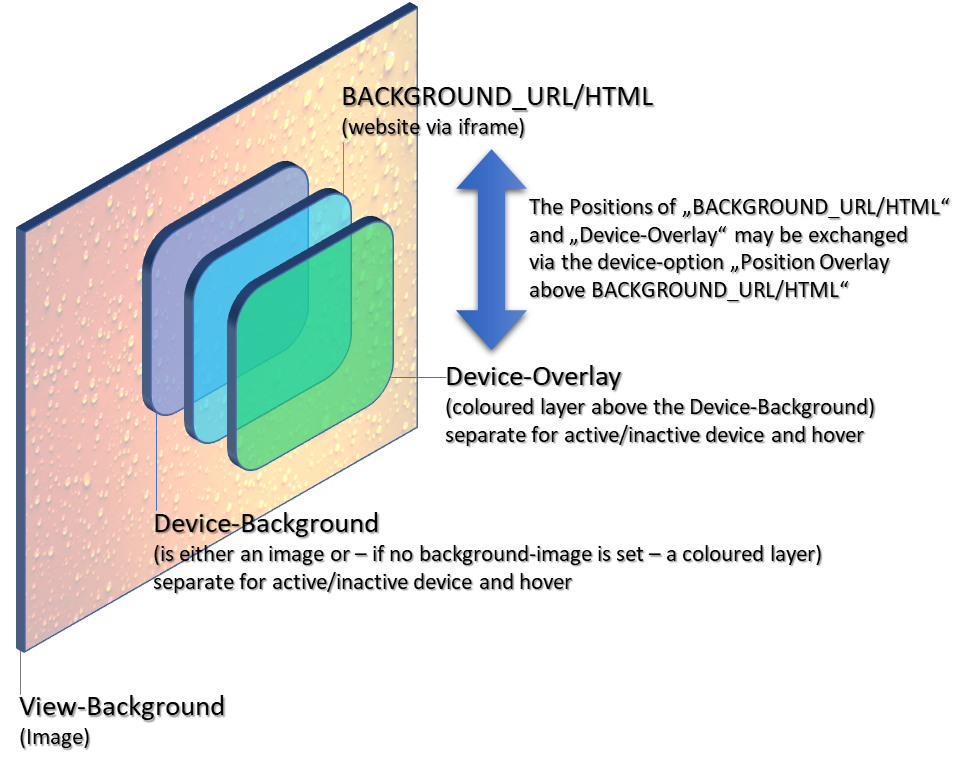
-
expand_more
Default Icons:
Icon-Preset:
Indicator Icons:
Device Icons:
INFO_A, INFO_B:
HUE/SATURATION/COLOR_BRIGHTNESS/CT/WHITE_BRIGHTNESS/ALTERNATIVE_COLORSPACE_VALUE -
expand_more
Device-Text:
Device-Name:
State:
INFO_A, INFO_B:
Badge:
Marquee (Scrolling of long text):
-
expand_more
Dark-Mode:
Settings:
Color-Settings:
Ensure to use transparency! clearToolbar - General:
Toolbar - Unselected Elements:
Toolbar - Selected Element:
Toolbar - Icons:
Main-Header:
Sub-Headers:
Devices - Icons:
Inactive Devices - Background:
Inactive Devices - Overlay:
Active Devices - Background:
Active Devices - Overlay:
Device-Name:
State:
INFO_A, INFO_B:
-
expand_more
Passphrase Protection:
Protect this instance of iQontrol via Passphrase:
The passphrase can be passed as URL parameter '&passphrase=myPassPhrase' when calling iQontrol.
warning Please note: This protection provides only a low level of security! The password is checked on the client side, which can be bypassed even with little programming knowledge.
-
expand_more
Miscellaneous:
-
expand_more
Backup/Restore:
Backup:
Restore:


