Simple button components for your React app
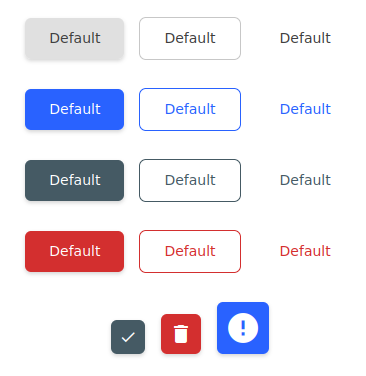
## Installation
```bash
npm install @hdoc/react-button @hdoc/react-material-icons @material-design-icons/font
```
## Usage
Import `@material-design-icons/font` in your entry file (example: src/main.jsx in Vite):
```js
import "@material-design-icons/font";
```
Check [@material-design-icons/font docs](https://www.npmjs.com/package/@material-design-icons/font#usage) for more info.
Then, in your `App.jsx` or another file:
```jsx
import { Button, ButtonIcon } from "@hdoc/react-button";
function App() {
return (
<>
...
);
}
```
## API
See documentation below for reference to all of the props and classes available for the following components:
- [``](docs/Button.md)
- [``](docs/ButtonIcon.md)
## Customization
You can customize the color of the button by using the following CSS custom properties:
```css
.any-parent-of-button-component,
.class-that-i-use-for-extending-styles {
/* NORMAL BUTTON */
--button-bg: lightgray;
--button-bg-hover: darkgray;
--button-bg-disabled: gray;
--button-color: black;
--button-color-disabled: white;
--button-shadow: 0 0 0 1px black;
/* COLOR VARIANTS: primary | secondary | danger */
--primary: blue; /* background and outline color */
--primary-hover: darkblue;
--primary-text: white;
--primary-transparent: rgba(0, 0, 255, 0.1);
/* OUTLINE AND TEXT VARIANTS */
--button-outline-color: white; /* border and font color */
--button-outline-bg-hover: black;
}
```


