# 
> Full featured image editor using HTML5 Canvas. It's easy to use and provides powerful filters.
[](https://github.com/nhnent/tui.image-editor/releases/latest) [](https://www.npmjs.com/package/tui-image-editor) [](https://github.com/nhnent/tui.image-editor/releases/latest) [](https://github.com/nhnent/tui.image-editor/blob/master/LICENSE) [](https://github.com/nhnent/tui.image-editor/issues?q=is%3Aissue+is%3Aopen+label%3A%22help+wanted%22)[](https://github.com/nhnent)
## Wrappers
- [toast-ui.vue-image-editor](https://github.com/nhnent/toast-ui.vue-image-editor): Vue wrapper component is powered by [NHN Entertainment](https://github.com/nhnent).

## 🚩 Table of Contents
* [Collect statistics on the use of open source](#Collect-statistics-on-the-use-of-open-source)
* [Browser Support](#-browser-support)
* [Has full features that stick to the basic.](#-has-full-features-that-stick-to-the-basic)
* [Photo manipulation](#photo-manipulation)
* [Integration function](#integration-function)
* [Powerful filter function](#powerful-filter-function)
* [Select only the desired function](#select-only-the-desired-function)
* [Easy to apply the size and design you want](#-easy-to-apply-the-size-and-design-you-want)
* [Can be used everywhere](#can-be-used-everywhere)
* [Nice default & Fully customizable Themes](#nice-default--fully-customizable-themes)
* [Features](#-features)
* [Install](#-install)
* [Via Package Manager](#via-package-manager)
* [Via Contents Delivery Network (CDN)](#via-contents-delivery-network-cdn)
* [Download Source Files](#download-source-files)
* [Usage](#-usage)
* [HTML](#html)
* [JavaScript](#javascript)
* [Development](#-development)
* [Setup](#setup)
* [Run webpack-dev-server](#run-webpack-dev-server)
* [Documents](#-documents)
* [Contributing](#-contributing)
* [Dependency](#-dependency)
* [TOAST UI Family](#-toast-ui-family)
* [Used By](#-used-by)
* [License](#-license)
## Collect statistics on the use of open source
TOAST UI ImageEditor applies Google Analytics (GA) to collect statistics on the use of open source, in order to identify how widely TOAST UI ImageEditor is used throughout the world. It also serves as important index to determine the future course of projects. location.hostname (e.g. > “ui.toast.com") is to be collected and the sole purpose is nothing but to measure statistics on the usage. To disable GA, use the following `usageStatistics` option when creating the instance.
```js
var options = {
...
usageStatistics: false
}
var imageEditor = new tui.ImageEditor('#tui-image-editor-container', options);
```
Or, include [`tui-code-snippet`](https://github.com/nhnent/tui.code-snippet)(**v1.4.0** or **later**) and then immediately write the options as follows:
```js
tui.usageStatistics = false;
```
## 🌏 Browser Support
| Chrome | Internet Explorer | Edge | Safari | Firefox |
| :---------: | :---------: | :---------: | :---------: | :---------: |
| Yes | 9+ | Yes | Yes | Yes |
## 💪 Has full features that stick to the basic.
### Photo manipulation
- Crop, Flip, Rotation, Drawing, Shape, Icon, Text, Mask Filter, Image Filter
### Integration function
- Download, Image Load, Undo, Redo, Reset, Delete Object(Shape, Line, Mask Image...)
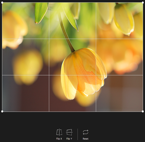
Crop
Flip
Rotation
Drawing
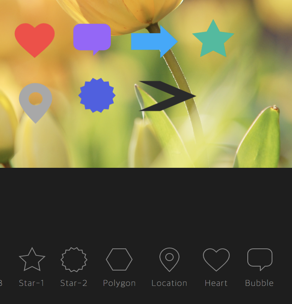
Shape
Icon
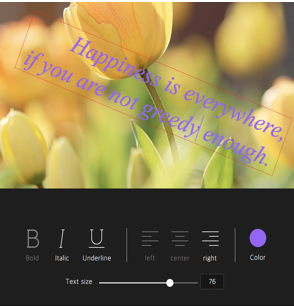
Text
Mask
Filter
### Powerful filter function
- Grayscale, Invert, Sepia, Blur Sharpen, Emboss, RemoveWhite, GradientTransparency, Brightness, Noise, Pixelate, ColorFilter, Tint, Multiply, Blend
| Grayscale | Noise | Gradient | Emboss | Pixelate |
| --- | --- | --- | --- | --- |
| 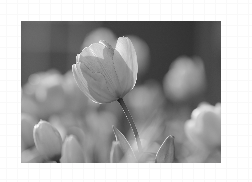 |  |  |  |  |
| Sepia | Sepia2 | Blend-righten | Blend-diff | Invert |
| --- | --- | --- | --- | --- |
| 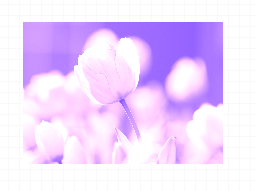 |  | 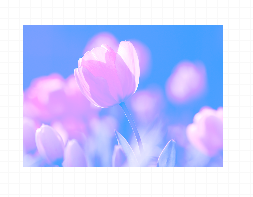 |  |  |
| Multifly | Tint | Brightness | Remove-white | Sharpen |
| --- | --- | --- | --- | --- |
|  |  |  | 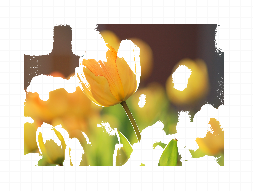 |  |
### Select only the desired function
```javascripot
var imageEditor = new tui.ImageEditor('#tui-image-editor-container', {
includeUI: {
menu: ['shape', 'crop']
...
},
...
```
## 🙆 Easy to apply the size and design you want
### Can be used everywhere.
- Widely supported in browsers including IE9, which is the minimum requirement to support canvas.
- Option to support various display sizes.
(allows you to use the editor features on your web pages at least over **550 * 450 sizes**)

### Nice default & Fully customizable Themes
- Has a white and black theme, and you can modify the theme file to customize it.
- Has an API so that you can create your own instead of the built-in.
| black - top | black - bottom | white - left | white - right |
| --- | --- | --- | --- |
|  |  | 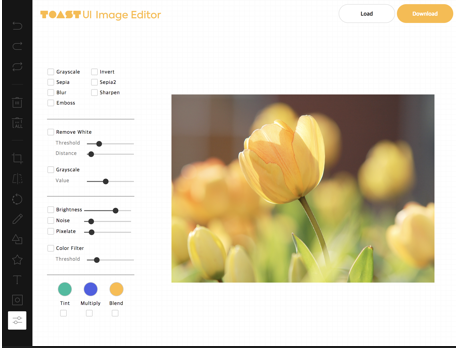 | 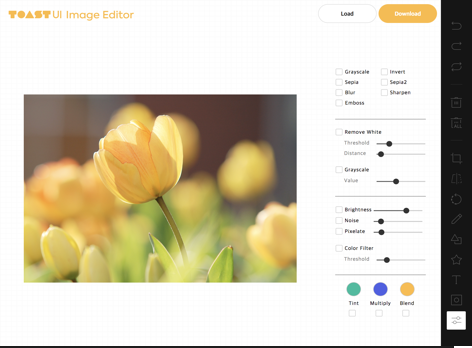 |
## 🎨 Features
* Load image to canvas
* Undo/Redo (With shortcut)
* Crop
* Flip
* Rotation
* Free drawing
* Line drawing
* Shape
* Icon
* Text
* Mask Filter
* Image Filter
## 💾 Install
The TOAST UI products can be installed by using the package manager or downloading the source directly.
However, we highly recommend using the package manager.
### Via Package Manager
You can find TOAST UI producs via [npm](https://www.npmjs.com/) and [bower](https://bower.io/) package managers.
Install by using the commands provided by each package manager.
When using npm, be sure [Node.js](https://nodejs.org) is installed in the environment.
#### npm
```sh
$ npm install --save tui-image-editor # Latest version
$ npm install --save tui-image-editor@ # Specific version
```
#### bower
```sh
$ bower install tui-image-editor # Latest version
$ bower install tui-image-editor# # Specific version
```
### Via Contents Delivery Network (CDN)
TOAST UI products are available over the CDN powered by [TOAST Cloud](https://www.toast.com).
You can use the CDN as below.
```html
```
If you want to use a specific version, use the tag name instead of `latest` in the URL.
The CDN directory has the following structure.
```
tui-image-editor/
├─ latest/
│ ├─ tui-image-editor.js
│ ├─ tui-image-editor.min.js
│ └─ tui-image-editor.css
├─ v3.1.0/
│ ├─ ...
```
### Download Source Files
* [Download bundle files from `dist` folder](https://github.com/nhnent/tui.image-editor/tree/production/dist)
* [Download all sources for each version](https://github.com/nhnent/tui.image-editor/releases)
## 🔨 Usage
### HTML
Add the container element where TOAST UI ImageEditor will be created.
``` html
...
...
```
### javascript
Add dependencies & initialize ImageEditor class with given element to make an image editor.
```javascript
var ImageEditor = require('tui-image-editor');
var blackTheme = require('./js/theme/black-theme.js');
var locale_ru_RU = { // override default English locale to your custom
'Crop': 'Обзрезать',
'Delete-all': 'Удалить всё'
// etc...
};
var instance = new ImageEditor(document.querySelector('#tui-image-editor'), {
includeUI: {
loadImage: {
path: 'img/sampleImage.jpg',
name: 'SampleImage'
},
locale: locale_ru_RU,
theme: blackTheme, // or whiteTheme
initMenu: 'filter',
menuBarPosition: 'bottom'
},
cssMaxWidth: 700,
cssMaxHeight: 500,
selectionStyle: {
cornerSize: 20,
rotatingPointOffset: 70
}
});
```
Or ~ UI
```javascript
var ImageEditor = require('tui-image-editor');
var instance = new ImageEditor(document.querySelector('#tui-image-editor'), {
cssMaxWidth: 700,
cssMaxHeight: 500,
selectionStyle: {
cornerSize: 20,
rotatingPointOffset: 70
}
});
```
See [details](https://nhnent.github.io/tui.image-editor/latest) for additional informations.
## 🔧 Development
The TOAST UI products are open-source.
After fixing issues, create a pull request(PR).
Run npm scripts and develop with the following process.
### Setup
Fork `master` branch into your personal repository.
Clone to local computer.
Install node modules.
Before starting development, check for any errors.
```sh
$ git clone https://github.com/{username}/tui.image-editor.git
$ cd tui.image-editor
$ npm install
$ npm run test
```
### Run webpack-dev-server
```sh
$ npm run serve
```
## 📙 Documents
* **Tutorial** : [https://github.com/nhnent/tui.image-editor/tree/master/docs](https://github.com/nhnent/tui.image-editor/tree/master/docs)
* **Example** : [http://nhnent.github.io/tui.image-editor/latest/tutorial-example01-includeUi.html](http://nhnent.github.io/tui.image-editor/latest/tutorial-example01-includeUi.html)
* **API** : [http://nhnent.github.io/tui.image-editor/latest/](http://nhnent.github.io/tui.image-editor/latest/)
## 💬 Contributing
* [Code of Conduct](CODE_OF_CONDUCT.md)
* [Contributing guideline](CONTRIBUTING.md)
* [Issue guideline](ISSUE_TEMPLATE.md)
* [Commit convention](https://github.com/nhnent/tui.image-editor/blob/production/docs/COMMIT_MESSAGE_CONVENTION.md)
## 🔩 Dependency
* [fabric.js](https://github.com/kangax/fabric.js/releases/tag/v1.6.7) >=1.6.7
* [tui.code-snippet](https://github.com/nhnent/tui.code-snippet/releases/tag/v1.2.5) >=1.3.0
* [tui.color-picker](https://github.com/nhnent/tui.color-picker/releases/tag/v2.2.0) >=2.2.0
## 🍞 TOAST UI Family
* [TOAST UI Editor](https://github.com/nhnent/tui.editor)
* [TOAST UI Grid](https://github.com/nhnent/tui.grid)
* [TOAST UI Chart](https://github.com/nhnent/tui.chart)
* [TOAST UI Calendar](https://github.com/nhnent/tui.calendar)
* [TOAST UI Components](https://github.com/nhnent)
## 🚀 Used By
* [TOAST Dooray! - Collaboration Service (Project, Messenger, Mail, Calendar, Drive, Wiki, Contacts)](https://dooray.com/home/)
## 📜 License
[MIT LICENSE](https://github.com/nhnent/tui.image-editor/blob/master/LICENSE)





 Chrome |
  Internet Explorer |
  Edge |
  Safari |
  Firefox |
| :---------: | :---------: | :---------: | :---------: | :---------: |
| Yes | 9+ | Yes | Yes | Yes |
## 💪 Has full features that stick to the basic.
### Photo manipulation
- Crop, Flip, Rotation, Drawing, Shape, Icon, Text, Mask Filter, Image Filter
### Integration function
- Download, Image Load, Undo, Redo, Reset, Delete Object(Shape, Line, Mask Image...)
Firefox |
| :---------: | :---------: | :---------: | :---------: | :---------: |
| Yes | 9+ | Yes | Yes | Yes |
## 💪 Has full features that stick to the basic.
### Photo manipulation
- Crop, Flip, Rotation, Drawing, Shape, Icon, Text, Mask Filter, Image Filter
### Integration function
- Download, Image Load, Undo, Redo, Reset, Delete Object(Shape, Line, Mask Image...)