# image-conversion
[](https://travis-ci.org/WangYuLue/image-conversion)
[](https://www.npmjs.com/package/image-conversion)
[](https://www.npmjs.com/package/image-conversion)
[](https://www.npmjs.com/package/image-conversion)
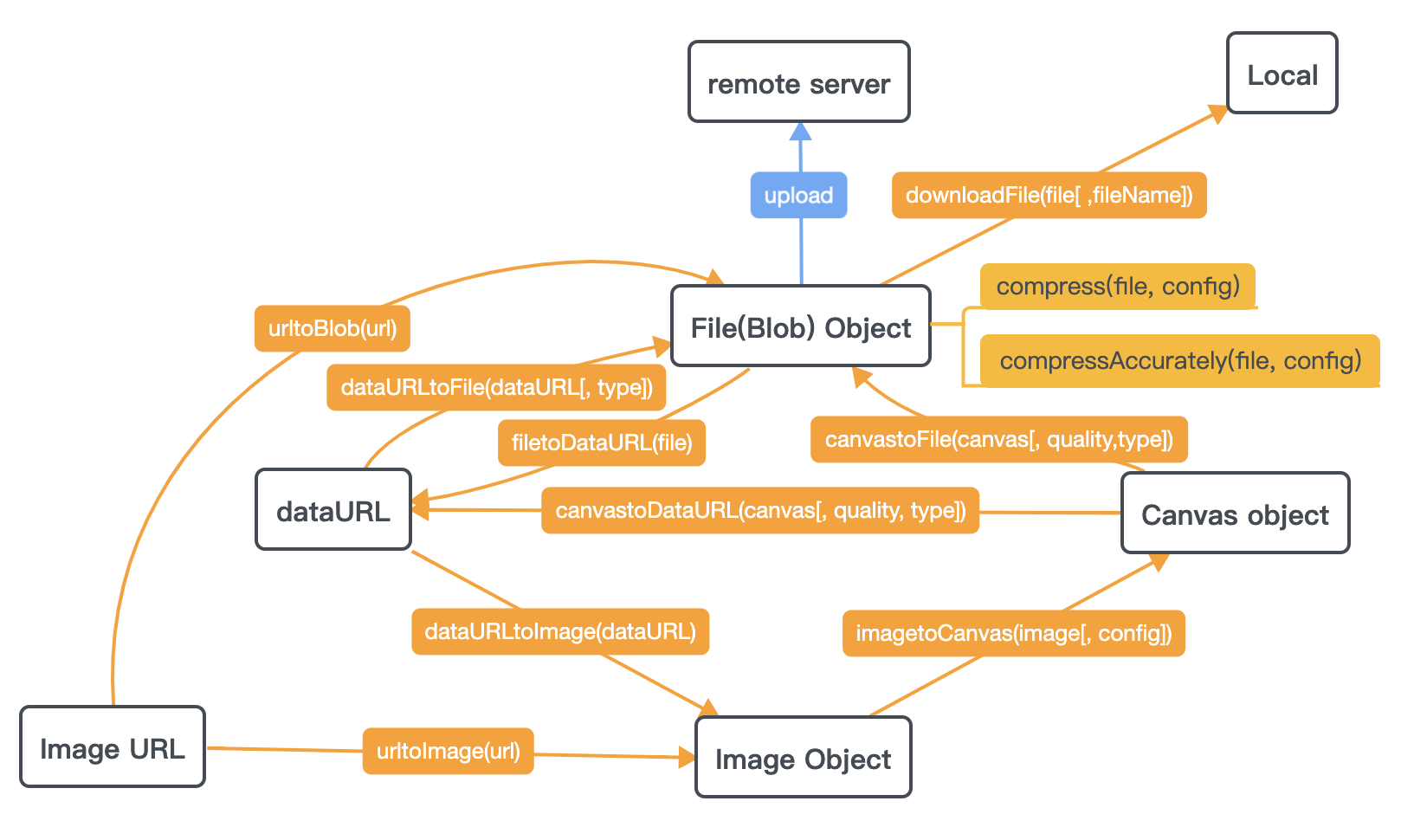
> [image-conversion](https://github.com/WangYuLue/image-conversion) is a simple and easy-to-use JS image convert tools, which provides many methods to convert between Image,Canvas,File and dataURL.
> In addition,image-conversion can specify size to compress the image ([test here](https://demo.wangyulue.com/image-conversion/)).
## Methods Map
## Getting started
### Install
```bash
npm i image-conversion --save
# or
yarn add image-conversion
```
### Include the library
in browser:
```html
```
in CommonJS:
```js
const imageConversion = require("image-conversion")
```
in ES6:
```js
import * as imageConversion from 'image-conversion';
```
or
```ts
import {compress, compressAccurately} from 'image-conversion';
```
### Use examples
```html
```
1. Compress image to 200kb:
```js
function view(){
const file = document.getElementById('demo').files[0];
console.log(file);
imageConversion.compressAccurately(file,200).then(res=>{
//The res in the promise is a compressed Blob type (which can be treated as a File type) file;
console.log(res);
})
}
// or use an async function
async function view() {
const file = document.getElementById('demo').files[0];
console.log(file);
const res = await imageConversion.compressAccurately(file,200)
console.log(res);
}
```
2. Compress images at a quality of 0.9
```js
function view(){
const file = document.getElementById('demo').files[0];
console.log(file);
imageConversion.compress(file,0.9).then(res=>{
console.log(res);
})
}
```
## Methods list
`image-conversion` provides many methods to convert between Image,Canvas,File and dataURL,as follow:
### `imagetoCanvas(image[, config]) → {Promise(Canvas)}`
#### Description:
Convert an image object into a canvas object.
#### Parameters:
| Name | Type | Attributes | Description |
|--------|--------|------------|------------------------------------------------------------------|
| image | image | | a image object |
| config | object | optional | with this config you can zoom in, zoom out, and rotate the image |
#### Example:
```js
imageConversion.imagetoCanvas(image);
//or
imageConversion.imagetoCanvas(image,{
width: 300, //result image's width
height: 200, //result image's height
orientation:2,//image rotation direction
scale: 0.5, //the zoom ratio relative to the original image, range 0-10;
//Setting config.scale will override the settings of
//config.width and config.height;
})
```
`config.orientation` has many options to choose,as follow:
| Options | Orientation |
|---------|---------------------------------|
| 1 | 0° |
| 2 | horizontal flip |
| 3 | 180° |
| 4 | vertical flip |
| 5 | clockwise 90° + horizontal flip |
| 6 | clockwise 90° |
| 7 | clockwise 90° + vertical flip |
| 8 | Counterclockwise 90° |
#### Returns:
Promise that contains canvas object.
### `dataURLtoFile(dataURL[, type]) → {Promise(Blob)}`
#### Description:
Convert a dataURL string to a File(Blob) object. you can determine the type of the File object when transitioning.
#### Parameters:
| Name | Type | Attributes | Description |
|---------|--------|------------|-------------------------------------------------------------------------------------------------|
| dataURL | string | | a dataURL string |
| type | string | optional | determine the converted image type; the options are "image/png", "image/jpeg", "image/gif". |
#### Returns:
Promise that contains a Blob object.
### `compress(file, config) → {Promise(Blob)}`
#### Description:
Compress a File(Blob) object.
#### Parameters:
| Name | Type | Description |
|--------|------------------|-----------------------------------------------------------------------------------------------------------------------------------------------------------------------------------|
| file | File(Blob) | a File(Blob) object |
| config | number \| object | if number type, range 0-1, indicate the image quality; if object type,you can pass parameters to the `imagetoCanvas` and `dataURLtoFile` method; Reference is as follow: |
#### Tips:
**If you compress png transparent images, please select 'image/png' type.**
#### Example:
```js
// number
imageConversion.compress(file,0.8)
//or
// object
imageConversion.compress(file,{
quality: 0.8,
type: "image/jpeg",
width: 300,
height: 200,
orientation:2,
scale: 0.5,
})
```
#### Returns:
Promise that contains a Blob object.
### `compressAccurately(file, config) → {Promise(Blob)}`
#### Description:
Compress a File(Blob) object based on size.
#### Parameters:
| Name | Type | Description |
|--------|------------------|-----------------------------------------------------------------------------------------------------------------------------------------------------------------------------------------------|
| file | File(Blob) | a File(Blob) object |
| config | number \| object | if number type, specify the size of the compressed image(unit KB); if object type,you can pass parameters to the `imagetoCanvas` and `dataURLtoFile` method; Reference is as follow: |
#### Tips:
**If you compress png transparent images, please select 'image/png' type**
#### Example:
```js
// number
imageConversion.compressAccurately(file,100); //The compressed image size is 100kb
// object
imageConversion.compressAccurately(file,{
size: 100, //The compressed image size is 100kb
accuracy: 0.9,//the accuracy of image compression size,range 0.8-0.99,default 0.95;
//this means if the picture size is set to 1000Kb and the
//accuracy is 0.9, the image with the compression result
//of 900Kb-1100Kb is considered acceptable;
type: "image/jpeg",
width: 300,
height: 200,
orientation:2,
scale: 0.5,
})
```
#### Returns:
Promise that contains a Blob object.
### `canvastoDataURL(canvas[, quality, type]) → {Promise(string)}`
#### Description:
Convert a Canvas object into a dataURL string, this method can be compressed.
#### Parameters:
| Name | Type | Attributes | Description |
|---------|--------|------------|---------------------------------------------------------------------------------------------------------------------|
| canvas | canvas | | a Canvas object |
| quality | number | optional | range 0-1, indicate the image quality, default 0.92 |
| type | string | optional | determine the converted image type; the options are "image/png", "image/jpeg", "image/gif",default "image/jpeg" |
#### Returns:
Promise that contains a dataURL string.
### `canvastoFile(canvas[, quality, type]) → {Promise(Blob)}`
#### Description:
Convert a Canvas object into a Blob object, this method can be compressed.
#### Parameters:
| Name | Type | Attributes | Description |
|---------|--------|------------|---------------------------------------------------------------------------------------------------------------------|
| canvas | canvas | | a Canvas object |
| quality | number | optional | range 0-1, indicate the image quality, default 0.92 |
| type | string | optional | determine the converted image type; the options are "image/png", "image/jpeg", "image/gif",default "image/jpeg" |
#### Returns:
Promise that contains a Blob object.
### `dataURLtoImage(dataURL) → {Promise(Image)}`
#### Description:
Convert a dataURL string to a image object.
#### Parameters:
| Name | Type | Description |
|---------|--------|------------------|
| dataURL | string | a dataURL string |
#### Returns:
Promise that contains a Image object.
### `downloadFile(file[, fileName])`
#### Description:
Download the image to local.
#### Parameters:
| Name | Type | Attributes | Description |
|----------|------------|------------|---------------------------------------------------|
| file | File(Blob) | | a File(Blob) object |
| fileName | string | optional | download file name, if none, timestamp named file |
### `filetoDataURL(file) → {Promise(string)}`
#### Description:
Convert a File(Blob) object to a dataURL string.
#### Parameters:
| Name | Type | Description |
|------|------------|---------------------|
| file | File(Blob) | a File(Blob) object |
#### Returns:
Promise that contains a dataURL string.
### `urltoBlob(url) → {Promise(Blob)}`
#### Description:
Load the required Blob object through the image url.
#### Parameters:
| Name | Type | Description |
|------|--------|-------------|
| url | string | image url |
#### Returns:
Promise that contains a Blob object.
### `urltoImage(url) → {Promise(Image)}`
#### Description:
Load the required Image object through the image url.
#### Parameters:
| Name | Type | Description |
|------|--------|-------------|
| url | string | image url |
#### Returns:
Promise that contains Image object.
## License
[MIT](http://opensource.org/licenses/MIT)