








 ---
---
Hub 向您展示数据的新纪元 以最快的方式储存、访问和管理 PyTorch与TensorFlow数据,在本地或任何云服务上工作,建立可扩展的数据工作流
---
[ [English](./README.md) | 简体中文 | [Türkçe](./README_TR.md) | [한글](./README_KR.md)]
### Hub 的作用是什么?
新时代的的软件需要新时代的数据,而 Hub 提供这些数据。数据科学家与机器学习研究者常常花费大量时间管理与预处理数据,因而牺牲了训练模型的时间。为了改进这一现状,我们创造了 Hub 。我们将您可达PB量级的数据转换为单个类numpy数组,将其存储在云端,使您可以无缝地从任何设备访问您的数据。Hub 使任何储存在云端的数据类型(图像、文本、音频或视频)像在本地服务器一样能被快速使用。通过使用一致的数据集,您的小组可以一直保持同步。
Waymo、红十字会、世界资源协会、Omdena 等组织都在使用 Hub。
### 特点
* 通过版本控制工具储存和获取大型数据集
* 像 Google Docs 一样协作: 多个数据科学家不间断地同时处理一组数据
* 同时从多个设备访问
* 部署在任何地方 - 本地、Google Cloud、S3、Azure或是Activeloop (默认——并且免费!)
* 与您的机器学习工具整合, 比如 Numpy、Dask、Ray、[PyTorch](https://docs.activeloop.ai/en/latest/integrations/pytorch.html)或[TensorFlow](https://docs.activeloop.ai/en/latest/integrations/tensorflow.html)
* 随心所欲地创建任意大小的数组. 您甚至可以储存 100k x 100k 大小的图片!
* 样本的形状是动态的. 因此您可以把不同大小的数组储存在一个数组内
* 无需冗长的操作,用几秒种即可[可视化](http://app.activeloop.ai/?utm_source=github&utm_medium=repo&utm_campaign=readme)数据中的片段
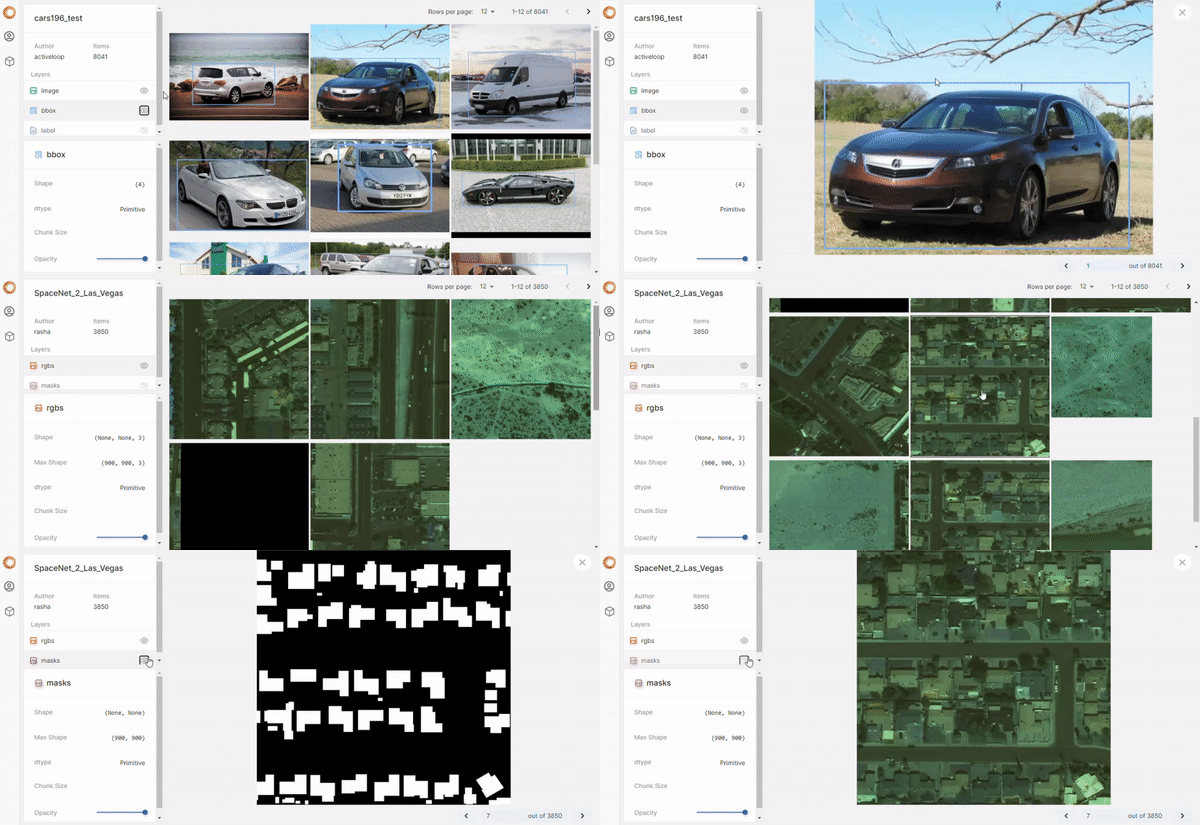 使用app.activeloop.ai(免费工具)可视化上传到Hub的数据集。
## 如何开始
使用公开或私密,本地或云端的数据。
### 快速访问公共数据
此前为了加载一个公共数据集,一个人需要写很多行代码,花费数个小时来访问,理解 API 并下载数据。通过 Hub, 您只需要2行代码, 即可**在3分钟内开始处理您的数据集**。
```sh
pip3 install hub
```
用 Hub 访问公共数据集仅仅需要几行约定俗成的简单代码。运行这个片段就可以 numpy 数组的形式取得[MNIST 数据集](https://app.activeloop.ai/dataset/activeloop/mnist/?utm_source=github&utm_medium=repo&utm_campaign=readme)前1000张图片。
```python
from hub import Dataset
mnist = Dataset("activeloop/mnist") # loading the MNIST data lazily
# saving time with *compute* to retrieve just the necessary data
mnist["image"][0:1000].compute()
```
您可以在 [app.activeloop.ai](https://app.activeloop.ai/datasets/popular/?utm_source=github&utm_medium=repo&utm_campaign=readme) 找到所有其他流行的数据集.
### 训练模型
加载数据并**直接**训练您的模型。Hub 已经与 PyTorch 和 TensorFlow 整合,能以通俗的方式进行格式转换。看看下面使用 PyTorch 的例子:
```python
from hub import Dataset
import torch
mnist = Dataset("activeloop/mnist")
# converting MNIST to PyTorch format
mnist = mnist.to_pytorch(lambda x: (x["image"], x["label"]))
train_loader = torch.utils.data.DataLoader(mnist, batch_size=1, num_workers=0)
for image, label in train_loader:
# Training loop here
```
### 创建本地数据集
如果您想在本地处理您的数据,您可以从创建一个数据集开始:
```python
from hub import Dataset, schema
import numpy as np
ds = Dataset(
"./data/dataset_name", # file path to the dataset
shape = (4,), # follows numpy shape convention
mode = "w+", # reading & writing mode
schema = { # named blobs of data that may specify types
# Tensor is a generic structure that can contain any type of data
"image": schema.Tensor((512, 512), dtype="float"),
"label": schema.Tensor((512, 512), dtype="float"),
}
)
# filling the data containers with data (here - zeroes to initialize)
ds["image"][:] = np.zeros((4, 512, 512))
ds["label"][:] = np.zeros((4, 512, 512))
ds.flush() # executing the creation of the dataset
```
您也可以指明 `s3://bucket/path`,`gcs://bucket/path` 或 azure 路径。在[这里](https://docs.activeloop.ai/en/latest/simple.html#data-storage)可以找到关于云储存的更多相关信息。同时,如果您无法在 Hub 上找到一个公共数据集,可以向我们[发送一个请求](https://github.com/activeloopai/Hub/issues/new?assignees=&labels=i%3A+enhancement%2C+i%3A+needs+triage&template=feature_request.md&title=%5BFEATURE%5D+New+Dataset+Required%3A+%2Adataset_name%2A)。我们会尽快让所有人都能获取到它!
### 通过三个步骤上传您的数据集,并从任何地方访问它
1. 在 [Activeloop](https://app.activeloop.ai/register/?utm_source=github&utm_medium=repo&utm_campaign=readme) 上注册一个免费账户并在本地认证:
```sh
activeloop register
activeloop login
```
2. 然后创建一个数据集,注明它的名字,然后将它上传到您的账户。例如:
```python
from hub import Dataset, schema
import numpy as np
ds = Dataset(
"username/dataset_name",
shape = (4,),
mode = "w+",
schema = {
"image": schema.Tensor((512, 512), dtype="float"),
"label": schema.Tensor((512, 512), dtype="float"),
}
)
ds["image"][:] = np.zeros((4, 512, 512))
ds["label"][:] = np.zeros((4, 512, 512))
ds.flush()
```
3. 在任何地点,以任何拥有命令行的机器访问它:
```python
from hub import Dataset
ds = Dataset("username/dataset_name")
```
## 官方文档
对于更高级的工作流,如上传较大的数据集或应用多重变换,请阅读[文档](http://docs.activeloop.ai/?utm_source=github&utm_medium=repo&utm_campaign=readme)。
## 教程笔记本
[examples](https://github.com/activeloopai/Hub/tree/master/examples) 目录下包含许多示例和笔记本,它们可以让你对 Hub 有一个大致的了解。其中一些笔记本如下所示。
| 笔记本 | 描述 | |
|:--- |:--- |---: |
| [图片上传](https://github.com/activeloopai/Hub/blob/master/examples/tutorial/Tutorial%201a%20-%20Uploading%20Images.ipynb) | 关于向 Hub 中上传和储存图片的概述 | [](https://colab.research.google.com/github/activeloopai/Hub/blob/master/examples/tutorial/Tutorial%201a%20-%20Uploading%20Images.ipynb) |
| [数据帧上传](https://github.com/activeloopai/Hub/blob/master/examples/tutorial/Tutorial%201b%20-%20Uploading%20Dataframes.ipynb) | 关于向 Hub 上上传和储存数据帧的概述 | [](https://colab.research.google.com/github/activeloopai/Hub/blob/master/examples/tutorial/Tutorial%201b%20-%20Uploading%20Dataframes.ipynb) |
| [音频上传](https://github.com/activeloopai/Hub/blob/master/examples/tutorial/Tutorial%201c%20-%20Uploading%20Audio.ipynb) | 解释了在 Hub 中处理音频数据的方法 |[](https://colab.research.google.com/github/activeloopai/Hub/blob/master/examples/tutorial/Tutorial%201c%20-%20Uploading%20Audio.ipynb) |
| [获取远程数据](https://github.com/activeloopai/Hub/blob/master/examples/tutorial/Tutorial%202%20-%20Retrieving%20Remote%20Data.ipynb) | 解释了如何获取数据 | [](https://colab.research.google.com/github/activeloopai/Hub/blob/master/examples/tutorial/tutorial/Tutorial%202%20-%20Retrieving%20Remote%20Data.ipynb) |
| [数据变换](https://github.com/activeloopai/Hub/blob/master/examples/tutorial/Tutorial%203%20-%20Transforming%20Data.ipynb) | 简要地描述了如何使用 Hub 进行数据变换 |[](https://colab.research.google.com/github/activeloopai/Hub/blob/master/examples/tutorial/Tutorial%203%20-%20Transforming%20Data.ipynb) |
| [动态张量](https://github.com/activeloopai/Hub/blob/master/examples/tutorial/Tutorial%204%20-%20What%20are%20Dynamic%20Tensors.ipynb) | 处理拥有可变形状与大小的数据 |[](https://colab.research.google.com/github/activeloopai/Hub/blob/master/examples/tutorial/Tutorial%204%20-%20What%20are%20Dynamic%20Tensors.ipynb) |
| [使用 Hub 进行自然语言处理(NLP)](https://github.com/activeloopai/Hub/blob/master/examples/nlp_using_hub.ipynb) | 针对 CoLA 的 Fine Tuning Bert |[](https://colab.research.google.com/github/activeloopai/Hub/blob/master/examples/nlp_using_hub.ipynb) |
## 应用场景
* **卫星和无人机成像**: [利用可扩展的航空数据流建造智能农场](https://activeloop.ai/usecase/intelinair?utm_source=github&utm_medium=repo&utm_campaign=readme), [绘制印度的经济状况](https://towardsdatascience.com/faster-machine-learning-using-hub-by-activeloop-4ffb3420c005), [与红十字一起在肯尼亚抗击沙漠蝗虫](https://omdena.com/projects/ai-desert-locust/)
* **医学图像**: 体积图像: MRI, Xray
* **自动驾驶汽车**: [雷达, 3D LIDAR, 点云, 语义分割, 视频对象](https://medium.com/snarkhub/extending-snark-hub-capabilities-to-handle-waymo-open-dataset-4dc7b7d8ab35)
* **零售**: 自行结账数据集
* **媒体**: 图像,视频,音频储存
## 为什么一定选择 Hub?
有许多数据集管理库提供与 Hub 类似的功能。实际上,很多用户都将 PyTorch 或 Tensorflow 的数据集迁移到了 Hub。以下是你在开始使用 Hub 后就会发现的一些惊人的不同点:
* 数据是划分为数据块提供的,你可以从远程位置流传输这些数据,而不是一次性将它全部下载下来
* 由于只需要评估必要部分的数据集,你可以立刻开始处理数据
* 你能够保存那些无法整个被存储在内存里的数据
* 你可以在不同机器上,与数个其他用户一起,在版本管理工具下合作管理数据集
* 你将能获得那些能在数秒内提升你对数据理解的工具,比如我们的可视化工具
* 你可以轻松地为几个不同的训练库准备数据(例如,你可以为 PyTorch 和 Tensorflow 使用同一个数据集)
## 社区
加入我们的 [**Slack 社区**](https://join.slack.com/t/hubdb/shared_invite/zt-ivhsj8sz-GWv9c5FLBDVw8vn~sxRKqQ) 以便从 Activeloop 团队及其他用户处获取帮助, 与此同时获取关于数据集管理/预处理的最新动态。
 on Twitter.
一如既往,感谢我们可爱的贡献者们!
[](http://sourcerer.io/fame/davidbuniat/activeloopai/Hub/links/0)[](http://sourcerer.io/fame/davidbuniat/activeloopai/Hub/links/1)[](http://sourcerer.io/fame/davidbuniat/activeloopai/Hub/links/2)[](http://sourcerer.io/fame/davidbuniat/activeloopai/Hub/links/3)[](http://sourcerer.io/fame/davidbuniat/activeloopai/Hub/links/4)[](http://sourcerer.io/fame/davidbuniat/activeloopai/Hub/links/5)[](http://sourcerer.io/fame/davidbuniat/activeloopai/Hub/links/6)[](http://sourcerer.io/fame/davidbuniat/activeloopai/Hub/links/7)
通过[contributors-img](https://contrib.rocks/)制作。
请阅读 [CONTRIBUTING.md](CONTRIBUTING.md) 以了解如何为 Hub 做贡献。
## 例子
Activeloop 的 Hub 格式使您可以以更低的成本来达成更快的推理。我们的平台已经包含超过 30 个流行的数据集。其中包括:
- COCO
- CIFAR-10
- PASCAL VOC
- Cars196
- KITTI
- EuroSAT
- Caltech-UCSD Birds 200
- Food101
在我们的 [可视化 web app](https://app.activeloop.ai/datasets/popular/?utm_source=github&utm_medium=repo&utm_campaign=readme) 重查看这些以及很多其他的数据集,并直接加载他们用于模型训练!
## README 徽章
在使用 Hub 吗? 添加 README 徽章来让大家知道:
[](https://github.com/activeloopai/Hub)
```
[](https://github.com/activeloopai/Hub)
```
## 免责声明
与其他的数据管理包一样, `Hub` 是一个用于下载和准备公共数据集的应用型库。我们不托管或分发这些数据集,不保证其质量或是公平性,也不声明您有使用它们的许可。您有责任确认您是否有权在数据集的许可下使用该数据集。
如果您是数据集所有者,希望更新数据集的任何部分(描述,引用等),或是不希望将数据集包含在此库中,请通过 [GitHub issue](https://github.com/activeloopai/Hub/issues/new) 告知我们。感谢您对机器学习社区做出的贡献!
## 致谢
这项技术的灵感来自我们在普林斯顿大学的经验,并且感谢 William Silversmith @SeungLab 和他优秀的 [cloud-volume](https://github.com/seung-lab/cloud-volume) 工具。我们是 [Zarr](https://zarr.readthedocs.io/en/stable/) 的重度使用者,特别感谢他们建立了如此重要的基础建设。
on Twitter.
一如既往,感谢我们可爱的贡献者们!
[](http://sourcerer.io/fame/davidbuniat/activeloopai/Hub/links/0)[](http://sourcerer.io/fame/davidbuniat/activeloopai/Hub/links/1)[](http://sourcerer.io/fame/davidbuniat/activeloopai/Hub/links/2)[](http://sourcerer.io/fame/davidbuniat/activeloopai/Hub/links/3)[](http://sourcerer.io/fame/davidbuniat/activeloopai/Hub/links/4)[](http://sourcerer.io/fame/davidbuniat/activeloopai/Hub/links/5)[](http://sourcerer.io/fame/davidbuniat/activeloopai/Hub/links/6)[](http://sourcerer.io/fame/davidbuniat/activeloopai/Hub/links/7)
通过[contributors-img](https://contrib.rocks/)制作。
请阅读 [CONTRIBUTING.md](CONTRIBUTING.md) 以了解如何为 Hub 做贡献。
## 例子
Activeloop 的 Hub 格式使您可以以更低的成本来达成更快的推理。我们的平台已经包含超过 30 个流行的数据集。其中包括:
- COCO
- CIFAR-10
- PASCAL VOC
- Cars196
- KITTI
- EuroSAT
- Caltech-UCSD Birds 200
- Food101
在我们的 [可视化 web app](https://app.activeloop.ai/datasets/popular/?utm_source=github&utm_medium=repo&utm_campaign=readme) 重查看这些以及很多其他的数据集,并直接加载他们用于模型训练!
## README 徽章
在使用 Hub 吗? 添加 README 徽章来让大家知道:
[](https://github.com/activeloopai/Hub)
```
[](https://github.com/activeloopai/Hub)
```
## 免责声明
与其他的数据管理包一样, `Hub` 是一个用于下载和准备公共数据集的应用型库。我们不托管或分发这些数据集,不保证其质量或是公平性,也不声明您有使用它们的许可。您有责任确认您是否有权在数据集的许可下使用该数据集。
如果您是数据集所有者,希望更新数据集的任何部分(描述,引用等),或是不希望将数据集包含在此库中,请通过 [GitHub issue](https://github.com/activeloopai/Hub/issues/new) 告知我们。感谢您对机器学习社区做出的贡献!
## 致谢
这项技术的灵感来自我们在普林斯顿大学的经验,并且感谢 William Silversmith @SeungLab 和他优秀的 [cloud-volume](https://github.com/seung-lab/cloud-volume) 工具。我们是 [Zarr](https://zarr.readthedocs.io/en/stable/) 的重度使用者,特别感谢他们建立了如此重要的基础建设。