# HTML Decision Tree
This is a generic library for building a simple web-based decision trees UI.
Data is provided in JSON format, which is then displayed on a website.
## Installing and Building
The code is in Typescript. After cloning the repository, just type
``` Bash
npm install
npm run-script build
```
This builds the `decisiontree.js` library in `dist`.
Alternative build is done using typescript and webpack:
``` Bash
npx tsc
npx webpack
```
Or simply install the package using
``` Bash
npm install html-decision-tree
```
## Simple Example
Here is a very simple decision tree for deciding if you should play tennis:
[Tennis example](https://zorkow.github.io/html-decision-tree/samples/tennis.html)
Here is the corresponding flow chart decision tree for deciding if you should play tennis in SVG
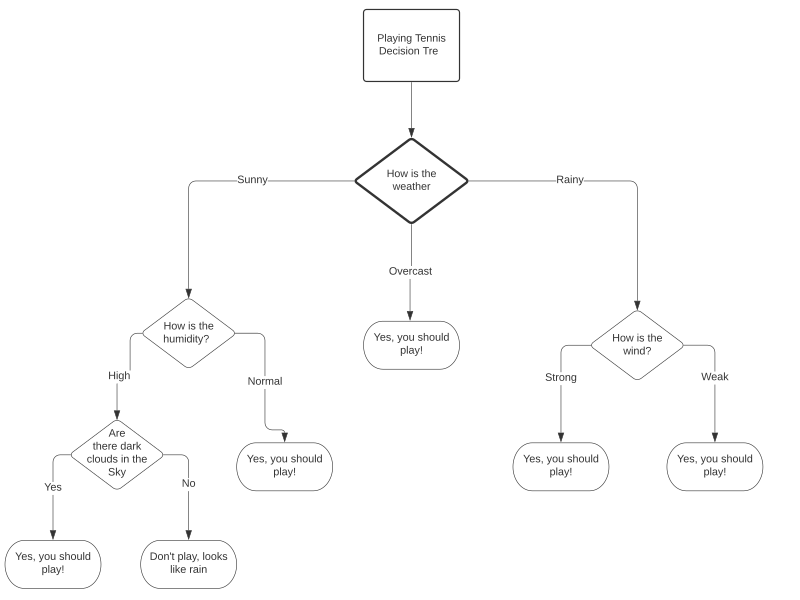
![]() and in [JSON format](./samples/tennis.json).
## JSON Format
Current node format in some pseudo grammar:
```Javascript
{
type: binary|nary|null,
value: 0-9+,
title: \w*,
content: \w*,
labels: [{
text: \w*,
value: 0-9+,
}],
children: [node*],
action: URL
}
```
The idea is nary nodes have content (that is the description on the radio
button) which is linked via the value to the children . Binary nodes have
default description content as Yes (0) and No (1). Actions are only considered
in leaf nodes and open a new Tab.
### Acknowledgments
* **Amaya Webster** for suggesting the initial idea at the 2020 DIAGRAM and ETS Code Sprint
* **Brian Hochhalter** for UI design and wireframe design and prototyping
* **Danielle Vargas** for CSS styles and accessibility testing and design
* **Carlos Cavalie** for accessibility testing and design
and in [JSON format](./samples/tennis.json).
## JSON Format
Current node format in some pseudo grammar:
```Javascript
{
type: binary|nary|null,
value: 0-9+,
title: \w*,
content: \w*,
labels: [{
text: \w*,
value: 0-9+,
}],
children: [node*],
action: URL
}
```
The idea is nary nodes have content (that is the description on the radio
button) which is linked via the value to the children . Binary nodes have
default description content as Yes (0) and No (1). Actions are only considered
in leaf nodes and open a new Tab.
### Acknowledgments
* **Amaya Webster** for suggesting the initial idea at the 2020 DIAGRAM and ETS Code Sprint
* **Brian Hochhalter** for UI design and wireframe design and prototyping
* **Danielle Vargas** for CSS styles and accessibility testing and design
* **Carlos Cavalie** for accessibility testing and design