# Hexo Theme Researcher
A modern, responsive, and professional academic portfolio theme for researchers.
[](https://github.com/jiehua1995/hexo-theme-researcher/blob/main/LICENSE)
[](https://github.com/jiehua1995/hexo-theme-researcher/stargazers)
[](https://github.com/jiehua1995/hexo-theme-researcher/network/members)
[](https://github.com/jiehua1995/hexo-theme-researcher/issues)
[](https://github.com/jiehua1995/hexo-theme-researcher/commits)
[](https://hexo.io/)
[](https://hexo-theme-researcher.jiehua1995.xyz/)
[](https://deepwiki.com/jiehua1995/hexo-theme-researcher)
### If you find this project useful, a ⭐️ would be greatly appreciated!
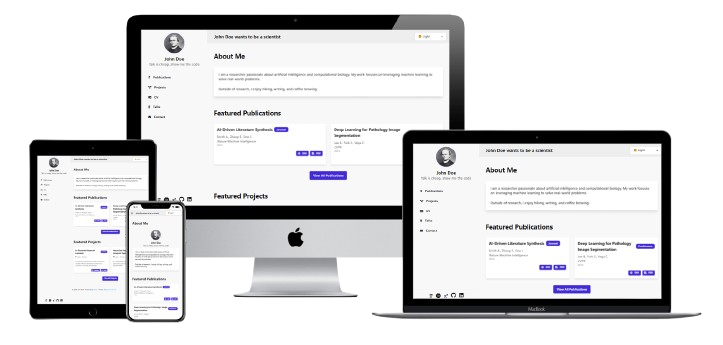
## Design Philosophy
The Researcher theme is designed with the following principles in mind:
- **Professional & Clean**: A minimalist design that puts your academic work in the spotlight
- **Modern & Responsive**: Built with the latest web technologies for optimal viewing on all devices
- **Accessible & Fast**: Optimized for performance and accessibility
- **Customizable**: Easy to personalize with your own colors, fonts, and content
- **Academic-Focused**: Specialized features for showcasing publications, projects, and academic achievements
## Features
- 📱 **Fully responsive design** - Mobile-first approach with optimal viewing on all devices
- 🎨 **30+ DaisyUI themes** - Light, dark, cupcake, bumblebee, wireframe and more
- 🏠 **Enhanced homepage** - Recent Notes, Featured Publications & Projects in 3-column layouts
- 📝 **Blog/Notes system** - Real-time search, filtering, and clean typography
- 📚 **Publications management** - Academic showcase with DOI, PDF links, and badges
- 📊 **Project showcase** - Status tracking, GitHub integration, and collaboration details
- 📄 **Professional CV page** - Downloadable resume with modular sections
- 🎤 **Talks & presentations** - Conference and seminar showcase
- 💻 **Enhanced code display** - Syntax highlighting with line numbers and copy functionality
- 🔍 **Site-wide search** - Real-time search across all content (requires `hexo-generator-search`)
- 🔗 **Academic profiles** - Google Scholar, ORCID, ResearchGate, GitHub, LinkedIn
- ⚡ **Performance optimized** - Fast loading with modern web technologies
## Usage
### Prerequisites
- Node.js (version 12.0 or higher)
- npm or yarn package manager
### Step-by-Step Installation
1. **Install Hexo CLI globally:**
```bash
npm install -g hexo-cli
```
2. **Create a new Hexo site:**
```bash
hexo init my-academic-site
cd my-academic-site
```
3. **Install required Hexo packages:**
```bash
yarn install
```
4. **Install theme dependencies (required for search functionality):**
```bash
yarn add hexo-generator-search --save
```
5. **Clone the theme:**
```bash
git clone https://github.com/jiehua1995/hexo-theme-researcher themes/hexo-theme-researcher
```
6. **Configure your main site** by editing `_config.yml` in your site's root directory:
```yaml
# Site Information
title: Your Name
subtitle: Your Academic Title
description: Your research description and academic bio
keywords: research, academic, portfolio, your-field
author: Your Name
language: en
timezone: ''
# URL Configuration
url: https://yourusername.github.io
root: /
permalink: :year/:month/:day/:title/
permalink_defaults:
lang: en
# Theme Configuration
theme: hexo-theme-researcher
# Search Configuration (Required for search functionality)
search:
path: search.xml
field: post
content: true
# Deployment (example for GitHub Pages)
deploy:
type: git
repo: https://github.com/yourusername/yourusername.github.io.git
branch: main
```
7. **Create the required pages** that the theme uses to display your academic content.
Before using the theme, you need to create the following pages in your Hexo site:
```bash
# Create all required pages
hexo new page publications
hexo new page projects
hexo new page talks
hexo new page cv
hexo new page notes
hexo new page contact
```
After creating each page, you **must** set the correct layout in the front-matter of each page's markdown file:
**Publications page** (`source/publications/index.md`):
```yaml
---
title: Publications
date: 2024-01-01
layout: publications
---
```
**Projects page** (`source/projects/index.md`):
```yaml
---
title: Projects
date: 2024-01-01
layout: projects
---
```
**CV page** (`source/cv/index.md`):
```yaml
---
title: CV
date: 2024-01-01
layout: cv
---
```
**Talks page** (`source/talks/index.md`):
```yaml
---
title: Talks
date: 2024-01-01
layout: talks
---
```
**Notes page** (`source/notes/index.md`):
```yaml
---
title: Notes
date: 2024-01-01
layout: notes
---
```
**Contact page** (`source/contact/index.md`):
```yaml
---
title: Contact
date: 2024-01-01
layout: contact
---
```
**Important Notes**
- The `layout` field must match the page name exactly
- The Notes page will automatically display all your blog posts
- The Recent Notes section on the homepage will show the 3 latest posts automatically
Edit `_config.yml` in the theme directory to customize your site:
8. **Configure the theme** by editing the `_config.yml` file located in the `themes/hexo-theme-researcher` directory. Edit `_config.yml` in the theme directory to customize your site.
It will be better to copy the `_config.yml` out as `_config.hexo-theme-researcher.yml ` into the main folder.
```bash
cp themes/hexo-theme-researcher/_config.yml _config.hexo-theme-researcher.yml
```
9. **Create blog posts** by adding markdown files in the `source/_posts` directory.
To create blog posts, use the standard Hexo command:
```bash
hexo new post "Your Post Title"
```
Then you could write whatever you want, those notes will be shown in **Notes** page.
9. **Create data files** in the `source/_data` directory to manage your academic content.
Create the following data files in your site's `source/_data` directory. You can find example data in the theme's `demo_data` folder:
- `publications.yml`: Your academic publications
- `projects.yml`: Research projects
- `talks.yml`: Presentations and talks
- `cv.yml`: Your CV/resume information
## License
This theme is released under the MIT License. See the [LICENSE](LICENSE) file for details.
## Credits
- [Hexo](https://hexo.io/)
- [Tailwind CSS](https://tailwindcss.com/)
- [DaisyUI](https://daisyui.com/)
- [Academic Icons](https://jpswalsh.github.io/academicons/)
- [Font Awesome](https://fontawesome.com/)
## Contributors
 ---
## Buy me a coffee
If you find this theme useful, consider supporting the development by buying me a coffee! ☕ You can scan the QR code below or click the button to support my work:
[](https://coff.ee/fdjiehuae)
---
## Buy me a coffee
If you find this theme useful, consider supporting the development by buying me a coffee! ☕ You can scan the QR code below or click the button to support my work:
[](https://coff.ee/fdjiehuae)
 Made with ❤️ for the academic community