

<div align = center>
  <img src="https://fastly.jsdelivr.net/gh/D-Sketon/blog-img/icon.png"/>
  <h1>hexo-theme-reimu</h1>
  <img alt="NPM License" src="https://img.shields.io/npm/l/hexo-theme-reimu">
  <img alt="NPM Version" src="https://img.shields.io/npm/v/hexo-theme-reimu">
  <img alt="NPM Downloads" src="https://img.shields.io/npm/dm/hexo-theme-reimu">
  <img alt="GitHub Repo stars" src="https://img.shields.io/github/stars/D-Sketon/hexo-theme-reimu">

💘 Hakurei Reimu 💘

[Demo](https://d-sketon.github.io)

[简体中文](https://github.com/D-Sketon/hexo-theme-reimu/blob/main/README.md) | English
<img src="https://cdn.jsdelivr.net/gh/D-Sketon/hexo-theme-reimu@main/_screenshot/Reimu.png"/>
</div>

---

> [!WARNING]
> Versions below v1.0.0 have been deprecated. Please upgrade to version v1.0.0 or above as soon as possible.

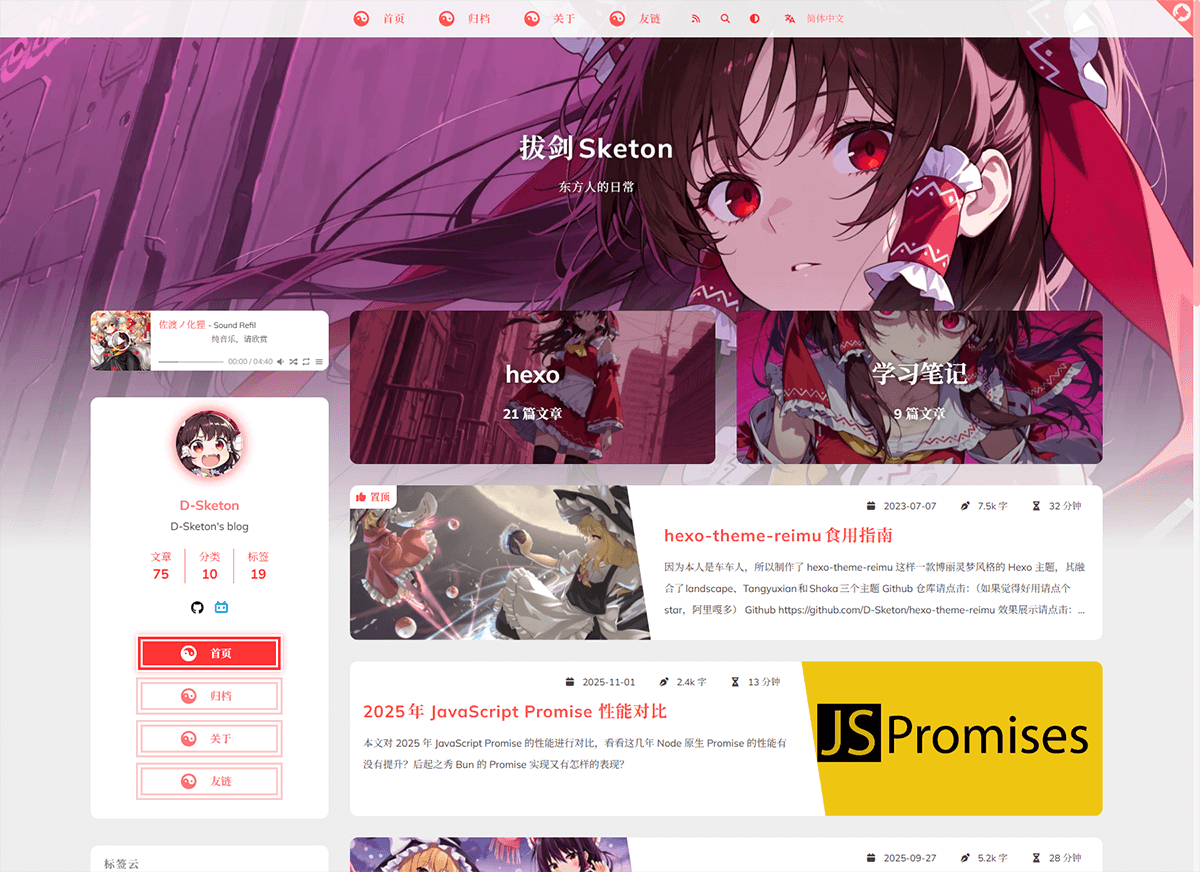
A Hakurei Reimu style Hexo theme.  
A combination of [landscape](https://github.com/hexojs/hexo-theme-landscape)、[Tangyuxian](https://github.com/tangyuxian/hexo-theme-tangyuxian) and [Shoka](https://github.com/amehime/hexo-theme-shoka) themes.

| framework                    | repository                                                         | version                                                                                                                                                                                     | stars                                                                                              |
| ---------------------------- | ------------------------------------------------------------------ | ------------------------------------------------------------------------------------------------------------------------------------------------------------------------------------------- | -------------------------------------------------------------------------------------------------- |
| [Hexo](https://hexo.io/)     | [hexo-theme-reimu](https://github.com/D-Sketon/hexo-theme-reimu)   | <img alt="version" src="https://img.shields.io/badge/dynamic/json?url=https%3A%2F%2Fgithub.com%2FD-Sketon%2Fhexo-theme-reimu%2Fraw%2Fmain%2Fpackage.json&query=%24.version&label=version">  | <img alt="GitHub Repo stars" src="https://img.shields.io/github/stars/D-Sketon/hexo-theme-reimu">  |
| [Hugo](https://gohugo.io)    | [hugo-theme-reimu](https://github.com/D-Sketon/hugo-theme-reimu)   | <img alt="version" src="https://img.shields.io/badge/dynamic/json?url=https%3A%2F%2Fgithub.com%2FD-Sketon%2Fhugo-theme-reimu%2Fraw%2Fmain%2Fpackage.json&query=%24.version&label=version">  | <img alt="GitHub Repo stars" src="https://img.shields.io/github/stars/D-Sketon/hugo-theme-reimu">  |
| [Astro](https://astro.build) | [astro-theme-reimu](https://github.com/D-Sketon/astro-theme-reimu) | <img alt="version" src="https://img.shields.io/badge/dynamic/json?url=https%3A%2F%2Fgithub.com%2FD-Sketon%2Fastro-theme-reimu%2Fraw%2Fmain%2Fpackage.json&query=%24.version&label=version"> | <img alt="GitHub Repo stars" src="https://img.shields.io/github/stars/D-Sketon/astro-theme-reimu"> |

**Issues and PRs welcome!**

## Features

### Basic Features
- ✨ Full blog functionality
- 🔄 Compatible with Hexo 6+
- 📱 Responsive layout
- 🌙 Dark mode support
- 🅰️ i18n support

### Code & Math
- 🖥️ Code highlighting & copying
- ➗ KaTeX / MathJax3 math formula support
- 📊 Mermaid flowchart support

### Search & Comments
- 🔍 Algolia search integration
- 🔍 Local search integration
- 💬 Multiple comment systems support:
  - Valine
  - Waline
  - Twikoo
  - Gitalk
  - Giscus
  - Disqus
  - Utterances
  - Beaudar

### Statistics & Analytics
- 📊 Article reading statistics (Valine / Waline)
- 👥 Visitor statistics (Busuanzi)

### Media & Interactive Features
- 🎵 Music player support:
  - Aplayer
  - Meting
- 🖼️ Lazy loading for images
- ⚡ Loading animations
- 🖱️ Mouse effects:
  - Animation effects
  - Reimu cursor style
- 👾 Live2D / Live2D-widgets integration

### Navigation & Structure
- 📑 Table of Contents
- 🔄 PJAX support
- 🔧 ServiceWorker implementation
- 📰 RSS feed

### Design & Customization
- 🎨 Icon support:
  - Iconfont
  - FontAwesome7
- 🔗 Built-in tag plugins:
  - Internal links
  - External links
  - Friend links
  - Heatmap
  - Tag Roulette
  - Tabs
  - Gallery
- 🎨 Dynamic theme color adaptation
- 🎨 Custom Containers
- ©️ Article copyright declaration
- 🌐 Custom CDN source configuration
- 📜 Custom Font Family
- 🎨 Share card functionality

## Installation

> For beginners, you can directly use [reimu-template](https://github.com/D-Sketon/reimu-template). It comes pre-installed with hexo, hexo-theme-reimu and other functional packages. You only need to clone the repository, install dependencies, and modify the configuration to get a basic blog!

Using npm

```bash
npm install hexo-theme-reimu --save
```

Or clone this repository directly to the `/themes` folder and rename it to `reimu`

```bash
git clone https://github.com/D-Sketon/hexo-theme-reimu.git
```

And modify the theme in `_config.yml`

```yaml
theme: reimu
```

## Usage

<details>
<summary>Basic structure</summary>

### Basic structure

To ensure correct display, please refer to `_example` and create `_data`, `about`, and `friend` folders in `source` (Note: This is the `source` folder in your blog's root directory, not the one in the theme!)

**Directory Structure Example:**

```
source/
├── images/
│   └── favicon.ico        # Website favicon
├── _data/
│   ├── avatar/
│   │   └── avatar.webp    # Avatar file
│   ├── covers.yml         # Article cover URL list
│   └── covers/            # Article cover folder
├── about/                 # About page
│   └── index.md
├── friend/                # Friend links page
│   ├── index.md
│   └── _data.yml          # Friend links data
└── _posts/                # Posts folder
    └── xxxx.md
```

#### \_data

- The `avatar` folder stores the author's avatar, default named `avatar.webp`. You can configure it in the inner `_config.yml` as follows:

```yaml
avatar: "avatar.webp" # By default, it looks for the avatar in the avatar folder. Do not include the path, or it will result in a 404 error
```

- The `covers` folder stores article cover images
- The `covers.yml` stores article cover URLs

#### about

`index.md` serves as the **About** page

#### friend

`index.md` serves as the **Friends** page. Fill in friend link information in `_data.yml` to display corresponding friend cards on the page

</details>
<details>
<summary>Cover Images, Banner and Favicon</summary>

### Cover Images, Banner, and Favicon

#### Cover Images

The display logic of `banner` and `cover` is as follows:

- The post header image prefers Front-matter `banner`; if `banner` is not set, it falls back to `cover` for compatibility.
- When both `banner` and `cover` are not set, the post header image uses global `cover` in the inner `_config.yml`, then falls back to global `banner`.
- The list card cover prefers Front-matter `cover` (URL only). If `cover` is not set, `false`, or `rgb(...)`, it falls back to random images from `source/_data/covers` and `source/_data/covers.yml`.
- If random covers are unavailable, it falls back to global `banner`.

Recommended usage (separate header image and card cover):

```yaml
---
title: Hello World
banner: https://example.com/post-header.webp
cover: https://example.com/post-card.webp
---
```

Legacy-compatible usage (`cover` only):

```yaml
---
title: Hello World
cover: https://example.com/cover.webp
---
```

#### banner

The banner image is stored at `themes/reimu/source/images/banner.webp`, and can be modified in the inner `_config.yml`:

```yaml
banner: "/images/banner.webp"
```

#### favicon

The favicon is stored at `themes/reimu/source/images/favicon.ico`, and can be modified in the inner `_config.yml`:

```yaml
favicon: "/images/favicon.ico"
```

#### Pinned Posts

Add `sticky: true` to the article's Front-matter to pin it:

```yaml
---
title: Hello World
sticky: true
---
```

#### Article Summary

Disabled by default. You can choose to display the article summary in the subtitle or at the beginning of the article.

```yaml
summary:
  enable: false
  style: 'subtitle' # 'subtitle' or 'blockquote'
```

</details>

<details>

<summary>Sidebar</summary>

### Sidebar

#### Sidebar Position

Default on the right. You can modify it in the inner `_config.yml`.

```yaml
sidebar:
  position: right # left | right | false
  menu: true # whether to show the sidebar menu button, ignored on mobile devices
  article:
    show_common: true # whether to show common sidebar on article pages, ignored on mobile devices
```

Additionally, you can control it through the article's Front-matter, which takes precedence over the global configuration.

```yaml
---
sidebar: left # left | right | false
---
```

> When sidebar is set to false, the sidebar will be hidden, and the aplayer player and widgets will not be displayed at the same time.

#### TOC

Default enabled. You can modify it in the inner `_config.yml`.

```yaml
toc: true # true | false
```

Additionally, you can control it through the article's Front-matter, which takes precedence over the global configuration.

```yaml
---
toc: true # true | false
---
```

You can also configure the behavior of the TOC through the following configuration:

```yaml
toc_options:
  list_number: true # Whether to display the list number
  min_depth: 1 # Minimum depth
  max_depth: 6 # Maximum depth
```

#### Social Links

You can configure the social links in the sidebar in the inner `_config.yml`.

```yaml
social:
  github: https://github.com/yourname
  bilibili: https://space.bilibili.com/yourname
  # weixin: https://example.com/your-weixin-link
  # qq: https://example.com/your-qq-link
  tiktok: https://www.tiktok.com/@yourname
```

#### Widgets

You can configure the widgets in the sidebar in the inner `_config.yml`.

```yaml
widgets:
  # - category
  # - tag
  # - tagcloud
  # - archive
  # - recent_posts
```

You can also configure the behavior of the widgets through the following configuration:

```yaml
archive_type: "monthly" # monthly | yearly, archive type
show_count: false # whether to show count in archive
tag_limits:
recent_posts_limits: 5
tagcloud_limits:
only_show_capsule_in_index: false # show all category/tag capsules only on archive index to improve build performance for large taxonomies
uppercase_capsule: true # whether to transform category/tag capsules to uppercase
show_update_time: false # whether to display article update time
```

</details>

<details>
<summary>Footer</summary>

### Footer

#### Basic Information

The footer section allows you to configure basic display information and statistics.

```yaml
footer:
  since: 2020 # The starting year displayed in the copyright information (e.g., 2020-current year)
  powered: true # Whether to display copyright information
  count: true # Whether to display word count and reading time statistics
  busuanzi: true # Whether to enable Busuanzi visitor counting statistics
```

#### ICP Filing

For websites hosted in mainland China, you can display ICP filing information as required by regulations.

```yaml
icp:
  icpnumber: # ICP filing number
  beian: # Public Security Bureau filing number
  recordcode: # Record code parameter from the Public Security Bureau filing link
```

#### Moe ICP Filing (v1.9.1+)

[Moe ICP Filing](https://icp.gov.moe/)

```yaml
moe_icp:
  icpnumber: # Moe ICP filing number
```

</details>

<details>
<summary>Code Blocks</summary>

### Code Blocks

To ensure proper display of code blocks, make sure your outer `_config.yml` has the following configuration:  
(Hexo <7.0.0)

```yaml
highlight:
  enable: true
  wrap: true
  hljs: false
prismjs:
  enable: false
```

(Hexo >=7.0.0)

```yaml
syntax_highlighter: highlight.js
highlight:
  wrap: true
  hljs: false
```

Code blocks also provide a code copying feature - click the copy button in the top right corner of the code block to copy the code. You can configure the copy functionality in the inner `_config.yml`.  

`success` is the prompt shown when copying is successful, `fail` is shown when copying fails. Additionally, you can configure copyright notices - when the copied text exceeds `count` characters, the copyright notice will be added after the copied content.

```yaml
clipboard:
  success: 
    en: Copy successfully (*^▽^*)
    zh-CN: 复制成功 (*^▽^*)
    zh-TW: 複製成功 (*^▽^*)
    ja: コピー成功 (*^▽^*)
  fail: 
    en: Copy failed (ﾟ⊿ﾟ)ﾂ
    zh-CN: 复制失败 (ﾟ⊿ﾟ)ﾂ
    zh-TW: 複製失敗 (ﾟ⊿ﾟ)ﾂ
    ja: コピー失敗 (ﾟ⊿ﾟ)ﾂ
  copyright:
    enable: false
    count: 50 # Add copyright notice when character count exceeds this number
    license_type: by-nc-sa # https://creativecommons.org/licenses
```

v1.1.0 added configuration to control the default expansion state of code blocks. `expand` can be set to `true`, `false`, or a number - the number indicates that code blocks will be collapsed by default when the number of lines exceeds this value.

```yaml
code_block:
  expand: true # true | false | number
```

</details>
<details>
<summary>Site comments</summary>

### Site comments

> Site comments can be individually controlled for each article using `comments` in the Front-matter.  
> When `comments` is `false`, comments won't be displayed. When it's `true` or not specified, the display will be determined by the `_config.yml` configuration.

> Support for multiple comment systems simultaneously after version 1.7.0+

Global comment system configuration:

```yaml
comment:
  title: Say something! # Title of the comment box  
  default: waline # Default comment system used when multiple are enabled
```

If using [Valine](https://valine.js.org/)  
Please refer to their official documentation to complete the `LeanCloud` configuration, then set `valine.enable` to `true` in the inner `_config.yml` and fill in your `appId` and `appKey`

```yaml
valine:
  enable: true
  appId: "your appId"
  appKey: "your appKey"
  pageSize: 10 # comment list page size
  avatar: mp # gravatar style https://valine.js.org/#/avatar
  # lang: zh-cn # deprecated, use html.lang instead
  placeholder: Just go go # valine comment input placeholder(like: Please leave your footprints )
  guest_info: nick,mail,link #valine comment header info
  recordIP: true # whether to record the IP address of the commenters
  highlight: true # whether to highlight the code blocks
  visitor: false # whether to display the number of visitors
  serverURLs: # leancloud server url
```

If using [Waline](https://waline.js.org/)  
Please refer to their [official documentation](https://waline.js.org/guide/get-started/) to complete the `LeanCloud` configuration, then set `waline.enable` to `true` in the inner `_config.yml` and fill in your `serverURL`

```yaml
waline:
  enable: true
  serverURL: "your server url"
  locale: {} # https://waline.js.org/guide/features/i18n.html#%E8%87%AA%E5%AE%9A%E4%B9%89%E8%AF%AD%E8%A8%80
  emoji:
    - https://unpkg.com/@waline/emojis@1.2.0/weibo
    - https://unpkg.com/@waline/emojis@1.2.0/alus
    - https://unpkg.com/@waline/emojis@1.2.0/bilibili
    - https://unpkg.com/@waline/emojis@1.2.0/qq
    - https://unpkg.com/@waline/emojis@1.2.0/tieba
    - https://unpkg.com/@waline/emojis@1.2.0/tw-emoji
  meta:
    - nick
    - mail
    - link
  requiredMeta:
    - nick
    - mail
  wordLimit: 0
  pageSize: 10
  pageview: true
```

If using [twikoo](https://twikoo.js.org)  
Please refer to their [official documentation](https://twikoo.js.org/quick-start.html) to complete Tencent Cloud or Vercel deployment, then set `twikoo.enable` to `true` in the inner `_config.yml` and fill in your `envId`

```yml
twikoo:
  enable: true
  envId: # For Tencent Cloud environment, fill in envId; For Vercel environment, fill in the URL (https://xxx.vercel.app)
  region:
```

If using [giscus](https://giscus.app/)  
Please refer to the documentation to complete repository configuration, then set `giscus.enable` to `true` in the inner `_config.yml` and fill in the corresponding data

```yml
giscus:
  enable: true
  repo: "your repo"
  repoId: "your repoId"
  category: "your category"
  categoryId: "your categoryId"
  mapping: mapping
  strict: 0
  reactionsEnabled: 1
  emitMetadata: 0
  inputPosition: bottom
  theme:
    light: # optional, supports giscus built-in theme names or custom CSS URL
    dark: # optional, supports giscus built-in theme names or custom CSS URL
```

Notes:

- Giscus is rendered in an iframe and cannot directly inherit global site styles, so theme is controlled via `data-theme`.
- If `theme.light` / `theme.dark` use URLs, the theme checks whether the URL allows CORS from `https://giscus.app`; if validation fails, it automatically falls back to built-in `light` / `dark`.
- If both `theme` values are empty, the theme tries built-in Reimu-style CSS (matching cursor style, fonts, and static tokens; dynamic tokens such as `material_theme` are not supported).
- Local `hexo s` (HTTP and usually without CORS headers) and default static resources on `github.io` usually cannot pass URL-theme validation directly; use a resource domain with configurable CORS (for example, jsDelivr proxy).

If using [gitalk](https://gitalk.github.io/)  
Please refer to their [official documentation](https://github.com/gitalk/gitalk?tab=readme-ov-file#usage) to complete repository configuration, then set `gitalk.enable` to `true` in the inner `_config.yml` and fill in the corresponding data

```yml
gitalk:
  enable: true
  clientID: "your application client ID"
  clientSecret: "your application client secret"
  repo: "your repo"
  owner: "repo owner"
  admin: "repo owner and collaborators"
  md5: false # Whether to use md5 to encrypt the path
```

If using [Disqus](https://disqus.com/)  
Please set `disqus.enable` to `true` in the inner `_config.yml`, and fill in your `shortname`

```yml
disqus:
  enable: true
  shortname: "your shortname"
  count: true # Whether to enable comment count statistics
```

If using [utterances](https://utteranc.es/)  
Please set `utterances.enable` to `true` in your theme's `_config.yml` and fill in your own `repo`
```yml
utterances:
  enable: true
  repo: owner/repo # Change this to "Your GitHub Username/The Repository Name" used for storing blog comments
  issue_term: title
  theme: github-light # You can use auto to automatically adapt to dark and light themes
```

If using [beaudar](https://beaudar.lipk.org/)  
Please set `beaudar.enable` to `true` in your theme's `_config.yml` and fill in your own `repo` and `branch`. Then create the [domain whitelist](https://github.com/beaudar/beaudar/blob/master/beaudar.json) in your repository (for Hexo themes, please place this file directly in the `source` directory) and [authorize the installation](https://github.com/apps/beaudar)
```yml
beaudar:
  enable: true
  repo: owner/repo # Change this to "Your GitHub Username/The Repository Name" used for storing blog comments
  branch: main # Change this to your repository branch name
  issue_term: title # Mapping between blog posts and Issues
  issue_number:
  theme: auto # You can use auto to automatically adapt to dark and light themes
  label:
  input_position: top # top/bottom - Position of the comment box, default is top
  comment_order: desc # asc/desc - Comment sorting order, default is desc (newest comments on top)
  keep_theme: # true/false - Save theme settings to the page's sessionStorage, default is true
  loading: # true/false - Clicking the loading icon redirects to the official page
```

</details>
<details>
<summary>Site search</summary>

### Site search

> Note: Do not enable both Algolia search and local search at the same time.

If choosing [Algolia](https://www.algolia.com/), please install [@reimujs/hexo-algoliasearch](https://github.com/D-Sketon/hexo-algoliasearch)

```bash
npm install @reimujs/hexo-algoliasearch --save
```

Then refer to its [README](https://github.com/D-Sketon/hexo-algoliasearch#readme) to complete the `Algolia` account configuration, and add the following configuration to the outer `_config.yml`

> Note: The search redirect link is a permanent link, so please ensure the `url` in the outer `_config.yml` is filled in correctly.

```yml
algolia:
  appId: "your applicationID"
  apiKey: "your apiKey"
  adminApiKey: "your adminApiKey"
  indexName: "your indexName"
  chunkSize: 5000
  fields:
    - content:strip:truncate,0,500
    - excerpt:strip
    - gallery
    - permalink
    - photos
    - slug
    - tags
    - title
```

In the inner `_config.yml`, set `algolia_search.enable` to `true`

```yaml
algolia_search:
  enable: true
```

And run the following command to generate the search index

```bash
hexo algolia
```

> After version 1.5.0, the theme has built-in `hexo-generator-search`, so there is no need to install `hexo-generator-search` separately.

This theme comes with `hexo-generator-search` built-in. If you choose to use local search, please set `generator_search.enable` to `true` in the inner `_config.yml`. For other configurations, refer to [hexo-generator-search](https://github.com/wzpan/hexo-generator-search).

```yaml
generator_search:
  enable: true
  field: post
  content: true
```

</details>
<details>
<summary>Mathematical formulas</summary>

### Mathematical formulas

Please install [@reimujs/hexo-renderer-markdown-it-plus](https://github.com/D-Sketon/hexo-renderer-markdown-it-plus)

```bash
npm uninstall hexo-renderer-marked --save
npm install @reimujs/hexo-renderer-markdown-it-plus --save
```

Mathematical formula support is disabled by default. To enable it, set `math.enable` to `true` in the inner `_config.yml`

> Note: Do not enable both KaTeX and MathJax3 at the same time.

#### KaTeX

For server-side rendering, set `math.katex.enable` to `true` in the inner `_config.yml`

```yaml
math:
  enable: true
  katex:
    enable: true
    autoRender: false
```

For client-side rendering, set both `math.katex.enable` and `autoRender` to `true` in the inner `_config.yml`

```yaml
math:
  enable: true
  katex:
    enable: true
    autoRender: true
```

Add the following configuration to the outer `_config.yml`

```yaml
markdown_it_plus:
  rawLaTeX: true
```

#### MathJax3

To use MathJax3, set `math.mathjax.enable` to `true` in the inner `_config.yml`

```yaml
math:
  enable: true
  mathjax:
    enable: true
    options: # MathJax3 Options
```

Add the following configuration to the outer `_config.yml`

```yaml
markdown_it_plus:
  rawLaTeX: true
```

</details>
<details>
<summary>Mermaid Diagrams</summary>

### Mermaid Diagrams

Please install [hexo-filter-mermaid-diagrams](https://github.com/webappdevelp/hexo-filter-mermaid-diagrams)

```bash
npm install hexo-filter-mermaid-diagrams --save
```

Set `mermaid.enable` to `true` in the inner `_config.yml`

```yaml
mermaid:
  enable: true
  zoom: false # whether to enable zoom
```

And add `mermaid: true` to the Front-matter of any article where you want to use mermaid diagrams

```yaml
---
title: Hello World
mermaid: true
---
```

</details>
<details>
<summary>RSS</summary>

### RSS

Please install [hexo-generator-feed](https://github.com/hexojs/hexo-generator-feed)

```bash
npm install hexo-generator-feed --save
```

Refer to its [README](https://github.com/hexojs/hexo-generator-feed#readme) to complete the `feed` configuration in the outer `_config.yml`   

Then add the generated `xml` path to the inner `_config.yml`

```yaml
rss: atom.xml
```

</details>

<details>
<summary>i18n</summary>

### i18n

This theme provides five languages by default: `en`, `zh-CN`, `zh-TW`, `ja` and `pt-BR`. You can switch the language by modifying the `language` in the outer `_config.yml`.

```yaml
language: zh-CN
```

> The following is an experimental feature and may contain bugs.

v1.4.0+ experimentally introduced `hexo-generator-i18n` and added multi-language switching functionality. You can configure `i18n` in the inner `_config.yml` to add custom languages. The configuration can be referenced from [hexo-generator-i18n](https://github.com/Jamling/hexo-generator-i18n):

```yaml
i18n:
  enable: false # false | true
  type: [page, post]
  generator: [archive, category, tag, index]
  languages: [zh-CN, en] # List of languages, the first one is the default language
```

For multilingual support in posts, you can add `lang` in the Front-matter to specify languages **other than the default language** (the default language does not need to be added).

```yaml
lang: en
```

The above will generate a page at `/en/:permalink`.

For multilingual support in pages, you can directly create a folder for the corresponding language in the `source` directory and place an `index.md` file inside it, such as `source/en/about/index.md`. This will generate a page at `/en/about`.

For more information, please refer to [How to add multi-language support to Hexo](https://d-sketon.github.io/en/20250223/hexo-theme-reimu-i18n/)

</details>

<details>
<summary>Icon</summary>

### Icon

By default, this theme uses its own provided iconfont (v0.1.3+)

```yml
icon_font: 4552607_0khxww3tj3q9
```

If you want to continue using fontawesome icons, set `icon_font` to `false`. This will use the corresponding fontawesome from the `vendor`

```yml
fontawesome:
  high_priority:
    - src: webcache|@fortawesome/fontawesome-free@7.1.0/css/regular.min.css
      integrity: sha384-4qYppzjH8EiA+cGdaubu2vL7Rk8WGiqCSj7oRuP1uwtFWkfKNHD20lPfcrbQc8dU
    - src: webcache|@fortawesome/fontawesome-free@7.1.0/css/solid.min.css
      integrity: sha384-wbMWab3UDSPm2kvIgVOn/d9KPTecgPU1+Nb3zoQrm/oVu0EkPL6IaKinjbwW0rum
  low_priority:
    - src: webcache|@fortawesome/fontawesome-free@7.1.0/css/brands.min.css
      integrity: sha384-KTGeC2hIMzpeQakhsmzB9bZfhCD5xZZCgI1iZH6f/O457SxzlkzTQg/WXFNoi3ih
    - src: webcache|@fortawesome/fontawesome-free@7.1.0/css/v5-font-face.min.css
      integrity: sha384-nJ1ThfldViXoLpJ6jlKcP2beas8BMbYq26SG9Hi8cH89bZi4RZ644v7helMCqJxd
    - src: webcache|@fortawesome/fontawesome-free@7.1.0/css/v4-font-face.min.css
      integrity: sha384-UlkrhOIvZxJFd4MElSUp7ow6/RUeYKi/orfCZIRRiOENFuQPIAA3T3HjYfmBRhNq
```

</details>

<details>
<summary>Extended features</summary>

### Extended features

#### Back to Top

Enabled by default

```yaml
top:
  enable: true
  position: right # left | right
```

#### Dark Mode

The default setting is `auto`, which automatically switches based on the user's system settings. It can be set to `true` or `false` to change the default state.

```yaml
dark_mode:
  # true means that the dark mode is enabled by default
  # false means that the dark mode is disabled by default
  # auto means that the dark mode is automatically switched according to the system settings
  enable: auto # true | false | auto
```

#### Analytics

Disabled by default, supports Baidu Analytics, Google Analytics and Microsoft Clarity

```yaml
baidu_analytics: false
google_analytics: false
clarity: false
```

#### Pace Progress Bar

Enabled by default

```yaml
pace:
  enable: true
```

#### Firework

Enabled by default

```yaml
firework:
  enable: true
  disable_on_mobile: false # whether to disable on mobile devices, which can improve performance
  options: # mouse-firework options
```

For detailed configuration, please check [mouse-firework](https://github.com/D-Sketon/mouse-firework)

#### PJAX

Disabled by default

```yaml
pjax:
  enable: false
```

> PJAX cannot be used with `relative_link: true`!

#### ServiceWorker

Disabled by default

```yaml
service_worker:
  enable: false
```

#### Live2D

Disabled by default

```yaml
live2d:
  enable: false
  position: left # left | right
```

#### Live2D Widgets

Disabled by default

```yaml
live2d_widgets:
  enable: false
  position: left # left | right
```

#### Reimu Cursor

Enabled by default

```yml
reimu_cursor:
  enable: true
  cursor:
    default: ../images/cursor/reimu-cursor-default.png
    pointer: ../images/cursor/reimu-cursor-pointer.png
    text: ../images/cursor/reimu-cursor-text.png
```

#### Responsive Banner (v0.2.0+)

Disabled by default. When enabled and provided with corresponding image sizes and media queries, it can improve mobile LCP performance

```yml
banner_srcset:
  enable: false
  srcset:
    - src: "/images/banner-600w.webp"
      media: "(max-width: 479px)"
    - src: "/images/banner-800w.webp"
      media: "(max-width: 799px)"
    - src:
        - "/images/banner.avif"
        - "/images/banner.webp" # support array format
      media: "(min-width: 800px)"
```

#### Article Copyright Notice (v0.2.0+)

Disabled by default

``` yml
article_copyright: 
  enable: false # Display copyright card?
  content:
    author: # true | false Show author in copyright card?
    link: # true | false Show link in copyright card?
    title: # true | false Show title in copyright card?
    date: # true | false Show creation date in copyright card?
    updated: # true | false Show update date in copyright card?
    license: # true | false Show license in copyright card?
    license_type: by-nc-sa # https://creativecommons.org/licenses
```

Additionally, this can be controlled through article Front-matter, which takes precedence over global configuration

```yaml
---
copyright: true # Display copyright card?
---
```

#### Quicklink (v0.2.3+)

Disabled by default. When enabled, it preloads links while users stay on the page to improve user experience

```yaml
quicklink:
  enable: false
  timeout: 3000 # Preload timeout
  priority: true # Whether to prioritize loading the page
  ignores: [] # Ignore the specified link, supports string array only
```

#### Outdate Content Warning (v0.2.4+)

Disabled by default

```yaml
outdate:
  enable: false
  daysAgo: 180 # How many days old before an article is considered outdated
  message:
    en: This article was last updated on {time}. Please note that the content may no longer be applicable.
    zh-CN: 本文最后更新于 {time}，请注意文中内容可能已不适用。
    zh-TW: 本文最後更新於 {time}，請注意文中內容可能已不適用。
    ja: この記事は最終更新日：{time}。記載内容が現在有効でない可能性がありますのでご注意ください。
```

#### Sponsorship (v0.3.2+)

Disabled by default

```yaml
sponsor:
  enable: false # Display sponsorship QR code?
  tip: # Sponsorship prompt
    zh-CN: 请作者喝杯咖啡吧
    zh-TW: 請作者喝杯咖啡吧
    en: Buy me a coffee
    ja: コーヒーを買ってください
  icon:
    url: "../images/taichi.png" # Sponsorship icon, path relative to css/style.css, so need to go up one level to find images folder
    rotate: true # Rotate icon?
    mask: true # Use image as mask (only show PNG image outline)?
  qr:
    - name: Alipay # QR code name
      src: "/sponsor/alipay.jpg" # QR code path, please fill in yourself
```

Additionally, this can be controlled through article Front-matter, which takes precedence over global configuration

```yaml
---
sponsor: true # Display sponsorship QR code?
---
```

#### Home Categories Card (v1.0.0+)

Disabled by default. When enabled, displays category cards on homepage as an alternative to widget categories

```yaml
home_categories:
  enable: false # Display home categories card?
  content:
    - categories: # Category name, format matches categories in Front-matter, can be string (single-level) or array (multi-level)
      cover: # Card cover, uses random cover if not specified
    - categories:
      cover:
```

#### Music Player (v1.2.0+)

> It's recommended to enable PJAX first, otherwise the player may auto-pause

Uses Aplayer + Meting (optional), disabled by default

##### Music Player Position (v1.9.1+)

Default is after sidebar

```yml
player:
  disable_on_mobile: false # whether to disable player on mobile for better performance
  position: before_sidebar # before_sidebar / after_sidebar / after_widget
```

##### Pure Aplayer

Set `player.aplayer.enable` to `true` and configure `player.aplayer.options` according to [Aplayer Docs](https://aplayer.js.org/#/home?id=options)

```yaml
player:
  aplayer:
    enable: true
    options:
      audio: [] # audio list
      fixed:
      autoplay:
      loop:
      order:
      preload: 
      volume:
      mutex:
      listFolded:
      lrcType:
```

##### Aplayer + Meting

Set both `player.aplayer.enable` and `player.meting.enable` to `true`, configure `player.meting.options` according to [Meting Docs](https://github.com/metowolf/MetingJS?tab=readme-ov-file#option), `player.aplayer.options` is for Aplayer configuration

```yaml
player:
  aplayer:
    enable: true
    options:
      audio: [] # this option will be overwritten by meting
      fixed:
      autoplay:
      loop:
      order:
      preload: 
      volume:
      mutex:
      listFolded:
      lrcType:
  meting:
    enable: true
    meting_api: # custom api
    options:
      id: 
      server: 
      type: 
      auto:
```

#### Share Link / Card (v1.3.0+)

Disabled by default, currently supports `facebook`, `twitter`, `bluesky`, `linkedin`, `reddit`, `weibo`, `qq`, `weixin`.

```yaml
share:
  # - facebook
  # - twitter
  # - bluesky
  # - linkedin
  # - reddit
  # - weibo
  # - qq
  # - weixin
```

For `weixin`, it generates a share card with QR code that can be saved locally and shared to WeChat Moments (Note: when the article cover has cross-origin issues, snapdom cannot correctly generate cards with images!)

#### Injector (v1.5.1+)

Used to inject custom code, similar to [Hexo#Injector](https://hexo.io/api/injector), supports `head`, `body` and `sidebar` injection

```yaml
injector:
  head_begin: # Inject code snippet right after <head>
  head_end: # Inject code snippet right before </head>
  body_begin: # Inject code snippet right after <body>
  body_end: # Inject code snippet right before </body>
  sidebar_begin: # Inject code snippet right after <aside>
  sidebar_end: # Inject code snippet right before </aside>
```

#### Triangle Badge (v1.10.2+)

Disabled by default. When enabled, it will display a triangle badge in the upper right corner, supporting custom links and icons.

```yaml
triangle_badge:
  enable: false
  icon: github # Same as the icon in the social config
  link: https://github.com/D-Sketon/hexo-theme-reimu
```

#### Paragraph Anchor (v1.12.5+)

Disabled by default

Injects linkable anchor icons into paragraphs, list items, and other block-level elements in the article body. Supports two modes: explicit anchors and auto anchors.

##### Explicit Anchors

Write `{#anchor-xxx}` anywhere inside a Markdown block. The matching element receives `id="anchor-xxx"` and an anchor icon is appended at the end.

```yaml
anchor:
  explicit:
    enable: false    # Whether to enable explicit anchors
    marker: "{#anchor-" # Anchor placeholder prefix; usually no need to change
    prefix: "anchor-"   # Prefix of the generated id; final id = prefix + xxx
```

Example:

```markdown
- [Reference 1](https://example.com) {#anchor-ref1}
```

After rendering, the `<li>` element gets `id="anchor-ref1"`, and adding `#anchor-ref1` to the URL navigates directly to it.

##### Auto Anchors

No manual annotation needed. Automatically derives `id` values for direct child paragraphs (`.article-entry > p`) from their text content: lowercased, special characters replaced with hyphens, and truncated to `length`.

```yaml
anchor:
  auto:
    enable: false # Whether to enable auto anchors
    length: 60    # Maximum length of auto-generated anchor ids
```

> If a paragraph already has an `id` injected by an explicit anchor, the auto anchor will skip it to avoid duplication.

</details>

<details>
<summary>Built-in Tag Plugins</summary>

### Built-in Tag Plugins

#### friendLink - Friend Link Card

```markdown
{% friendsLink path %}
```

The first parameter `path` indicates the path to the friend links yaml file

#### postLinkCard - Internal Link Card (Not recommended, use `link` instead)

```markdown
{% postLinkCard slug [cover]|"auto" [escape] %}
```

Not recommended to use this tag. It is advised to use the `link` tag instead.

The first parameter is the article's `slug`; the second parameter (optional) is the cover image displayed on the card, if set to `auto` it will automatically use the blog's `banner`; the third parameter (optional) indicates whether the article title should be escaped

> Slug generation algorithm: https://github.com/hexojs/hexo-util/blob/master/lib/slugize.ts
> In simple terms, it removes invisible characters from the article title and replaces special characters `\s~!@#$%^&*()\-_+=[]{}|\;:"'<>,.?/` with the separator `-`, merges consecutive separators and removes leading/trailing separators

#### externalLinkCard - External Link Card (Not recommended, use `link` instead)

```markdown
{% externalLinkCard title link [cover]|"auto" %}
```

Not recommended to use this tag. It is advised to use the `link` tag instead.

The first parameter is the article title; the second parameter is the external link to the article; the third parameter (optional) is the cover image displayed on the card, if set to `auto` it will automatically use the default cover

#### Heat Map Card Article Heatmap (v1.7.0+)

```markdown
{% heatMapCard levelStandard %}
```

The first parameter is the level standard for the heatmap (graded based on the word count of the articles), with the default value being `"1000,5000,10000"`. 

#### tagRoulette (v1.9.0+)

```markdown
{% tagRoulette tags icon %}
```

tagRoulette is an interactive element that provides a random tag display feature. When the button is clicked, a tag is randomly selected and displayed from a predefined pool of tags.  

- tags: Optional parameter specifying the tag pool. Multiple tags should be separated by English commas (,). If not provided, a few example tags will be used by default. Example: "memory decline, loss of expression, increased laziness, numbness, so sleepy"  
- icon: Optional parameter to customize the trigger button's icon. Default: 🕹️ (game controller emoji). Can be replaced with any emoji or text, such as 🎲, 🎯, 🔄, etc.

#### link (v1.11.0+)

```markdown
{% link slug|title [title] [cover]|"auto" [escape] %}
```

Upgraded version of `externalLinkCard` and `postLinkCard`. It is recommended to use this tag.

The first parameter is the `slug` of the article or the `title` of the external link;  
The second parameter (optional) is the title displayed on the card;  
The third parameter (optional) is the cover image displayed on the card. If set to `auto`, the blog's `banner` or default cover will be used automatically;  
The fourth parameter (optional) indicates whether the article title is escaped.

#### tabs (v1.11.0+)

```markdown
{% tabs [activeTab] ["center"] %}
<!-- tabName -->
Tab content
<!-- tabName -->
Tab content
{% endtabs %}
```

Adapted from the next, volantis, and stellar themes, this feature supports creating tabbed switching effects within articles.

- activeTab: Optional parameter, specifies the default active tab index (counting starts from 1). Default is 1.
- "center": Optional parameter, specifies that tab titles should be center-aligned. Default is left-aligned.
- tabName: The title of each tab, must be wrapped in `<!-- tabName -->`. Supports displaying icons using `@` + icon hexadecimal code. Examples:
  - Title only: `<!-- Title -->`
  - Icon only: `<!-- @e60c -->`
  - Icon + Title: `<!-- Title@e60c -->`

#### Gallery Photo Wall (v1.11.0+)

```markdown
{% gallery %}
![alt text](image_url1)
![alt text](image_url2)
...
{% endgallery %}
```

Display multiple images in a photo wall format, supporting automatic arrangement and responsive layout.

#### grid Grid Layout (v1.11.1+)

```markdown
{% grid [width] [col] %}
<!-- cell -->
Content 1
<!-- cell -->
Content 2
<!-- cell -->
Content 3
{% endgrid %}
```

Display content in a grid layout with responsive design.

- width: Optional parameter, sets the minimum column width, e.g., `300` means a minimum column width of 300px. Default is `240`
- col: Optional parameter, sets a fixed number of columns, e.g., `col:3` means a fixed 3-column layout. Default is auto column count
- Use `<!-- cell -->` to separate each grid cell, and each cell's content will be rendered independently

#### alertBlockquote Warning Quote Block (v1.11.1+)

```markdown
{% alertBlockquote [type] [title] %}
Quote content
{% endalertBlockquote %}
```

Fallback version of the custom container, suitable for renderers that do not support custom containers.

- type: Optional parameter, specifies the warning type, optional values are `info`, `tip`, `important`, `warning`, `danger`, default is `info`
- title: Optional parameter, specifies the warning title, if not provided, the default title will be used

#### details Collapsible Details Block (v1.11.1+)

```markdown
{% details [summary] %}
Details content
{% enddetails %}
```

Fallback version of the custom container, suitable for renderers that do not support custom containers.

- summary: Optional parameter, specifies the details title, if not provided, the default title will be used

</details>

<details>
<summary>Custom Containers</summary>

### Custom Containers

This theme provides custom container functionality similar to VitePress. Before using it, you need to install [@reimujs/hexo-renderer-markdown-it-plus](https://github.com/D-Sketon/hexo-renderer-markdown-it-plus).

Usage is as follows:

```markdown
::: info
This is an info box.
:::

::: tip
This is a tip.
:::

::: important
This is an important box.
:::

::: warning
This is a warning.
:::

::: danger
This is a dangerous warning.
:::

::: danger STOP
Danger zone, do not proceed
:::

::: details INFO
This is a details block.
:::
```

</details>

<details>
<summary>Customize theme</summary>

### Customize theme

The hexo-theme-reimu theme supports extensive customization. You can customize your theme by modifying `_config.yml`.

#### Dynamic Theme Color Adaptation (Experimental Feature in v1.7.0+)

Disabled by default. When enabled, it dynamically generates theme colors based on the dominant color of the article's banner image, following Google's Material You design guidelines.

```yml
material_theme:
  enable: false # true | false
```

> Note: When this feature is enabled, the `crossorigin="anonymous"` attribute will be added to the `img` element of the banner to fetch the dominant color of the image. Please ensure your image server supports cross-origin access or use a third-party image proxy.

#### Manual Customizing Theme Colors

The hexo-theme-reimu theme supports theme color customization through CSS variables. You can customize your theme colors by modifying CSS variables under the `:root` pseudo-class.

v1.8.0 added `internal_theme` configuration to customize theme colors. You can change the theme colors by modifying the `internal_theme` configuration in `_config.yml`. The default theme colors are as follows:

```yaml
internal_theme:
  light:
    --red-0: "#ff0000"
    --red-1: "#ff5252"
    --red-2: "#ff7c7c"
    --red-3: "#ffafaf"
    --red-4: "#ffd0d0"
    --red-5: "#ffecec"
    --red-5-5: "#fff3f3"
    --red-6: "#fff7f7"
    --color-red-6-shadow: "rgba(255, 78, 78, 0.6)"
    --color-red-3-shadow: "rgba(255, 78, 78, 0.3)"

    --highlight-nav: "#f5f5f5"
    --highlight-scrollbar: "#d6d6d6"
    --highlight-background: "#fdfdfd"
    --highlight-selection: "#e9e9e988"
    --highlight-foreground: "#24292e"
    --highlight-comment: "#7d7d7d"
    --highlight-red: "#d73a49"
    --highlight-orange: "#e36209"
    --highlight-yellow: "#cb911d"
    --highlight-green: "#22863a"
    --highlight-aqua: "#005cc5"
    --highlight-blue: "#032f62"
    --highlight-purple: "#6f42c1"
    --highlight-deletion: "#b31d28"
    --highlight-deletion-bg: "#ffeef0"
    --highlight-addition: "#22863a"
    --highlight-addition-bg: "#f0fff4"
  dark:
    --red-4: "rgba(255, 208, 208, 0.5)"
    --red-5: "rgba(255,228,228,0.15)"
    --red-5-5: "rgba(255,236,236,0.05)"
    --red-6: "rgba(255, 243, 243, 0.2)"

    --highlight-nav: "#222830"
    --highlight-scrollbar: "#454d59"
    --highlight-background: "#1e2027"
    --highlight-selection: "#51515155"
    --highlight-foreground: "#c9d1d9"
    --highlight-comment: "#8b949e"
    --highlight-red: "#ff7b72"
    --highlight-orange: "#ffa657"
    --highlight-yellow: "#ffcc66"
    --highlight-green: "#7ee787"
    --highlight-aqua: "#a5d6ff"
    --highlight-blue: "#79c0ff"
    --highlight-purple: "#d2a8ff"
    --highlight-deletion: "#ffa198"
    --highlight-deletion-bg: "#490202"
    --highlight-addition: "#7ee787"
    --highlight-addition-bg: "#04260f"
```

#### Custom Fonts

You can define Google Fonts through the following configuration:

```yaml
# https://fonts.google.com/
font:
  enable: true # Enable Google Fonts
  article:
    - Mulish
    - Noto Serif SC
  code:
    # - Ubuntu Mono
    # - Source Code Pro
    # - JetBrains Mono
```

v1.1.0 added `local_font` configuration for defining local fonts, which has lower priority than Google Fonts:

```yaml
local_font:
  article:
    - "-apple-system"
    - PingFang SC
    - Microsoft YaHei
    - sans-serif
  code:
    - Menlo
    - Monaco
    - Consolas
    - monospace
```

v1.8.0 added `custom_font` configuration for defining custom fonts, which has the highest priority:

```yaml
custom_font:
  enable: true
  article:
    - css: https://fontsapi.zeoseven.com/292/main/result.css # font css
      name: LXGW WenKai # font name
  code:
```

#### Customizing Icons

v1.0.0 underwent significant refactoring and exposed many configurations for changing the original icons

##### Header / Sidebar Icons

The `menu` configuration structure changed in v1.0.0, allowing users to customize icons. When icon is empty, it defaults to the Taichi icon. You can fill in a hexadecimal number to customize the icon, supporting both FontAwesome, icon font and `false`.

v1.8.4 icons support image paths, such as `/avatar/avatar.webp`.

```yaml
menu:
  - name: home
    url: /
    icon: # Defaults to Taichi icon when empty
  - name: archives
    url: /archives
    icon: f0c1 # You can fill in a hexadecimal number to customize the icon, supports FontAwesome and icon font. If set to false, no icon will be displayed.
  - name: about
    url: /about
    icon:
  - name: friend
    url: /friend
    icon:
```

##### Footer / Back to Top / Sponsor Icons

v1.0.0 added `icon` configuration to `footer`, `top`, and `sponsor` configurations for customizing icons.

- `url` is the path to the icon, relative to `css/style.css`, so you need to go up one level to find the images folder.
- `rotate` determines whether to rotate the icon, defaults to `true`.
- `mask` determines whether to use the image as a mask (only showing PNG image outline), defaults to `true`.

```yaml
footer:
  icon:
    url: "../images/taichi.png" # If set to false, no icon will be displayed
    rotate: true
    mask: true

top:
  icon:
    url: "../images/taichi.png"
    rotate: true
    mask: true

sponsor:
  icon:
    url: "../images/taichi.png" # If set to false, no icon will be displayed
    rotate: true
    mask: true
```

##### Loading Icon

v1.0.0 added `icon` configuration to `preloader` for customizing the loading icon. When icon is empty, it defaults to using inline SVG (ensuring first-screen loading speed). You can enter a link to customize the loading icon.

It's not recommended to use oversized icons to avoid affecting loading speed.

```yaml
preloader:
  enable: true
  text:
    zh-CN: 少女祈祷中...
    zh-TW: 少女祈禱中...
    en: Loading...
    ja: 少女祈祷中...
  icon: # if the icon is empty, the default svg is used, which is inlined to ensure the loading speed of the first screen. You can fill in a link to customize the loading icon, such as '/images/taichi.png'
  rotate: true
```

##### Anchor Icon

v1.0.0 added `anchor_icon` configuration for customizing anchor icons, defaults to using the `#` icon. You can fill in a hexadecimal number to customize the icon, supporting both FontAwesome and icon font.

```yaml
anchor_icon: # if the icon is empty, the default # icon is used
```

v1.8.5 `anchor_icon` supports passing `false` to hide anchor icon.

##### Cursor Icon (v1.3.0+)

v1.3.0 added `reimu_cursor.cursor` configuration for customizing cursor icons. You can fill in a path relative to `css/style.css` to customize cursor icons.

```yaml
reimu_cursor:
  enable: true
  cursor:
    default: ../images/cursor/reimu-cursor-default.png
    pointer: ../images/cursor/reimu-cursor-pointer.png
    text: ../images/cursor/reimu-cursor-text.png
```

#### Custom Scroll Animation

Based on [AOS.js](https://github.com/D-Sketon/aos.js) scroll animation effects, default is `true`, you can enable or disable through the following configuration, and set different animation effects for different pages.

```yaml
animation:
  enable: true
  options:
    header:
    home:
    article:
    archive:
```

**Available Animation Effects:**

- **Fade**: fade, fade-up, fade-down, fade-left, fade-right, fade-up-right, fade-up-left, fade-down-right, fade-down-left
- **Flip**: flip-up, flip-down, flip-left, flip-right
- **Slide**: slide-up, slide-down, slide-left, slide-right
- **Zoom**: zoom-in, zoom-in-up, zoom-in-down, zoom-in-left, zoom-in-right, zoom-out, zoom-out-up, zoom-out-down, zoom-out-left, zoom-out-right

#### Custom Styles

You can customize the maximum width of the main content area by modifying `layout.max_width`, default is `1350px`.

```yaml
layout:
  max_width: 1350px # Maximum width of the main content area
```

</details>
<details>
<summary>Vendor</summary>

### Vendor

`vendor` is used to store third-party resources such as fontawesome, iconfont, katex, mathjax, etc.

The `vendor` structure in hexo-theme-reimu is very flexible and supports the following formats:

- `:cdn|:package@:version/:file`: Uses CDN acceleration, for example `cdn_jsdelivr_gh|katex@0.13.11/dist/katex.min.css`. The `:cdn` can be configured in `vendor`. Currently includes the following CDN sources:
  ```yaml
  cdn_jsdelivr_gh: https://cdn.jsdelivr.net/gh/ # GitHub acceleration only
  cdn_jsdelivr_npm: https://cdn.jsdelivr.net/npm/ # NPM acceleration only
  fastly_jsdelivr_gh: https://fastly.jsdelivr.net/gh/ # GitHub acceleration only
  fastly_jsdelivr_npm: https://fastly.jsdelivr.net/npm/ # NPM acceleration only
  unpkg: https://unpkg.com/ # NPM acceleration only
  webcache: https://npm.webcache.cn/ # NPM acceleration only
  ```
  Users can switch CDN sources based on their network conditions.
- Starting with `https://`: Uses absolute links directly, such as `https://cdn.jsdelivr.net/npm/katex@0.13.11/dist/katex.min.css`
- Starting with `/`: Local resources. You can place resources in the `source` folder at the same level as `_posts`, then reference them using paths like `/katex.min.css`

Additionally, `vendor` supports SRI (Subresource Integrity) verification. You can use `SHA-384` in `vendor` to verify resource integrity, for example:

```yaml
js:
  clipboard: # Using SRI verification
    src: webcache|clipboard@2.0.11/dist/clipboard.min.js
    integrity: sha384-J08i8An/QeARD9ExYpvphB8BsyOj3Gh2TSh1aLINKO3L0cMSH2dN3E22zFoXEi0Q
  lazysizes: webcache|lazysizes@5.3.2/lazysizes.min.js # Without SRI verification
```

Both formats are supported. It's recommended to use SRI verification for external CDN resources to ensure resource integrity.
</details>

<details>
<summary>Front-matter Fields</summary>

### Front-matter Fields

| meta        | Description                                                              | Type                                               | Value Logic                               | Version       |
| ----------- | ------------------------------------------------------------------------ | -------------------------------------------------- | ----------------------------------------- | ------------- |
| title       | Title                                                                    | `string`                                           | Article file name                         | Hexo Built-in |
| date        | Creation Date                                                            | `date`                                             | File creation date                        | Hexo Built-in |
| updated     | Update Date                                                              | `date`                                             | File update date                          | Hexo Built-in |
| tags        | Tags                                                                     | `string[] \| string[][]`                           | -                                         | Hexo Built-in |
| categories  | Categories                                                               | `string[] \| string[][]`                           | -                                         | Hexo Built-in |
| permalink   | Override the article's permanent link                                    | `string`                                           | -                                         | Hexo Built-in |
| excerpt     | Article Excerpt                                                          | `string`                                           | -                                         | Hexo Built-in |
| description | Article Description                                                      | `string`                                           | -                                         | 0.0.1         |
| link        | Directs the article to an external link                                  | `string`                                           | -                                         | 0.0.1         |
| sticky      | Whether to pin the article                                               | `boolean`                                          | `false`                                   | 0.0.1         |
| photos      | Article photo gallery                                                    | `string[]`                                         | -                                         | 0.0.1         |
| cover       | Article cover                                                            | `https://example.com \| false \| rgb(255,117,117)` | Defaults to global config if not provided | 0.0.7         |
| mermaid     | Whether to enable mermaid (requires configuration with `mermaid` config) | `boolean`                                          | `false`                                   | 0.2.0         |
| copyright   | Whether to enable article copyright notice                               | `boolean`                                          | Defaults to global config if not provided | 0.3.1         |
| sponsor     | Whether to enable article sponsorship                                    | `boolean`                                          | Defaults to global config if not provided | 0.3.2         |
| comments    | Whether to enable article comments                                       | `boolean`                                          | Defaults to global config if not provided | 0.3.2         |
| sidebar     | Article sidebar position                                                 | `false \| 'left' \| 'right'`                       | Defaults to global config if not provided | 1.3.0         |
| lang        | Article language (requires configuration with `i18n` config)             | `string`                                           | -                                         | 1.4.0         |
| toc         | Whether to enable article table of contents                              | `boolean`                                          | Defaults to global config if not provided | 1.6.0         |
| outdated    | Whether the article is outdated                                          | `boolean`                                          | Defaults to global config if not provided | 1.10.1        |
| author      | Article author (used for article copyright and sharing cards)            | `string`                                           | Defaults to global config if not provided | 1.10.2        |
| keywords    | Article keywords for SEO                                                 | `string[] \| string`                               | Defaults to global config if not provided | 1.10.4        |
| banner      | Article banner image                                                     | `https://example.com \| false \| rgb(255,117,117)` | -                                         | 1.12.2        |

</details>

## Contributors

[![](https://contributors-img.web.app/image?repo=D-Sketon/hexo-theme-reimu)](https://github.com/D-Sketon/hexo-theme-reimu/graphs/contributors)

## Related Projects

| package name                                                                                          | version                                                                              | npm                                                                                     | jsdelivr                                                                                         |
| ----------------------------------------------------------------------------------------------------- | ------------------------------------------------------------------------------------ | --------------------------------------------------------------------------------------- | ------------------------------------------------------------------------------------------------ |
| [hexo-theme-reimu](https://github.com/D-Sketon/hexo-theme-reimu)                                      | ![NPM Version](https://img.shields.io/npm/v/hexo-theme-reimu)                        | ![NPM Downloads](https://img.shields.io/npm/dm/hexo-theme-reimu)                        | ![jsDelivr Hits](https://img.shields.io/jsdelivr/npm/hm/hexo-theme-reimu)                        |
| [theme-shokax-pjax](https://github.com/theme-shoka-x/theme-shokax-pjax)                               | ![NPM Version](https://img.shields.io/npm/v/theme-shokax-pjax)                       | ![NPM Downloads](https://img.shields.io/npm/dm/theme-shokax-pjax)                       | ![jsDelivr Hits](https://img.shields.io/jsdelivr/npm/hm/theme-shokax-pjax)                       |
| [theme-shokax-anime](https://github.com/theme-shoka-x/theme-shokax-anime)                             | ![NPM Version](https://img.shields.io/npm/v/theme-shokax-anime)                      | ![NPM Downloads](https://img.shields.io/npm/dm/theme-shokax-anime)                      | ![jsDelivr Hits](https://img.shields.io/jsdelivr/npm/hm/theme-shokax-anime)                      |
| [mouse-firework](https://github.com/D-Sketon/mouse-firework)                                          | ![NPM Version](https://img.shields.io/npm/v/mouse-firework)                          | ![NPM Downloads](https://img.shields.io/npm/dm/mouse-firework)                          | ![jsDelivr Hits](https://img.shields.io/jsdelivr/npm/hm/mouse-firework)                          |
| [@reimujs/aos](https://github.com/D-Sketon/aos.js)                                                    | ![NPM Version](https://img.shields.io/npm/v/@reimujs/aos)                            | ![NPM Downloads](https://img.shields.io/npm/dm/@reimujs/aos)                            | ![jsDelivr Hits](https://img.shields.io/jsdelivr/npm/hm/@reimujs/aos)                            |
| [@reimujs/hexo-algoliasearch](https://github.com/D-Sketon/hexo-algoliasearch)                         | ![NPM Version](https://img.shields.io/npm/v/@reimujs/hexo-algoliasearch)             | ![NPM Downloads](https://img.shields.io/npm/dm/@reimujs/hexo-algoliasearch)             | ![jsDelivr Hits](https://img.shields.io/jsdelivr/npm/hm/@reimujs/hexo-algoliasearch)             |
| [@reimujs/hexo-renderer-markdown-it-plus](https://github.com/D-Sketon/hexo-renderer-markdown-it-plus) | ![NPM Version](https://img.shields.io/npm/v/@reimujs/hexo-renderer-markdown-it-plus) | ![NPM Downloads](https://img.shields.io/npm/dm/@reimujs/hexo-renderer-markdown-it-plus) | ![jsDelivr Hits](https://img.shields.io/jsdelivr/npm/hm/@reimujs/hexo-renderer-markdown-it-plus) |
| [@reimujs/instantsearch.js](https://github.com/D-Sketon/instantsearch)                                | ![NPM Version](https://img.shields.io/npm/v/@reimujs/instantsearch.js)               | ![NPM Downloads](https://img.shields.io/npm/dm/@reimujs/instantsearch.js)               | ![jsDelivr Hits](https://img.shields.io/jsdelivr/npm/hm/@reimujs/instantsearch.js)               |
| [plugin-live2d](https://github.com/D-Sketon/plugin-live2d)                                            | -                                                                                    | -                                                                                       | ![jsDelivr hits (GitHub)](https://img.shields.io/jsdelivr/gh/hm/D-Sketon/plugin-live2d)          |

## Star History

[![Star History Chart](https://api.star-history.com/svg?repos=D-Sketon/hexo-theme-reimu&type=date&legend=top-left)](https://www.star-history.com/#D-Sketon/hexo-theme-reimu&type=date&legend=top-left)

## License

MIT
