# Herotable
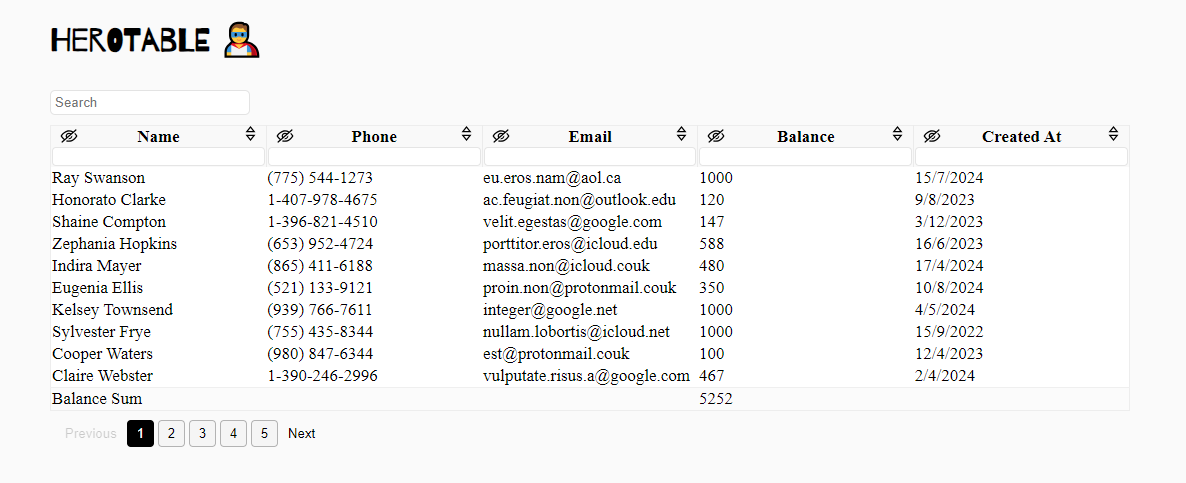
Herotable is a plug-in for the jQuery Javascript library, to make your tables have the ability to filter, sort and hide and a lot of another features.
[Demo](https://yazanqwaider.github.io/herotable/)
### Installing
```shell
npm install herotable
```
From CDN :
```html
```
```html
```
#### Note:
You must import the jquery plugin before the herotable.
### Usage
```js
$('table').herotable();
```
with options :
```js
$('table').herotable({
// options
});
```
#### Available options:
| Name | Description |
|--------------------| ---------------------|
|isRTL | If the table is in RTL direction, make it rtl in herotable, Boolean (default: false)|
|GeneralSearch | Show the general search input above the table, Boolean (default: false) |
|scrollableWrapper | Make the table scrollable, Boolean (default: false)|
|columnSearch | Enable searching on each column, Boolean (default: true)|
|columnResizer | Enable resizing feature on columns, Boolean (default: true)|
|hideColumn | Enalbe the hide column feature, Boolean (default: true) |
|noAvailableData | When the table is empty, would you like to show the empty row or not, Boolean (default: true)|
|afterResizeCallback | You can call your callback function after column resizing, there is passed parameter to function is data contains on (new_width and col_index), function (default: null)|
|afterHideCallback | You can call your callback function after column hiding, function (default: null)|
|afterShowHiddenColsCallback| You can call your callback function after show the hidden columns, function (default: null)|
|hideFooterIfBodyEmpty| You can hide the footer when you search on something and the no results, Boolean (default: true)|
|columns | From `columns` option you can edit the column width and column visibility at the begining, Object (default: {sizes: {}, hidden: [], types: []})|
|enableSumValuesOnColumns | You can enable sum values on columns and put the summation in footer, Array(default: [])|
|sumValuesCell | When you enable the summation on column, the summation will be displayed in ```td``` tag in the same index in footer, but you can determine nested element inside td, string (default: 'td')|
|decimalNumberLength| If you enabled the summation on columns, you can make the summation with decimal like: 50.016 through define the length, Number(default: 0)|
|withPagination | For enable the pagination feature, you must make the value is true, Boolean(default: false)|
|rowsPerPage | If you enabled the pagination feature, you maybe would like to change the rows count per page, Number(default: 15)|
|lang | Change the default text on elements, like (generalSearch, noAvailableData, showHiddenColumn, nextPaginateBtn, prevPaginateBtn, all)|
|dateFormatFunc| The default format for date columns is ISO 8601, the date that you added in the table cells will passed to new Date() method automatically, but if you want a custom date format, use ```dateFormatFunc``` and return a timestamp value.|
|preserveState | Preserve the state in the search inputs when return back to the page. Boolean(default: true)|
Example:
```js
$('table').herotable({
afterHideCallback: function(data) {
console.log(`Column index is: ${data.col_index}`);
console.log(`New width is: ${data.new_width}`);
},
lang: {
generalSearch: "Search on products",
}
});
```
Another Example:
```js
$('table').herotable({
columns: {
sizes: {0: 100, 1: 50}, // first column will take "100px", and the second "50px"
hidden: [2, 3], // hide the third and fourth columns
},
});
```
For a **scrollableWrapper** optionm you can determine the max height of the wrapper in your css :
```css
.scrollable-herotable-wrapper {
max-height: 350px !important; /* default is 50vh */
}
```
**Date Format :**
```js
// you can use any date library you want, we'll use moment.js as an example.
$('table').herotable({
dateFormatFunc: function(date) {
// If we show the dates in table by this format (DD/MM/YYYY), so
// we'll parse it to timestamp like that through moment.js
return +moment(date, 'DD/MM/YYYY');
}
});
```
**Columns Types :**
There are an automatically types detector for columns, and you can also define the columns types manually like that:
```js
$('table').herotable({
// available types: number - string - date
columns: {
types: ['number', 'number', 'string', 'date'],
}
});
```
If you would like to destroy the herotable :
```js
let instance = $('table').herotable();
instance[0].herotable.destroy();
```
Sometimes you would like to initialize the herotable in a global place, so you don't have the instance direcly, you can do this:
```js
$('#table-id').herotable(); // in a global place
$('#table-id')[0].herotable.destroy();
```
And you can pass the **destroy** argument to herotable directly like this:
```js
$('#table-id').herotable('destroy');
```