Hermes Web UI
中文
A full-featured web dashboard for Hermes Agent.
Manage AI chat sessions, monitor usage & costs, configure platform channels,
schedule cron jobs, browse skills — all from a clean, responsive web interface.
npm install -g hermes-web-ui && hermes-web-ui start




---
## Features
### AI Chat
- Real-time chat streaming over Socket.IO `/chat-run`; chat runs execute through the Hermes agent bridge
- Multi-session management — create, rename, delete, switch between sessions
- **Self-built session database** — local SQLite storage for Web UI sessions; Hermes state.db remains a read-only source for Hermes history APIs
- Session grouping by source (Telegram, Discord, Slack, etc.) with collapsible accordion
- Active session indicator — live sessions pin to top with spinner icon
- Sessions sorted by latest message time
- Markdown rendering with syntax highlighting and code copy
- Tool call detail expansion (arguments / result)
- File upload support
- File download support — download user-uploaded files and agent-generated files across local, Docker, SSH, and Singularity backends
- Session search — Ctrl+K search across the Web UI local session database; read-only Hermes history sessions are not included
- Global model selector — discovers models from `~/.hermes/auth.json` credential pool
- Per-session model display badge and context token usage
### Platform Channels
Unified configuration for **8 platforms** in one page:
| Platform | Features |
| ------------- | ---------------------------------------------------------------------- |
| Telegram | Bot token, mention control, reactions, free-response chats |
| Discord | Bot token, mention, auto-thread, reactions, channel allow/ignore lists |
| Slack | Bot token, mention control, bot message handling |
| WhatsApp | Enable/disable, mention control, mention patterns |
| Matrix | Access token, homeserver, auto-thread, DM mention threads |
| Feishu (Lark) | App ID / Secret, mention control |
| WeChat | QR code login (scan in browser, auto-save credentials) |
| WeCom | Bot ID / Secret |
- Credential management writes to `~/.hermes/.env`
- Channel behavior settings write to `~/.hermes/config.yaml`
- Per-platform configured/unconfigured status detection
### Usage Analytics
- Total token usage breakdown (input / output)
- Session count with daily average
- Estimated cost tracking & cache hit rate
- Model usage distribution chart
- 30-day daily trend (bar chart + data table)
### Scheduled Jobs
- Create, edit, pause, resume, delete cron jobs
- Trigger immediate execution
- Cron expression quick presets
### Model Management
- Auto-discover models from credential pool (`~/.hermes/auth.json`)
- Fetch available models from each provider endpoint (`/v1/models`)
- Add, update, and delete providers (preset & custom OpenAI-compatible)
- OpenAI Codex & Nous Portal OAuth login
- Provider URL auto-detection for non-v1 API versions (e.g. `/v4`)
- Provider-level model grouping with default model switching
### Multi-Profile
- Create, rename, delete, and switch between Hermes profiles
- Clone existing profile or import from archive (`.tar.gz`)
- Export profile for backup or sharing
- Profile-scoped configuration and cache isolation
### File Browser
- Browse files on remote backends (local, Docker, SSH, Singularity)
- Upload, download, rename, copy, move, and delete files
- Create directories
- View file content with syntax highlighting
### Group Chat
- Multi-agent chat rooms with real-time messaging via Socket.IO
- @mention routing — mention an agent to trigger a contextual reply
- Context compression — automatic conversation summarization when history exceeds token threshold
- Typing status and reply progress indicators
- Room creation, deletion, and invite code management
- Agent management — add/remove agents from rooms with per-agent profiles
- SQLite message persistence
- Mobile responsive with collapsible sidebar
### Skills & Memory
- Browse and search installed skills
- View skill details and attached files
- User notes and profile management
### Logs
- View agent / server / error logs
- Filter by log level, log file, and keyword
- Structured log parsing with HTTP access log highlighting
### Authentication
- Token-based auth (auto-generated on first run or set via `AUTH_TOKEN` env var)
- Optional username/password login — set via settings page after initial token auth
- Auth can be disabled with `AUTH_DISABLED=1`
### Settings
- Display (streaming, compact mode, reasoning, cost display)
- Agent (max turns, timeout, tool enforcement)
- Memory (enable/disable, char limits)
- Session reset (idle timeout, scheduled reset)
- Privacy (PII redaction)
- Model settings (default model & provider)
- Profile and provider configuration
### Web Terminal
- Integrated terminal powered by node-pty and @xterm/xterm
- Multi-session support — create, switch between, and close terminal sessions
- Real-time keyboard input and PTY output streaming via WebSocket
- Window resize support
---
## Quick Start
### npm (Recommended)
```bash
npm install -g hermes-web-ui
hermes-web-ui start
```
Open **http://localhost:8648**
### One-line Setup (Auto-detect OS)
Automatically installs Node.js (if missing) and hermes-web-ui on Debian/Ubuntu/macOS:
```bash
bash <(curl -fsSL https://raw.githubusercontent.com/EKKOLearnAI/hermes-web-ui/main/scripts/setup.sh)
```
### WSL
```bash
bash <(curl -fsSL https://raw.githubusercontent.com/EKKOLearnAI/hermes-web-ui/main/scripts/setup.sh)
hermes-web-ui start
```
> WSL uses the same Web UI daemon startup flow as other local installs; no separate gateway service is started by Web UI.
### Docker Compose
Single-container deployment with integrated Hermes Agent:
```bash
# Use pre-built image (Recommended)
WEBUI_IMAGE=ekkoye8888/hermes-web-ui docker compose up -d
# Or build from source
docker compose up -d --build
docker compose logs -f hermes-webui
```
Open **http://localhost:6060**
- Persistent Hermes data is stored in `./hermes_data`
- Web UI auth token is stored in `./hermes_data/hermes-web-ui/.token`
- On first run with auth enabled, the token is printed to container logs
- All runtime settings are environment-variable driven in `docker-compose.yml`
For detailed notes and troubleshooting, see [`docs/docker.md`](./docs/docker.md).
### Hermes Agent Runtime Discovery
When Web UI starts backend chat features, it prefers a source checkout that
contains `run_agent.py` such as `~/.hermes/hermes-agent`. If no source checkout
is found, it falls back to the Python environment used by the installed
`hermes` command, then the system Python. This supports both source installs
and package installs such as `pip install hermes-agent`.
## Web UI Environment Variables
These variables configure Hermes Web UI itself. Provider API keys and Hermes Agent settings are managed separately through Hermes profiles.
| Variable | Default | Description |
| --- | --- | --- |
| `PORT` | `8648` | Web UI listen port. |
| `BIND_HOST` | `0.0.0.0` | Web UI bind host. Set `::` explicitly for IPv6. |
| `HERMES_WEB_UI_HOME` | `~/.hermes-web-ui` | Web UI data home for auth token, credentials, logs, DB, and default uploads. `HERMES_WEBUI_STATE_DIR` is also supported as a compatibility alias. |
| `UPLOAD_DIR` | `$HERMES_WEB_UI_HOME/upload` | Upload directory override. |
| `CORS_ORIGINS` | `*` | Koa CORS origin setting. |
| `AUTH_DISABLED` | unset | Set to `1` or `true` to disable Web UI auth. |
| `AUTH_TOKEN` | auto-generated | Explicit bearer token. If unset, Web UI creates one under `HERMES_WEB_UI_HOME`. |
| `PROFILE` | `default` | Initial Hermes profile name. |
| `LOG_LEVEL` | `info` | Server log level. |
| `BRIDGE_LOG_LEVEL` | `$LOG_LEVEL` or `info` | Bridge log level. |
| `MAX_DOWNLOAD_SIZE` | `200MB` | Maximum file download size. |
| `MAX_EDIT_SIZE` | `10MB` | Maximum editable file size. |
| `WORKSPACE_BASE` | `/opt/data/workspace` | Base directory for workspace browsing. |
### CLI Commands
| Command | Description |
| --------------------------------- | ---------------------------------- |
| `hermes-web-ui start` | Start in background (daemon mode) |
| `hermes-web-ui start --port 9000` | Start on custom port |
| `hermes-web-ui stop` | Stop background process |
| `hermes-web-ui restart` | Restart background process |
| `hermes-web-ui status` | Check if running |
| `hermes-web-ui update` | Update to latest version & restart |
| `hermes-web-ui upgrade` | Alias for `update` |
| `hermes-web-ui -v` | Show version number |
| `hermes-web-ui -h` | Show help message |
`update` / `upgrade` first attempt `npm cache clean --force`, then run `npm install -g hermes-web-ui@latest` and restart. Cache cleanup is best-effort; if it fails, the updater continues with the install.
### Auto Configuration
On startup the BFF server automatically:
- Initializes Web UI data directories, local databases, and bundled skills
- Starts the Hermes agent bridge used by `/chat-run`
- Opens browser on successful startup
---
## Development
```bash
git clone https://github.com/EKKOLearnAI/hermes-web-ui.git
cd hermes-web-ui
npm install
npm run dev
```
- Frontend: http://localhost:5173
- BFF Server: http://localhost:8648
```bash
npm run build # outputs to dist/
```
See [DEVELOPMENT.md](./DEVELOPMENT.md) for project development guidelines.
## Architecture
```
Browser → BFF (Koa, :8648) → Socket.IO /chat-run
↓
Hermes agent bridge → Hermes Agent runtime
↓
Hermes CLI / profiles
~/.hermes/config.yaml (channel behavior)
~/.hermes/auth.json (credential pool)
Tencent iLink API (WeChat QR login)
```
The frontend is designed with **multi-agent extensibility** — all Hermes-specific code is namespaced under `hermes/` directories (API, components, views, stores), making it straightforward to add new agent integrations alongside.
The BFF layer handles Socket.IO chat streaming, the Hermes agent bridge, file upload and download (multi-backend: local/Docker/SSH/Singularity), session CRUD, config/credential management, WeChat QR login, model discovery, skills/memory management, log reading, and static file serving.
## Tech Stack
**Frontend:** Vue 3 + TypeScript + Vite + Naive UI + Pinia + Vue Router + vue-i18n + SCSS + markdown-it + highlight.js
**Backend:** Koa 2 (BFF server) + node-pty (web terminal)
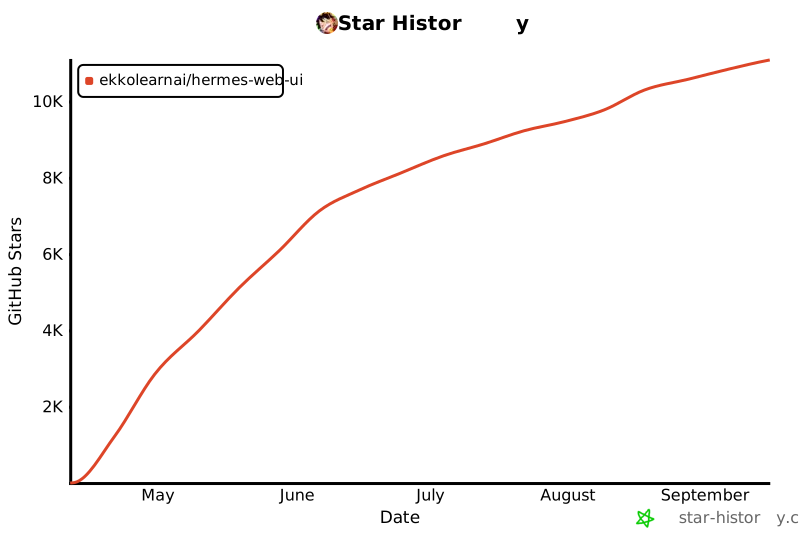
## Star History
[](https://star-history.com/#EKKOLearnAI/hermes-web-ui&Date)
## License
[BSL-1.1](./LICENSE)