:warning: **Handsontable Pro is now Handsontable.** Since version `6.2.3` the Handsontable Pro package is deprecated. For version `7.0.0` use [handsontable](https://github.com/handsontable/handsontable) instead of [handsontable-pro](https://github.com/handsontable/handsontable-pro) to stay up to date with future releases.

-------

<div align="center">
  <a href="//handsontable.com" target="_blank"><img src="https://raw.githubusercontent.com/handsontable/static-files/master/Images/Logo/Handsontable/handsontable-logo-300-74-new-pro.png" alt="Handsontable Pro logo" /></a>
</div>

<br/>

[**Handsontable Pro**](//handsontable.com) is a premium JavaScript/HTML5 data grid component with spreadsheet look & feel. It easily integrates with any data source and comes with premium features like Filtering, Nested Headers, Dropdown Menu, Collapsing Columns, Multiple Column Sorting and Export to File.  It is available for [Vue](//github.com/handsontable/vue-handsontable-official), [React](//github.com/handsontable/react-handsontable), [Angular](//github.com/handsontable/angular-handsontable) and [Polymer](//github.com/handsontable/hot-table).

**This is a commercial, paid software available for evaluation purposes only. To use it in a production environment you need to purchase a license and pass a valid [license key](#license-key) in the configuration object.**

<br/>

[![Build status](https://travis-ci.org/handsontable/handsontable-pro.png?branch=master)](//travis-ci.org/handsontable/handsontable-pro)
[![npm](https://img.shields.io/npm/dt/handsontable-pro.svg)](//npmjs.com/package/handsontable-pro)

## Table of contents

1. [Installation](#installation)
2. [Basic usage](#basic-usage)
3. [Examples](#examples)
4. [Features](#features)
5. [Screenshot](#screenshot)
6. [Resources](#resources)
7. [Wrappers](#wrappers)
8. [Support](#support)
9. [Pricing](#pricing)
10. [License key](#license-key)
11. [License](#license)

<br/>

### Installation
There are many ways to install Handsontable Pro, but we suggest using npm:
```
npm install handsontable-pro
```

**Alternative ways to install**
- See the [download section](//handsontable.com/pro-download.html) on how to install Handsontable Pro using nuget, bower, yarn and more.

<br/>

### Basic usage
Assuming that you have already installed Handsontable Pro, create an empty `<div>` element that will be turned into a spreadsheet:

```html
<div id="example"></div>
```
In the next step, pass a reference to that `<div>` element into the Handsontable constructor and fill the instance with sample data:
```javascript
var data = [
  ["", "Tesla", "Volvo", "Toyota", "Honda"],
  ["2017", 10, 11, 12, 13],
  ["2018", 20, 11, 14, 13],
  ["2019", 30, 15, 12, 13]
];

var container = document.getElementById('example');
var hot = new Handsontable(container, {
  data: data,
  rowHeaders: true,
  colHeaders: true,
  filters: true,
  dropdownMenu: true
});
```

<br/>

### Examples
- [See a live demo](//handsontable.com/examples.html?manual-resize&manual-move&conditional-formatting&context-menu&filters&dropdown-menu&headers)

<br/>

### Features

**It includes all of the Handsontable Community Edition (CE) features, plus:**

- Filtering
- Export to file
- Dropdown menu
- Nested headers
- Collapsing columns
- Multiple Column Sorting
- Hiding rows
- Hiding columns
- Trimming rows
- Column summary
- Header tooltips
- Binding rows with headers
- Formulas (alpha)
- Nested rows (alpha)
- Gantt Chart (beta)
- Non-contiguous selection

[See a comparison table](//handsontable.com/docs/tutorial-features.html)

<br/>

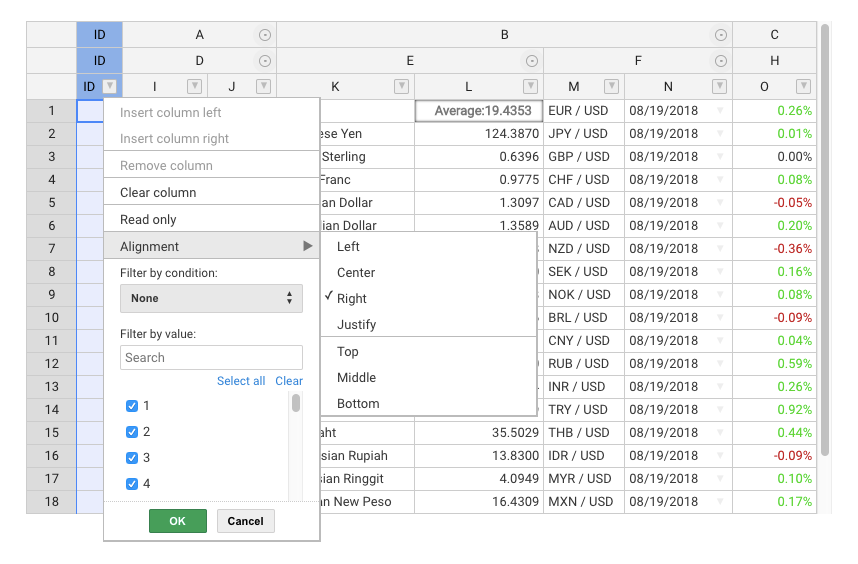
### Screenshot
<div align="center">
<a href="//handsontable.com/examples.html?manual-resize&manual-move&conditional-formatting&context-menu&filters&dropdown-menu&headers">
<img src="https://raw.githubusercontent.com/handsontable/static-files/master/Images/Screenshots/handsontable-pro-showcase.png" align="center" alt="Handsontable Pro Screenshot"/>
</a>
</div>

<br/>

### Resources
- [API Reference](//handsontable.com/docs/Core.html)
- [Compatibility](//handsontable.com/docs/tutorial-compatibility.html)
- [Change log](//handsontable.com/docs/tutorial-release-notes.html)
- [Roadmap](//trello.com/b/PztR4hpj)
- [Newsroom](//twitter.com/handsontable)

<br/>

### Wrappers
Handsontable Pro comes with wrappers and directives for most popular frameworks:

- [Angular](//github.com/handsontable/angular-handsontable)
- [Angular 1](//github.com/handsontable/ngHandsontable)
- [React](//github.com/handsontable/react-handsontable)
- [Vue](//github.com/handsontable/vue-handsontable-official)
- [Polymer](//github.com/handsontable/hot-table)

<br/>

### Support
Handsontable Pro is supported on a commercial basis. All the suggestions and issues should be sent to support@handsontable.com.

<br/>

### Pricing
The [pricing page](//handsontable.com/pricing.html) lists all pricing info, and contains links to purchase a new license, or to renew a maintenance plan.

<br/>

### License key
Handsontable Pro requires passing a valid license key in the configuration section.
You can find your purchased license key in your account at [my.handsontable.com](//my.handsontable.com/sign-in.html).

An example of what the configuration object should look like:

```javascript
hot = new Handsontable(container,{
  data: data,
  rowHeaders: true,
  colHeaders: true,
  licenseKey: '00000-00000-00000-00000-00000'
});
```

**Note that the license key is passed as a string so you need to wrap it in quotes ('').**

<br/>

### License
Handsontable Pro is released under a commercial license. [Learn more](//docs.handsontable.com/pro/tutorial-licensing.html)

Copyright belong to Handsoncode sp. z o.o.