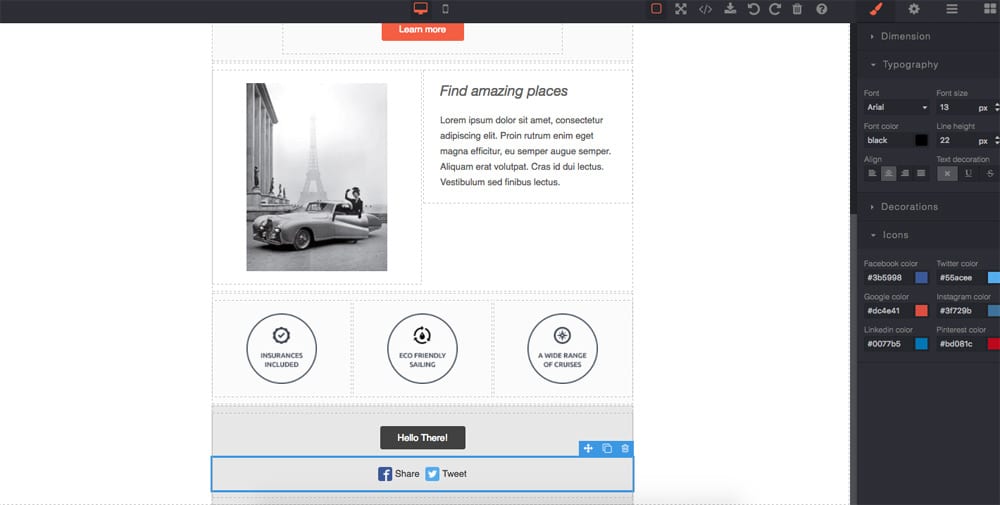
# GrapesJS MJML
This plugin enables the usage of [MJML](https://mjml.io/) components inside the GrapesJS environment. MJML components are rendered in real-time using the official compiler, therefore the result is, almost, the same as using the [MJML Live Editor](https://mjml.io/try-it-live).
[Demo](http://grapesjs.com/demo-mjml.html)
Supported components:
`mj-container`
`mj-section`
`mj-column`
`mj-text`
`mj-image`
`mj-button`
`mj-social`
`mj-divider`
`mj-spacer`
## Options
|Option|Description|Default|
|-|-|-
|`categoryLabel`|Category for blocks|`''`|
|`importPlaceholder`|Import placeholder MJML|`''`|
|`modalTitleImport`|Title for the import modal|`Import MJML`|
|`modalBtnImport`|Test for the import button|`Import`|
|`modalLabelImport`|Description for the import modal|`''`|
|`modalTitleExport`|Title for the export modal|`Export MJML`|
|`modalLabelExport`|Description for the export modal|`''`|
|`overwriteExport`|Overwrite default export command|`true`|
|`preMjml`|String before the MJML in export code|`''`|
|`postMjml`|String after the MJML in export code|`''`|
|`resetBlocks`|Clean all previous blocks if true|`true`|
|`resetDevices`|Clean all previous devices and set a new one for mobile|`true`|,
|`resetStyleManager`|Reset the Style Manager and add new properties for MJML|`true`|,
## Download
* `npm i grapesjs-mjml`
## Usage
```html
My Company
```
## Development
Clone the repository
```sh
$ git clone https://github.com/artf/grapesjs-mjml.git
$ cd grapesjs-mjml
```
Install it
```sh
$ npm i
```
Start the dev server
```sh
$ npm start
```
## License
BSD 3-Clause