# GLSL Preview package
Live preview fragment shaders in the Atom editor, with `ctrl-shift-G`.
 Make sure you install [language-glsl](https://atom.io/packages/language-glsl)
for syntax highlighting.
## Uniforms
The following default uniforms are included, no need to add these into your
fragment shaders. Uncheck `Include default uniforms` in the package settings to
declare these yourself.
```glsl
uniform vec2 iResolution; // size of the preview
uniform vec2 iMouse; // cursor in normalized coordinates [0, 1)
uniform float iGlobalTime; // clock in seconds
```
The variants `u_resolution`, `u_mouse` and `u_time` can also be used to match
the style found in [The Book of Shaders](http://thebookofshaders.com/).
## Textures
Textures can be loaded by defining a uniform with a comment containing the path
to the file. The syntax is:
```glsl
uniform sampler2D ; //
```
For example:
```glsl
uniform sampler2D inThisDirectory; // foo.jpg
uniform sampler2D inOtherDirectory; // ../other_textures/bar.png
uniform sampler2D withAbsolutePath; // /Users/ford/textures/blah.bmp
```
## Shader errors
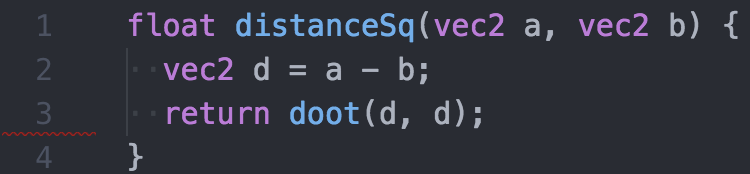
If the shader fails to compile, the tab and line number will subtly highlight in
red.

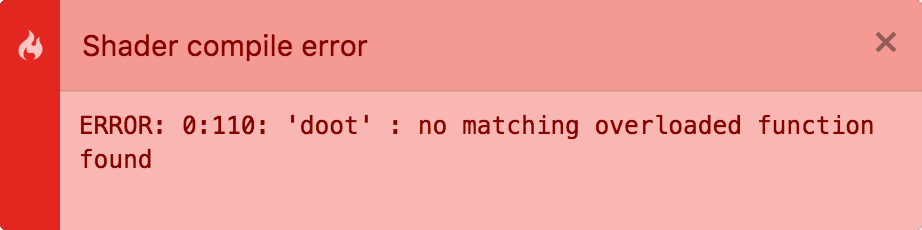
 If enabled in the package settings, a notification will show the error message:
 ## Capture images
Right click on the preview to copy or save a still image of the shader. This can
also be done by running the command "Glsl Preview: Copy Image" or
"Glsl Preview: Save Image" from the command palette (`cmd-shift-P`).
## Examples
Example shaders can be found in the `examples/` directory.
## glslify
Supports [glslify](https://github.com/glslify/glslify) for importing glsl
modules.
```glsl
// Import from local file:
#pragma glslify: map = require('./map')
// Import from npm installed module:
#pragma glslify: rainbow = require('glsl-colormap/rainbow')
```
## Frag snippet
Create a new .glsl file, type `frag`, and hit enter. This will output the base
fragment shader code to get started from.
## Credits
[Markdown Preview](https://github.com/atom/markdown-preview) for the boilerplate
code.
[three.js](http://threejs.org/) for simplifying WebGL.