Calls
The HTTP client’s job is to accept your request and produce its response. This is simple in theory but it gets tricky in practice.
Requests
Each HTTP request contains a URL, a method (like GET or POST), and a list of headers. Requests may also contain a body: a data stream of a specific content type.
Responses
The response answers the request with a code (like 200 for success or 404 for not found), headers, and its own optional body.
Rewriting Requests
When you provide OkHttp with an HTTP request, you’re describing the request at a high-level: “fetch me this URL with these headers.” For correctness and efficiency, OkHttp rewrites your request before transmitting it.
OkHttp may add headers that are absent from the original request, including Content-Length, Transfer-Encoding, User-Agent, Host, Connection, and Content-Type. It will add an Accept-Encoding header for transparent response compression unless the header is already present. If you’ve got cookies, OkHttp will add a Cookie header with them.
Some requests will have a cached response. When this cached response isn’t fresh, OkHttp can do a conditional GET to download an updated response if it’s newer than what’s cached. This requires headers like If-Modified-Since and If-None-Match to be added.
Rewriting Responses
If transparent compression was used, OkHttp will drop the corresponding response headers Content-Encoding and Content-Length because they don’t apply to the decompressed response body.
If a conditional GET was successful, responses from the network and cache are merged as directed by the spec.
Follow-up Requests
When your requested URL has moved, the webserver will return a response code like 302 to indicate the document’s new URL. OkHttp will follow the redirect to retrieve a final response.
If the response issues an authorization challenge, OkHttp will ask the Authenticator (if one is configured) to satisfy the challenge. If the authenticator supplies a credential, the request is retried with that credential included.
Retrying Requests
Sometimes connections fail: either a pooled connection was stale and disconnected, or the webserver itself couldn’t be reached. OkHttp will retry the request with a different route if one is available.
Calls
With rewrites, redirects, follow-ups and retries, your simple request may yield many requests and responses. OkHttp uses Call to model the task of satisfying your request through however many intermediate requests and responses are necessary. Typically this isn’t many! But it’s comforting to know that your code will continue to work if your URLs are redirected or if you failover to an alternate IP address.
Calls are executed in one of two ways:
- Synchronous: your thread blocks until the response is readable.
- Asynchronous: you enqueue the request on any thread, and get called back on another thread when the response is readable.
Calls can be canceled from any thread. This will fail the call if it hasn’t yet completed! Code that is writing the request body or reading the response body will suffer an IOException when its call is canceled.
Dispatch
For synchronous calls, you bring your own thread and are responsible for managing how many simultaneous requests you make. Too many simultaneous connections wastes resources; too few harms latency.
For asynchronous calls, Dispatcher implements policy for maximum simultaneous requests. You can set maximums per-webserver (default is 5), and overall (default is 64).
Connections
Although you provide only the URL, OkHttp plans its connection to your webserver using three types: URL, Address, and Route.
URLs
URLs (like https://github.com/square/okhttp) are fundamental to HTTP and the Internet. In addition to being a universal, decentralized naming scheme for everything on the web, they also specify how to access web resources.
URLs are abstract:
- They specify that the call may be plaintext (
http) or encrypted (https), but not which cryptographic algorithms should be used. Nor do they specify how to verify the peer's certificates (the HostnameVerifier) or which certificates can be trusted (the SSLSocketFactory). - They don't specify whether a specific proxy server should be used or how to authenticate with that proxy server.
They're also concrete: each URL identifies a specific path (like /square/okhttp) and query (like ?q=sharks&lang=en). Each webserver hosts many URLs.
Addresses
Addresses specify a webserver (like github.com) and all of the static configuration necessary to connect to that server: the port number, HTTPS settings, and preferred network protocols (like HTTP/2 or SPDY).
URLs that share the same address may also share the same underlying TCP socket connection. Sharing a connection has substantial performance benefits: lower latency, higher throughput (due to TCP slow start) and conserved battery. OkHttp uses a ConnectionPool that automatically reuses HTTP/1.x connections and multiplexes HTTP/2 and SPDY connections.
In OkHttp some fields of the address come from the URL (scheme, hostname, port) and the rest come from the OkHttpClient.
Routes
Routes supply the dynamic information necessary to actually connect to a webserver. This is the specific IP address to attempt (as discovered by a DNS query), the exact proxy server to use (if a ProxySelector is in use), and which version of TLS to negotiate (for HTTPS connections).
There may be many routes for a single address. For example, a webserver that is hosted in multiple datacenters may yield multiple IP addresses in its DNS response.
Connections
When you request a URL with OkHttp, here's what it does:
- It uses the URL and configured OkHttpClient to create an address. This address specifies how we'll connect to the webserver.
- It attempts to retrieve a connection with that address from the connection pool.
- If it doesn't find a connection in the pool, it selects a route to attempt. This usually means making a DNS request to get the server's IP addresses. It then selects a TLS version and proxy server if necessary.
- If it's a new route, it connects by building either a direct socket connection, a TLS tunnel (for HTTPS over an HTTP proxy), or a direct TLS connection. It does TLS handshakes as necessary.
- It sends the HTTP request and reads the response.
If there's a problem with the connection, OkHttp will select another route and try again. This allows OkHttp to recover when a subset of a server's addresses are unreachable. It's also useful when a pooled connection is stale or if the attempted TLS version is unsupported.
Once the response has been received, the connection will be returned to the pool so it can be reused for a future request. Connections are evicted from the pool after a period of inactivity.
Recipes
We've written some recipes that demonstrate how to solve common problems with OkHttp. Read through them to learn about how everything works together. Cut-and-paste these examples freely; that's what they're for.
Synchronous Get
Download a file, print its headers, and print its response body as a string.
The string() method on response body is convenient and efficient for small documents. But if the response body is large (greater than 1 MiB), avoid string() because it will load the entire document into memory. In that case, prefer to process the body as a stream.
  private final OkHttpClient client = new OkHttpClient();

  public void run() throws Exception {
    Request request = new Request.Builder()
        .url("http://publicobject.com/helloworld.txt")
        .build();

    Response response = client.newCall(request).execute();
    if (!response.isSuccessful()) throw new IOException("Unexpected code " + response);

    Headers responseHeaders = response.headers();
    for (int i = 0; i < responseHeaders.size(); i++) {
      System.out.println(responseHeaders.name(i) + ": " + responseHeaders.value(i));
    }

    System.out.println(response.body().string());
  }
Asynchronous Get
Download a file on a worker thread, and get called back when the response is readable. The callback is made after the response headers are ready. Reading the response body may still block. OkHttp doesn't currently offer asynchronous APIs to receive a response body in parts.
  private final OkHttpClient client = new OkHttpClient();

  public void run() throws Exception {
    Request request = new Request.Builder()
        .url("http://publicobject.com/helloworld.txt")
        .build();

    client.newCall(request).enqueue(new Callback() {
      @Override public void onFailure(Call call, IOException e) {
        e.printStackTrace();
      }

      @Override public void onResponse(Call call, Response response) throws IOException {
        if (!response.isSuccessful()) throw new IOException("Unexpected code " + response);

        Headers responseHeaders = response.headers();
        for (int i = 0, size = responseHeaders.size(); i < size; i++) {
          System.out.println(responseHeaders.name(i) + ": " + responseHeaders.value(i));
        }

        System.out.println(response.body().string());
      }
    });
  }
Accessing Headers
Typically HTTP headers work like a Map<String, String>: each field has one value or none. But some headers permit multiple values, like Guava's Multimap. For example, it's legal and common for an HTTP response to supply multiple Vary headers. OkHttp's APIs attempt to make both cases comfortable.
When writing request headers, use header(name, value) to set the only occurrence of name to value. If there are existing values, they will be removed before the new value is added. Use addHeader(name, value) to add a header without removing the headers already present.
When reading response a header, use header(name) to return the last occurrence of the named value. Usually this is also the only occurrence! If no value is present, header(name) will return null. To read all of a field's values as a list, use headers(name).
To visit all headers, use the Headers class which supports access by index.
  private final OkHttpClient client = new OkHttpClient();

  public void run() throws Exception {
    Request request = new Request.Builder()
        .url("https://api.github.com/repos/square/okhttp/issues")
        .header("User-Agent", "OkHttp Headers.java")
        .addHeader("Accept", "application/json; q=0.5")
        .addHeader("Accept", "application/vnd.github.v3+json")
        .build();

    Response response = client.newCall(request).execute();
    if (!response.isSuccessful()) throw new IOException("Unexpected code " + response);

    System.out.println("Server: " + response.header("Server"));
    System.out.println("Date: " + response.header("Date"));
    System.out.println("Vary: " + response.headers("Vary"));
  }
Posting a String
Use an HTTP POST to send a request body to a service. This example posts a markdown document to a web service that renders markdown as HTML. Because the entire request body is in memory simultaneously, avoid posting large (greater than 1 MiB) documents using this API.
  public static final MediaType MEDIA_TYPE_MARKDOWN
      = MediaType.parse("text/x-markdown; charset=utf-8");

  private final OkHttpClient client = new OkHttpClient();

  public void run() throws Exception {
    String postBody = ""
        + "Releases\n"
        + "--------\n"
        + "\n"
        + " * _1.0_ May 6, 2013\n"
        + " * _1.1_ June 15, 2013\n"
        + " * _1.2_ August 11, 2013\n";

    Request request = new Request.Builder()
        .url("https://api.github.com/markdown/raw")
        .post(RequestBody.create(MEDIA_TYPE_MARKDOWN, postBody))
        .build();

    Response response = client.newCall(request).execute();
    if (!response.isSuccessful()) throw new IOException("Unexpected code " + response);

    System.out.println(response.body().string());
  }
Post Streaming
Here we POST a request body as a stream. The content of this request body is being generated as it's being written. This example streams directly into the Okio buffered sink. Your programs may prefer an OutputStream, which you can get from BufferedSink.outputStream().
  public static final MediaType MEDIA_TYPE_MARKDOWN
      = MediaType.parse("text/x-markdown; charset=utf-8");

  private final OkHttpClient client = new OkHttpClient();

  public void run() throws Exception {
    RequestBody requestBody = new RequestBody() {
      @Override public MediaType contentType() {
        return MEDIA_TYPE_MARKDOWN;
      }

      @Override public void writeTo(BufferedSink sink) throws IOException {
        sink.writeUtf8("Numbers\n");
        sink.writeUtf8("-------\n");
        for (int i = 2; i <= 997; i++) {
          sink.writeUtf8(String.format(" * %s = %s\n", i, factor(i)));
        }
      }

      private String factor(int n) {
        for (int i = 2; i < n; i++) {
          int x = n / i;
          if (x * i == n) return factor(x) + " × " + i;
        }
        return Integer.toString(n);
      }
    };

    Request request = new Request.Builder()
        .url("https://api.github.com/markdown/raw")
        .post(requestBody)
        .build();

    Response response = client.newCall(request).execute();
    if (!response.isSuccessful()) throw new IOException("Unexpected code " + response);

    System.out.println(response.body().string());
  }
Posting a File
It's easy to use a file as a request body.
  public static final MediaType MEDIA_TYPE_MARKDOWN
      = MediaType.parse("text/x-markdown; charset=utf-8");

  private final OkHttpClient client = new OkHttpClient();

  public void run() throws Exception {
    File file = new File("README.md");

    Request request = new Request.Builder()
        .url("https://api.github.com/markdown/raw")
        .post(RequestBody.create(MEDIA_TYPE_MARKDOWN, file))
        .build();

    Response response = client.newCall(request).execute();
    if (!response.isSuccessful()) throw new IOException("Unexpected code " + response);

    System.out.println(response.body().string());
  }
Posting form parameters
Use FormBody.Builder to build a request body that works like an HTML <form> tag. Names and values will be encoded using an HTML-compatible form URL encoding.
  private final OkHttpClient client = new OkHttpClient();

  public void run() throws Exception {
    RequestBody formBody = new FormBody.Builder()
        .add("search", "Jurassic Park")
        .build();
    Request request = new Request.Builder()
        .url("https://en.wikipedia.org/w/index.php")
        .post(formBody)
        .build();

    Response response = client.newCall(request).execute();
    if (!response.isSuccessful()) throw new IOException("Unexpected code " + response);

    System.out.println(response.body().string());
  }
Posting a multipart request
MultipartBody.Builder can build sophisticated request bodies compatible with HTML file upload forms. Each part of a multipart request body is itself a request body, and can define its own headers. If present, these headers should describe the part body, such as its Content-Disposition. The Content-Length and Content-Type headers are added automatically if they're available.
  private static final String IMGUR_CLIENT_ID = "...";
  private static final MediaType MEDIA_TYPE_PNG = MediaType.parse("image/png");

  private final OkHttpClient client = new OkHttpClient();

  public void run() throws Exception {
    // Use the imgur image upload API as documented at https://api.imgur.com/endpoints/image
    RequestBody requestBody = new MultipartBody.Builder()
        .setType(MultipartBody.FORM)
        .addFormDataPart("title", "Square Logo")
        .addFormDataPart("image", "logo-square.png",
            RequestBody.create(MEDIA_TYPE_PNG, new File("website/static/logo-square.png")))
        .build();

    Request request = new Request.Builder()
        .header("Authorization", "Client-ID " + IMGUR_CLIENT_ID)
        .url("https://api.imgur.com/3/image")
        .post(requestBody)
        .build();

    Response response = client.newCall(request).execute();
    if (!response.isSuccessful()) throw new IOException("Unexpected code " + response);

    System.out.println(response.body().string());
  }
Parse a JSON Response With Gson
Gson is a handy API for converting between JSON and Java objects. Here we're using it to decode a JSON response from a GitHub API.
Note that ResponseBody.charStream() uses the Content-Type response header to select which charset to use when decoding the response body. It defaults to UTF-8 if no charset is specified.
  private final OkHttpClient client = new OkHttpClient();
  private final Gson gson = new Gson();

  public void run() throws Exception {
    Request request = new Request.Builder()
        .url("https://api.github.com/gists/c2a7c39532239ff261be")
        .build();
    Response response = client.newCall(request).execute();
    if (!response.isSuccessful()) throw new IOException("Unexpected code " + response);

    Gist gist = gson.fromJson(response.body().charStream(), Gist.class);
    for (Map.Entry<String, GistFile> entry : gist.files.entrySet()) {
      System.out.println(entry.getKey());
      System.out.println(entry.getValue().content);
    }
  }

  static class Gist {
    Map<String, GistFile> files;
  }

  static class GistFile {
    String content;
  }
Response Caching
To cache responses, you'll need a cache directory that you can read and write to, and a limit on the cache's size. The cache directory should be private, and untrusted applications should not be able to read its contents!
It is an error to have multiple caches accessing the same cache directory simultaneously. Most applications should call new OkHttpClient() exactly once, configure it with their cache, and use that same instance everywhere. Otherwise the two cache instances will stomp on each other, corrupt the response cache, and possibly crash your program.
Response caching uses HTTP headers for all configuration. You can add request headers like Cache-Control: max-stale=3600 and OkHttp's cache will honor them. Your webserver configures how long responses are cached with its own response headers, like Cache-Control: max-age=9600. There are cache headers to force a cached response, force a network response, or force the network response to be validated with a conditional GET.
  private final OkHttpClient client;

  public CacheResponse(File cacheDirectory) throws Exception {
    int cacheSize = 10 * 1024 * 1024; // 10 MiB
    Cache cache = new Cache(cacheDirectory, cacheSize);

    client = new OkHttpClient.Builder()
        .cache(cache)
        .build();
  }

  public void run() throws Exception {
    Request request = new Request.Builder()
        .url("http://publicobject.com/helloworld.txt")
        .build();

    Response response1 = client.newCall(request).execute();
    if (!response1.isSuccessful()) throw new IOException("Unexpected code " + response1);

    String response1Body = response1.body().string();
    System.out.println("Response 1 response:          " + response1);
    System.out.println("Response 1 cache response:    " + response1.cacheResponse());
    System.out.println("Response 1 network response:  " + response1.networkResponse());

    Response response2 = client.newCall(request).execute();
    if (!response2.isSuccessful()) throw new IOException("Unexpected code " + response2);

    String response2Body = response2.body().string();
    System.out.println("Response 2 response:          " + response2);
    System.out.println("Response 2 cache response:    " + response2.cacheResponse());
    System.out.println("Response 2 network response:  " + response2.networkResponse());

    System.out.println("Response 2 equals Response 1? " + response1Body.equals(response2Body));
  }
To prevent a response from using the cache, use CacheControl.FORCE_NETWORK. To prevent it from using the network, use CacheControl.FORCE_CACHE. Be warned: if you use FORCE_CACHE and the response requires the network, OkHttp will return a 504 Unsatisfiable Request response.
Canceling a Call
Use Call.cancel() to stop an ongoing call immediately. If a thread is currently writing a request or reading a response, it will receive an IOException. Use this to conserve the network when a call is no longer necessary; for example when your user navigates away from an application. Both synchronous and asynchronous calls can be canceled.
  private final ScheduledExecutorService executor = Executors.newScheduledThreadPool(1);
  private final OkHttpClient client = new OkHttpClient();

  public void run() throws Exception {
    Request request = new Request.Builder()
        .url("http://httpbin.org/delay/2") // This URL is served with a 2 second delay.
        .build();

    final long startNanos = System.nanoTime();
    final Call call = client.newCall(request);

    // Schedule a job to cancel the call in 1 second.
    executor.schedule(new Runnable() {
      @Override public void run() {
        System.out.printf("%.2f Canceling call.%n", (System.nanoTime() - startNanos) / 1e9f);
        call.cancel();
        System.out.printf("%.2f Canceled call.%n", (System.nanoTime() - startNanos) / 1e9f);
      }
    }, 1, TimeUnit.SECONDS);

    try {
      System.out.printf("%.2f Executing call.%n", (System.nanoTime() - startNanos) / 1e9f);
      Response response = call.execute();
      System.out.printf("%.2f Call was expected to fail, but completed: %s%n",
          (System.nanoTime() - startNanos) / 1e9f, response);
    } catch (IOException e) {
      System.out.printf("%.2f Call failed as expected: %s%n",
          (System.nanoTime() - startNanos) / 1e9f, e);
    }
  }
Timeouts
Use timeouts to fail a call when its peer is unreachable. Network partitions can be due to client connectivity problems, server availability problems, or anything between. OkHttp supports connect, read, and write timeouts.
  private final OkHttpClient client;

  public ConfigureTimeouts() throws Exception {
    client = new OkHttpClient.Builder()
        .connectTimeout(10, TimeUnit.SECONDS)
        .writeTimeout(10, TimeUnit.SECONDS)
        .readTimeout(30, TimeUnit.SECONDS)
        .build();
  }

  public void run() throws Exception {
    Request request = new Request.Builder()
        .url("http://httpbin.org/delay/2") // This URL is served with a 2 second delay.
        .build();

    Response response = client.newCall(request).execute();
    System.out.println("Response completed: " + response);
  }
Per-call Configuration
All the HTTP client configuration lives in OkHttpClient including proxy settings, timeouts, and caches. When you need to change the configuration of a single call, call OkHttpClient.newBuilder(). This returns a builder that shares the same connection pool, dispatcher, and configuration with the original client. In the example below, we make one request with a 500 ms timeout and another with a 3000 ms timeout.
  private final OkHttpClient client = new OkHttpClient();

  public void run() throws Exception {
    Request request = new Request.Builder()
        .url("http://httpbin.org/delay/1") // This URL is served with a 1 second delay.
        .build();

    try {
      // Copy to customize OkHttp for this request.
      OkHttpClient copy = client.newBuilder()
          .readTimeout(500, TimeUnit.MILLISECONDS)
          .build();

      Response response = copy.newCall(request).execute();
      System.out.println("Response 1 succeeded: " + response);
    } catch (IOException e) {
      System.out.println("Response 1 failed: " + e);
    }

    try {
      // Copy to customize OkHttp for this request.
      OkHttpClient copy = client.newBuilder()
          .readTimeout(3000, TimeUnit.MILLISECONDS)
          .build();

      Response response = copy.newCall(request).execute();
      System.out.println("Response 2 succeeded: " + response);
    } catch (IOException e) {
      System.out.println("Response 2 failed: " + e);
    }
  }
Handling authentication
OkHttp can automatically retry unauthenticated requests. When a response is 401 Not Authorized, an Authenticator is asked to supply credentials. Implementations should build a new request that includes the missing credentials. If no credentials are available, return null to skip the retry.
Use Response.challenges() to get the schemes and realms of any authentication challenges. When fulfilling a Basic challenge, use Credentials.basic(username, password) to encode the request header.
  private final OkHttpClient client;

  public Authenticate() {
    client = new OkHttpClient.Builder()
        .authenticator(new Authenticator() {
          @Override public Request authenticate(Route route, Response response) throws IOException {
            System.out.println("Authenticating for response: " + response);
            System.out.println("Challenges: " + response.challenges());
            String credential = Credentials.basic("jesse", "password1");
            return response.request().newBuilder()
                .header("Authorization", credential)
                .build();
          }
        })
        .build();
  }

  public void run() throws Exception {
    Request request = new Request.Builder()
        .url("http://publicobject.com/secrets/hellosecret.txt")
        .build();

    Response response = client.newCall(request).execute();
    if (!response.isSuccessful()) throw new IOException("Unexpected code " + response);

    System.out.println(response.body().string());
  }
To avoid making many retries when authentication isn't working, you can return null to give up. For example, you may want to skip the retry when these exact credentials have already been attempted:
  if (credential.equals(response.request().header("Authorization"))) {
    return null; // If we already failed with these credentials, don't retry.
   }
You may also skip the retry when you’ve hit an application-defined attempt limit:
  if (responseCount(response) >= 3) {
    return null; // If we've failed 3 times, give up.
  }
This above code relies on this responseCount() method:
  private int responseCount(Response response) {
    int result = 1;
    while ((response = response.priorResponse()) != null) {
      result++;
    }
    return result;
  }
Interceptors
Interceptors are a powerful mechanism that can monitor, rewrite, and retry calls. Here's a simple interceptor that logs the outgoing request and the incoming response.
class LoggingInterceptor implements Interceptor {
  @Override public Response intercept(Interceptor.Chain chain) throws IOException {
    Request request = chain.request();

    long t1 = System.nanoTime();
    logger.info(String.format("Sending request %s on %s%n%s",
        request.url(), chain.connection(), request.headers()));

    Response response = chain.proceed(request);

    long t2 = System.nanoTime();
    logger.info(String.format("Received response for %s in %.1fms%n%s",
        response.request().url(), (t2 - t1) / 1e6d, response.headers()));

    return response;
  }
}
A call to chain.proceed(request) is a critical part of each interceptor’s implementation. This simple-looking method is where all the HTTP work happens, producing a response to satisfy the request.
Interceptors can be chained. Suppose you have both a compressing interceptor and a checksumming interceptor: you'll need to decide whether data is compressed and then checksummed, or checksummed and then compressed. OkHttp uses lists to track interceptors, and interceptors are called in order.
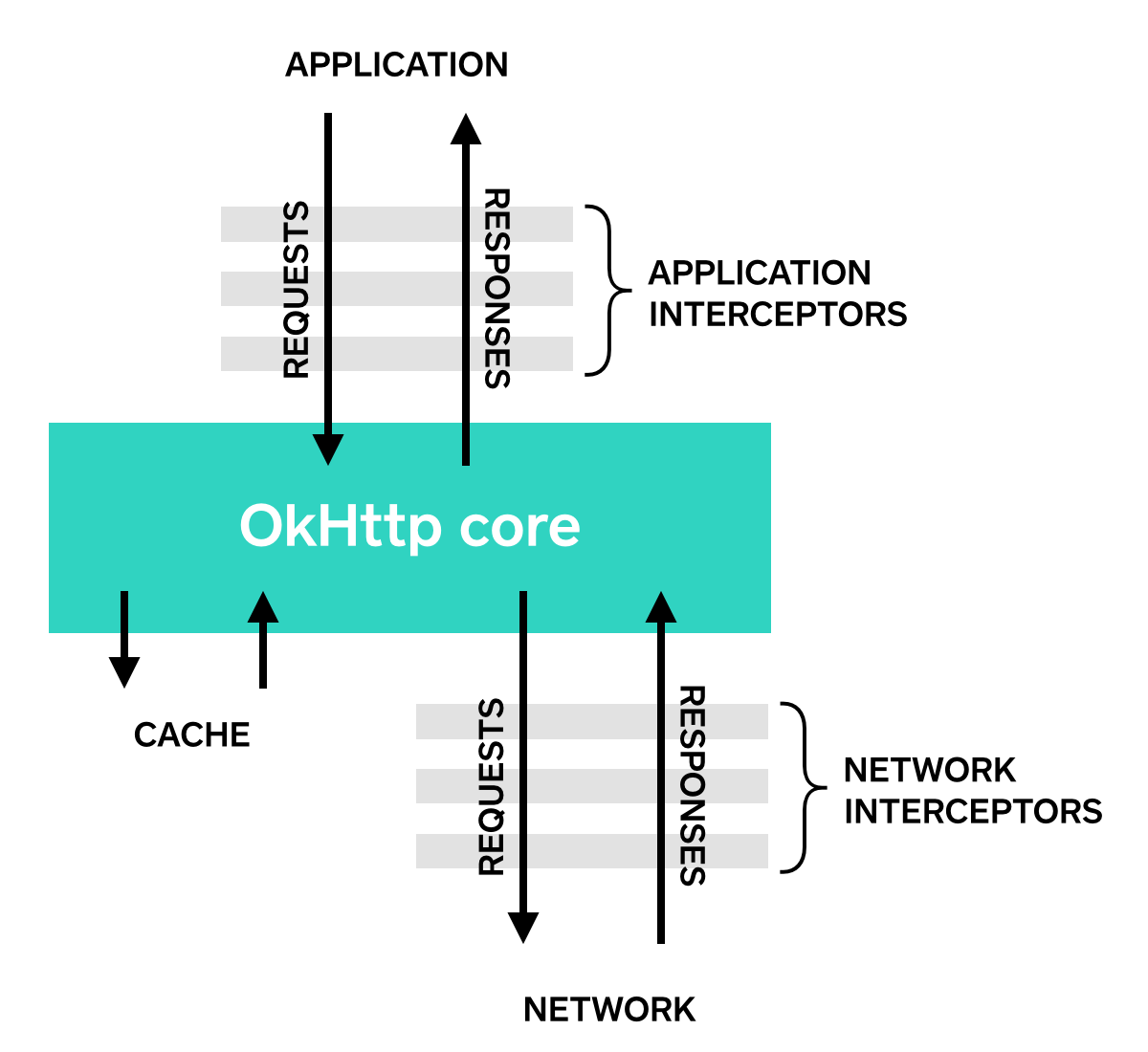
Application Interceptors
Interceptors are registered as either application or network interceptors. We'll use the LoggingInterceptor defined above to show the difference.
Register an application interceptor by calling addInterceptor() on OkHttpClient.Builder:
OkHttpClient client = new OkHttpClient.Builder()
    .addInterceptor(new LoggingInterceptor())
    .build();

Request request = new Request.Builder()
    .url("http://www.publicobject.com/helloworld.txt")
    .header("User-Agent", "OkHttp Example")
    .build();

Response response = client.newCall(request).execute();
response.body().close();
The URL http://www.publicobject.com/helloworld.txt redirects to https://publicobject.com/helloworld.txt, and OkHttp follows this redirect automatically. Our application interceptor is called once and the response returned from chain.proceed() has the redirected response:
INFO: Sending request http://www.publicobject.com/helloworld.txt on null
User-Agent: OkHttp Example

INFO: Received response for https://publicobject.com/helloworld.txt in 1179.7ms
Server: nginx/1.4.6 (Ubuntu)
Content-Type: text/plain
Content-Length: 1759
Connection: keep-alive
We can see that we were redirected because response.request().url() is different from request.url(). The two log statements log two different URLs.
Network Interceptors
Registering a network interceptor is quite similar. Call addNetworkInterceptor() instead of addInterceptor():
OkHttpClient client = new OkHttpClient.Builder()
    .addNetworkInterceptor(new LoggingInterceptor())
    .build();

Request request = new Request.Builder()
    .url("http://www.publicobject.com/helloworld.txt")
    .header("User-Agent", "OkHttp Example")
    .build();

Response response = client.newCall(request).execute();
response.body().close();
When we run this code, the interceptor runs twice. Once for the initial request to http://www.publicobject.com/helloworld.txt, and another for the redirect to https://publicobject.com/helloworld.txt.
INFO: Sending request http://www.publicobject.com/helloworld.txt on Connection{www.publicobject.com:80, proxy=DIRECT hostAddress=54.187.32.157 cipherSuite=none protocol=http/1.1}
User-Agent: OkHttp Example
Host: www.publicobject.com
Connection: Keep-Alive
Accept-Encoding: gzip

INFO: Received response for http://www.publicobject.com/helloworld.txt in 115.6ms
Server: nginx/1.4.6 (Ubuntu)
Content-Type: text/html
Content-Length: 193
Connection: keep-alive
Location: https://publicobject.com/helloworld.txt

INFO: Sending request https://publicobject.com/helloworld.txt on Connection{publicobject.com:443, proxy=DIRECT hostAddress=54.187.32.157 cipherSuite=TLS_ECDHE_RSA_WITH_AES_256_CBC_SHA protocol=http/1.1}
User-Agent: OkHttp Example
Host: publicobject.com
Connection: Keep-Alive
Accept-Encoding: gzip

INFO: Received response for https://publicobject.com/helloworld.txt in 80.9ms
Server: nginx/1.4.6 (Ubuntu)
Content-Type: text/plain
Content-Length: 1759
Connection: keep-alive
The network requests also contain more data, such as the Accept-Encoding: gzip header added by OkHttp to advertise support for response compression. The network interceptor's Chain has a non-null Connection that can be used to interrogate the IP address and TLS configuration that were used to connect to the webserver.
Choosing between application and network interceptors
Each interceptor chain has relative merits.
Application interceptors
- Don't need to worry about intermediate responses like redirects and retries.
- Are always invoked once, even if the HTTP response is served from the cache.
- Observe the application's original intent. Unconcerned with OkHttp-injected headers like
If-None-Match. - Permitted to short-circuit and not call
Chain.proceed(). - Permitted to retry and make multiple calls to
Chain.proceed().
Network Interceptors
- Able to operate on intermediate responses like redirects and retries.
- Not invoked for cached responses that short-circuit the network.
- Observe the data just as it will be transmitted over the network.
- Access to the
Connectionthat carries the request.
Rewriting Requests
Interceptors can add, remove, or replace request headers. They can also transform the body of those requests that have one. For example, you can use an application interceptor to add request body compression if you're connecting to a webserver known to support it.
/** This interceptor compresses the HTTP request body. Many webservers can't handle this! */
final class GzipRequestInterceptor implements Interceptor {
  @Override public Response intercept(Interceptor.Chain chain) throws IOException {
    Request originalRequest = chain.request();
    if (originalRequest.body() == null || originalRequest.header("Content-Encoding") != null) {
      return chain.proceed(originalRequest);
    }

    Request compressedRequest = originalRequest.newBuilder()
        .header("Content-Encoding", "gzip")
        .method(originalRequest.method(), gzip(originalRequest.body()))
        .build();
    return chain.proceed(compressedRequest);
  }

  private RequestBody gzip(final RequestBody body) {
    return new RequestBody() {
      @Override public MediaType contentType() {
        return body.contentType();
      }

      @Override public long contentLength() {
        return -1; // We don't know the compressed length in advance!
      }

      @Override public void writeTo(BufferedSink sink) throws IOException {
        BufferedSink gzipSink = Okio.buffer(new GzipSink(sink));
        body.writeTo(gzipSink);
        gzipSink.close();
      }
    };
  }
}
Rewriting Responses
Symmetrically, interceptors can rewrite response headers and transform the response body. This is generally more dangerous than rewriting request headers because it may violate the webserver's expectations!
If you're in a tricky situation and prepared to deal with the consequences, rewriting response headers is a powerful way to work around problems. For example, you can fix a server's misconfigured Cache-Control response header to enable better response caching:
/** Dangerous interceptor that rewrites the server's cache-control header. */
private static final Interceptor REWRITE_CACHE_CONTROL_INTERCEPTOR = new Interceptor() {
  @Override public Response intercept(Interceptor.Chain chain) throws IOException {
    Response originalResponse = chain.proceed(chain.request());
    return originalResponse.newBuilder()
        .header("Cache-Control", "max-age=60")
        .build();
  }
};
Typically this approach works best when it complements a corresponding fix on the webserver!
Availability
OkHttp's interceptors require OkHttp 2.2 or better. Unfortunately, interceptors do not work with OkUrlFactory, or the libraries that build on it, including Retrofit ≤ 1.8 and Picasso ≤ 2.4.
HTTPS
OkHttp attempts to balance two competing concerns:
- Connectivity to as many hosts as possible. That includes advanced hosts that run the latest versions of boringssl and less out of date hosts running older versions of OpenSSL.
- Security of the connection. This includes verification of the remote webserver with certificates and the privacy of data exchanged with strong ciphers.
When negotiating a connection to an HTTPS server, OkHttp needs to know which TLS versions and cipher suites to offer. A client that wants to maximize connectivity would include obsolete TLS versions and weak-by-design cipher suites. A strict client that wants to maximize security would be limited to only the latest TLS version and strongest cipher suites.
Specific security vs. connectivity decisions are implemented by ConnectionSpec. OkHttp includes three built-in connection specs:
MODERN_TLSis a secure configuration that connects to modern HTTPS servers.COMPATIBLE_TLSis a secure configuration that connects to secure–but not current–HTTPS servers.CLEARTEXTis an insecure configuration that is used forhttp://URLs.
By default, OkHttp will attempt a MODERN_TLS connection, and fall back to COMPATIBLE_TLS connection if the modern configuration fails.
The TLS versions and cipher suites in each spec can change with each release. For example, in OkHttp 2.2 we dropped support for SSL 3.0 in response to the POODLE attack. And in OkHttp 2.3 we dropped support for RC4. As with your desktop web browser, staying up-to-date with OkHttp is the best way to stay secure.
You can build your own connection spec with a custom set of TLS versions and cipher suites. For example, this configuration is limited to three highly-regarded cipher suites. Its drawback is that it requires Android 5.0+ and a similarly current webserver.
ConnectionSpec spec = new ConnectionSpec.Builder(ConnectionSpec.MODERN_TLS)
    .tlsVersions(TlsVersion.TLS_1_2)
    .cipherSuites(
          CipherSuite.TLS_ECDHE_ECDSA_WITH_AES_128_GCM_SHA256,
          CipherSuite.TLS_ECDHE_RSA_WITH_AES_128_GCM_SHA256,
          CipherSuite.TLS_DHE_RSA_WITH_AES_128_GCM_SHA256)
    .build();

OkHttpClient client = new OkHttpClient.Builder()
    .connectionSpecs(Collections.singletonList(spec))
    .build();
Certificate Pinning
By default, OkHttp trusts the certificate authorities of the host platform. This strategy maximizes connectivity, but it is subject to certificate authority attacks such as the 2011 DigiNotar attack. It also assumes your HTTPS servers’ certificates are signed by a certificate authority.
Use CertificatePinner to restrict which certificates and certificate authorities are trusted. Certificate pinning increases security, but limits your server team’s abilities to update their TLS certificates. Do not use certificate pinning without the blessing of your server’s TLS administrator!
  public CertificatePinning() {
    client = new OkHttpClient.Builder()
        .certificatePinner(new CertificatePinner.Builder()
            .add("publicobject.com", "sha256/afwiKY3RxoMmLkuRW1l7QsPZTJPwDS2pdDROQjXw8ig=")
            .build())
        .build();
  }

  public void run() throws Exception {
    Request request = new Request.Builder()
        .url("https://publicobject.com/robots.txt")
        .build();

    Response response = client.newCall(request).execute();
    if (!response.isSuccessful()) throw new IOException("Unexpected code " + response);

    for (Certificate certificate : response.handshake().peerCertificates()) {
      System.out.println(CertificatePinner.pin(certificate));
    }
  }
Customizing Trusted Certificates
The full code sample shows how to replace the host platform’s certificate authorities with your own set. As above, do not use custom certificates without the blessing of your server’s TLS administrator!
  private final OkHttpClient client;

  public CustomTrust() {
    SSLContext sslContext = sslContextForTrustedCertificates(trustedCertificatesInputStream());
    client = new OkHttpClient.Builder()
        .sslSocketFactory(sslContext.getSocketFactory())
        .build();
  }

  public void run() throws Exception {
    Request request = new Request.Builder()
        .url("https://publicobject.com/helloworld.txt")
        .build();

    Response response = client.newCall(request).execute();
    System.out.println(response.body().string());
  }

  private InputStream trustedCertificatesInputStream() {
    ... // Full source omitted. See sample.
  }

  public SSLContext sslContextForTrustedCertificates(InputStream in) {
    ... // Full source omitted. See sample.
  }
FAQs
How do I fix verify warnings in dalvikvm?
OkHttp supports some APIs that require Java 7+ or Android API 20+. If you run OkHttp on earlier Android releases, dalvikvm's verifier will warn about the missing methods. This isn't a problem and you can ignore the warnings.
I/dalvikvm﹕ Could not find method okhttp3.internal.huc.HttpURLConnectionImpl.getContentLengthLong, referenced from method okhttp3.internal.huc.HttpsURLConnectionImpl.getContentLengthLong
W/dalvikvm﹕ VFY: unable to resolve virtual method 21498: Lokhttp3/internal/huc/HttpURLConnectionImpl;.getContentLengthLong ()J
D/dalvikvm﹕ VFY: replacing opcode 0x6e at 0x0002
I/dalvikvm﹕ Could not find method okhttp3.internal.huc.HttpURLConnectionImpl.getHeaderFieldLong, referenced from method okhttp3.internal.huc.HttpsURLConnectionImpl.getHeaderFieldLong
W/dalvikvm﹕ VFY: unable to resolve virtual method 21503: Lokhttp3/internal/huc/HttpURLConnectionImpl;.getHeaderFieldLong (Ljava/lang/String;J)J
D/dalvikvm﹕ VFY: replacing opcode 0x6e at 0x0002
W/dalvikvm﹕ VFY: unable to find class referenced in signature (Ljava/nio/file/Path;)
W/dalvikvm﹕ VFY: unable to find class referenced in signature ([Ljava/nio/file/OpenOption;)
I/dalvikvm﹕ Could not find method java.nio.file.Files.newOutputStream, referenced from method okio.Okio.sink
W/dalvikvm﹕ VFY: unable to resolve static method 24080: Ljava/nio/file/Files;.newOutputStream (Ljava/nio/file/Path;[Ljava/nio/file/OpenOption;)Ljava/io/OutputStream;
D/dalvikvm﹕ VFY: replacing opcode 0x71 at 0x000a
W/dalvikvm﹕ VFY: unable to find class referenced in signature (Ljava/nio/file/Path;)
W/dalvikvm﹕ VFY: unable to find class referenced in signature ([Ljava/nio/file/OpenOption;)
I/dalvikvm﹕ Could not find method java.nio.file.Files.newInputStream, referenced from method okio.Okio.source
W/dalvikvm﹕ VFY: unable to resolve static method 24079: Ljava/nio/file/Files;.newInputStream (Ljava/nio/file/Path;[Ljava/nio/file/OpenOption;)Ljava/io/InputStream;
D/dalvikvm﹕ VFY: replacing opcode 0x71 at 0x000a
Works with OkHttp
Here’s some libraries that work nicely with OkHttp.
- Communicator: An OkHttp wrapper for Scala built with Android in mind.
- Fresco: An Android library for managing images and the memory they use.
- Glide: An image loading and caching library for Android focused on smooth scrolling.
- GoogleAppEngineOkHttp: An OkHttp Call that works on Google App Engine.
- ModernHttpClient: Xamarin HTTP API that uses native implementations.
- ⬜️ Moshi: A modern JSON library for Android and Java.
- Ok2Curl: Convert OkHttp requests into curl logs.
- okhttp-digest: A digest authenticator for OkHttp.
- okhttp-signpost: OAuth signing with signpost and OkHttp.
- OkHttp-Xamarin: Xamarin bindings for OkHttp.
- ⬜️ Okio: A modern I/O API for Java.
- OkLog: Response logging interceptor for OkHttp. Logs a URL link with URL-encoded response for every OkHttp call.
- OkSocial A curl-like client for social networks and other APIs.
- PersistentCookieJar: A persistent
CookieJar. - ⬜️ Picasso: A powerful image downloading and caching library for Android.
- ⬜️ Retrofit: Type-safe HTTP client for Android and Java by Square.
- Smash: A Volley-inspired networking library.
- Stetho: Stetho is a debug bridge for Android applications.
- Thrifty: An implementation of Apache Thrift for Android.
- Volley-OkHttp-Android: A fork of Volley with changes to work with OkHttp.
- ⬜️ Wire: Clean, lightweight protocol buffers for Android and Java.
Building
OkHttp requires Java 7 to build and run tests. Runtime compatibility with Java 6 is enforced as part of the build to ensure compliance with Android and older versions of the JVM.
Desktop Testing with Maven
Run OkHttp tests on the desktop with Maven. Running HTTP/2 and SPDY tests on the desktop uses Jetty-ALPN, which adds ALPN support to JDK 7 and JDK 8.
mvn clean testDesktop Testing without Maven
If you're working in an IDE, or in another environment where Maven configuration isn't honored, you'll need to manually enable ALPN. Add this JVM flag for OpenJDK 8:
-Xbootclasspath/p:/Users/jwilson/.m2/repository/org/mortbay/jetty/alpn/alpn-boot/8.1.2.v20141202/alpn-boot-8.1.2.v20141202.jarAdd this JVM flag for OpenJDK 7:
-Xbootclasspath/p:/Users/jwilson/.m2/repository/org/mortbay/jetty/alpn/alpn-boot/7.1.2.v20141202/alpn-boot-7.1.2.v20141202.jarYou must substitute /Users/jwilson/.m2/repository with the path to your Maven repository!
Device Testing
OkHttp's test suite creates an in-process HTTPS server. Prior to Android 2.3, SSL server sockets were broken, and so HTTPS tests will time out when run on such devices.
Test on a USB-attached Android using Vogar. Unfortunately dx requires that you build with Java 6, otherwise the test class will be silently omitted from the .dex file.
mvn clean
mvn package -DskipTests
vogar \
    --classpath ~/.m2/repository/org/bouncycastle/bcprov-jdk15on/1.48/bcprov-jdk15on-1.48.jar \
    --classpath ~/.m2/repository/com/squareup/okio/okio/1.6.0/okio-1.6.0.jar \
    --classpath okhttp/target/okhttp-2.0.0-SNAPSHOT.jar \
    ./samples/guide/src/main/java/okhttp3/recipes/SynchronousGet.java
Concurrency
The HttpURLConnection API is a blocking API. You make a blocking write to send a request, and a blocking read to receive the response.
Blocking APIs
Blocking APIs are convenient because you get top-to-bottom procedural code without indirection. Network calls work like regular method calls: ask for data and it is returned. If the request fails, you get a stacktrace right were the call was made.
Blocking APIs may be inefficient because you hold a thread idle while waiting on the network. Threads are expensive because they have both a memory overhead and a context-switching overhead.
Framed protocols
Framed protocols like spdy/3 and http/2 don't lend themselves to blocking APIs. Each application-layer thread wants to do blocking I/O for a specific stream, but the streams are multiplexed on the socket. You can't just talk to the socket, you need to cooperate with the other application-layer threads that you're sharing it with.
Framing rules make it impractical to implement spdy/3 or http/2 correctly on a single blocking thread. The flow-control features introduce feedback between reads and writes, requiring writes to acknowledge reads and reads to throttle writes.
In OkHttp we expose a blocking API over a framed protocol. This document explains the code and policy that makes that work.
Threads
Application's calling thread
The application-layer must block on writing I/O. We can't return from a write until we've pushed its bytes onto the socket. Otherwise, if the write fails we are unable to deliver its IOException to the application. We would have told the application layer that the write succeeded, but it didn't!
The application-layer can also do blocking reads. If the application asks to read and there's nothing available, we need to hold that thread until either the bytes arrive, the stream is closed, or a timeout elapses. If we get bytes but there's nobody asking for them, we buffer them. We don't consider bytes as delivered for flow control until they're consumed by the application.
Consider an application streaming a video over http/2. Perhaps the user pauses the video and the application stops reading bytes from this stream. The buffer will fill up, and flow control prevents the server from sending more data on this stream. When the user unpauses her video the buffer drains, the read is acknowledged, and the server proceeds to stream data.
Shared reader thread
We can't rely on application threads to read data from the socket. Application threads are transient: sometimes they're reading and writing and sometimes they're off doing application-layer things. But the socket is permanent, and it needs constant attention: we dispatch all incoming frames so the connection is good-to-go when the application layer needs it.
So we have a dedicated thread for every socket that just reads frames and dispatches them.
The reader thread must never run application-layer code. Otherwise one slow stream can hold up the entire connection.
Similarly, the reader thread must never block on writing because this can deadlock the connection. Consider a client and server that both violate this rule. If you get unlucky, they could fill up their TCP buffers (so that writes block) and then use their reader threads to write a frame. Nobody is reading on either end, and the buffers are never drained.
Do-stuff-later pool
Sometimes there's an action required like calling the application layer or responding to a ping, and the thread discovering the action is not the thread that should do the work. We enqueue a runnable on this executor and it gets handled by one of the executor's threads.
Locks
We have 3 different things that we synchronize on.
FramedConnection
This lock guards internal state of each connection. This lock is never held for blocking operations. That means that we acquire the lock, read or write a few fields and release the lock. No I/O and no application-layer callbacks.
FramedStream
This lock guards the internal state of each stream. As above, it is never held for blocking operations. When we need to hold an application thread to block a read, we use wait/notify on this lock. This works because the lock is released while wait() is waiting.
FrameWriter
Socket writes are guarded by the FrameWriter. Only one stream can write at a time so that messages are not interleaved. Writes are either made by application-layer threads or the do-stuff-later pool.
Holding multiple locks
You're allowed to take the SpdyConnection lock while holding the FrameWriter lock. But not vice-versa. Because taking the FrameWriter lock can block.
This is necessary for bookkeeping when creating new streams. Correct framing requires that stream IDs are sequential on the socket, so we need to bundle assigning the ID with sending the SYN_STREAM frame.
Contributing
If you would like to contribute code you can do so through GitHub by forking the repository and sending a pull request.
When submitting code, please make every effort to follow existing conventions and style in order to keep the code as readable as possible. Please also make sure your code compiles by running mvn clean verify.
Before your code can be accepted into the project you must also sign the Individual Contributor License Agreement (CLA).