
> Display your Github repositories stats in style using Semantic-ui labeled buttons. Working with [Semantic-ui labeled buttons](http://semantic-ui.com/elements/button.html#labeled) to represent Github buttons (Stars, Forks, Watchers, Issues, Download and Contributors), this jQuery library requests a Github repository information and updates the associated buttons accordingly.
[](https://travis-ci.org/websemantics/bragit) [](https://raw.githubusercontent.com/websemantics/bragit/master/LICENSE) [](https://github.com/websemantics/bragit/network) [](https://github.com/websemantics/bragit/stargazers)
[](http://isitmaintained.com/project/websemantics/bragit "Percentage of issues still open") [](http://standardjs.com/)
#### [Try it](http://websemantics.github.io/bragit/)
> Or follow the How To guide
## Getting Started
1- Include the following script in a web page. Notice the release number `0.1.6` in the url; change as needed.
```
```
2- Add a labeled button as specified in [Semantic-ui documentation](http://semantic-ui.com/elements/button.html#labeled).
3- Add a custom class name for the Github button you desire following a basic convention **`github-{username}-{repo}-{action}`** where action can be, **stars**, **forks**, **watchers**, **issues**, **download** or **contributors**.
```
Stars
```
The above example shows how to add a `stars` button of this repository, **Bragit**. The class name constructed as `github-websemantics-bragit-stars`. Following the above formula, other possible classes / buttons for this repository would be,
```
github-websemantics-bragit-stars
github-websemantics-bragit-forks
github-websemantics-bragit-watchers
github-websemantics-bragit-issues
github-websemantics-bragit-download
```
## Preview
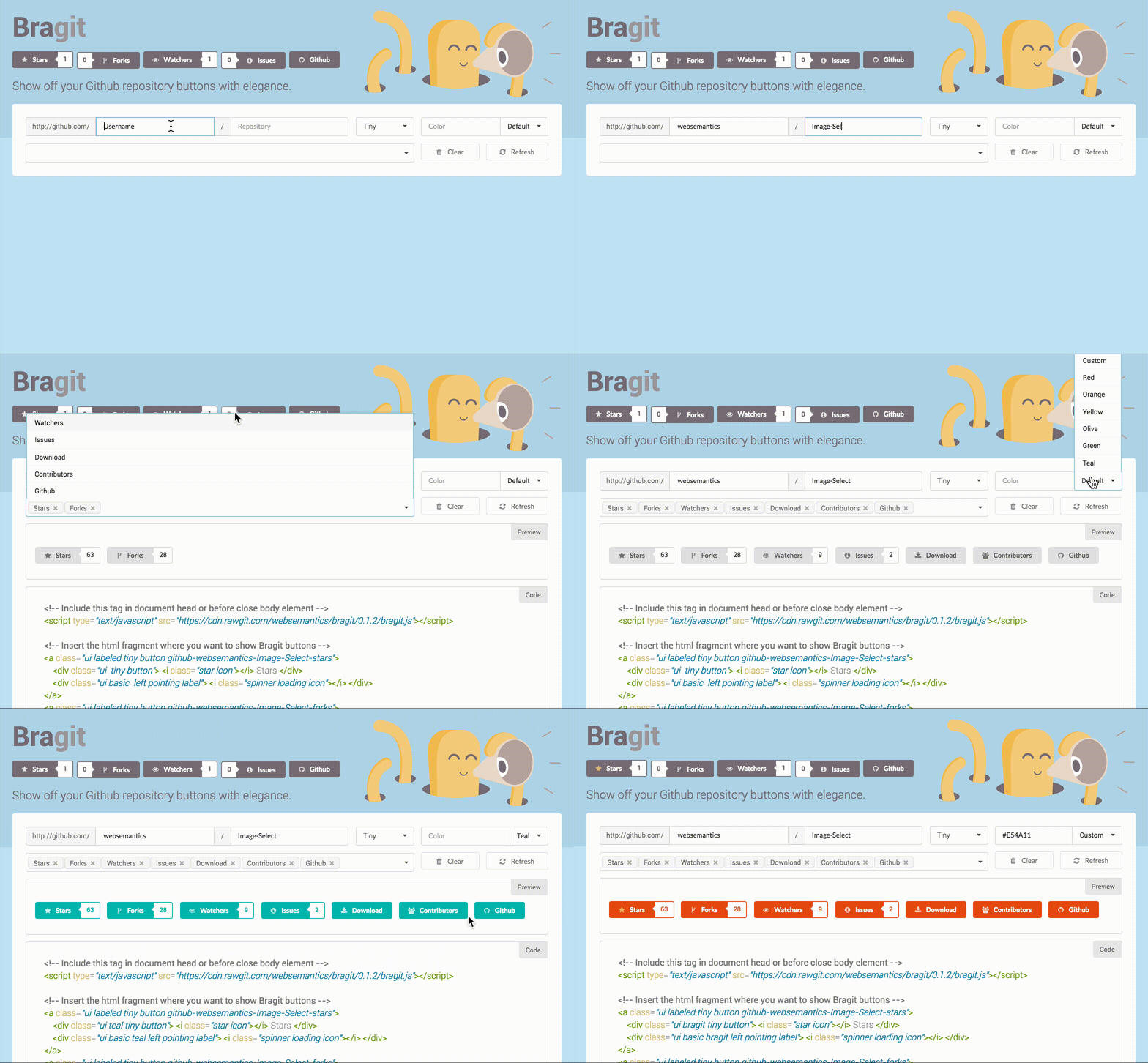
## Behind the Scenes
The library takes care of many things behind closed doors. For one thing, it makes sure that the buttons styles are loaded if the [Semantic-ui](http://semantic-ui.com/elements/button.html#labeled) framework was not detected in the loaded document.
The code will automatically inject the css files that contain the styles of three `Semantic-ui` components `button`, `icon` and `label` using a public cdn `https://cdnjs.cloudflare.com/ajax/libs/semantic-ui`
This can be overridden if required as follows
```
```
Notice the `inject` flag which is responsible to force the injection of the specified components styles if set to `true`. Other modules can be added to the list of auto-loaded components and or a custom css styles by setting the `custom` attribute `custom: "css/styles.css"`
#### Custom Class Names
As explained above, **Bragit** detects the existence of a unique css class name pattern, **`github-{username}-{repo}-{action}`** to retrieve the required Github repository information and update the associated labeled buttons accordingly.
However, should the need arise, this can be changed as follows,
```
```
By changing the delimiter to say `_` and the class name **cls** to `brag`, the class name for the `stars` button of this repository will be `brag_websemantics_bragit_stars`.
#### Actions
**Bragit** supports a number of `actions` or `action buttons`, **stars**, **forks**, **watchers**, **issues**, **download** and **contributors**. These can be re-configured or more actions added through the `defaults` function,
```
```
Notice how each action has two attributes, a `uri` and a `property` name. **Bragit** appends the `uri` value to the repository `html_url` retrieved from Github API. This is then used to set the `href` value of the labeled button link element `a`. The `property` name is used to access a named attribute in the repository information returned from Github API.
For example, using `stargazers_count` as an index to the repository data will return an number value. This number/text is then used to update the label element of the associated button (and that's how the magic happens, ladies and gents).
#### Custom Buttons Styles
Semantic-ui [labeled buttons](http://semantic-ui.com/elements/button.html#labeled) come in all [colors](http://semantic-ui.com/usage/theming.html#using-themes) and [sizes](http://semantic-ui.com/elements/button.html#size). However we all need to customize styles to our needs sometimes. Here's a quick example of a new color named `brand` which is used in this project, **Bragit** to re-theme Github buttons as shown [here](http://websemantics.github.io/bragit/).
```
/* styles for github action buttons */
.ui.brand.button, .ui.brand.buttons .button {
background-color: #756c74;
color: #fff!important;
}
.ui.brand.label {
color: #756c74!important;
border-color: #756c74!important;
background-color: #ffffff;
}
.ui.brand.button:focus, .ui.brand.buttons .button:focus,
.ui.brand.button:hover, .ui.brand.buttons .button:hover {
background-color: #9d959c;
}
.ui.brand.labels .label:focus, .ui.brand.label:focus,
.ui.brand.labels .label:hover, .ui.brand.label:hover {
color: #9d959c!important;
border-color: #9d959c!important;
}
.ui.labeled .ui.button .star.icon {
color: #F5CC7A!important;
}
```
All you need to do is to replace the main color `#756c74` and its lighter shade `#9d959c` to your own. Also notice how the `stars` icon has been colored golden. You can easily change that or even the colors of the other icons (`fork` for forks, `eye` for watchers, `info circle` for issues, `download` for download and `users` for contributors). The following is the code to display all the supports Github actions by **Bragit**.
```
Stars
Forks
Watchers
Issues
Download
Contributors
```
## Using Bower
If the use of [Bower](http://bower.io/) is prefered, one can either include **Bragit** in the `bower.json` file or install from the command line,
```
Bower install bragit
```
## Bragit in the Wild
Here a list of awesome projects (ahem) that used **Bragit**, .. let's all applaud, right.
* [Github SPA](https://websemantics.github.io/gh-pages-spa/), Easy way to enable Single Page Applications for GitHub Pages.
* [Image Select](https://github.com/websemantics/Image-Select), jQuery library that provides image support for Single and Multi select HTML tags to be used with [Chosen](https://harvesthq.github.io/chosen/).
* [Semantic Dojo](https://github.com/websemantics/semantic-dojo), A responsive Dojo theme that harnesses the style awesomeness of [Semantic-ui documentation](http://semantic-ui.com/elements/button.html#labeled) framework.
* [Palette Genie](https://github.com/websemantics/palette-genie), Turns color values from an Image or PhotoShop ACO file into a list of named colors, lighter and darker shades, CSS classes and a beautiful style guide.
* [Vimeo Upload](https://github.com/websemantics/vimeo-upload), Upload Vimeo videos and update their metadata directly from the browser.
* [Boxed](https://github.com/websemantics/boxed), Lightweight Boilerplate Generator that does not require the Command-line Interface (CLI) to customize software addons and packages, for the Visually-oriented Developers.
* [Oea.svg](https://github.com/websemantics/oeasvg.com), A library for building SVG interactive web applications. It provides three packages: Java.js, Draw2D.svg and Swing.svg, that makes building SVG apps a breeze.
* [Browser.js](https://github.com/websemantics/Browser.js), An implementation of MathML, HTML and SVG Layout Manager and CSS Processor (i.e. Browser) in JavaScript.
* [Hotdraw.js](https://github.com/websemantics/Hotdraw.js), a port of JHotDraw version 5.1. It is based on Erich Gamma's JHotDraw, which is copyright 1996, 1997 by IFA Informatik and Erich Gamma.
## License
[MIT](LICENSE)
Copyright (c) Web Semantics, Inc.