Welcome to generator-express-api-generator 👋




> Yeoman generator to create a base structure for APIs based on Express framework and sequelize, using tools such as: eslint, prettier, swagger and others.
### 🏠 [Homepage](https://github.com/cristopher1/generator-express-api-generator)
This generator was created using [generator-esmodules-generator](https://www.npmjs.com/package/generator-esmodules-generator) version 1.0.3
Based on [generator-koa2-api-generator](https://github.com/cristopher1/generator-koa2-api-generator)
The project generated by generator-express-api-generator use ES Modules and async/await functions.
### What's changed? See [generator-express-api-generator releases](https://github.com/cristopher1/generator-express-api-generator/releases)
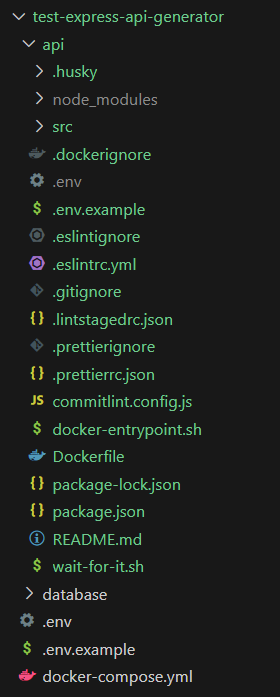
Example of a generator created by `generator-express-api-generator`:
### [Index](#index)
- [Installation](#installation)
- [Prerequisites](#prerequisites)
- [Arguments and options](#arguments-and-options)
- [Project structure](#structure)
- [Generators included](#generators-included)
- [The question: Do you want to automatically run the scripts that configure the package, then installing the dependencies?](#configuring-the-project-automatically)
- [The scripts in package.json](#scripts)
- [Getting To Know Yeoman](#know-yeoman)
- [Author](#author)
- [Contributing](#contributing)
- [Show your support](#support)
- [License](#license)
## Installation
First, install [Yeoman](http://yeoman.io) and generator-express-api-generator using [npm](https://www.npmjs.com/) (we assume you have pre-installed [node.js](https://nodejs.org/)).
```bash
npm install -g yo
npm install -g generator-express-api-generator
```
Then generate your new project:
```bash
yo express-api-generator project_name
```
## Prerequisites
First, you must create a folder, then you enter it using the terminal. Finally you runs.
```bash
yo express-api-generator project_name
```
Example:
```console
PS C:\Users\...\new_express_api_project> yo express-api-generator project_name
```
## Arguments and options
The generator-express-api-generator include two arguments called **projectName** and **databaseDriver** (postgresql or mysql, or mariadb). **projectName** is a required argument:
For example: If you want to create a new express api called express_api_project (projectName = express_api_project) with postgresql plugin, you should use:
```bash
yo express-api-generator express_api_project postgresql
```
The generator-express-api-generator include various options, these are:
| option | value | default | description | example |
| :---------------- | :-----: | :-----: | :------------------------------------------------------------------------------------------------------------ | :------------------------------------------------------------------------------ |
| runGitInit | Boolean | false | Run git init automatically, then installing the dependencies | `yo express-api-generator project_name --runGitInit` |
| runPackageScripts | Boolean | false | Run the scripts that configure the package, then installing the dependencies | `yo express-api-generator project_name --runPackageScripts` |
| useDocker | Boolean | false | Add docker support using DockerFile, .dockerignore and others | `yo express-api-generator project_name --useDocker` |
| nodeVersion | Number | 16 | Node version used in DockerFile. (FROM nodeVersion). Recommended to use node 16, 18, 20 or 21 | `yo express-api-generator project_name --nodeVersion=21` |
| projectFolderName | String | api | Project folder name used in DockerFile. (WORKDIR /usr/src/projectFolderName) | `yo express-api-generator project_name --projectFolderName=project_folder_name` |
| useDockerCompose | String | false | Add Docker Compose support. | `yo express-api-generator project_name --useDockerCompose` |
| databaseName | String | null | Select the database to which the application will connect. Accepts the values: postgresql, mysql and mariadb. | `yo express-api-generator project_name --databaseName=postgresql` |
## Project structure
The project generated by generator-express-api-generator includes:
**Default project structure**
- **api (folder)**: In this folder there are project configurations and the src folder that contains the source code
- **.husky (folder)**: Contains git hook used by husky
- **.env (file)**: Contains the API environment variables.
- **.env.example (file)**: Contains an example of API environment variables used to create a .env file.
- **.eslintignore (file)**: Files and folders ignored by eslint.
- **.eslintrc.yml (file)**: Configuration used by eslint.
- **.gitignore (file)**: Files ignored by git.
- **.lintstagedrc.json (file)**: Configuration used by lintstaged.
- **.prettierignore (file)**: Files and folders ignored by prettier.
- **.prettierrc.json (file)**: Configuration used by prettier.
- **.sequelizerc (file)**: Configuration used by sequelize-cli.
- **api-specification (file)**: Contains specification used by openapi-comment-parser.
- **babel.config.json (file)**: Configuration used by babel. In this case babel-register (.sequelizerc).
- **commitlint.config.js (file)**: Congiguration used by commitlint.
- **package.json (file)**: Contains dependencies, dev dependencies, scripts, etc.
- **README.md (file)**: Documentation generated by generator-express-api-generator.
- **src (folder)**: Contains the source code:
- **config (folder)**: Contains configuration files, for example database.js (contains environment varibles used by sequelize), jwt.js (contains environment variables used by jsonwebtoken) and openapi.js (contains the configuration used by openapi-comment-parser).
- **db (folder)**: Contains folders used by sequelize.
- **migrations (folder)**: This folder contains CommonJS Modules (files with extension .cjs and use require/module.exports). Includes a default user migration.
- **models (folder)**: This folder contains ES Modules (by default the project generated by generator-express-api-generator uses ES Modules, files with extension .js and use import/export). Includes a default user model.
The index.js file loads the models exporting the orm constant.
- **seeders (folder)**: This folder contains CommonJS Modules (files with extension .cjs and use require/module.exports).
- **routes (folder)**: Contains the Express routers used by the project.
- **authentication (folder)**: Contains functions and routers to authenticate the users with json web token.
- **swagger (folder)**: Contains functions and routes to create documentation using swagger.
- **user (folder)**: Contains functions and routes to register, obtain and modify an user. Uses default model user
- **index.js (file)**: Contains the main Express router with prefix 'api/v1' and mounts the others routers.
- **schemas (folder)**: Contains openapi schemas and json schemas.
- **json (folder)**: Contains json schemas.
- **index.js**: Loads the json schemas using ajv, ajv-errors and ajv-formats. Exports the jsonSchema constant and the simpleJsonSchemaValidation function, the json schemas file should have the file name : 'name_of_json_schema.json' and they can be saved in subfolders within the json folder.
- **openapi (folder)**: Contains openapi schemas. The files in this folder have the .yml extension and they can have any name, for example: 'my_new_openapi_schema.yml'.
- **default_response (folder)**: Contains openapi schemas for Express default response (200, 201, 401, 404, 500).
- **json_web_token (folder)**: Contains openapi schemas for token (json web token) and create token.
- **secutiry (folder)**: Contains openapi schema for authentication with bearer token.
- **user (folder)**: Contains openapi schema for user.
- **types.d.ts (file)**: Includes any types used by the project, for example type Orm, JsonSchema, Module augmentation (Express), etc. You can call the Orm/JsonSchema/others type using jsdoc, for example: /\*_ @type {import('route/to/typesfolder/types.d.ts').Orm} _/
- **api.js (file)**: Creates and configures the Express object and it exports the Express object.
- **server.js (file)**: Mounts the API and runs the server.
- If you do not want to use openapi.
- Delete the api/src/schemas/openapi folder.
- Delete the api/src/config/openapi.js file.
- Delete the api/src/routes/swagger folder.
- In the api/src/routes/index.js file, delete:
```node
if (environment !== 'production') {
router.use('/docs', swaggerRouter)
}
```
- In terminal use:
```sh
cd api
npm uninstall openapi-comment-parser swagger-ui-express
```
- delete api-specification.yml
- Remove the openapi comment in the files in api/src/routes, for example:
```node
/**
* GET /api/v1/users/{userEmail}
*
* @tag API endpoints
* @security BearerAuth
* @summary Get an user by email
* @pathParam {string} userEmail
* @response 200 - Ok
* @responseContent {User} 200.application/json
* @response 401 - Unauthorized
* @responseComponent {Unauthorized} 401
* @response 404 - Not found
* @responseComponent {NotFound} 404
* @response 500 - Internal Server Error
* @responseComponent {InternalServerError} 500
*/
router.get('/:userEmail', async (req, res) => {
```
This comment begin with GET, POST, PUT or others HTTP Verb.
- If you do not want to use JSON Schemas.
- Delete the api/src/schemas/json folder.
- In terminal use:
```sh
cd api
npm uninstall ajv ajv-errors ajv-formats globs
```
- Delete in files api/src/routes/user/registerRouter.js, api/src/routes/user/router.js and api/src/routes/authentication/tokenRouter.js
```node
import { simpleJsonSchemaValidation } from '../../schemas/json/index.js'
```
**Added docker support**:
When the Docker support is activate (--useDocker is used), the following files are added to default project in api folder:
- **.dockerignore (file)**: Files and folders ignore to Docker.
- **Dockerfile (file)**: Used to create a docker image.
- **docker-entrypoint.sh (file)**: Contains scripts to run migrations in development mode. Used by ENTRYPOINT in Dockerfile.
- **wait-for-it.sh (file)**: More information, see [wait-for-it.sh in github](https://github.com/vishnubob/wait-for-it). Script used to wait for the database to be enabled to receive connections.
**Added docker compose support**:
When the Docker Compose support is activate (--useDockerCompose is used), the following files and folders are added to default.
- **api/.env (file)**: Adds the values corresponding to the database environment variables, for example for postgresql, adds the following environment variables:
```
DB_USERNAME=admin
DB_PASSWORD=admin
DB_NAME=api
DB_HOST=database
DB_PORT=5432
DB_DIALECT=postgres
DATABASE_URL=postgresql://admin:admin@database:5432/api
```
- **database (folder)**: Contains files used to create and cofigure the database.
- **.dockerignore (file)**: Files and folders ignored by docker.
- **.env (file)**: Environment variables used the database in docker.
- **.env.example (file)**: Contains an example of database environment variables used to create a .env file.
- **Dockerfile (file)**: Used to create docker image.
- **In the root folder**:
- **docker-compose.yml (file)**: Used to deploy the docker container (API and database), contains the volumen and environment variables used by the API and database, publish the API ports, etc.
- **.env (file)**: Contains the environment variables to configure docker-compose.yml file.
- **.env.example (file)**: Contains an example of docker-compose.yml environment variables used to create a .env file.
## Generators included
The generators included are:
`express-api-generator:app` used by `yo express-api-generator`: It is the generator used by default.
`express-api-generator:docker`: It is used to add support for Docker. It accepts the options `--useDocker`, `--nodeVersion` and `--projectFolderName`.
`express-api-generator:docker_compose`: It is used to add support for Docker Compose. It accepts the options `--useDockerCompose` and `--databaseName`.
## The question: Do you want to automatically run the scripts that configure the package, then installing the dependencies?
When you selects the true value, the following scripts ubicated in the package.json are executed:
- `init`
- `format:fix`
If you selects the false value, if you want to use husky, you must run `npm run init`.
## The scripts in package.json
The more important scripts added into the package.json created by this generator are:
- `"init"`: Runs the commands necessary to initialize the package, for example `init:husky`.
- `"dev"`: Runs the application in development mode using nodemon and dotenv.
- `"start"`: Runs the application using node.
- `"format"`: Checks the format using prettier.
- `"format:fix"`: Fixes the format using prettier.
- `"lint"`: static code analysis using eslint.
- `"lint:fix"`: Fixes the code using eslint.
- `"commitlint"`: Runs commitlint. It is used into .husky/commit-msg file. It is called by the commit-msg hook. See [git hook](https://www.atlassian.com/git/tutorials/git-hooks#:~:text=The%20commit%2Dmsg%20hook%20is,file%20that%20contains%20the%20message.).
- `"lint-staged"`: Runs lint-staged. It is used into .husky/pre-commit file. It is called by the pre-commit hook. See [git hook](https://www.atlassian.com/git/tutorials/git-hooks#:~:text=The%20commit%2Dmsg%20hook%20is,file%20that%20contains%20the%20message.).
- `"quality-check"`: Runs `npm run format && npm run lint`. It is used into .husky/pre-push file. It is called by the pre-push hook See [git hook](https://www.atlassian.com/git/tutorials/git-hooks#:~:text=The%20commit%2Dmsg%20hook%20is,file%20that%20contains%20the%20message.).
## Getting To Know Yeoman
- Yeoman has a heart of gold.
- Yeoman is a person with feelings and opinions, but is very easy to work with.
- Yeoman can be too opinionated at times but is easily convinced not to be.
- Feel free to [learn more about Yeoman](http://yeoman.io/).
## Author Author
👤 **Cristopher Jiménez Meza**
- Github: [@cristopher1](https://github.com/cristopher1)
## 🤝 Contributing
Contributions, issues and feature requests are welcome!
Feel free to check [issues page](https://github.com/cristopher1/generator-express-api-generator/issues). You can also take a look at the [contributing guide](https://github.com/cristopher1/generator-express-api-generator/blob/master/CONTRIBUTING.md).
## Show your support
Give a ⭐️ if this project helped you!
## 📝 License
Copyright © 2024 [Cristopher Jiménez Meza](https://github.com/cristopher1).
This project is [MIT](https://github.com/cristopher1/generator-express-api-generator/blob/master/LICENSE) licensed.
---