<p align="center">
    <br>
    <img src="https://rawgithub.com/nextapps-de/flexsearch/master/doc/flexsearch.svg" alt="Search Library" width="50%">
    <br><br>
    <a target="_blank" href="https://www.npmjs.com/package/flexsearch-server"><img src="https://img.shields.io/npm/v/flexsearch-server.svg"></a>
    <img src="https://img.shields.io/badge/status-BETA-orange.svg">
    <img src="https://badges.greenkeeper.io/nextapps-de/flexsearch.svg">
    <a target="_blank" href="https://github.com/nextapps-de/flexsearch-server/issues"><img src="https://img.shields.io/github/issues/nextapps-de/flexsearch-server.svg"></a>
    <a target="_blank" href="https://github.com/nextapps-de/flexsearch-server/blob/master/LICENSE.md"><img src="https://img.shields.io/npm/l/flexsearch-server.svg"></a>
</p>

<h1></h1>
<h3>High-performance FlexSearch Server for Node.js (Cluster)</h3>

A full documentation of FlexSearch is available here: <a target="_blank" href="https://github.com/nextapps-de/flexsearch">https://github.com/nextapps-de/flexsearch</a>

<a name="installation"></a>
## Installation

```npm
npm install flexsearch-server
```

Run setup once when not installing via "npm install":

```node
npm run setup
```

Run as a single web server:

```node
npm start
```

Run as a server cluster:

```node
npm run cluster
```

Run with a specified environment:

```node
npm start production
```

```node
npm run cluster test
```

The server is listening at:

<table>
    <tr></tr>
    <tr>
        <td>Environment</td>
        <td>Server Address</td>
    </tr>
    <tr>
        <td>development</td>
        <td>http://localhost</td>
    </tr>
    <tr></tr>
    <tr>
        <td>production<br><br></td>
        <td>http://localhost:6780<br>https://localhost:6780</td>
    </tr>
     <tr></tr>
    <tr>
        <td>test</td>
        <td>http://localhost</td>
    </tr>
</table>

> The default port for production is __6780__ (over HTTP) and __6781__ (over HTTPS), you can change the default ports in the configs.

> When _NODE_ENV_ is set, all manual passed environments will be overridden.

<a name="api"></a>
## API Overview

__RESTful__

<table>
    <tr></tr>
    <tr>
        <td>Request Type</td>
        <td>Endpoint</td>
        <td>Description</td>
    </tr>
    <tr>
        <td>GET</td>
        <td>/</td>
        <td>Returns info about the index</td>
    </tr>
    <tr></tr>
    <tr>
        <td>POST</td>
        <td>/add/:id/:content</td>
        <td>Add content to the index</td>
    </tr>
    <tr></tr>
    <tr>
        <td>POST</td>
        <td>/update/:id/:content</td>
        <td>Update content of the index</td>
    </tr>
    <tr></tr>
    <tr>
        <td>GET</td>
        <td>/search/:query</td>
        <td>Search for query</td>
    </tr>
    <tr></tr>
    <tr>
        <td>POST</td>
        <td>/remove/:id</td>
        <td>Remove id from the index</td>
    </tr>
</table>

__JSON__

<table>
    <tr></tr>
    <tr>
        <td>Request Type</td>
        <td>Endpoint</td>
        <td>Body</td>
        <td>Description</td>
    </tr>
    <tr>
        <td>POST</td>
        <td>/add</td>
        <td>JSON</td>
        <td>Add multiple contents to the index</td>
    </tr>
    <tr></tr>
    <tr>
        <td>POST</td>
        <td>/update</td>
        <td>JSON</td>
        <td>Update multiple contents of the index</td>
    </tr>
    <tr></tr>
    <tr>
        <td>GET</td>
        <td>/search</td>
        <td>JSON</td>
        <td>Search for query (custom search)</td>
    </tr>
    <tr></tr>
    <tr>
        <td>POST</td>
        <td>/remove</td>
        <td>JSON</td>
        <td>Remove multiple ids from the index</td>
    </tr>
</table>

<a name="env"></a>
## Server Environment Variables

<table>
    <tr></tr>
    <tr>
        <td>Variable</td>
        <td>Values</td>
        <td>Default</td>
        <td>Description</td>
    </tr>
    <tr>
        <td>PORT</td>
        <td>integer</td>
        <td>80&nbsp;(development)<br>6780&nbsp;(production)</td>
        <td>Server listening port</td>
    </tr>
    <tr></tr>
    <tr>
        <td>PORT_SSL</td>
        <td>integer</td>
        <td>443&nbsp;(development)<br>6781&nbsp;(production)</td>
        <td>Server listening port</td>
    </tr>
    <tr></tr>
    <tr>
        <td>SSL</td>
        <td>true<br>false</td>
        <td>false</td>
        <td>Starts a HTTPS server (additionally to HTTP)</td>
    </tr>
    <tr></tr>
    <tr>
        <td>FORCE_SSL</td>
        <td>true<br>false</td>
        <td>false</td>
        <td>Accept HTTPS connections only</td>
    </tr>
    <tr></tr>
    <tr>
        <td>COMPRESS</td>
        <td>true<br>false</td>
        <td>true</td>
        <td>Enable/Disable response compression (gzip)</td>
    </tr>
    <tr></tr>
    <tr>
        <td>WORKER</td>
        <td>integer<br>"auto"</td>
        <td>"auto"</td>
        <td>Sets the number of workers or automatically determine available cpus</td>
    </tr>
    <tr></tr>
    <tr>
        <td>AUTOSAVE</td>
        <td>integer<br>false</td>
        <td>10000</td>
        <td>Enables persistent handler. Set the delay in milliseconds or disable by setting to <i>false</i></td>
    </tr>
</table>

<a name="config"></a>
## Configuration

When you do not pass any custom options, the environment will be inherited from _NODE_ENV_ by default.

Override the current environment (_NODE_ENV_) by adding a field in the root of `package.json`:

```json
  "flexsearch": "production" // development, test
```

Or add a config payload in the root of `package.json`:

> The field "client" holds the flexsearch options

```json
  "flexsearch": {
    "server": {
      "debug": true,
      "port": 80,
      "port_ssl": 443,
      "force_ssl": false,
      "https": true,
      "compress": true,
      "autosave": 2000,
      "worker": "auto"
    },
    "client": {
      "async": false,
      "cache": 0,
      "worker": 4
    }
  }
```

Or provide a config json file for each environment respectively and pass file locations:

> You can also provide a config json file to override the default settings globally.

```json
  "flexsearch": {
    "development": "config/development.json",
    "production": "config/production.json",
    "test": "config/test",
    "default": "config/default.json"
}
```

Or just provide a ___flexsearch.json___ in the root of your project.

<a name="persistence"></a>
## Persistence

Turn on persistence by setting a numeric value as delay on _config.autosave_. Flexsearch will automatically save the index to the local filesystem and also loads it when starting.

Disable persistence by setting this field to _false_.

<a name="ssl"></a>
## Setup SSL for HTTPS Connections

Inside the folder _cert_ add the certificate as a .crt file and the key as a .pem file for each environment respectively.

__Development Environment:__

_cert/development.crt_<br>
_cert/development.pem_

__Production Environment:__

_cert/production.crt_<br>
_cert/production.pem_

<a name="important"></a>
## Important Notes

You can increase workers without any drawbacks, but when you decrease worker count, the old index doesnt restore completely from the filesystem. This will be fixed in an upcoming version. As long please do not decrease worker count when using persistent index.

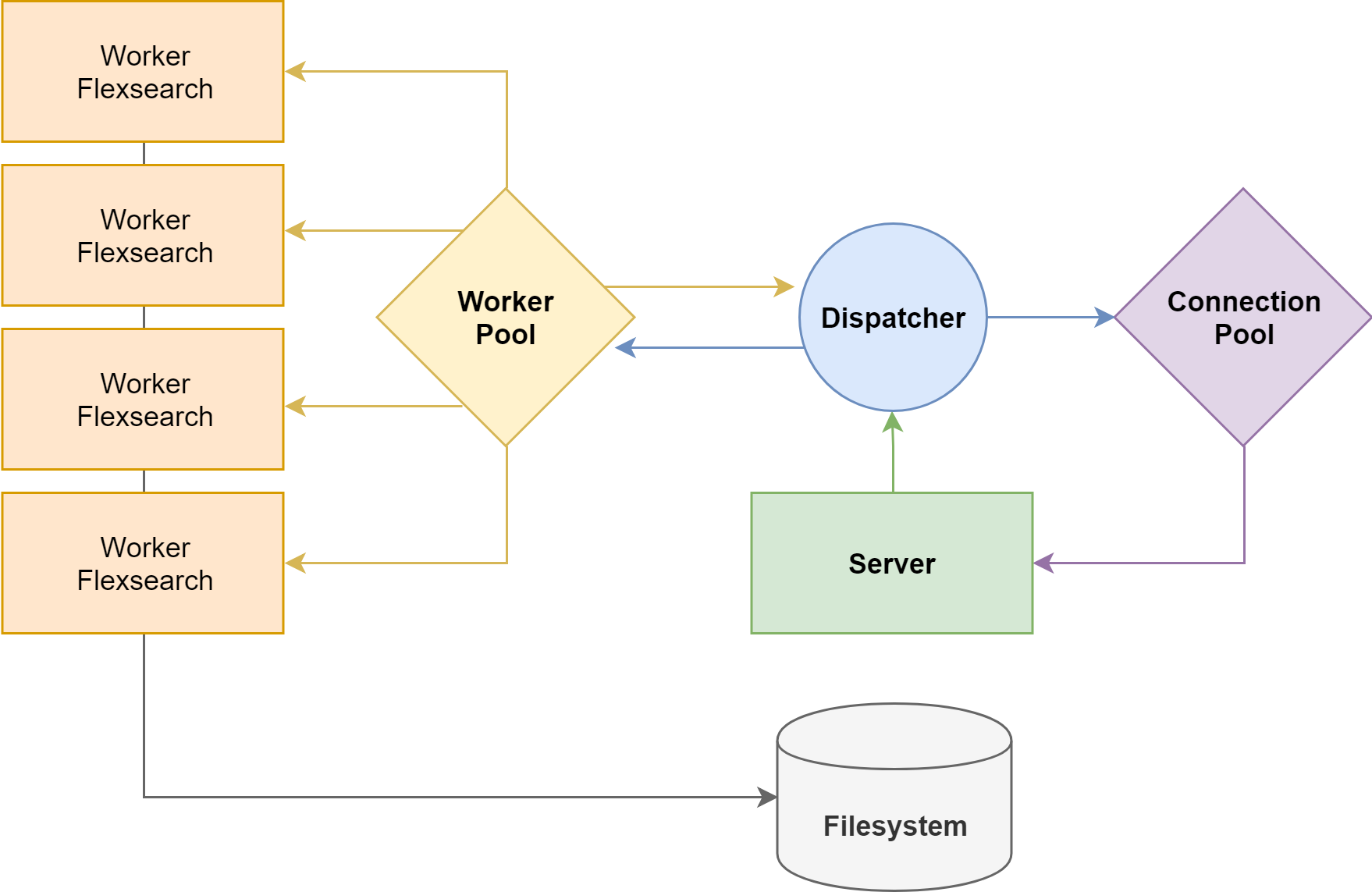
## Cluster

<img src="https://raw.githubusercontent.com/nextapps-de/flexsearch-server/master/doc/cluster.png" width="62%"><br>

FlexSearch Server actually use Node.js Clusters and a Connection Pool to balance all incoming load through the workers.

---

Copyright 2019 Nextapps GmbH<br>
Released under the <a href="http://www.apache.org/licenses/LICENSE-2.0.html" target="_blank">Apache 2.0 License</a><br>