One-command FFmpeg build from source — installs x264, x265, VP9, AV1, AAC, MP3 and more on CentOS, Amazon Linux, Ubuntu and beyond.



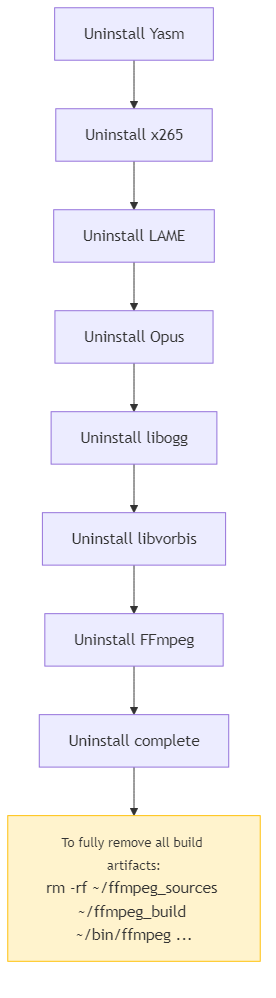
 ### Uninstall
```sh
chmod +x ./bin/uninstall.sh
./bin/uninstall.sh
```
### Uninstall
```sh
chmod +x ./bin/uninstall.sh
./bin/uninstall.sh
```
 ## FFmpeg Command Examples
### Video to Sequential Images
```sh
ffmpeg -i input.mp4 -vf fps=1 output_%04d.png
```
### Sequential Images to MP4
```sh
ffmpeg -framerate 1 -i input_%04d.png -vcodec libx264 -pix_fmt yuv420p -r 60 output.mp4
```
| Parameter | Description |
|-----------|-------------|
| `-framerate` | Input frame rate (images per second) |
| `-r` | Output frame rate |
| `-vcodec libx264` | H.264 encoder |
| `-pix_fmt yuv420p` | Pixel format for broad compatibility |
### Sequential Images to GIF
```sh
ffmpeg -framerate 1 -i input_%04d.png -r 60 -vf scale=512:-1 output.gif
```
| Parameter | Description |
|-----------|-------------|
| `-vf scale=512:-1` | Scale width to 512px, maintain aspect ratio. Omit for original size |
## Node.js Examples
Using [ffmpeg-stream](https://www.npmjs.com/package/ffmpeg-stream):
```sh
cd examples
npm install
node images2mp4.js
node images2gif.js
```
| Description | File |
|-------------|------|
| Images to MP4 | [examples/images2mp4.js](examples/images2mp4.js) |
| Images to GIF | [examples/images2gif.js](examples/images2gif.js) |
## Changelog
See [CHANGELOG.md](CHANGELOG.md) for release history.
## License
MIT — see [LICENSE](LICENSE).
## Author
- X: [@shumatsumonobu](https://x.com/shumatsumonobu)
- GitHub: [shumatsumonobu](https://github.com/shumatsumonobu)
- Email: shumatsumonobu@gmail.com
## FFmpeg Command Examples
### Video to Sequential Images
```sh
ffmpeg -i input.mp4 -vf fps=1 output_%04d.png
```
### Sequential Images to MP4
```sh
ffmpeg -framerate 1 -i input_%04d.png -vcodec libx264 -pix_fmt yuv420p -r 60 output.mp4
```
| Parameter | Description |
|-----------|-------------|
| `-framerate` | Input frame rate (images per second) |
| `-r` | Output frame rate |
| `-vcodec libx264` | H.264 encoder |
| `-pix_fmt yuv420p` | Pixel format for broad compatibility |
### Sequential Images to GIF
```sh
ffmpeg -framerate 1 -i input_%04d.png -r 60 -vf scale=512:-1 output.gif
```
| Parameter | Description |
|-----------|-------------|
| `-vf scale=512:-1` | Scale width to 512px, maintain aspect ratio. Omit for original size |
## Node.js Examples
Using [ffmpeg-stream](https://www.npmjs.com/package/ffmpeg-stream):
```sh
cd examples
npm install
node images2mp4.js
node images2gif.js
```
| Description | File |
|-------------|------|
| Images to MP4 | [examples/images2mp4.js](examples/images2mp4.js) |
| Images to GIF | [examples/images2gif.js](examples/images2gif.js) |
## Changelog
See [CHANGELOG.md](CHANGELOG.md) for release history.
## License
MIT — see [LICENSE](LICENSE).
## Author
- X: [@shumatsumonobu](https://x.com/shumatsumonobu)
- GitHub: [shumatsumonobu](https://github.com/shumatsumonobu)
- Email: shumatsumonobu@gmail.com