<h1 align="center">
  <a href="https://npmjs.com/package/faim" target="_blank" rel="noopener noreferrer">
    faim <sup><img alt="version" src="https://img.shields.io/npm/v/faim.svg?style=flat-square&color=white&label="></sup>
  </a>
</h1>

<p align="center">
  <img height="28px" src="https://user-images.githubusercontent.com/10731096/95823103-9ce15780-0d5f-11eb-8010-1bd1b5910d4f.png">
  &nbsp;
  <img height="28px" src="https://cdn.rawgit.com/ElemeFE/element/dev/element_logo.svg">
  <br>
  Element Plus & Element UI 一体通用 UI 组件库，不止于 Element
</p>

<p align="center">
  <a href="https://www.npmjs.com/package/faim?activeTab=versions"><img alt="created at" src="https://img.shields.io/github/created-at/cloydlau/faim?&color=1C404E&logo=data:image/svg+xml;base64,PHN2ZyB4bWxucz0iaHR0cDovL3d3dy53My5vcmcvMjAwMC9zdmciIHdpZHRoPSIxZW0iIGhlaWdodD0iMWVtIiB2aWV3Qm94PSIwIDAgNDggNDgiPjxnIGZpbGw9Im5vbmUiPjxwYXRoIGQ9Ik04IDQwaDMyVjI0SDh6Ii8+PHBhdGggc3Ryb2tlPSIjZmZmZmZmIiBzdHJva2UtbGluZWNhcD0icm91bmQiIHN0cm9rZS1saW5lam9pbj0icm91bmQiIHN0cm9rZS13aWR0aD0iNCIgZD0iTTQwIDQwSDhtMzIgMEg0aDRtMzIgMGg0bS00IDBWMjRIOHYxNiIvPjxwYXRoIHN0cm9rZT0iI2ZmZmZmZiIgc3Ryb2tlLWxpbmVjYXA9InJvdW5kIiBzdHJva2UtbGluZWpvaW49InJvdW5kIiBzdHJva2Utd2lkdGg9IjQiIGQ9Im00MCAzNGwtNC0ybC00IDJsLTQtMmwtNCAybC00LTJsLTQgMmwtNC0ybC00IDJtMjQtMTB2LTltLTggOXYtOW0tOCA5di05bTE2LTVWOG0tOCAyVjhtLTggMlY4TTggMjR2MTZtMzItMTZ2MTYiLz48L2c+PC9zdmc+"></a>
  <a href="https://github.com/antfu/eslint-config"><img alt="code style" src="https://antfu.me/badge-code-style.svg"></a>
  <a href="https://app.fossa.com/projects/git%2Bgithub.com%2Fcloydlau%2Ffaim?ref=badge_shield&issueType=license" alt="FOSSA Status"><img src="https://app.fossa.com/api/projects/git%2Bgithub.com%2Fcloydlau%2Ffaim.svg?type=shield&issueType=license"/></a>
  <a href="https://arethetypeswrong.github.io/?p=faim"><img alt="attw" src="https://img.shields.io/badge/are_the_types_wrong%3F-analyze-3178C6?logo=typescript&logoColor=white"></a>
  <a href="https://conventionalcommits.org"><img alt="conventional commits" src="https://img.shields.io/badge/commits-Conventional-FE5196.svg?logo=conventionalcommits"></a>
  <a href="https://semantic-release.gitbook.io"><img alt="semantic release" src="https://img.shields.io/badge/release-semantic-e10079?logo=semantic-release"></a>
  <a href="https://pr.new"><img src="https://developer.stackblitz.com/img/start_pr_dark_small.svg" alt="Start new PR in StackBlitz Codeflow"></a>
</p>

<br>

## 特性

- Vue 2.6/2.7/3 一体通用
- Element UI / Element Plus 一体通用 (定位并不是 Element wrapper，部分组件不依赖 Element 甚至不依赖 Vue)
- 支持 i18n
- 支持按需导入、自动导入
- 支持全局属性、全局事件、全局插槽、全局作用域插槽 ([vue-global-config](https://github.com/cloydlau/vue-global-config) 提供技术支持)

<br>

## 安装

```shell
npm i faim
```

> [!Warning]
>
> 为了方便用户更换 tinymce 的皮肤、主题、图标，这些样式资源需要用户手动引入
>
> 故使用 FaRichText 组件时还需额外安装 tinymce：
>
> `npm i faim tinymce@6`

### Vite

```ts
// vite.config.mts

import { defineConfig } from 'vite'

export default defineConfig({
  optimizeDeps: {
    include: ['faim > qrcode', 'faim > sweetalert2', 'faim > upng-js'],
  },
})
```

### webpack

```js
// webpack.config.js

module.exports = {
  resolve: {
    extensions: ['.mjs', '...'],
  },
  module: {
    rules: [
      {
        test: /\.m?js$/,
        type: 'javascript/auto',
        resolve: {
          fullySpecified: false,
        },
        include: [
          path.resolve(__dirname, 'src'),
          path.resolve(__dirname, 'node_modules', 'faim'),
          path.resolve(__dirname, 'node_modules', 'mime'),
        ],
        loader: 'babel-loader',
      },
    ]
  }
}
```

### Vue CLI 5

```shell
npm i faim
npm i sass-loader -D
```

### Vue CLI 4

```shell
npm i faim
npm i sass-loader@10 -D
```

```js
// vue.config.js

module.exports = {
  transpileDependencies: ['faim', 'mime'],
}
```

### Vue ≤2

```json5
// package.json
{
  // npm/cnpm/bun
  "overrides": {
    "@vueuse/core": "^11"
  },
  // yarn/bun
  "resolutions": {
    "@vueuse/core": "^11"
  },
  // pnpm
  "pnpm": {
    "overrides": {
      "@vueuse/core": "^11"
    }
  }
}
```

缩小作用范围：

```json5
// package.json
{
  // npm/cnpm/bun
  "overrides": {
    "faim": {
      "@vueuse/core": "^11"
    }
  },
  // yarn/bun
  "resolutions": {
    "faim/@vueuse/core": "^11"
  },
  // pnpm
  "pnpm": {
    "overrides": {
      "faim>@vueuse/core": "^11"
    }
  }
}
```

### 自动导入

```shell
npm i unplugin-vue-components -D
```

```ts
// vite.config.mts

import FaimResolver from 'faim/auto-import-resolver'
import Components from 'unplugin-vue-components/vite'
import { defineConfig } from 'vite'

export default defineConfig({
  // ...
  plugins: [
    // ...
    Components({
      resolvers: [FaimResolver()],
    }),
  ],
})
```

```js
// webpack.config.js

const FaimResolver = require('faim/auto-import-resolver')
const Components = require('unplugin-vue-components/webpack')

module.exports = {
  // ...
  plugins: [
    // ...
    Components({
      resolvers: [FaimResolver()],
    }),
  ],
}
```

### Element Plus (Vue 3)

#### 局部注册

```vue
<script setup>
import { FaFormDialog, FaImage, FaImageUpload, FaMessageBox, FaPopSwitch, FaRichText, FaSelect, FaUpload } from 'faim'

// 在 FaRichText 外部引入皮肤、主题、图标等样式资源的目的是方便用户对其进行更换
import 'tinymce/skins/ui/oxide/skin.min.css'
import 'tinymce/themes/silver/theme'
import 'tinymce/icons/default/icons'

const $swal = FaMessageBox
</script>
```

#### 全局注册

```ts
import * as ElementPlusIconsVue from '@element-plus/icons-vue'
import ElementPlus from 'element-plus'
import { FaFormDialog, FaImage, FaImageUpload, FaMessageBox, FaPopSwitch, FaRichText, FaSelect, FaUpload } from 'faim'
import FaimLocale from 'faim/dist/locale/zh-cn.mjs'
import { createApp, h } from 'vue'
import App from './App.vue'
import 'element-plus/dist/index.css'

import 'tinymce/icons/default/icons'
// 在 FaRichText 外部引入皮肤、主题、图标等样式资源的目的是方便用户对其进行更换
import 'tinymce/skins/ui/oxide/skin.min.css'
import 'tinymce/themes/silver/theme'

const app = createApp(App)
  .use(ElementPlus)
  .use(FaFormDialog, {
    // 全局配置
    locale: FaimLocale.FaFormDialog,
    width: `${window.outerWidth / 2}px`,
  })
  .use(FaImage, {
    // 全局配置
  })
  .use(FaImageUpload, {
    // 全局配置
    // 完整示例参考 ./demo/ImageUpload
    locale: FaimLocale.FaImageUpload,
  })
  .use(FaPopSwitch, {
    // 全局配置
  })
  .use(FaRichText, {
    // 全局配置
    // 完整示例参考 ./demo/RichText
  })
  .use(FaSelect, {
    // 全局配置
    locale: FaimLocale.FaSelect,
  })
  .use(FaUpload, {
    // 全局配置
    // 完整示例参考 ./demo/Upload
    locale: FaimLocale.FaUpload,
  })

app.config.globalProperties.$swal = FaMessageBox

for (const [key, component] of Object.entries(ElementPlusIconsVue)) {
  app.component(key, component)
}

app.mount('#app')
```

#### CDN

> [!Note]
>
> Faim 输出的格式为包含 SFC 的 ESM + CJS (没有 IIFE)，常规方法引入依赖会比较繁琐，可使用如下工具：
>
> - [esm.sh](https://github.com/esm-dev/esm.sh)
> - [vue3-sfc-loader](https://github.com/FranckFreiburger/vue3-sfc-loader)

### Element UI (Vue 2.7/2.6)

#### 局部注册

```vue
<script>
import { FaFormDialog, FaImage, FaImageUpload, FaMessageBox, FaPopSwitch, FaRichText, FaSelect, FaUpload } from 'faim'

// 在 FaRichText 外部引入皮肤、主题、图标等样式资源的目的是方便用户对其进行更换
import 'tinymce/skins/ui/oxide/skin.min.css'
import 'tinymce/themes/silver/theme'
import 'tinymce/icons/default/icons'

const $swal = FaMessageBox

export default {
  components: { FaFormDialog, FaImage, FaImageUpload, FaPopSwitch, FaRichText, FaSelect, FaUpload },
}
</script>
```

#### 全局注册

```ts
import ElementUI from 'element-ui'
import { FaFormDialog, FaImage, FaImageUpload, FaMessageBox, FaPopSwitch, FaRichText, FaSelect, FaUpload } from 'faim'
import FaimLocale from 'faim/dist/locale/zh-cn.mjs'
import Vue from 'vue'
import App from './App.vue'
import 'element-ui/lib/theme-chalk/index.css'

import 'tinymce/icons/default/icons'
// 在 FaRichText 外部引入皮肤、主题、图标等样式资源的目的是方便用户对其进行更换
import 'tinymce/skins/ui/oxide/skin.min.css'
import 'tinymce/themes/silver/theme'

Vue.use(ElementUI)
Vue.use(FaFormDialog, {
  // 全局配置
  locale: FaimLocale.FaFormDialog,
})
Vue.use(FaImage, {
  // 全局配置
})
Vue.use(FaImageUpload, {
  // 全局配置
  // 完整示例参考 ./demo/ImageUpload
  locale: FaimLocale.FaImageUpload,
})
Vue.use(FaPopSwitch, {
  // 全局配置
})
Vue.use(FaRichText, {
  // 全局配置
  // 完整示例参考 ./demo/RichText
})
Vue.use(FaSelect, {
  // 全局配置
  locale: FaimLocale.FaSelect,
})
Vue.use(FaUpload, {
  // 全局配置
  // 完整示例参考 ./demo/Upload
  locale: FaimLocale.FaUpload,
})

Object.defineProperty(Vue.prototype, '$swal', {
  value: FaMessageBox,
})

new Vue({
  render: h => h(App),
}).$mount('#app')
```

#### CDN

> [!Note]
>
> Faim 输出的格式为包含 SFC 的 ESM + CJS (没有 IIFE)，常规方法引入依赖会比较繁琐，可使用如下工具：
>
> - [esm.sh](https://github.com/esm-dev/esm.sh)
> - [vue3-sfc-loader](https://github.com/FranckFreiburger/vue3-sfc-loader)

### SSR/Nuxt 环境

```ts
// nuxt.config.ts

export default defineNuxtConfig({
  build: {
    transpile: ['faim'],
  },
  vite: {
    optimizeDeps: {
      include: ['faim > qrcode', 'faim > sweetalert2', 'faim > upng-js'],
    },
  }
})
```

如果在 SSR/Nuxt 中遇到报错：`navigator is not defined`，可能是受到了不支持 SSR/Nuxt 环境的组件代码影响，可以指定路径导入组件：

```ts
import FaFormDialog from 'faim/dist/components/FormDialog/index.vue'
```

### 非 Element 环境

以下组件支持在非 Element 环境中使用：

- FaImage
- FaMessageBox
- FaRichText
- FaUpload

### 非 Vue 环境

以下组件支持在非 Vue 环境中使用：

- FaMessageBox

为了避免受到依赖 Vue 的组件代码影响，可以指定路径导入组件：

```ts
import FaMessageBox from 'faim/dist/components/MessageBox/index'
```

### 布尔类型属性

> [!Warning]
>
> 对于基于 Element 的组件，仅写上布尔类型的属性但不传值，支持隐式转换为 `true`：
>
> ✓ `<FaImageUpload disabled />`
>
> ✓ `<FaImageUpload :disabled="true" />`
>
> 与 Element 表现一致：
>
> ✓ `<el-upload disabled />`
>
> ✓ `<el-upload :disabled="true" />`
>
> **但非 Element 环境的组件是不支持的：**
>
> ✗ `<FaUpload disabled />`
>
> ✓ `<FaUpload :disabled="true" />`

### 覆盖依赖版本

```json5
// package.json
{
  // npm/cnpm/bun
  "overrides": {
    "xxx": "yyy"
  },
  // yarn/bun
  "resolutions": {
    "xxx": "yyy"
  },
  // pnpm
  "pnpm": {
    "overrides": {
      "xxx": "yyy"
    }
  }
}
```

或缩小作用范围：

```json5
// package.json
{
  // npm/cnpm/bun
  "overrides": {
    "faim": {
      "xxx": "yyy"
    }
  },
  // yarn/bun
  "resolutions": {
    "faim/xxx": "yyy"
  },
  // pnpm
  "pnpm": {
    "overrides": {
      "faim>xxx": "yyy"
    }
  }
}
```

<br>

## FaFormDialog

[el-dialog](https://element.eleme.cn/#/zh-CN/component/dialog) + [el-form](https://element.eleme.cn/#/zh-CN/component/form) 组合拳

### 特性

- 打开对话框自动回显数据，关闭对话框自动重置数据
- 提交、拒绝、保存、重置、全屏一应俱全
- 校验失败时平滑滚动至错误项并震动提示
- 限制高度，始终展示 footer，无页面级滚动条
- 只读模式

### 属性

| 名称                                               | 说明                                | 类型                                             | 默认值                         |
| -------------------------------------------------- | ----------------------------------- | ------------------------------------------------ | ------------------------------ |
| title                                              | 对话框标题                          | string                                           |                                |
| v-model:show (Vue 3) /<br>show.sync (Vue 2)        | 是否显示                            | boolean                                          | `false`                        |
| v-model /<br>modelValue (Vue 3) /<br>value (Vue 2) | 表单数据对象 (`el-form` 的 `model`) | any                                              |                                |
| elFormProps                                        | `el-form` 的属性                    | object                                           |                                |
| retrieve                                           | 读取数据                            | () => Promise<void> \| void                      |                                |
| retrieving                                         | 读取状态                            | boolean                                          | `false`                        |
| readonly                                           | 是否只读                            | boolean                                          | `false`                        |
| showFullscreenToggle                               | 是否显示全屏开关                    | boolean                                          | `true`                         |
| showConfirmButton                                  | 是否显示确认按钮                    | boolean                                          | `!readonly`                    |
| confirm                                            | 确认                                | ()= > Promise<void \| { show: boolean }> \| void |                                |
| showDenyButton                                     | 是否显示拒绝按钮                    | boolean                                          | `false`                        |
| deny                                               | 拒绝                                | () => Promise<void \| { show: boolean }> \| void |                                |
| showSaveButton                                     | 是否显示保存按钮                    | boolean                                          | `false`                        |
| save                                               | 保存                                | () => Promise<void \| { show: boolean }> \| void |                                |
| showResetButton                                    | 是否显示重置按钮                    | boolean                                          | `false`                        |
| reset                                              | 重置                                | () => void                                       |                                |
| showCancelButton                                   | 是否显示取消按钮                    | boolean                                          | `!readonly`                    |
| reverseButtons                                     | 是否反转按钮顺序                    | boolean                                          | `false`                        |
| locale                                             | i18n                                | Record<string, string>                           | [查看代码](./src/locale/en.ts) |
| ...                                                | `el-dialog` 的属性                  |                                                  |                                |

#### v-model / modelValue (Vue 3) / value (Vue 2)

如果是 plain object 类型，将用于 `el-form` 的 `model`

`onMounted` 时记录初始值 (与 `el-form-item` 保持一致)，关闭对话框时会重置至初始值

#### retrieve

```vue
<template>
  <FaFormDialog
    :retrieve="() => {
      // 表格打开之后、获取数据之前
      return $POST('xxx').then(() => {
        // 获取数据之后
      })
    }"
  />
</template>
```

#### readonly

开启只读模式时默认隐藏底部操作按钮

跟 `<el-form disabled />` 的区别是在样式上，不置灰，提高可读性和美观度

支持在非只读模式下应用只读样式、支持局部应用只读样式：

```html
<FaFormDialog>
  <div class="is-readonly">
    <el-form-item>
      <el-checkbox disabled />
    </el-form-item>
  </div>
  <el-form-item>
    <el-input />
  </el-form-item>
</FaFormDialog>
```

#### confirm

如果返回一个 Promise 实例，则在该 Promise 实例状态终结后对话框才会关闭

```vue
<template>
  <FaFormDialog
    :confirm="() => {
      // 确认之前
      return $POST('xxx').then(() => {
        // 确认之后
      })
    }"
  />
</template>
```

返回 `Promise.reject()` / `Promise.resolve({ show: true })` / `{ show: true }` 时对话框不会关闭

```vue
<template>
  <FaFormDialog
    :confirm="() => {
      const valid = true
      if (valid) {
        return $POST('xxx')
      }
      else {
        $swal.warning('校验失败')
        return {
          show: true,
        }
      }
    }"
  />
</template>
```

#### deny

如果返回一个 Promise 实例，则在该 Promise 实例状态终结后对话框才会关闭

```vue
<template>
  <FaFormDialog
    :deny="() => {
      // 拒绝之前
      return $POST('xxx').then(() => {
        // 拒绝之后
      })
    }"
  />
</template>
```

返回 `Promise.reject()` / `Promise.resolve({ show: true })` / `{ show: true }` 时对话框不会关闭

```vue
<template>
  <FaFormDialog
    :deny="() => {
      const valid = true
      if (valid) {
        return $POST('xxx')
      }
      else {
        $swal.warning('校验失败')
        return {
          show: true,
        }
      }
    }"
  />
</template>
```

#### reverseButtons

关于 “确定” 和 “取消” 按钮的顺序，可以看看这篇[知乎回答](https://www.zhihu.com/question/20694680/answer/1400624833)

### 事件

| 名称             | 说明                          | 回调参数              |
| ---------------- | ----------------------------- | --------------------- |
| fullscreenChange | 切换全屏状态时触发            | (fullscreen: boolean) |
| ...              | `el-dialog`、`el-form` 的事件 |                       |

### 插槽

| 名称    | 说明               |
| ------- | ------------------ |
| default | `el-form` 的内容   |
| ...     | `el-dialog` 的插槽 |

### 外部方法

| 名称           | 说明                           | 类型                                                                                                       |
| -------------- | ------------------------------ | ---------------------------------------------------------------------------------------------------------- |
| highlightError | 平滑滚动至校验失败的表单项     | (selectors: string \| Element \| NodeList = '.el-form .el-form-item.is-error', container = window) => void |
| ...            | 通过 ref 调用 `el-form` 的方法 |                                                                                                            |

### 改变遮罩层定位

```scss
.el-dialog__wrapper,
.v-modal {
  position: absolute;
}

// 在原来的基础上减去 navbar + tab 的高度 (以 90px 为例)
.el-dialog {
  .el-dialog__body {
    max-height: calc(100vh - 190px) !important;
  }

  &.is-fullscreen .el-dialog__body {
    max-height: calc(100vh - 135px) !important;
  }
}
```

<br>

## FaImage

[Viewer.js](https://github.com/fengyuanchen/viewerjs) + [Swiper](https://swiperjs.com) + [node-qrcode](https://github.com/soldair/node-qrcode) 组合拳

### 特性

- 不依赖 Element，支持任意 UI 框架
- 多样的展示形式：文档流/瀑布流/轮播图/表格嵌套，适配 `<table>` & `<el-table>`
- 灵活的数据类型：URL/Base64/二维码/[object URL](https://developer.mozilla.org/en-US/docs/Web/API/File_API/Using_files_from_web_applications#example_using_object_urls_to_display_images)
- 任意绑定值类型
- 支持二维码内嵌图标

### 属性

| 名称                                  | 说明                                                    | 类型                                  | 默认值                                                              |
| ------------------------------------- | ------------------------------------------------------- | ------------------------------------- | ------------------------------------------------------------------- |
| modelValue (Vue 3) /<br>value (Vue 2) | 绑定值                                                  | any                                   |                                                                     |
| pattern                               | 展示模式（`'waterfall'`, `'swiper'` 或 `'table-cell'`） | string                                | `undefined`（即文档流）                                             |
| srcAt                                 | 图片 `src` 的位置                                       | string / symbol / (value: any) => any |                                                                     |
| viewable                              | 是否启用 Viewer.js                                      | boolean                               | `true`                                                              |
| viewerOptions                         | Viewer.js 的参数                                        | object                                | `{ zIndex: 5000, zoomRatio: 0.4 }`                                  |
| swiperOptions                         | Swiper 的参数                                           | object                                | `{ observer: true }`                                                |
| qrcode                                | 是否生成二维码                                          | boolean / (src: string) => string     | `false`                                                             |
| qrcodeOptions                         | node-qrcode 的参数                                      | object                                | `{ margin: 0, errorCorrectionLevel: 'L', width: 444, height: 444 }` |
| ...                                   | `<img>` 的属性                                          |                                       |                                                                     |

#### srcAt

用于定位 `model-value` 中的图片 `src`，适用于绑定值非 `src` 本身的情况，绑定值为数组类型时尤其有用

- 支持属性名，如 `'url'`
- 支持属性路径，如 `'data[0].url'`
- 支持 symbol 类型的属性名
- 支持 Function，如 `({ url }) => url`

### 插槽

| 名称    | 说明           |
| ------- | -------------- |
| default | 自定义图片标签 |

### 外部方法

| 名称    | 说明                       | 类型       |
| ------- | -------------------------- | ---------- |
| viewer  | Viewer.js 实例             | Object     |
| swiper  | Swiper 实例                | Object     |
| hydrate | 初始化 Viewer.js 和 Swiper | () => void |

```html
<FaImage>
  <template #default="{ src, index }">
    <img :src="src" style="cursor: zoom-in; height: 148px" />
    <div>第{{ index + 1 }}张</div>
  </template>
</FaImage>
```

通过默认插槽来使用 `<el-image>`：

```html
<FaImage>
  <template #default="{ src, index }">
    <el-image :src="src" style="cursor: zoom-in; height: 148px" />
    <div>第{{ index + 1 }}张</div>
  </template>
</FaImage>
```

> [!CAUTION]
>
> Element UI 的 `<el-image>` 在图片加载完毕后才会渲染 `<img>`，因此 Viewer.js 和 Swiper 必须在全部图片加载完毕后再进行初始化
>
> Element Plus 不存在这个问题
>
> 可以这样解决：

```vue
<script setup>
const faImageRef = ref()
const value = ref([])
const loadCount = ref(0)
function onLoad() {
  if (++loadCount.value === value.value.length) {
    faImageRef.value.hydrate()
  }
}
</script>

<template>
  <FaImage
    ref="faImageRef"
    :value="value"
    :model-value="value"
  >
    <template #default="{ src, index }">
      <el-image
        :src="src"
        style="cursor: zoom-in; height: 148px"
        @load="onLoad"
        @error="onLoad"
      />
      <div>第{{ index + 1 }}张</div>
    </template>
  </FaImage>
</template>
```

### 获取 Swiper 实例

```vue
<script setup>
import { FaImage } from 'faim'

const faImageRef = ref()
</script>

<template>
  <FaImage
    ref="faImageRef"
    pattern="swiper"
    :swiper-options="{
      on: {
        init: () => {
          $nextTick(() => {
            console.log(faImageRef.swiper)
          })
        },
      },
    }"
  />
</template>
```

### 二维码清晰度

默认的图片 CSS 高度为 148px (与 `el-upload` 保持一致)，默认的二维码分辨率为 444 × 444 (三倍图)，如果你增大了图片的 CSS 尺寸，将导致图片变模糊

解决方式：将二维码分辨率设置为展示尺寸的三倍

```vue
<template>
  <FaImage
    :qrcode-options="{
      width: 900,
      height: 900,
    }"
  />
</template>

<style lang="scss" scoped>
// Vue 2.6 需要将 :deep 替换为 ::v-deep
:deep(.fa-image) img {
  width: 300px;
  height: 300px;
}
</style>
```

### 二维码内嵌图标

`qrcode` 支持传入一个函数，该函数的入参为绑定值所生成的二维码链接，你可以通过该函数修改二维码，然后输出新的二维码链接

```vue
<!-- 内嵌图片 -->

<script setup>
import embeddedImgSrc from '../assets/logo.png'

function modifyQRCode(src) {
  // 二维码画布
  const canvas = document.createElement('canvas')
  canvas.width = 444
  canvas.height = 444
  const ctx = canvas.getContext('2d')
  const img = new Image()
  img.src = src

  return new Promise((resolve, reject) => {
    img.onerror = (reason) => {
      reject(reason)
    }
    img.onload = () => {
      ctx.drawImage(img, 0, 0, canvas.width, canvas.height)

      // 内嵌图片
      const embeddedImg = new Image()
      embeddedImg.crossOrigin = 'Anonymous'
      embeddedImg.width = 100
      embeddedImg.height = 100
      embeddedImg.src = embeddedImgSrc
      embeddedImg.onerror = (reason) => {
        reject(reason)
      }
      embeddedImg.onload = () => {
        const x = (canvas.width - embeddedImg.width) / 2
        const y = (canvas.height - embeddedImg.height) / 2

        ctx.drawImage(embeddedImg, x, y, embeddedImg.width, embeddedImg.height)
        resolve(canvas.toDataURL())
      }
    }
  })
}
</script>

<template>
  <FaImage
    model-value="blahblah"
    :qrcode="modifyQRCode"
  />
</template>
```

```vue
<!-- 内嵌 canvas 画布 -->

<script setup>
function modifyQRCode(src) {
  // 二维码画布
  const width = 444
  const height = 444
  const canvas = document.createElement('canvas')
  canvas.width = width
  canvas.height = height
  const ctx = canvas.getContext('2d')
  const img = new Image()
  img.src = src

  return new Promise((resolve, reject) => {
    img.onerror = (reason) => {
      reject(reason)
    }
    img.onload = () => {
      ctx.drawImage(img, 0, 0, canvas.width, canvas.height)

      // 内嵌图标
      const canvasEmbedded = document.createElement('canvas')
      const widthEmbedded = 148
      const heightEmbedded = 52
      canvasEmbedded.width = widthEmbedded
      canvasEmbedded.height = heightEmbedded

      // 背景
      const ctxEmbedded = canvasEmbedded.getContext('2d')
      ctxEmbedded.fillStyle = 'white'
      ctxEmbedded.fillRect(0, 0, widthEmbedded, heightEmbedded)

      // 边框
      ctxEmbedded.lineWidth = 5
      ctxEmbedded.strokeStyle = 'rgb(93,155,74)'
      ctxEmbedded.strokeRect(0, 0, widthEmbedded, heightEmbedded)

      // 编号，可换成图标等
      const text = '12345'
      const fontSize = 52
      ctxEmbedded.font = `bolder ${fontSize}px Arial`
      ctxEmbedded.fillStyle = 'rgb(93,155,74)'
      const textMetrics = ctxEmbedded.measureText(text)
      const textX = (widthEmbedded - textMetrics.width) / 2
      const textY = (heightEmbedded + 38) / 2
      ctxEmbedded.fillText(text, textX, textY)
      const x = (canvas.width - canvasEmbedded.width) / 2
      const y = (canvas.height - canvasEmbedded.height) / 2

      ctx.drawImage(canvasEmbedded, x, y)
      resolve(canvas.toDataURL())
    }
  })
}
</script>

<template>
  <FaImage
    model-value="blahblah"
    :qrcode="modifyQRCode"
  />
</template>
```

<br>

## FaImageUpload

[el-upload](https://element-plus.org/zh-CN/component/upload.html) 封装，图片上传一站式解决方案

### 对比 FaUpload

- FaImageUpload 专攻图片上传，支持图片编辑
- FaImageUpload 支持图片回显，不存在跨域问题
- FaImageUpload 依赖 Element

### 特性

- 数据双向绑定 `v-model`，支持任意绑定值类型
- 数据源
  - 用户选择本地文件 (File)
  - 编程式提供数据源 (File/Blob/Base64/URL/[object URL](https://developer.mozilla.org/en-US/docs/Web/API/File_API/Using_files_from_web_applications#example_using_object_urls_to_display_images))
- 编辑图片
  - 格式转换
  - 尺寸指定
  - 品质调节 (支持 JPG/PNG/WEBP)
  - 自由裁剪、锁定比例裁剪
  - 翻转、缩放、无级角度旋转
- 限制图片
  - 格式筛选、格式校验
  - 数量上限、下限
  - 大小上限、下限
  - 尺寸、尺寸范围
  - 分辨率、分辨率范围
  - 比例、比例范围
  - 自定义校验
  - 限制条件可视化 (让用户根据限制条件去准备图片，而不是准备好了才发现不合适)
- 多选、并发上传
- 拖拉拽上传、拖拉拽排序
- 使用 FaImage 来预览图片
- 支持表格嵌套，适配 `<table>` & `<el-table>`

### 属性

| 名称                                               | 说明                              | 类型                                               | 默认值                         |
| -------------------------------------------------- | --------------------------------- | -------------------------------------------------- | ------------------------------ |
| v-model /<br>modelValue (Vue 3) /<br>value (Vue 2) | 绑定值                            | any                                                |                                |
| upload                                             | 调用接口上传图片，返回图片 URL/ID | Upload                                             |                                |
| arrayed                                            | 绑定值是否为数组类型，默认自动    | boolean                                            |                                |
| stringified                                        | 绑定值是否为 stringified JSON     | boolean                                            | `false`                        |
| srcAt                                              | 图片 URL/ID 的位置                | string / symbol / (value: any) => any              |                                |
| disabled                                           | 禁用状态                          | boolean                                            | `false`                        |
| editable                                           | 是否开启编辑功能                  | boolean                                            | `true`                         |
| minCount                                           | 最小数量                          | number                                             |                                |
| maxCount                                           | 最大数量                          | number                                             |                                |
| minSize                                            | 大小下限 (字节)                   | number                                             |                                |
| maxSize                                            | 大小上限 (字节)                   | number                                             |                                |
| width                                              | 宽度 (像素)                       | number / { min?: number, max?: number } / number[] |                                |
| height                                             | 高度 (像素)                       | number / { min?: number, max?: number } / number[] |                                |
| resolution                                         | 分辨率，即宽高的积 (像素)         | number / { min?: number, max?: number } / number[] |                                |
| aspectRatio                                        | 比例，即宽高的商                  | string / { min?: string, max?: string } / string[] |                                |
| outputType                                         | 图片输出格式 (编辑后)，默认原格式 | string                                             |                                |
| validator                                          | 自定义数据源校验器                | (source: File \| Blob \| string) => boolean        |                                |
| locale                                             | i18n                              | Record<string, string>                             | [查看代码](./src/locale/en.ts) |
| ...                                                | `el-upload` 的属性                |                                                    |                                |

#### upload

```ts
type Upload = (output: File | Blob) => Promise<string | object> | string | object | void
```

开启编辑功能时，会在编辑完成后调用，未开启编辑功能时，会在选择图片后调用

未配置或函数返回值为空时，绑定值将输出二进制文件

参数为编辑产物：

用户选择本地文件、编程式提供 File 类型的数据源时，编辑产物的类型为 File

编程式提供非 File 类型的数据源且编辑了图片时，编辑产物的类型为 Blob

未开启编辑功能或未编辑时，编辑产物即输入值

编程式提供 string 类型的数据源且未编辑时，不需要上传，该方法不会被调用

返回值类型为 Promise\<object\> 或 object 时需要配置 srcAt

#### arrayed

如果数量上限和图片数量均不超过 1，则处于单选状态，否则为多选

默认情况下，在单选时输出的绑定值形如：item，多选时输出的绑定值形如：[item，item]

item 具体是什么格式？

未配置 srcAt 时，会提取图片 URL/ID 作为 item，配置了则不会

如果将 arrayed 设置为 `true` 则强制输出数组类型，无论单选还是多选

如果将 arrayed 设置为 `false` 则强制输出非数组类型，如果此时图片数量为多个，则会执行 `JSON.stringify`

#### stringified

- 场景1: 需要存储图片链接和图片名称等多维度信息，但后端提供的字段类型为字符串
- 场景2: 需要存储多张图片，但后端提供的字段类型为字符串

> [!Warning]
>
> 这通常并不是最佳实践，建议后端修改字段类型

#### srcAt

用于定位 value 和 upload 返回值中的图片 URL/ID，适用于绑定值非图片 URL/ID 本身的情况

- 支持属性名，如 `'url'`
- 支持属性路径，如 `'data[0].url'`
- 支持 symbol 类型的属性名
- 支持 Function，如 `value => value.url`

#### aspectRatio

- `'16:9'`：限制比例为 16:9
- `{ min: '16:10' }`：限制比例下限为 16:10
- `{ max: '21:9' }`：限制比例上限为 21:9
- `{ min: '16:10', max: '21:9' }`：限制比例下限为 16:10，且上限为 21:9
- `['16:10', '16:9', '21:9']`：限制比例为 16:10，16:9，21:9 其中之一

#### width，height，resolution

- `200`：限制参数值为 200
- `{ min: 100 }`：限制参数值下限为 100
- `{ max: 300 }`：限制参数值上限为 300
- `{ min: 100, max: 300 }`：限制参数值下限为 100，且上限为 300
- `[100, 200, 300]`：限制参数值为 100，200，300 其中之一

> [!CAUTION]
>
> 为了避免冲突，宽度、高度、分辨率最多同时指定其中两者，宽度、高度、比例也是一样

#### outputType

关闭编辑模式时，会按照 `accept` 筛选格式、校验格式

开启编辑模式时，会按照 `accept` 筛选格式，但不会校验格式，编辑图片后，按照 `outputType` 指定的格式输出图片

可选值参考 [MIME type](https://www.iana.org/assignments/media-types/media-types.xhtml#image)

#### validator

关闭编辑模式时，在选择图片时调用该方法进行校验

开启编辑模式时，在输出图片时调用该方法进行校验

### 插槽

同 `el-upload`

### 外部方法

| 名称       | 说明                             | 参数                                                                           |
| ---------- | -------------------------------- | ------------------------------------------------------------------------------ |
| openEditor | 打开图片编辑对话框               | async (source: File \| Blob \| string \| File[] \| Blob[] \| string[]) => void |
| uploading  | 图片上传状态                     | boolean                                                                        |
| ...        | 通过 ref 调用 `el-upload` 的方法 |                                                                                |

openEditor 参数为输入的数据源，支持的数据类型有：

- File
- Blob
- Base64
- URL：需要跨域支持
- object URL：需要在当前 `document` 创建

如果没有编辑图片，则输出值类型不变 (与输入值一致)

如果编辑了图片，输入类型为 File 时，输出类型也为 File，其它情况均输出 Blob 类型

### 编程式提供数据源

```vue
<template>
  <!-- eslint-disable vue/no-constant-condition -->
  <FaImageUpload
    v-show="false"
    ref="faImageUploadRef"
    :upload="(file) => $POST.upload(import.meta.env.VITE_APP_UPLOAD_API, {
      file,
    }).then(res => res.data.data)"
  />

  <el-button
    :loading="openingEditor"
    @click="async () => {
      openingEditor = true
      const url = 'https://picsum.photos/100'
      const fileName = '100x100.jpg'
      // 如果需要附加图片名称，可以先转换为 File 类型再输入
      const blob = await (await fetch(url)).blob()
      const file = new File([blob], fileName, { type: blob.type })
      $refs.faImageUploadRef.openEditor(file).finally(() => {
        openingEditor = false
      })
    }"
  >
    编辑图片
  </el-button>
</template>
```

### 输出大小

图片经过编辑后，输出的大小与以下因素相关：

- 原图大小
- 配置或用户设置的图片宽度
- 配置或用户设置的图片高度
- 配置的图片格式
- 用户设置的品质系数

### 自定义 trigger

```vue
<template>
  <FaImageUpload
    class="fa-image-upload__custom-trigger"
    list-type="text"
  >
    <el-button>自定义 trigger</el-button>
  </FaImageUpload>
</template>

<style lang="scss" scoped>
// Vue 2.6 需要将 :deep() 替换为 ::v-deep
:deep(.fa-image-upload__custom-trigger) {
  .fa-image,
  .el-upload-list,
  .el-upload__tip,
  .el-upload__text {
    display: none;
  }
  .el-upload-dragger {
    width: unset;
    height: unset;
    margin-bottom: 8px;
  }
}
</style>
```

### PNG 签名错误

> [!Note]
>
> [upng-js](https://github.com/photopea/UPNG.js) 和 [fast-png](https://github.com/image-js/fast-png) 均无法解析 Windows 系统下的微信截图
>
> 该截图可能存在 PNG 签名错误的问题，能正常编辑和上传，但无法调节品质系数
>
> 可尝试使用图像工具重新导出，然后重新上传

<br>

## FaMessageBox

<a href="https://sweetalert2.github.io">sweetalert 2</a> + [el-message-box](https://element-plus.org/zh-CN/component/message-box) 组合拳

### 特性

- 不依赖 Element，支持任意 UI 框架
- 不依赖 Vue，支持非 Vue 环境

### 生命周期

```ts
FaMessageBox.success('Operation Success').then(() => {
  // onClose
})

FaMessageBox.info('Information').then(() => {
  // onClose
})

FaMessageBox.warning('Warning').then(() => {
  // onClose
})

FaMessageBox.error('Error Occurred').then(() => {
  // onClose
})

FaMessageBox.confirm('Are You Sure?').then(() => {
  // onConfirmed
}).catch((e) => {
  if (e.isDenied) {
    // onDenied
  }
  else if (e.isDismissed) {
    // onDismissed
  }
})

FaMessageBox.loading().then(() => {
  // onClose
})
FaMessageBox.close()
```

### 案例：强制确认

无取消，必须确认

```ts
FaMessageBox.confirm({
  titleText: 'Confirm to continue',
  showCancelButton: false,
  allowOutsideClick: false,
  allowEscapeKey: false,
})
```

### 案例：复杂确认

```ts
// form with async submitting
FaMessageBox.confirm({
  input: 'text',
  inputAttributes: {
    placeholder: 'Remark'
  },
  confirmButtonText: 'Agree',
  showLoaderOnConfirm: true,
  preConfirm: (input) => {
    return new Promise((resolve) => {
      setTimeout(resolve, 500)
    }).then(() => {
      alert('Agree Success')
    }).catch((e) => {
      alert('Agree Failed')
    })
  },
  showDenyButton: true,
  denyButtonText: 'Deny',
  returnInputValueOnDeny: true,
  preDeny: (input) => {
    if (input) {
      return new Promise((resolve, reject) => {
        setTimeout(reject, 500)
      }).then(() => {
        alert('Deny Success')
      }).catch((e) => {
        alert('Deny Failed')
      })
    }
    else {
      FaMessageBox.showValidationMessage('Please fill in the remark')
      return false
    }
  },
}).then((e) => {
  alert('Agreed')
}).catch((e) => {
  if (e.isDenied) {
    alert('Denied')
  }
  else if (e.isDismissed) {
    alert('Dismissed')
  }
})
```

<br>

## FaPopSwitch

[el-switch](https://element-plus.org/zh-CN/component/switch) + [el-popconfirm](https://element-plus.org/zh-CN/component/popconfirm) + [el-popover](https://element-plus.org/zh-CN/component/popover) + [el-tooltip](https://element-plus.org/zh-CN/component/tooltip) 组合拳

### 特性

- 操作拦截 (`el-popconfirm` 点击确定后才会触发 `change` 事件)
- 支持内嵌文字描述，宽度自适应
- `el-popover` 和 `el-tooltip` 的 `content` 属性均支持渲染 HTML
- `el-tooltip` 不与 `el-popconfirm`、`el-popover` 冲突
- `el-popconfirm`、`el-popover`、`el-tooltip` 内容为空时，默认不启用

### 属性

| 名称                        | 说明                                       | 类型    | 默认值  |
| --------------------------- | ------------------------------------------ | ------- | ------- |
| inlinePrompt                | 是否内嵌文字描述                           | boolean | `false` |
| elPopconfirmProps           | `el-popconfirm` 的属性                     | object  |         |
| elPopoverProps              | `el-popover` 的属性，支持事件绑定          | object  |         |
| `elPopoverProps.rawContent` | `content` 中的内容是否作为 HTML 字符串处理 | boolean | `false` |
| elTooltipProps              | `el-tooltip` 的属性                        | object  |         |
| `elTooltipProps.rawContent` | `content` 中的内容是否作为 HTML 字符串处理 | boolean | `false` |
| ...                         | `el-switch` 的属性                         |         |         |

### 事件

`el-switch`、`el-popconfirm`、`el-popover` 的事件

### 插槽

| 名称            | 说明                           |
| --------------- | ------------------------------ |
| tooltip-content | `el-tooltip` 的 `content` 插槽 |
| popover-content | `el-popover` 的 `content` 插槽 |

### 外部方法

通过 ref 调用 `el-switch` 的方法

<br>

## FaRichText

富文本编辑器，可离线使用的 <a href="https://github.com/tinymce/tinymce">TinyMCE</a> Vue 封装

### 对比 [tinymce-vue](https://github.com/tinymce/tinymce-vue)

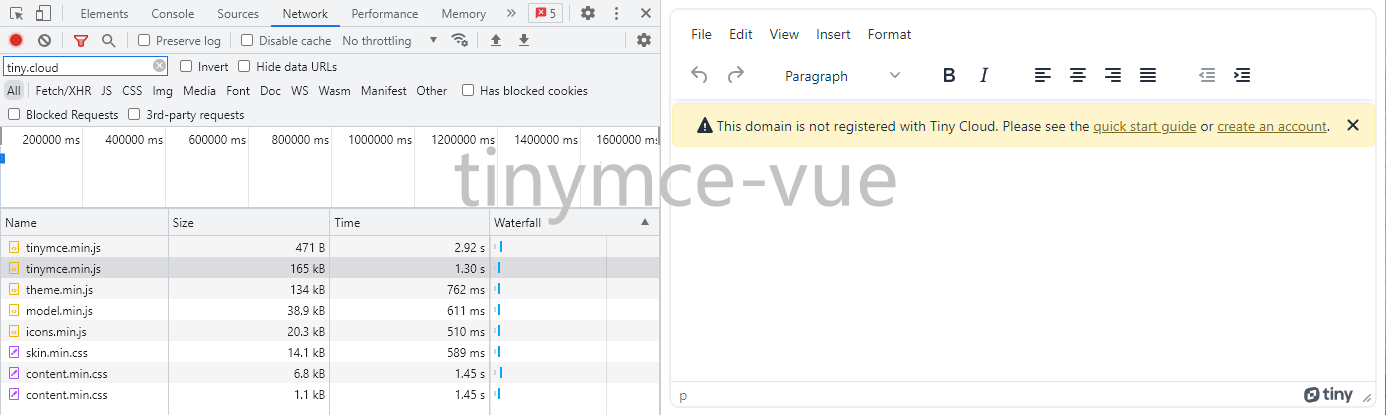
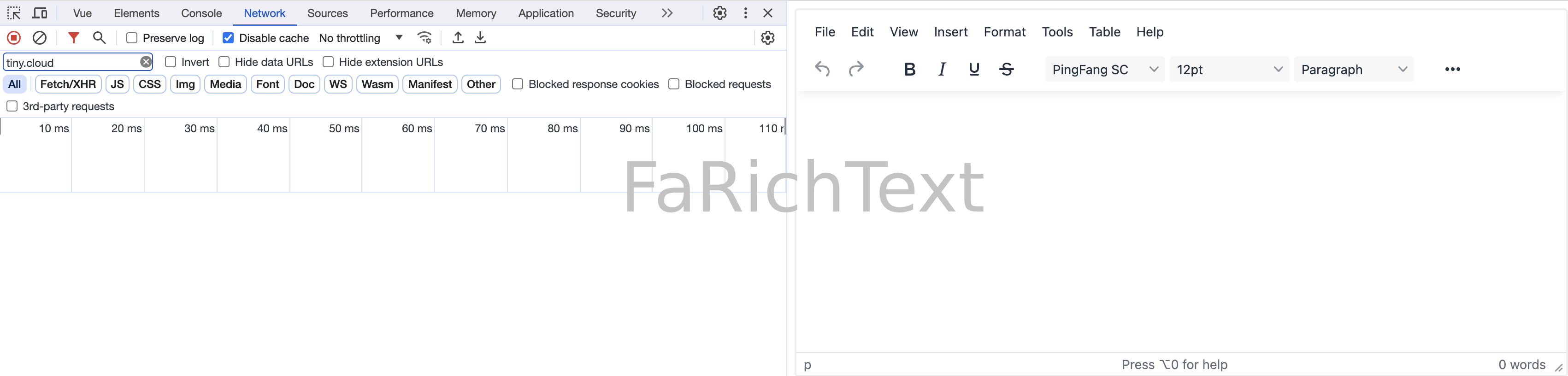
- tinymce-vue 需要加载至少 **380kB** 的网络资源 (开启插件全家桶将达到 **563kB**，还没算上付费插件)，外网会很慢，甚至超时
- tinymce-vue 有[域名检测](#域名检测)，会弹窗警告
- tinymce-vue 区别适配不同的 Vue 版本，升级成本较高，针对 Vue 2 的 v3 版本最后更时间为 2021-01，有停止维护风险
- tinymce-vue 默认功能最小化，需要繁杂的配置，还不支持全局传参

![tinymce-vue](./docs/tinymce-vue.png)

![FaRichText](./docs/FaRichText.png)

### 特性

- 可离线使用，零网络延迟
- 无[域名检测](#域名检测)，无弹窗困扰
- 使用 tinymce@6 (MIT)，[无许可证风险](https://github.com/tinymce/tinymce/issues/9453)
- 插件全家桶开箱即用
- 提供常用自定义插件示例
  - 插入本地图片
  - 插入本地视频
  - 插入本地音频
  - 插入 Word 文档 (`.docx`)，兼容 Microsoft Office、WPS
- 支持浅色模式 & 深色模式，主题、图标、内容样式均可自定义
- 支持将 HTML 输出为普通文本
- 字数统计功能默认统计字符数，而不是单词数

### 属性

| 名称                                               | 说明                                                   | 类型    | 默认值                                         |
| -------------------------------------------------- | ------------------------------------------------------ | ------- | ---------------------------------------------- |
| v-model /<br>modelValue (Vue 3) /<br>value (Vue 2) | 绑定值                                                 | string  |                                                |
| disabled                                           | 禁用状态                                               | boolean | `false`                                        |
| outputFormat                                       | 输出格式，`'html'` 或 `'text'`                         | string  | `'html'`                                       |
| ...                                                | [TinyMCE 配置](https://www.tiny.cloud/docs/tinymce/6/) | /       | [查看代码](./src/components/RichText/index.ts) |

<br>

### 外部方法

| 名称 | 说明    | 类型   |
| ---- | ------- | ------ |
| id   | 元素 ID | string |

<br>

### 获取 [TinyMCE Editor](https://www.tiny.cloud/docs/tinymce/6/apis/tinymce.editor/) 实例

```vue
<!-- 示例: 监听 TinyMCE 的事件 -->

<script setup>
import tinymce from 'tinymce/tinymce'
import { reactive, ref } from 'vue'

const faRichTextRef = ref()
</script>

<template>
  <FaRichText
    ref="faRichTextRef"
    :setup="(editor) => {
      // 方式1
      editor.on('init', (e) => {
        console.log('init', e)

        // 方式2
        tinymce.get(faRichTextRef.value.id).on('Change', (e) => {
          console.log('Change', e)
        })

        // 方式3
        tinymce.activeEditor.on('Change', (e) => {
          console.log('Change', e)
        })
      })
    }"
    :init_instance_callback="(editor) => {
      // 方式4
      editor.on('Change', (e) => {
        console.log('Change', e)
      })
    }"
  />
</template>
```

### 显隐控制

请使用 `v-if` 控制显隐

由于实际的富文本元素并没有挂载在 `selector` 上面，所以使用 `v-show` 切换显隐会有问题

### 内容样式

富文本的内容样式建议在展示侧自行添加，而不是在富文本的生产侧添加，因为：

1. 富文本的生产侧无法满足展示侧各自的定制化需求
2. 展示侧可能包含小程序，小程序不支持 `style` 标签

<a name="域名检测"></a>

### 域名检测

TinyMCE 有四种价格计划：

- Core (免费)
- Essential
- Professional
- Flexible

如果没有注册 Tiny 账号、或者没有在账号设置中登记域名，界面上会有警告弹出 (**即使你使用的是免费的 Core 计划**)

> 当然，你可以用 CSS 来屏蔽弹窗，只是不推荐这种方式

TinyMCE 提供了两种加载方式：

- CDN (tinymce-vue 采用的方式)：需要注册账号以提供 `api-key`，并在账号设置中登记所有用到 TinyMCE 的项目域名
- NPM (FaRichText 采用的方式)：没有 `api-key` 参数，所以不需要注册账号、不需要登记域名，参考 [Tiny 官方解释](https://stackoverflow.com/questions/63398432/how-to-use-tinymce-5-api-key-using-npm)

### 自定义插件示例

[插入本地图片/视频/音频](./demo/RichText/plugins/InsertFile.vue)

[插入 Word 文档 (`.docx`)，兼容 Microsoft Office、WPS](./demo/RichText/plugins/InsertWord.js)

#### 粘贴 Word 文档

TinyMCE 提供了 premium 插件 PowerPaste，可用于粘贴 Word 文档，但兼容性一般，尤其是不支持 WPS

FaRichText 提供了插入 Word 文档的插件示例，兼容 Microsoft Office、WPS，可在一定程度上替代 PowerPaste

注意：粘贴可以片段粘贴，插入只能整个文档插入

#### PowerPaste 插件

```ts
// PowerPaste 配置示例

import axios from 'axios'
import createAxiosShortcut from 'axios-shortcut'
import { FaRichText } from 'faim'

const { POST } = createAxiosShortcut(axios)

app.use(FaRichText, {
  images_upload_handler(blobInfo, success, failure) {
    const blob = blobInfo.blob()
    const file = new File(
      [blob],
      blobInfo.filename(),
      { type: blob.type }
    )

    POST.upload(process.env.VUE_APP_UPLOAD_API, {
      file
    }).then((res) => {
      if (typeof res.data?.data === 'string') {
        success(res.data.data)
      }
      else {
        failure(res.data?.message)
      }
    }).catch((err) => {
      failure(String(err))
    })
  },
})
```

- 兼容性
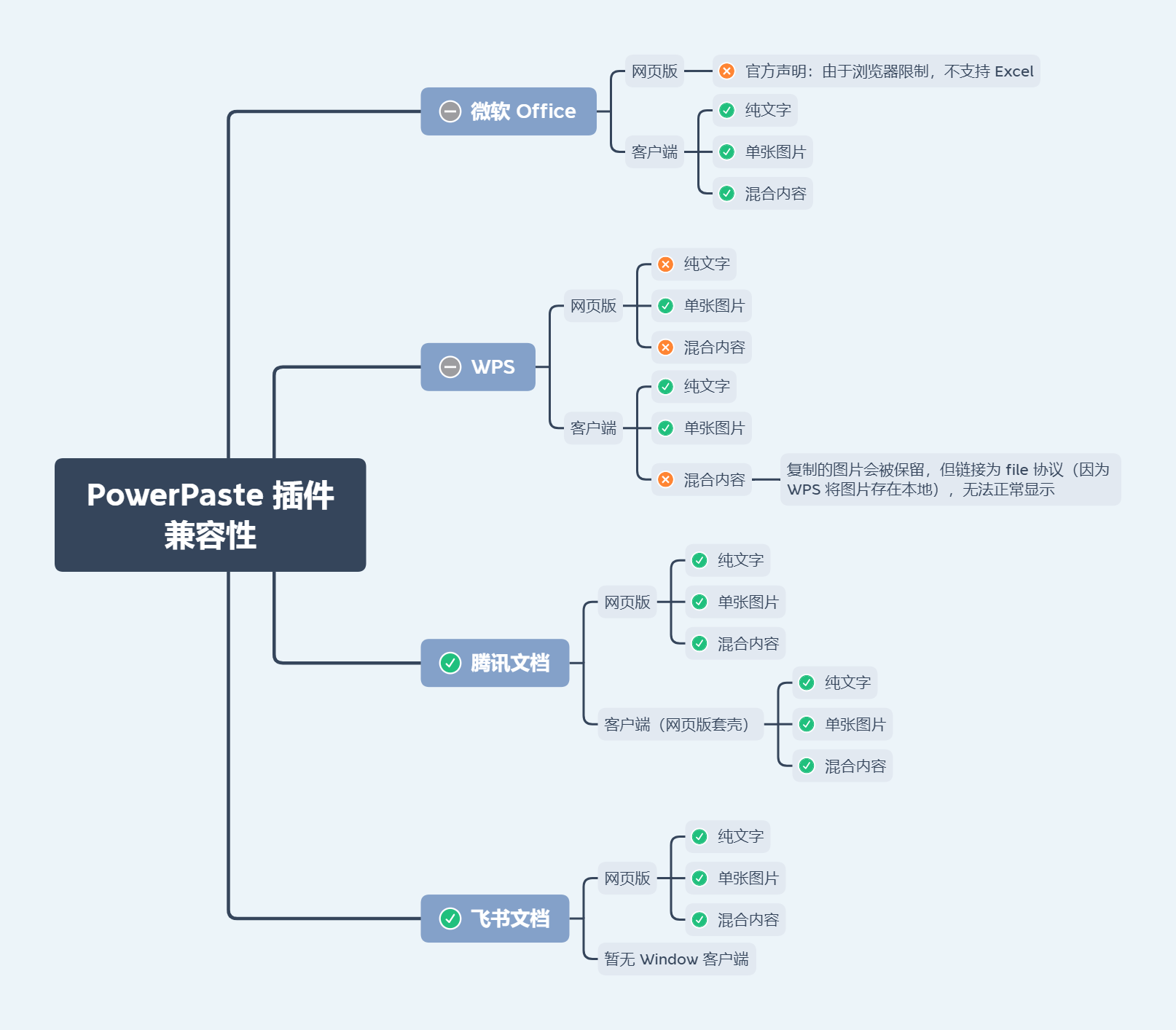
  ![PowerPaste 插件兼容性](./docs/powerpaste-compatibility.png)

- 受浏览器限制，PowerPaste 插件**无法支持微软 Word 和 Excel 文档所支持的<font color="#dd0000">所有</font>图片类型**。
  举个例子，浏览器禁止以编程方式访问文件系统，所以无法解析文档中使用 `file://` 协议的图片 (WPS 使用的就是此协议)

- 粘贴微软 Word 文档 (Windows 系统、≥ 2013 版本) 中<font color="#dd0000">受保护视图</font>的内容，将仅得到**无格式的普通文本**，这是受保护视图与剪贴板的交互机制决定的

- 受微软 Excel 网页版限制，粘贴<font color="#dd0000">微软 Excel 网页版</font>的内容将仅得到**无格式的普通文本**

### 粘贴网页内容 (HTML)

#### 格式

粘贴的网页内容默认会保留一定的源格式，启用 PowerPaste
插件后，对格式的处理将会更加完善。详见 [Improved HTML Cleaning](https://www.tiny.cloud/docs/tinymce/6/powerpaste-support/#improved-html-cleaning)

如需获取纯文本，选中**编辑**-**粘贴为文本**再进行粘贴

**清除格式**按钮得到的<font color="#dd0000">不是</font>纯文本，可以自定义清除效果：
[Removing a format](https://www.tiny.cloud/docs/tinymce/6/content-formatting/#removing-a-format)

#### 图片

如果用户复制第三方网站的内容到编辑框内，静态资源 (如图片) 可能无法正常显示，这是因为：

1. 第三方网站没有开启静态资源的跨域访问

2. 第三方网站对静态资源做了 Referer 校验

TinyMCE 的 `urlconverter_callback`、`paste_postprocess` API 不支持异步操作，所以批量转存图片可行性低

技术上是可以解决的，可以通过 NGINX 动态代理配合这两个 API 来处理

请自行评估相关风险

<br>

## FaSelect

[el-select](https://element-plus.org/zh-CN/component/select) + `el-option` + `el-option-group` 组合拳

### 特性

- 单向绑定 `label`
- 远程搜索时无需关心 `options` 和 `loading`
- 无匹配选项时展示 `label` (而不是 `value`)
- 多选时支持一键全选、拖拉拽排序

### 属性

| 名称                                               | 说明                              | 类型                                          | 默认值                         |
| -------------------------------------------------- | --------------------------------- | --------------------------------------------- | ------------------------------ |
| v-model /<br>modelValue (Vue 3) /<br>value (Vue 2) | 绑定值                            | any                                           |                                |
| v-model:options (Vue 3) /<br>options.sync (Vue 2)  | 选项                              | any[]                                         |                                |
| v-model:label (Vue 3) /<br>label.sync (Vue 2)      | 绑定值对应的 `label` (单向数据流) | string \| string[]                            |                                |
| props                                              | 定位选项的各项属性                | object                                        |                                |
| search                                             | 远程搜索 (`remote-method` 封装)   | (query: string) =><br>Promise<any[]> \| any[] |                                |
| searchImmediately                                  | 是否立即执行远程搜索              | boolean                                       | `true`                         |
| showSelectAllCheckbox                              | 多选时是否显示全选框              | boolean                                       | `true`                         |
| locale                                             | i18n                              | Record<string, string>                        | [查看代码](./src/locale/en.ts) |
| ...                                                | `el-select` 的属性                |                                               |                                |

#### options

默认情况下绑定值将得到选中项的数组元素本身

可使用 `props.value` 改变此行为 (比如选项的数组元素是 plain object 类型，而绑定值只想要其中某个属性)

#### props

```ts
interface Props {
  // 定位 option 中的 value
  // 如果是 string 类型，将默认用于 el-select 的 value-key
  value: string | symbol | ((value: any) => any)
  // 定位 option 中的 label
  label: string | symbol | ((value: any) => string)
  // 定位 option 中的 disabled
  disabled: string | symbol | ((value: any) => boolean)
  // 定位 option 中分组的 label
  groupLabel: string | symbol | ((value: any) => string)
  // 定位 option 中分组的 options
  groupOptions: string | symbol | ((value: any) => any[])
  // 定位 option 中分组的 disabled
  groupDisabled: string | symbol | ((value: any) => boolean)
}
```

- 支持属性名，如 `'url'`
- 支持属性路径，如 `'data[0].url'`
- 支持 symbol 类型的属性名
- 支持 Function，如 `value => value.url`

### 事件

`el-select` 的事件

### 插槽

| 名称           | 说明                                                                |
| -------------- | ------------------------------------------------------------------- |
| prefix         | `el-select` 的 `prefix` 插槽                                        |
| empty          | `el-select` 的 `empty` 插槽                                         |
| group-prepend  | `el-option-group` 的前置内容                                        |
| group-append   | `el-option-group` 的后置内容                                        |
| default        | `el-option` 的默认插槽，作用域参数为 `{option: any, index: number}` |
| option-prepend | `el-option` 的前置内容，默认内容为全选框                            |
| option-append  | `el-option` 的后置内容                                              |

### 外部方法

| 名称         | 说明                                                             | 类型                    |
| ------------ | ---------------------------------------------------------------- | ----------------------- |
| remoteMethod | `el-select` 的 `remoteMethod` 属性，自行控制 `search` 时机时使用 | (query: string) => void |
| ...          | 通过 ref 调用 `el-select` 的方法                                 |                         |

### 命名

关于 `value` 和 `label` 的命名：

- `value`：这里要表达的含义就是选中目标的 “值”，等同于原生 `<input type="checkbox">` 元素的 `value` 属性，不一定是其唯一标识，所以不应该使用 id 或者 key，且 key 与 Vue 的特殊 attribute 冲突

- `label`：HTML 中 `<label>` 与 `<input>` 元素相关联，用于对后者进行说明，所以 `label` 天生是用来表达选中目标的 “展示名称” 的，而 ‘name’ 由于与原生 `<input>` 元素的 `name` 属性冲突故不考虑使用 ‘name’

> Element 本身没有做到命名的统一，`el-select` 中 `label` 表示选项的标签，
> 但 `el-checkbox` 中 `label` 却表示的是选中状态的值

Ant Design 也是使用 `value` 与 `label` 命名

### 仅在初始化时执行一次 search

```html
<FaSelect :search="query => $POST('...', { query }).then(res => res.data)" :filterable="false" />
```

<br>

## FaUpload

文件上传，[FilePond](https://pqina.nl/filepond) Vue 封装

### 对比 [vue-filepond](https://github.com/pqina/vue-filepond)

- vue-filepond 不支持 `v-model`
- vue-filepond 不支持全局传参
- vue-filepond 区别适配不同的 Vue 版本，升级成本较高，针对 Vue 2 的 v6 版本最后更新时间为 2020-09，有停止维护风险

### 对比 FaImageUpload

- FaUpload 适用于各种文件类型
- FaUpload 适用于大文件上传
- FaUpload 不依赖 Element

### 特性

- 不依赖 Element，支持任意 UI 框架
- 数据双向绑定 `v-model`，支持任意绑定值类型
- 数据源
  - 用户选择本地文件 (File)
  - 编程式提供数据源 (File/Blob/Base64/URL/[object URL](https://developer.mozilla.org/en-US/docs/Web/API/File_API/Using_files_from_web_applications#example_using_object_urls_to_display_images))
- 限制文件
  - 格式筛选、格式校验 (`acceptedFileTypes` 同时支持 [MIME](https://www.iana.org/assignments/media-types/media-types.xhtml#image) 和扩展名)
  - 大小上限、下限
  - 数量上限、下限
  - 图片尺寸、尺寸范围
  - 图片分辨率、分辨率范围
  - 图片比例、比例范围
  - 视频尺寸、尺寸范围
  - 视频分辨率、分辨率范围
  - 视频比例、比例范围
  - 视频时长、时长范围
  - 音频时长、时长范围
  - 自定义校验
  - 限制条件可视化 (让用户根据限制条件去准备文件，而不是准备好了才发现不合适)
- 已上传文件预览、下载
- 多选、多文件并发上传
- 大文件分片切割+分片哈希计算+分片并发上传
- WebAssembly 高性能哈希计算、文件去重
- Web Worker 多线程分片+多线程哈希计算
- 前端消息队列、控制并发上限
- 离线断点续传、自动失败重试
- 精确进度展示、手动中途取消
- 拖拉拽上传、拖拉拽排序

### 属性

| 名称                                               | 说明                                                                          | 类型                                               | 默认值                         |
| -------------------------------------------------- | ----------------------------------------------------------------------------- | -------------------------------------------------- | ------------------------------ |
| v-model /<br>modelValue (Vue 3) /<br>value (Vue 2) | 绑定值                                                                        | any                                                |                                |
| upload                                             | 调用接口上传文件，返回 URL/ID                                                 | Upload                                             |                                |
| arrayed                                            | 绑定值是否为数组类型，默认自动                                                | boolean                                            |                                |
| stringified                                        | 绑定值是否为 stringified JSON                                                 | boolean                                            | `false`                        |
| srcAt                                              | 文件 URL/ID 的位置                                                            | string / symbol / (value: any) => any              |                                |
| minFiles                                           | 最小数量                                                                      | number                                             |                                |
| imageAspectRatio                                   | 图片比例                                                                      | string / { min?: string, max?: string } / string[] |                                |
| videoWidth                                         | 视频宽度 (像素)                                                               | number / { min?: number, max?: number } / number[] |                                |
| videoHeight                                        | 视频高度 (像素)                                                               | number / { min?: number, max?: number } / number[] |                                |
| videoResolution                                    | 视频分辨率，即宽高的积 (像素)                                                 | number / { min?: number, max?: number } / number[] |                                |
| videoAspectRatio                                   | 视频比例，即宽高的商                                                          | string / { min?: string, max?: string } / string[] |                                |
| videoDuration                                      | 视频时长 (秒)                                                                 | number / { min?: number, max?: number } / number[] |                                |
| audioDuration                                      | 音频时长 (秒)                                                                 | number / { min?: number, max?: number } / number[] |                                |
| ...                                                | i18n                                                                          | Record<string, string>                             | [查看代码](./src/locale/en.ts) |
| ...                                                | [FilePond 实例的属性](https://pqina.nl/filepond/docs/api/instance/properties) |

#### upload

```ts
type Upload = (file: File, progress: (progress: number) => void, abortController: AbortController) => Promise<string | object> | string | object | void
```

未配置或函数返回值为空时，绑定值将输出二进制文件

返回值类型为 Promise\<object\> 或 object 时需要配置 srcAt

#### arrayed

如果数量上限和文件数量均不超过 1，则处于单选状态，否则为多选

默认情况下，在单选时输出的绑定值形如：item，多选时输出的绑定值形如：[item，item]

item 具体是什么格式？

未配置 srcAt 时，会提取文件 URL/ID 作为 item，配置了则不会

如果将 arrayed 设置为 `true` 则强制输出数组类型，无论单选还是多选

如果将 arrayed 设置为 `false` 则强制输出非数组类型，如果此时文件数量为多个，则会执行 `JSON.stringify`

#### stringified

- 场景1: 需要存储文件链接和文件名称等多维度信息，但后端提供的字段类型为字符串
- 场景2: 需要存储多个文件，但后端提供的字段类型为字符串

> [!Warning]
>
> 这通常并不是最佳实践，建议后端修改字段类型

#### srcAt

用于定位 value 和 upload 返回值中的文件 URL/ID，适用于绑定值非文件 URL/ID 本身的情况

- 支持属性名，如 `'source'`
- 支持属性路径，如 `'data[0].source'`
- 支持 symbol 类型的属性名
- 支持 Function，如 `value => value.source`

#### imageAspectRatio，videoAspectRatio

- `'16:9'`：限制比例为 16:9
- `{ min: '16:10' }`：限制比例下限为 16:10
- `{ max: '21:9' }`：限制比例上限为 21:9
- `{ min: '16:10', max: '21:9' }`：限制比例下限为 16:10，且上限为 21:9
- `['16:10', '16:9', '21:9']`：限制比例为 16:10，16:9，21:9 其中之一

#### videoWidth，videoHeight，videoResolution，videoDuration，audioDuration

- `200`：限制参数值为 200
- `{ min: 100 }`：限制参数值下限为 100
- `{ max: 300 }`：限制参数值上限为 300
- `{ min: 100, max: 300 }`：限制参数值下限为 100，且上限为 300
- `[100, 200, 300]`：限制参数值为 100，200，300 其中之一

> [!CAUTION]
>
> videoAspectRatio，videoWidth，videoHeight，videoResolution 和 videoDuration 需要 video 标签支持的视频格式才能生效
>
> 即：MP4，WebM 和 OGG (Safari 不支持 OGG)
>
> audioDuration 需要 audio 标签支持的音频格式才能生效
>
> 即：MP3，WAV 和 OGG (Safari 不支持 OGG)

> [!CAUTION]
>
> 为了避免冲突，宽度、高度、分辨率最多同时指定其中两者，宽度、高度、比例也是一样

### 事件

Vue 3

```vue
<script setup>
const faUploadRef = ref()
</script>

<template>
  <FaUpload
    ref="faUploadRef"
    @vue:mounted="() => {
      faUploadRef.filePond.on('init', () => {

      })
    }"
  />
</template>
```

Vue 2

```vue
<template>
  <FaUpload
    ref="faUploadRef"
    @hook:mounted="() => {
      $refs.faUploadRef.filePond.on('init', () => {

      })
    }"
  />
</template>
```

### 外部方法

| 名称      | 说明                                                          |
| --------- | ------------------------------------------------------------- |
| filePond  | [FilePond 实例](https://pqina.nl/filepond/docs/api/instance/) |
| uploading | 上传状态                                                      |

### 大文件上传

[示例](./demo/Upload)

<br>

## 更新日志

各版本详细改动请参考 [release notes](https://github.com/cloydlau/faim/releases)

<br>