# Important Note
### This package is pretty much obsolete. I recommend you to switch to [face-api.js](https://github.com/justadudewhohacks/face-api.js), which covers the same functionality as face-recognition.js in a nodejs as well as browser environment.



Simple Node.js API for robust face detection and face recognition. This a Node.js wrapper library for the face detection and face recognition tools implemented in dlib.

* **[Examples](#examples)**
* **[Install](#install)**
* **[Boosting Performance](#boosting-performance)**
* **[How to use](#how-to-use)**
* **[Async API](#async-api)**
* **[With TypeScript](#with-typescript)**
* **[With opencv4nodejs](#with-opencv4nodejs)**
# Examples
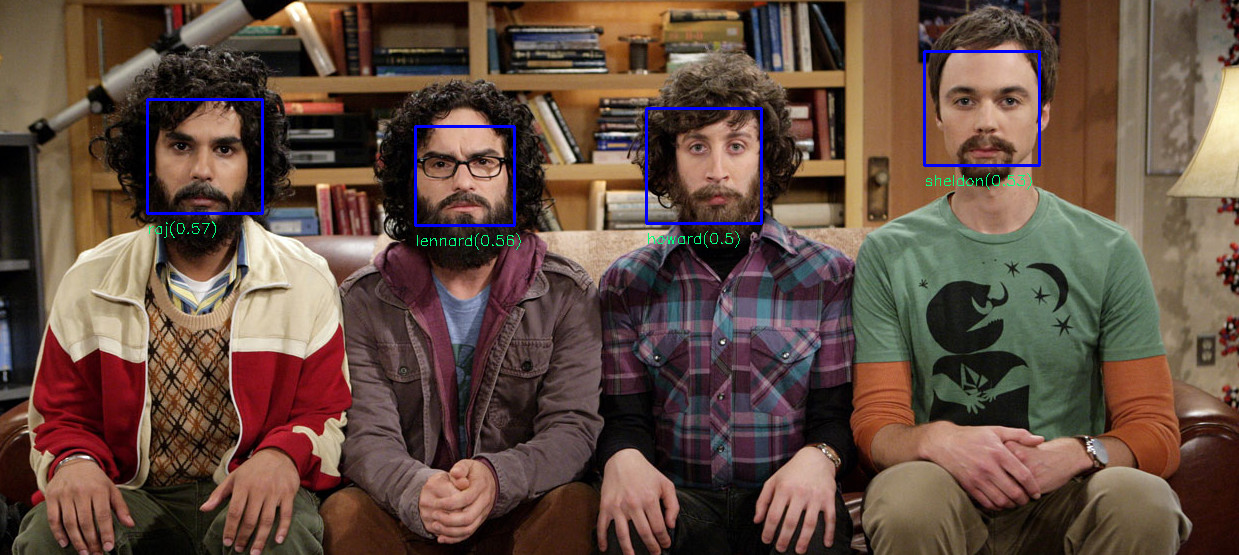
### Face Detection


### Face Recognition
### Face Landmarks

# Install
## Requirements
### MacOS / OSX
- cmake `brew install cmake`
- XQuartz for the dlib GUI (`brew cask install xquartz`)
- libpng for reading images (`brew install libpng`)
### Linux
- cmake
- libx11 for the dlib GUI (`sudo apt-get install libx11-dev`)
- libpng for reading images (`sudo apt-get install libpng-dev`)
### Windows
- cmake
- VS2017 build tools (not Visual Studio 2017) -> https://www.visualstudio.com/de/downloads/
## Auto build
Installing the package will build dlib for you and download the models. Note, this might take some time.
``` bash
npm install face-recognition
```
## Manual build
If you want to use an own build of dlib:
- set DLIB_INCLUDE_DIR to the source directory of dlib
- set DLIB_LIB_DIR to the file path to dlib.lib | dlib.so | dlib.dylib
If you set these environment variables, the package will use your own build instead of compiling dlib:
``` bash
npm install face-recognition
```
# Boosting Performance
Building the package with openblas support can hugely boost CPU performance for face detection and face recognition.
### Linux and OSX
Simply install openblas (`sudo apt-get install libopenblas-dev`) before building dlib / installing the package.
### Windows
Unfortunately on windows we have to compile [openblas](https://github.com/xianyi/OpenBLAS) manually (this will require you to have perl installed). Compiling openblas will leave you with `libopenblas.lib` and `libopenblas.dll`. In order to compile face-recognition.js with openblas support, provide an environment variable `OPENBLAS_LIB_DIR` with the path to `libopenblas.lib` and add the path to `libopenblas.dll` to your system path, before installing the package. In case you are using a manual build of dlib, you have to compile it with openblas as well.
# How to use
``` javascript
const fr = require('face-recognition')
```
### Loading images from disk
``` javascript
const image1 = fr.loadImage('path/to/image1.png')
const image2 = fr.loadImage('path/to/image2.jpg')
```
### Displaying Images
``` javascript
const win = new fr.ImageWindow()
// display image
win.setImage(image)
// drawing the rectangle into the displayed image
win.addOverlay(rectangle)
// pause program until key pressed
fr.hitEnterToContinue()
```
### Face Detection
``` javascript
const detector = fr.FaceDetector()
```
Detect all faces in the image and return the bounding rectangles:
``` javascript
const faceRectangles = detector.locateFaces(image)
```
Detect all faces and return them as separate images:
``` javascript
const faceImages = detector.detectFaces(image)
```
You can also specify the output size of the face images (default is 150 e.g. 150x150):
``` javascript
const targetSize = 200
const faceImages = detector.detectFaces(image, targetSize)
```
### Face Recognition
``` javascript
const recognizer = fr.FaceRecognizer()
```
Train the recognizer with face images of atleast two different persons:
``` javascript
// arrays of face images, (use FaceDetector to detect and extract faces)
const sheldonFaces = [ ... ]
const rajFaces = [ ... ]
const howardFaces = [ ... ]
recognizer.addFaces(sheldonFaces, 'sheldon')
recognizer.addFaces(rajFaces, 'raj')
recognizer.addFaces(howardFaces, 'howard')
```
You can also jitter the training data, which will apply transformations such as rotation, scaling and mirroring to create different versions of each input face. Increasing the number of jittered version may increase prediction accuracy but also increases training time:
``` javascript
const numJitters = 15
recognizer.addFaces(sheldonFaces, 'sheldon', numJitters)
recognizer.addFaces(rajFaces, 'raj', numJitters)
recognizer.addFaces(howardFaces, 'howard', numJitters)
```
Get the distances to each class:
``` javascript
const predictions = recognizer.predict(sheldonFaceImage)
console.log(predictions)
```
example output (the lower the distance, the higher the similarity):
``` javascript
[
{
className: 'sheldon',
distance: 0.5
},
{
className: 'raj',
distance: 0.8
},
{
className: 'howard',
distance: 0.7
}
]
```
Or immediately get the best result:
``` javascript
const bestPrediction = recognizer.predictBest(sheldonFaceImage)
console.log(bestPrediction)
```
example output:
``` javascript
{
className: 'sheldon',
distance: 0.5
}
```
Save a trained model to json file:
``` javascript
const fs = require('fs')
const modelState = recognizer.serialize()
fs.writeFileSync('model.json', JSON.stringify(modelState))
```
Load a trained model from json file:
``` javascript
const modelState = require('model.json')
recognizer.load(modelState)
```
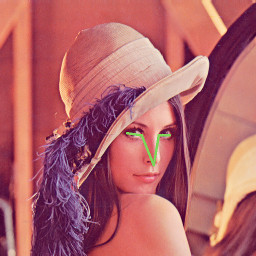
### Face Landmarks
This time using the FrontalFaceDetector (you can also use FaceDetector):
``` javascript
const detector = new fr.FrontalFaceDetector()
```
Use 5 point landmarks predictor:
``` javascript
const predictor = fr.FaceLandmark5Predictor()
```
Or 68 point landmarks predictor:
``` javascript
const predictor = fr.FaceLandmark68Predictor()
```
First get the bounding rectangles of the faces:
``` javascript
const img = fr.loadImage('image.png')
const faceRects = detector.detect(img)
```
Find the face landmarks:
``` javascript
const shapes = faceRects.map(rect => predictor.predict(img, rect))
```
Display the face landmarks:
``` javascript
const win = new fr.ImageWindow()
win.setImage(img)
win.renderFaceDetections(shapes)
fr.hitEnterToContinue()
```
# Async API
### Async Face Detection
``` javascript
const detector = fr.AsyncFaceDetector()
detector.locateFaces(image)
.then((faceRectangles) => {
...
})
.catch((error) => {
...
})
detector.detectFaces(image)
.then((faceImages) => {
...
})
.catch((error) => {
...
})
```
### Async Face Recognition
``` javascript
const recognizer = fr.AsyncFaceRecognizer()
Promise.all([
recognizer.addFaces(sheldonFaces, 'sheldon')
recognizer.addFaces(rajFaces, 'raj')
recognizer.addFaces(howardFaces, 'howard')
])
.then(() => {
...
})
.catch((error) => {
...
})
recognizer.predict(faceImage)
.then((predictions) => {
...
})
.catch((error) => {
...
})
recognizer.predictBest(faceImage)
.then((bestPrediction) => {
...
})
.catch((error) => {
...
})
```
### Async Face Landmarks
``` javascript
const predictor = fr.FaceLandmark5Predictor()
```
``` javascript
const predictor = fr.FaceLandmark68Predictor()
```
``` javascript
Promise.all(faceRects.map(rect => predictor.predictAsync(img, rect)))
.then((shapes) => {
...
})
.catch((error) => {
...
})
```
# With TypeScript
``` javascript
import * as fr from 'face-recognition'
```
Check out the TypeScript [examples](https://github.com/justadudewhohacks/face-recognition.js/tree/master/examples/typed).
# With opencv4nodejs
In case you need to do some image processing, you can also use this package with opencv4nodejs. Also see examples for using face-recognition.js with opencv4nodejs.
``` javascript
const cv = require('opencv4nodejs')
const fr = require('face-recognition').withCv(cv)
```
Now you can simple convert a cv.Mat to fr.CvImage:
``` javascript
const cvMat = cv.imread('image.png')
const cvImg = fr.CvImage(cvMat)
```
Display it:
``` javascript
const win = new fr.ImageWindow()
win.setImage(cvImg)
fr.hitEnterToContinue()
```
Resizing:
``` javascript
const resized1 = fr.resizeImage(cvImg, 0.5)
const resized2 = fr.pyramidUp(cvImg)
```
Detecting faces and retrieving them as cv.Mats:
``` javascript
const faceRects = detector.locateFaces(cvImg)
const faceMats = faceRects
.map(mmodRect => fr.toCvRect(mmodRect.rect))
.map(cvRect => mat.getRegion(cvRect).copy())
```