# f-layout CSS layout system
[f-layout](https://jhlagado.github.io/f-layout) is an easy to use alternative to grid layouts.
A family of composable CSS classes designed to quickly enable
responsive flexbox-based layout on IE 11+, Edge, Chrome, Firefox
and Safari browsers.
Using CSS for laying out pages has always been tricky and before CSS3
was done mainly by misusing CSS features in order to get the job done.
The idea behind f-layout is use modern CSS (now well supported
in browsers) to create a small set of easily learned classes
to enable web designers to build layouts quickly.
It uses the flexbox CSS model
but tries to avoid complexity by surfacing only its most useful features
and to have sensible defaults to make layout building as simple as possible.
Here's a simple example:
```html
menuWelcome to f-layout email
```
and this is what it looks like:

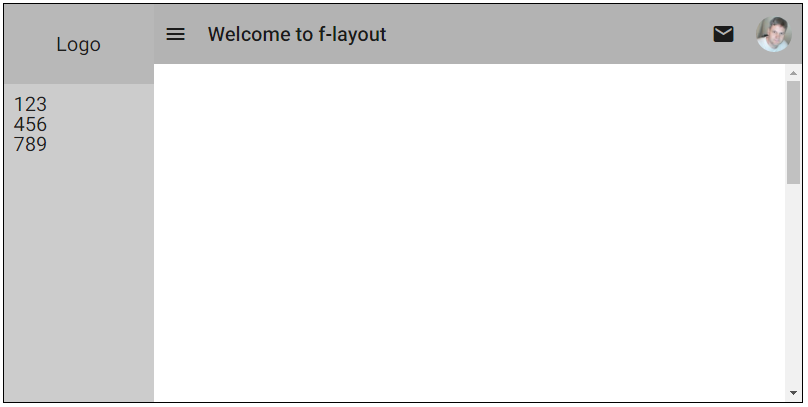
Here's a reasonably complicated example:
```html
Logo
123
456
789
menuWelcome to f-layout email
```
which looks like this:
In f-layout, all layout is either in a row or a column or
a nested combination. Flow is from left to right, top to bottom.
For element alignment, it follows CSS conventions of using terms like "left", "right", "top" and "bottom".
It also uses the term "center" to denote horizontal centering as opposed
to "middle" for vertical centering.
Elements can be hidden or shown and reordered. All of the features of
f-layout can be applied responsively so as to deal with different
device screen widths.
All classes can be suffixed with s, m or l and these suffixes
correspond to screen width break points:
suffix
meaning
break point
s
small
less than 600px
m
medium
601px to 992px
l
large
more than 992px
### Installing
#### Using Npm
```bash
npm install f-layout --save
```
Add this tag to your html:
```html
```
#### Using Bower
```bash
bower install f-layout --save
```
Add this tag to your html:
```html
```
#### Documentation
[Go here](https://jhlagado.github.io/f-layout) to read the f-layout documentation.
