# ez-email
[ez-email](https://www.npmjs.com/package/ez-email) is a fast, easy, basic
emailing package built off of
[nodemailer](https://www.npmjs.com/package/nodemailer). This is to get you off
and running with little code.
---
## Getting Started
### **Download the Example repo**
Copy and paste these commands in your terminal, make sure to put in your email
credientials first!
```
git clone https://github.com/shiratap/example-ez-email
cd example-ez-email
npm i
code .env index.js .
node index.js
```
### **NPM Installation into an existing node app:**
`npm i ez-email`
### In your javascript file:
```js
const EZE = require('ez-email');
```
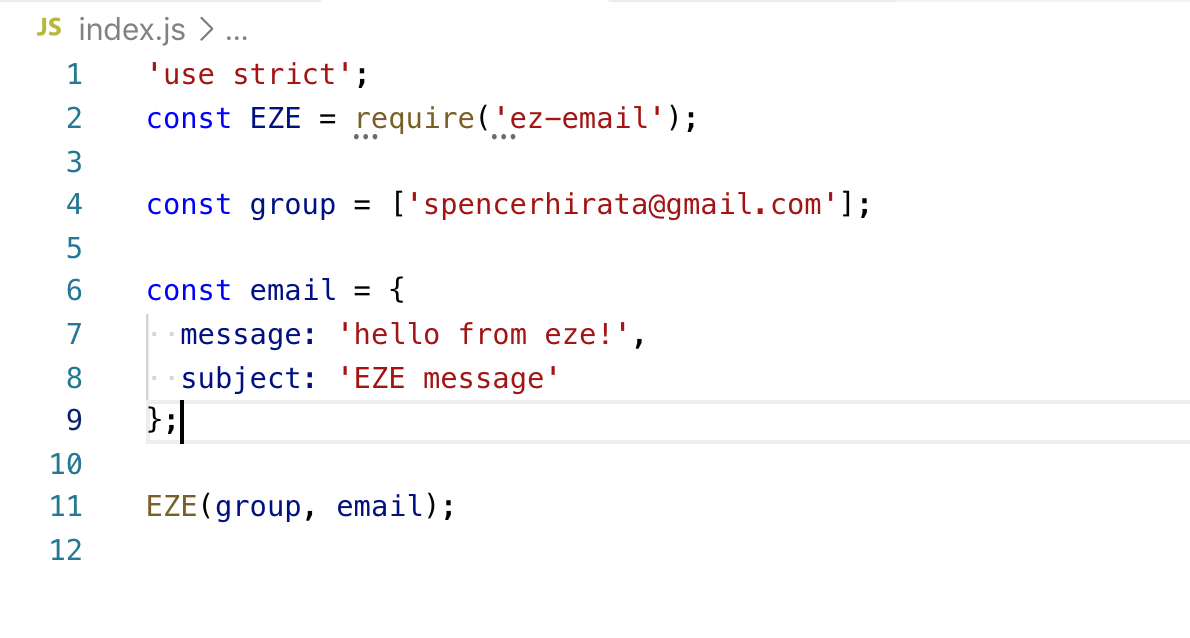
### Simple example with ez-email:
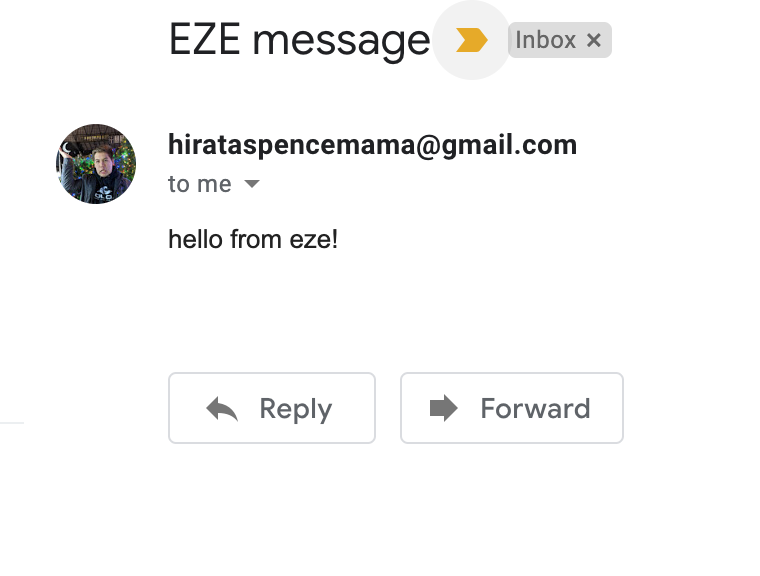
 ### Result:
 ## Recommended: Use a .env file for email credentials
**ez-email function runs the dotenv method to map out .env variables, so you
don't need to invoke the dotenv function**
```
EMAIL={your-email-in-raw-text-here}
PASSWORD={your-password-in-raw-text-here}
SERVICE={List is linked below} //Defaulted to gmail
```
### [Service list](https://nodemailer.com/smtp/well-known/)
## Gmail users: Disabling "[Less Secure App Access](https://support.google.com/accounts/answer/6010255?hl=en)"
Route in your browser to `https://myaccount.google.com/lesssecureapps`, and
enable less secure apps
---
## Function Parameters
```js
EZE(recipients, message, emailCredentials);
```
### **recipients**
Represents the list of recipients you want to send to. Format your array as
such:
```js
const plain = ['someEmail@gmail.com'];
const withoutNames = [{ email: 'someEmail@gmail.com' }];
const withNames = [{ name: 'A dude', email: 'someEmail@gmail.com' }];
```
As you can see, you have the option to have the raw email string or to use an
object. You can tag on other properties to the object if you wish to go that
route, they'll be disregarded when running in the EZE function. The `name`
property is used in the greeting line, which will be talked about in the message
section.
### **message**
This is your message object. Your email properties are defined here.
```js
const maxProperties = {
greeting: 'Hello',
subject: 'This is a test',
messageType: 'html', //The type of markup your message is. Options here are ['html', 'text'] with text as the default
message: '
## Recommended: Use a .env file for email credentials
**ez-email function runs the dotenv method to map out .env variables, so you
don't need to invoke the dotenv function**
```
EMAIL={your-email-in-raw-text-here}
PASSWORD={your-password-in-raw-text-here}
SERVICE={List is linked below} //Defaulted to gmail
```
### [Service list](https://nodemailer.com/smtp/well-known/)
## Gmail users: Disabling "[Less Secure App Access](https://support.google.com/accounts/answer/6010255?hl=en)"
Route in your browser to `https://myaccount.google.com/lesssecureapps`, and
enable less secure apps
---
## Function Parameters
```js
EZE(recipients, message, emailCredentials);
```
### **recipients**
Represents the list of recipients you want to send to. Format your array as
such:
```js
const plain = ['someEmail@gmail.com'];
const withoutNames = [{ email: 'someEmail@gmail.com' }];
const withNames = [{ name: 'A dude', email: 'someEmail@gmail.com' }];
```
As you can see, you have the option to have the raw email string or to use an
object. You can tag on other properties to the object if you wish to go that
route, they'll be disregarded when running in the EZE function. The `name`
property is used in the greeting line, which will be talked about in the message
section.
### **message**
This is your message object. Your email properties are defined here.
```js
const maxProperties = {
greeting: 'Hello',
subject: 'This is a test',
messageType: 'html', //The type of markup your message is. Options here are ['html', 'text'] with text as the default
message: 'We made it!
'
};
const minimalProperties = {
message: 'Hello' //Technically you don't even need this either, but I doubt you want to be sending emails without messages
};
```
The value in `greeting:` is what would come at the top of the message
accompanied with the recipient name (if it exists in your recipient's object) or
email string (if it doesn't).
Other than that, the properties here are pretty self explanatory. Though none of
these properties are actually required to send emails, you wouldn't be sending
an email in the first place if you had no message to the recipient (I hope).
### **emailCredentials**
```js
const emailCredentials = {
email: 'someEmail@email.com',
password: 'rawtext',
service: 'yourserviceproviderhere'
};
```
You might be asking what is the point of this feature if ez-email already parses
your .env file, and the answer to that is if you have multiple emails that
you're sending from. Service defaults to 'gmail' if none is provided. Nodemailer
will give you an error if your credentials aren't correct.
---
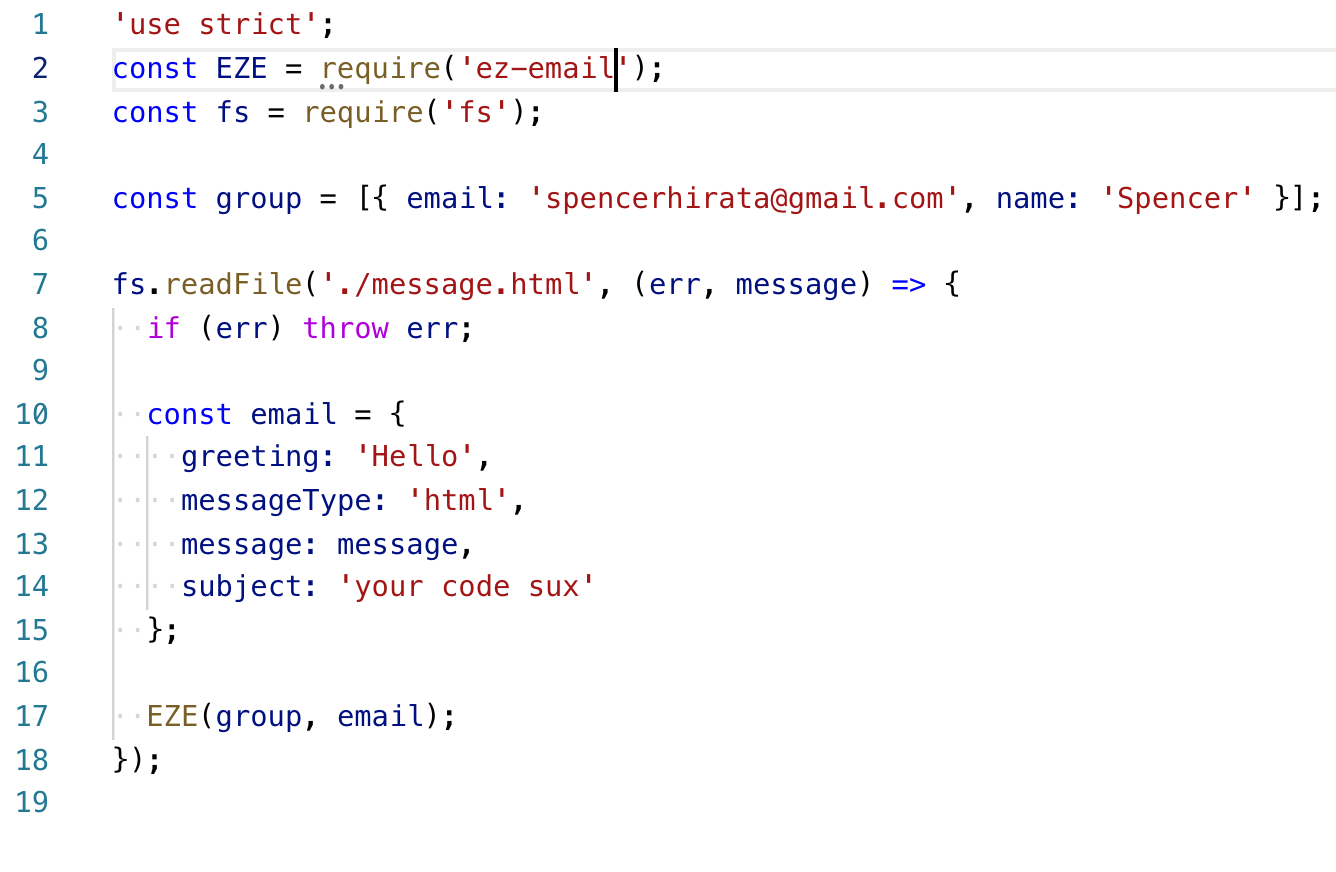
## Examples with FS
**With an html template**
 ## Future Updates
- Greeting customization for html
- Placeholder feature in messages
- Optimization
- Testing
Was very shocked and happy to see the amount of weekly downloads at 361 in 2
days! Would love to contribute more features to help you guys out. Please add in
issues to the [github repo](https://github.com/shiratap/ez-email/issues) if you
would like to see new ideas in place, or
[Email Me](mailto:spencerhirata@gmail.com?subject=ez-email).
## Future Updates
- Greeting customization for html
- Placeholder feature in messages
- Optimization
- Testing
Was very shocked and happy to see the amount of weekly downloads at 361 in 2
days! Would love to contribute more features to help you guys out. Please add in
issues to the [github repo](https://github.com/shiratap/ez-email/issues) if you
would like to see new ideas in place, or
[Email Me](mailto:spencerhirata@gmail.com?subject=ez-email).